1. Introduzzjoni
This manual provides comprehensive instructions for the setup, operation, and maintenance of your Cherry MW 9100 Wireless Rechargeable Mouse. The MW 9100 is a compact, versatile mouse offering dual connectivity options (Bluetooth or 2.4 GHz USB receiver) and a convenient rechargeable battery.
Il-karatteristiċi ewlenin jinkludu:
- Compact design with charging functionality.
- Flexible operation: use while charging via USB-C cable.
- Dual connectivity: Bluetooth or 2.4 GHz USB receiver.
- Magnetic storage for the USB receiver, ideal for travel.
- Adjustable DPI settings for varied usage.
2. Kontenut tal-Pakkett
Ivverifika li l-oġġetti kollha huma preżenti fil-pakkett:
- Cherry MW 9100 Wireless Rechargeable Mouse
- Cable tal-Iċċarġjar tal-USB-C
- Riċevitur USB 2.4 GHz
- Borża protettiva
- Manwal ta 'Istruzzjoni (dan id-dokument)
3. Setup
3.1 Iċċarġjar tal-Maws
The Cherry MW 9100 mouse features a built-in rechargeable battery. Before initial use, or when the battery is low, connect the included USB-C cable to the mouse and to a USB power source (e.g., computer USB port, USB wall adapter). The mouse can be used normally while charging.

Stampa 3.1: Fuq view of the Cherry MW 9100 mouse, showing the charging indicator light.
3.2 Konnessjoni tal-Maws
The MW 9100 offers two connection methods: 2.4 GHz wireless via USB receiver or Bluetooth.
Konnessjoni bla fili 3.2.1 2.4 GHz
- Locate the USB receiver. It is magnetically stored in a compartment on the underside of the mouse.
- Daħħal ir-riċevitur USB f'port USB disponibbli fuq il-kompjuter tiegħek.
- On the underside of the mouse, slide the switch to the "RF" position.
- Il-maws għandu jikkonnettja awtomatikament mal-kompjuter tiegħek.
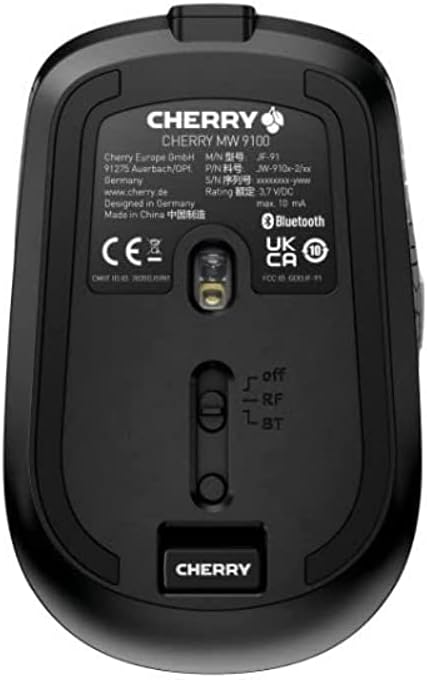
Stampa 3.2: Underside of the Cherry MW 9100 mouse, highlighting the USB receiver storage and the connection mode switch.
3.2.2 Konnessjoni Bluetooth
- On the underside of the mouse, slide the switch to the "BT" (Bluetooth) position.
- Press and hold the small pairing button located near the connection switch on the underside of the mouse until the LED indicator on the mouse starts blinking, indicating pairing mode.
- Fuq il-kompjuter jew l-apparat tiegħek, iftaħ is-settings tal-Bluetooth u fittex apparati ġodda.
- Select "Cherry MW 9100" from the list of available devices to complete the pairing process.
4. Istruzzjonijiet Operattivi
4.1 Funzjonijiet Bażiċi
The Cherry MW 9100 mouse features standard left and right click buttons, a scroll wheel (which also functions as a middle click button), and two side buttons for navigation (typically forward/back).
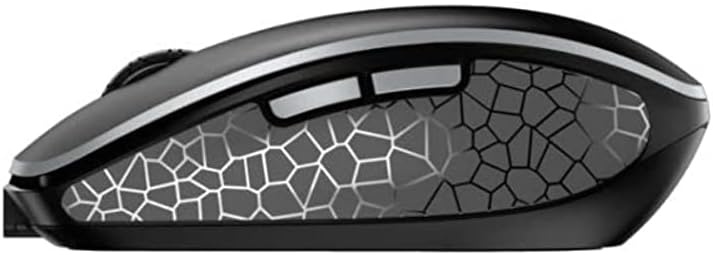
Stampa 4.1: Ġenb view of the Cherry MW 9100 mouse, illustrating the ergonomic design and side buttons.
4.2 Aġġustament DPI
The mouse includes a DPI (Dots Per Inch) button, usually located near the scroll wheel, allowing you to adjust the cursor sensitivity. Press this button to cycle through different DPI settings to match your preference or task requirements.

Stampa 4.2: A hand demonstrating the comfortable grip on the Cherry MW 9100 mouse during use.
5. Manutenzjoni
To ensure optimal performance and longevity of your Cherry MW 9100 mouse:
- Tindif: Uża drapp artab u niexef biex tnaddaf il-wiċċ tal-maws. Għal ħmieġ iebes, neħħi ftit drapp.amp Jista' jintuża drapp, iżda kun żgur li ma tidħolx umdità fl-apparat. Evita kimiċi ħarxa jew materjali li joborxu.
- Ħażna: When not in use, especially during travel, store the mouse in the provided protective pouch to prevent scratches and damage.
- Kura tal-batterija: Evita li tiċċarġja l-batterija kompletament ta' spiss. Erġa' ċċarġja l-maws meta jidher l-indikatur ta' batterija baxxa.
6 Issolvi l-problemi
| Problema | Kawża Possibbli | Soluzzjoni |
|---|---|---|
| Il-ġurdien ma jirrispondix | Low battery, incorrect connection mode, USB receiver not connected, Bluetooth not paired. |
|
| Intermittent connection (Bluetooth) | Interference, device driver issues, distance from device. |
|
| Il-moviment tal-cursor huwa irregolari jew bil-mod | Dirty optical sensor, low battery, incorrect DPI setting. |
|
7. Speċifikazzjonijiet
| Karatteristika | Dettall |
|---|---|
| Brand | Ċirasa |
| Numru tal-Mudell | JW-9100US-2 |
| Teknoloġija tal-Konnettività | Bluetooth, USB bla fili ta' 2.4 GHz |
| Sejbien tal-Moviment | Ottiċi |
| Karatteristiċi Speċjali | Ħafif, Portabbli, Riċarġabbli |
| Dimensjonijiet tal-Prodott | 4 x 3 x 2 pulzieri |
| Piż tal-oġġett | 6.4 uqija |
| Kulur | Iswed |
8. Garanzija u Appoġġ
Għal informazzjoni dwar il-garanzija u appoġġ tekniku, jekk jogħġbok irreferi għas-sit uffiċjali ta' Cherry website or contact Cherry customer service directly. Keep your proof of purchase for warranty claims.
Manifattur: ĊIRASA
Websit: www.cherry.de


