1. Prodott Aktarview
The Xigmatek LUX S Arctic (Model EN48298) is a mid-tower PC case designed for computer enthusiasts and gamers. It features a distinctive triangular mesh front panel for optimal airflow and comes equipped with four 120mm X24A A-RGB fans to provide efficient cooling and customizable lighting. The case supports Micro ATX motherboards and is constructed with durable materials, including tempered glass for a clear view tal-komponenti interni.
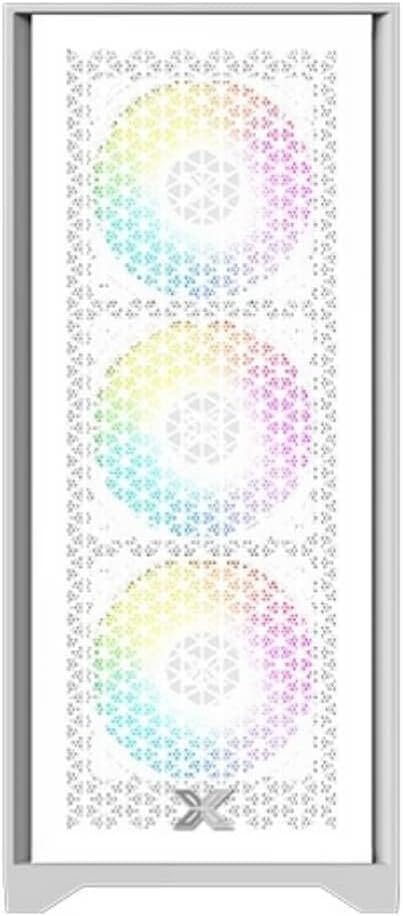
Figura 1.1: Quddiem view of the Xigmatek LUX S Arctic PC case, showcasing the triangular mesh design and the pre-installed A-RGB fans.
2. Kontenut tal-Pakkett
Before proceeding with installation, please ensure all components listed below are present in your package. If any items are missing or damaged, contact your retailer or Xigmatek support.
- Xigmatek LUX S Arctic Mid-Tower PC Case
- 4 x 120mm X24A A-RGB Fans (pre-installed)
- Accessory box (screws, cable ties, standoffs, user manual)
3. Setup u Installazzjoni
Follow these steps to install your computer components into the Xigmatek LUX S Arctic PC case. Ensure your system is powered off and unplugged before beginning any installation.
3.1. Tħejjija tal-Każ
- Poġġi l-kaxxa fuq wiċċ ċatt u stabbli.
- Carefully remove the tempered glass side panel by unscrewing the thumb screws at the rear of the case and gently pulling the panel away.
- Remove the opposite side panel (metal) in a similar manner to access the cable management area.

Figura 3.1: Intern view of the PC case, illustrating the spacious layout for component installation.
3.2. Installazzjoni tal-Motherboard
- Installa l-I/O shield li ġie mal-motherboard tiegħek fil-ftuħ magħżul fuq wara tal-kaxxa.
- Align your Micro ATX motherboard with the pre-installed standoffs. Ensure all screw holes on the motherboard match the standoffs.
- Secure the motherboard using the provided screws from the accessory box. Do not overtighten.
3.3. Installazzjoni tal-Unità tal-Provvista tal-Enerġija (PSU)
- Locate the PSU mounting area at the rear bottom of the case.
- Slide your PSU into the bay from the rear, ensuring the fan faces the bottom (if the case has a filtered intake) or upwards.
- Waħħal il-PSU bil-viti minn wara ta' barra tal-kaxxa.
3.4. Installazzjoni tad-Drajv tal-Ħażna
The case supports various storage configurations. Refer to the accessory box for specific mounting hardware.
- SSDs ta' 2.5": Mount SSDs to the designated brackets behind the motherboard tray.
- HDDs ta' 3.5": Install HDDs into the drive cage located beneath the PSU shroud.

Figura 3.2: Intern ta' wara view, highlighting cable management cutouts and storage drive mounting locations.
3.5. Expansion Card Installation (GPU, etc.)
- Neħħi l-għata meħtieġa tas-slott tal-PCIe minn wara tal-kaxxa.
- Insert your expansion card (e.g., graphics card) into the corresponding PCIe slot on your motherboard until it clicks into place.
- Waħħal il-kard max-chassis tal-kaxxa b'kamin.
3.6. Ġestjoni tal-Kejbils u Konnessjonijiet
Connect all necessary cables from the PSU to your motherboard and components. Utilize the cable routing cutouts and tie-down points behind the motherboard tray for a clean build and improved airflow.
- Connect front panel headers (Power SW, Reset SW, HDD LED, Power LED) to the motherboard.
- Connect USB 2.0 and USB 3.0 headers to the motherboard.
- Connect audio header to the motherboard.
- Connect the pre-installed A-RGB fans to your motherboard's A-RGB header or a compatible controller. Ensure power is supplied to the fan hub/controller if applicable.
4. Istruzzjonijiet Operattivi
Once all components are installed and cables are connected, you can power on your system.
- Replace both side panels and secure them with their respective screws.
- Connect your monitor, keyboard, mouse, and power cable to the rear of your PC.
- Aqleb is-swiċċ tal-enerġija fuq il-PSU tiegħek għall-pożizzjoni 'ON'.
- Agħfas il-buttuna tal-qawwa fuq il-pannell ta' quddiem tal-kaxxa.
- The pre-installed A-RGB fans will illuminate. You can control their lighting effects via your motherboard's software (if connected to an A-RGB header) or a dedicated controller (if included with the fans or purchased separately).
5. Manutenzjoni
Manutenzjoni regolari tgħin biex tiżgura prestazzjoni ottimali u lonġevità tal-komponenti tal-PC tiegħek.
- Filtri tat-Trab: The Xigmatek LUX S Arctic case likely includes removable dust filters (e.g., top, bottom, front). Clean these filters every 1-3 months, depending on your environment, by gently brushing or washing them with water and allowing them to dry completely before reinstallation.
- Tindif ta 'ġewwa: Periodically (every 6-12 months), open the case and use compressed air to remove dust buildup from fans, heatsinks, and other components. Hold fan blades gently to prevent them from spinning too fast during cleaning.
- Tindif ta' barra: Imsaħ l-uċuħ ta 'barra b'artab, damp cloth. Avoid harsh chemicals that may damage the finish or tempered glass.
6 Issolvi l-problemi
If you encounter issues with your PC build, refer to these common troubleshooting steps.
- Is-Sistema Mhux Tixgħel:
- Kun żgur li s-swiċċ tal-PSU jkun fil-pożizzjoni 'ON'.
- Iċċekkja li l-kejbils tal-enerġija kollha (24-pin ATX, 8-pin CPU, GPU power) huma konnessi sew.
- Verify front panel power switch header is correctly connected to the motherboard.
- Fans Not Spinning/RGB Not Lighting Up:
- Check fan power connections to the motherboard or fan hub.
- Ensure A-RGB cables are correctly connected to the motherboard's A-RGB header or controller.
- Verify that any fan hub or controller is receiving power.
- L-ebda Output tal-Wiri:
- Ensure your monitor cable is connected to the graphics card (not the motherboard's integrated graphics ports, unless you are using integrated graphics).
- Erġa' poġġi l-karta grafika fl-islott PCIe tagħha.
- Check graphics card power connections.
For more complex issues, consult your motherboard manual or component manufacturer's support resources.
7. Speċifikazzjonijiet
| Karatteristika | Dettall |
|---|---|
| Brand | Xigmatek |
| Isem tal-Mudell | LUX S Arctic |
| Numru tal-Mudell | EN48298 |
| Tip ta' Każ | Nofs it-Torri |
| Kulur | Abjad Artiku |
| Materjal | Ħġieġ ittemprat (pannell tal-ġenb) |
| Kompatibbiltà tal-motherboard | Mikro ATX |
| Fannijiet installati minn qabel | 4 x 120mm X24A A-RGB Fans |
| Metodu tat-tkessiħ | Arja |
| Front Panel I / O | 2 x USB ports (type not specified, typically USB 2.0/3.0), Audio Jacks |
| Immuntar tal-Provvista tal-Enerġija | Immuntar ta' wara (qiegħ) |
| Użu Rakkomandat | Logħob |
8. Garanzija u Appoġġ
For information regarding warranty coverage, technical support, or replacement parts, please refer to the warranty card included with your product or visit the official Xigmatek websit.


