Introduzzjoni
This manual provides detailed instructions for the operation and maintenance of your KONNWEI KW850 OBD II Scanner. This device is designed to diagnose engine issues in OBD II/EOBD & CAN compliant vehicles, light trucks (12V only), SUVs, and minivans. It is not compatible with hybrid or electric cars.
Informazzjoni dwar is-Sigurtà
Always observe basic safety precautions when working on a vehicle:
- Always perform automotive work in a well-ventilated area.
- Ilbes protezzjoni xierqa għall-għajnejn.
- Żomm il-ħwejjeġ, ix-xagħar, l-idejn, l-għodda, u t-tagħmir tat-test 'il bogħod mill-partijiet tal-magna li jiċċaqalqu jew li jisħnu.
- Do not connect or disconnect test equipment with the ignition on or engine running unless specifically instructed.
- Refer to the vehicle service manual for specific safety precautions.
Prodott Overview
Karatteristiċi ewlenin:
- Reads and clears engine fault codes.
- Turns off Malfunction Indicator Light (MIL).
- Displays I/M Readiness status.
- Views Freeze Frame data.
- Displays live data stream in text and graph format.
- Performs O2 Sensor Test.
- Performs EVAP System Test.
- Supports On-Board Monitor Test (Mode 6).
- Retrieves vehicle information (VIN, CID, CVN).
- Real-time car battery voltagiċċekkja.
- Multi-language menu options.
- Lifetime free smart updates.

Image showing the KONNWEI KW850 OBD II scanner's display with icons representing its diagnostic functions, including turning off MIL, live battery monitor, on-board monitor, data storage, read engine fault codes, live data, O2 monitor test, I/M readiness status, vehicle information, freeze frame, read live data, and print diagnostic report.
Kompatibbiltà tal-Vettura:
The KW850 is compatible with most 12V diesel and gasoline vehicles manufactured from 1996 (US), 2001 (EU), and 2007 (Asia) that are OBD II/EOBD & CAN compliant.

Image illustrating the KONNWEI KW850's vehicle compatibility, showing examples of US (1996), EU (2003), and Asian (2007) cars, and listing supported languages: English, Spanish, Portuguese, French, Russian, German, Dutch, Italian, Polish.
Kontenut tal-Pakkett:
- KONNWEI KW850 OBD II Scanner
- Polyester Protective Bag
- Manwal għall-Utent
- Kejbil OBD II
- Cable USB

Image showing the KONNWEI KW850 scanner, polyester bag, user manual, cable clip, and USB cable included in the package, along with product dimensions.
Setup
Konnessjoni tal-Iskaner:
- Locate the 16-pin Data Link Connector (DLC) in your vehicle. This is typically found under the dashboard on the driver's side.
- Kun żgur li l-ignition tal-vettura tkun mitfija.
- Connect the OBD II cable from the KW850 scanner to the vehicle's DLC.
- Turn the vehicle's ignition to the "ON" position (engine can be off). The scanner will power on automatically.

Image illustrating the connection of the KONNWEI KW850 OBD II scanner to a vehicle's 16-pin DLC port located under the dashboard, highlighting its plug-and-play operation.
Istruzzjonijiet Operattivi
Navigazzjoni tal-Menu Prinċipali:
Use the directional buttons (UP, DOWN, LEFT, RIGHT) to navigate through menu options and the OK button to confirm selections. The ESC Il-buttuna terġa' lura għall-iskrin ta' qabel.
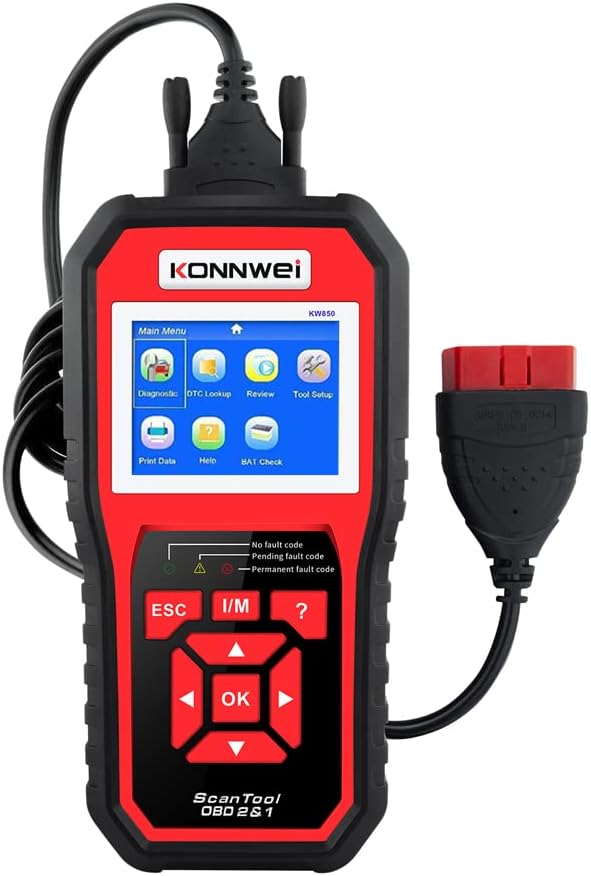
Quddiem view of the KONNWEI KW850 OBD II scanner displaying its main menu interface with icons for Diagnostic, DTC Lookup, Review, Setup tal-Għodda, Stampar tad-Dejta, Għajnuna, u Kontroll tal-BAT.
1. Diagnostic Scan:
This function allows you to read and clear Diagnostic Trouble Codes (DTCs) and view data diretta.
- Mill-Main Menu, agħżel Dijanjostiċi u agħfas OK.
- The scanner will establish communication with the vehicle's ECU.
- Agħżel Aqra l-Kodiċi biex view current, pending, and permanent fault codes.
- Agħżel Ħassar Kodiċi to clear DTCs and turn off the Malfunction Indicator Light (MIL). Note: Clearing codes will also clear Freeze Frame data. Ensure you have recorded any necessary information before clearing.
2. Live Data:
View real-time operational parameters of the vehicle's engine.
- From the Diagnostic menu, select Dejta Ħaj u agħfas OK.
- Tista' view data in text format or graphical format.
- The device supports comparing up to 4 live readings simultaneously in graph mode.

Screenshot of the KONNWEI KW850 display showing live data parameters plotted on a graph, illustrating engine load, short-term fuel trim, engine coolant temperature, and long-term fuel trim.
3. Prontezza I/M:
Checks the readiness of the emission-related monitoring systems.
- From the Diagnostic menu, select I/M Prontezza u agħfas OK.
- The display will show the status of various monitors (e.g., Misfire Monitor, Fuel System Monitor, O2 Sensor Monitor). "OK" indicates the monitor has completed its diagnostic cycle, "INC" indicates incomplete, and "N/A" indicates not applicable.
4. O2 Sensor Test:
Retrieves O2 sensor monitoring test results for the most recently completed tests from the vehicle's on-board computer.
- From the Diagnostic menu, select Test tas-Sensor O2 u agħfas OK.
- Review the test results to identify potential issues with the oxygen sensors.
5. EVAP System Test:
Initiates a test of the Evaporative Emission Control System (EVAP) for leaks.
- From the Diagnostic menu, select Test tas-Sistema EVAP u agħfas OK.
- Follow any on-screen prompts to complete the test.
6. Freeze Frame Data:
Displays a snapshot of the vehicle's operating conditions at the moment a fault code was set.
- From the Diagnostic menu, select Iffriżar Qafas u agħfas OK.
- Review parameters such as engine coolant temperature, fuel trim, engine speed, etc., to understand the conditions when the fault occurred.
7. Battery Test (BAT Check):
Checks the real-time voltage tal-batterija tal-karozza.
- Mill-Main Menu, agħżel Iċċekkja BAT u agħfas OK.
- The scanner will display the current battery voltage.
- Interpret results:
- Qabel it-Tqabbid:
- <10.8V: Battery voltage too low, consider replacement.
- 10.8V - 11.8V: Voltage slightly low, may cause starting difficulty.
- 11.8V - 12.8V: Normal battery voltage, good status.
- After Ignition (Engine Running):
- 12.8V - 13.2V: Battery voltage too low, alternator may not be charging effectively.
- 13.2V - 14.8V: Normal battery voltage, alternator charging correctly.
- >14.8V: High battery voltage detected, may damage battery. Check engine stabilizer.

Diagram illustrating the interpretation of battery voltage readings from the KONNWEI KW850, differentiating between voltage levels before and after engine ignition and their implications for battery health and alternator function.
8. Informazzjoni dwar il-Vettura:
Retrieves the Vehicle Identification Number (VIN), Calibration ID (CID), and Calibration Verification Number (CVN).
- From the Diagnostic menu, select Informazzjoni tal-Vettura u agħfas OK.
- The scanner will display the requested vehicle information.
Manutenzjoni
Tindif:
Clean the scanner's casing b'artab, damp drapp. Tużax tindif jew solventi li joborxu.
Ħażna:
Store the device in its protective bag in a clean, dry environment away from extreme temperatures and direct sunlight.
Aġġornamenti tal-Firmware:
The KW850 supports lifetime free smart updates. Regularly check for updates to ensure optimal performance and compatibility with newer vehicles.
- Visit the official KONNWEI website (www.konnwei.com) or itoscanner.com.
- Download the UPLINK application.
- Connect the KW850 scanner to your computer using the supplied USB cable.
- Run the UPLINK application, select "Print Data" from the main menu, and then click "Update Mode" to proceed with the firmware update.

Diagram showing the four steps to update the KONNWEI KW850 scanner's firmware: searching the website, connecting to a computer, downloading the application, and running the update process via the UPLINK software.
Issolvi l-problemi
Ebda Qawwa:
- Ensure the OBD II cable is securely connected to both the scanner and the vehicle's DLC.
- Verify the vehicle's ignition is in the "ON" position.
- Check the vehicle's fuse for the OBD II port (consult your vehicle's manual).
Żball fil-Komunikazzjoni:
- Verify the vehicle is OBD II compliant (most vehicles from 1996 onwards in the US, 2001 in EU, 2007 in Asia).
- Ensure the ignition is on and the engine is off or running, depending on the test.
- Try connecting to a different OBD II compliant vehicle to rule out scanner issues.
- Check for any loose connections in the OBD II cable.
L-iskaner jiffriża:
- If the scanner freezes, disconnect it from the vehicle and reconnect.
- Kun żgur li l-firmware huwa aġġornat.
Kwistjonijiet ta' Aġġornament:
- Kun żgur li jkollok konnessjoni tal-internet stabbli matul il-proċess tal-aġġornament.
- Verify that the correct UPLINK software version is installed for your operating system.
- Temporarily disable antivirus or firewall software if it interferes with the update.
Speċifikazzjonijiet
| Karatteristika | Dettall |
|---|---|
| Brand | KONNWEI |
| Numru tal-Mudell | KW850 |
| Wiri | 2.8" TFT Color Screen |
| Konnettività | OBD II, USB |
| Protokolli Appoġġjati | All OBD II/EOBD & CAN protocols |
| Vol Operattivtage | 9-18V (from vehicle DLC) |
| Dimensjonijiet | 7.87 x 3.94 x 1.38 pulzieri (20 x 10 x 3.5 ċm) |
| Piż | 1.6 liri (0.73 kg) |
| Lingwi Appoġġjati | English, Spanish, Portuguese, French, Russian, German, Dutch, Italian, Polish |
Garanzija u Appoġġ
For warranty information and technical support, please refer to the documentation included with your product or visit the official KONNWEI website. KONNWEI provides lifetime free software updates for this device.


