Introduzzjoni
This manual provides detailed instructions for the operation and maintenance of your Midland T10 FRS Walkie Talkie. The T10 is a compact and user-friendly two-way radio designed for reliable communication in various settings, including family activities, camping, and hiking. It features 22 FRS channels, NOAA Weather Alert, and eVOX hands-free operation. Please read this manual thoroughly to ensure proper use and to maximize the performance of your device.
Prodott Overview
Karatteristiċi ewlenin:
- 22 FRS Channels for clear communication.
- 38 CTCSS Privacy Codes to minimize interference.
- eVOX (Easy Voice and Sound Activated Transmission) for hands-free operation.
- NOAA Weather Scan + Alert for severe weather updates.
- Channel Scan and Monitor Mode functions.
- Keystroke Tones and Silent Operation options.
- Up to 20-mile range in open areas.
X'hemm fil-Kaxxa:
- Midland T10 Two-Way Radios (quantity as purchased, e.g., 4 radios)
- Klipps taċ-Ċinturin (waħda għal kull radju)
- Manwal tas-Sid (dan id-dokument)
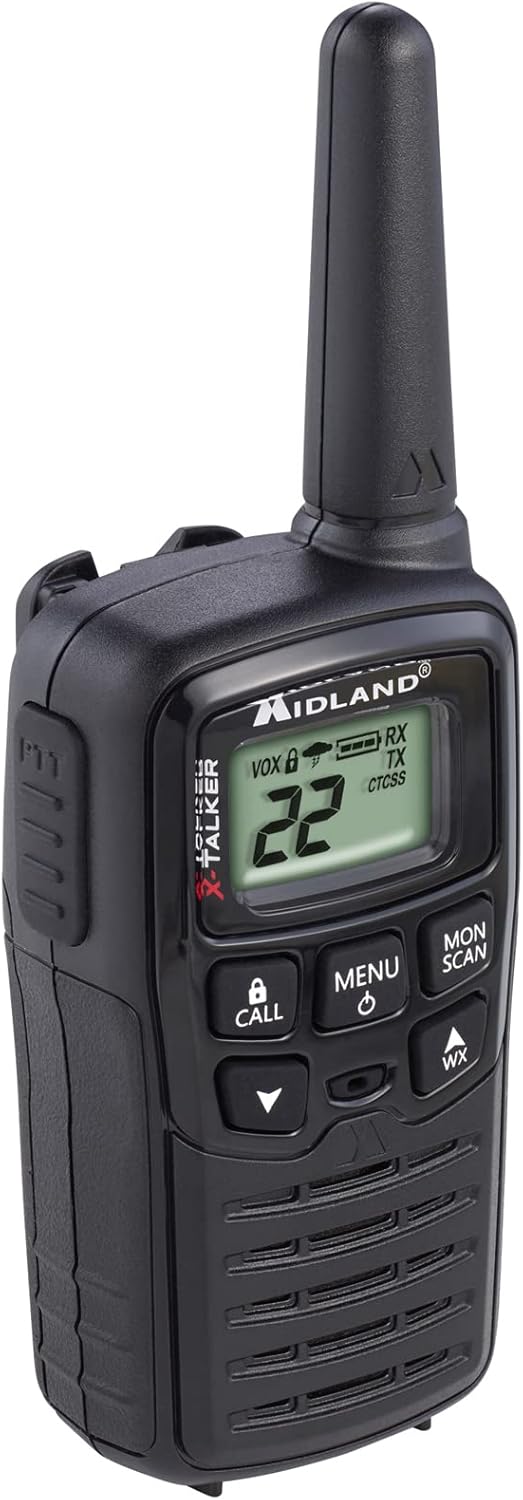
Figure 1: Midland T10 Walkie Talkie, angled front view juri d-displej u l-buttuni.
Setup
1. Installazzjoni tal-batterija
- Kun żgur li r-radju huwa mitfi.
- Sib l-għatu tal-kompartiment tal-batterija fuq wara tar-radju.
- Agħfas 'l isfel fuq it-tab u żżerżaq l-għatu 'l isfel biex tneħħih.
- Insert 3 AAA alkaline batteries (not included) into the compartment, observing the correct polarity (+/-) as indicated.
- Erġa’ poġġi l-għatu tal-kompartiment tal-batterija billi tiżżerżaq 'il fuq sakemm tikklikkja f'postu.
Importanti: Use only AAA alkaline batteries. Do not mix old and new batteries, or different types of batteries.
2. Twaħħil tal-Klipp taċ-Ċinturin
- Allinja l-klipp taċ-ċinturin mal-iskanalaturi fuq wara tar-radju.
- Żerżaq il-klipp taċ-ċinturin 'il fuq sakemm jissakkar sew f'postu.
- To remove, push the release tab on the belt clip and slide it downwards.

Figura 2: Ġenb view of the Midland T10 Walkie Talkie with the belt clip attached.
Istruzzjonijiet Operattivi
1. Power On/Off
- Biex Tixgħel: Agħfas u żomm il- MENU/QAWWA button until the display illuminates and you hear a tone.
- Biex Tifi: Agħfas u żomm il- MENU/QAWWA buttuna sakemm il-wiri jintefa.
2. Volum ta 'aġġustament
- Agħfas il- UP (▲) button to increase the volume.
- Agħfas il- 'L isfel (▼) button to decrease the volume.
- The current volume level (1-8) will be displayed.
3. Għażla tal-Kanal
- Bir-radju mixgħul, agħfas il- MENU Agħfas il-buttuna darba. In-numru tal-kanal se jteptep.
- Uża l- UP (▲) jew 'L isfel (▼) buttons to select one of the 22 FRS channels.
- Agħfas il- MENU button again to confirm your selection, or wait 5 seconds for the selection to be automatically saved.
4. Trażmissjoni u Riċeviment
- Biex Tittrażmetti: Agħfas u żomm il- PTT (Push-To-Talk) button located on the side of the radio. Speak clearly into the microphone. Release the PTT button to stop transmitting.
- Biex Tirċievi: Kun żgur li l-buttuna PTT ma tkunx ippressata. Ir-radju jirċievi sinjali awtomatikament fuq il-kanal magħżul.
5. Privacy Codes (CTCSS)
Privacy Codes help reduce interference from other users on the same channel. Your radio has 38 CTCSS codes.
- Wara li tagħżel kanal, agħfas il-buttuna MENU Agħfas il-buttuna darbtejn. In-numru tal-kodiċi tal-privatezza se jteptep.
- Uża l- UP (▲) jew 'L isfel (▼) buttons to select a privacy code (01-38). Code 00 means no privacy code is active.
- Agħfas il- MENU button again to confirm, or wait 5 seconds.
Nota: Both radios must be set to the same channel and privacy code to communicate.
6. eVOX (Hands-Free Operation)
eVOX allows you to transmit without pressing the PTT button.
- Agħfas il- MENU button three times. The eVOX sensitivity level will flash (oF, 1-3).
- Uża l- UP (▲) jew 'L isfel (▼) buttons to select a sensitivity level (1 being highest sensitivity, 3 being lowest). Select "oF" to turn eVOX off.
- Agħfas il- MENU button again to confirm, or wait 5 seconds.
7. NOAA Weather Scan + Alert
Your radio can receive NOAA Weather Radio alerts.
- To Activate Weather Scan: Agħfas il- WX button. The radio will scan 10 NOAA weather channels and lock onto the strongest signal.
- To Activate Weather Alert: While in Weather Scan mode, press the MENU button. The "AL" icon will flash. Use UP (▲) jew 'L isfel (▼) to turn the alert ON or OFF. Press MENU to confirm. When activated, the radio will sound an alarm if a severe weather alert is broadcast.
- To Exit Weather Mode: Agħfas il- WX buttuna għal darb'oħra.
8. Call Alert
Agħfas il- SEJĦA button to send an audible call tone to other radios on the same channel and privacy code.
9. Funzjoni tal-Monitor
The Monitor function allows you to temporarily disable the squelch to listen for weak signals or to check for activity on a channel.
- Agħfas u żomm il- MON/SCAN button to activate the Monitor function.
- Release the button to deactivate.
10. Funzjoni ta 'Skennjar
The Scan function allows you to scan all 22 channels for activity.
- Agħfas il- MON/SCAN button once (do not hold). The radio will begin scanning.
- When activity is detected, the scan will pause on that channel.
- Agħfas il- MON/SCAN buttuna għal darb'oħra biex tieqaf l-iskannjar.
Manutenzjoni
- Tindif: Uża artab, damp drapp biex tnaddaf il-barra tar-radju. Tużax prodotti tat-tindif jew solventi li joborxu.
- Kura tal-batterija: Neħħi l-batteriji jekk ir-radju ma se jintużax għal perjodu estiż biex tevita t-tnixxija.
- Ħażna: Aħżen ir-radju f'post frisk u niexef 'il bogħod mix-xemx diretta u minn temperaturi estremi.
- Reżistenza għall-Ilma: This radio is not water-resistant. Avoid exposure to water or high humidity.
Issolvi l-problemi
| Problema | Soluzzjoni Possibbli |
|---|---|
| Ebda qawwa. |
|
| Firxa fqira jew statika. |
|
| Ma tistax tittrażmetti. |
|
| Hearing other conversations. |
|
Speċifikazzjonijiet
| Numru tal-Mudell | FBA-4PK-T10 |
| Kanali | 22 Kanal FRS |
| Kodiċi tal-Privatezza | 38 Kodiċijiet CTCSS |
| Medda ta' Frekwenzi | 462.5625 MHz - 462.7250 MHz |
| Talking Range Massimu | Up to 20 Miles (in open areas) |
| Sors tal-Enerġija | 3 Batteriji Alkalini AAA (mhux inklużi) |
| Piż tal-oġġett | 1.23 liri (għall-pakkett ta' 4) |
| Dimensjonijiet tal-Prodott | 7 x 7 x 4 pulzieri |
| Livell ta 'Reżistenza għall-Ilma | Mhux Reżistenti għall-Ilma |
Garanzija u Appoġġ
The Midland T10 FRS Walkie Talkie comes with an industry-leading garanzija ta 'sena against defects in materials and workmanship. This warranty covers normal use and service. For warranty claims or technical support, please refer to the contact information provided with your purchase or visit the official Midland websit.
For additional information, FAQs, or to register your product, please visit www.midlandusa.com.


