1. Twissijiet ta 'Sigurtà Importanti
To ensure safe operation and prevent injury or damage, please read all instructions carefully before using the HTC AT588 trimmer. Keep this manual for future reference.
- Espożizzjoni għall-Ilma: Do not use this appliance near water, in bathtubs, showers, or other vessels containing water. Avoid contact with wet hands.
- Tfal: This appliance is not intended for use by children without adult supervision. Keep out of reach of infants.
- Xfafar: Handle blades with extreme care to prevent skin irritation or injury. Ensure blades are properly attached before use.
- Sors tal-Enerġija: Use only the provided USB charging cable. Ensure the power source matches the specified voltage.
- Ħsara: Do not operate the trimmer if it has a damaged cord, plug, or casing, or if it is not working properly. Contact customer support for assistance.
- Ħażna: Aħżen it-trimmer f'post xott, 'il bogħod mix-xemx diretta u minn temperaturi estremi.
2. Prodott Aktarview
The HTC AT588 is a versatile rechargeable hair and beard trimmer designed for precise grooming. It features a T-shaped blade, two-speed settings, and an LED display for battery status.
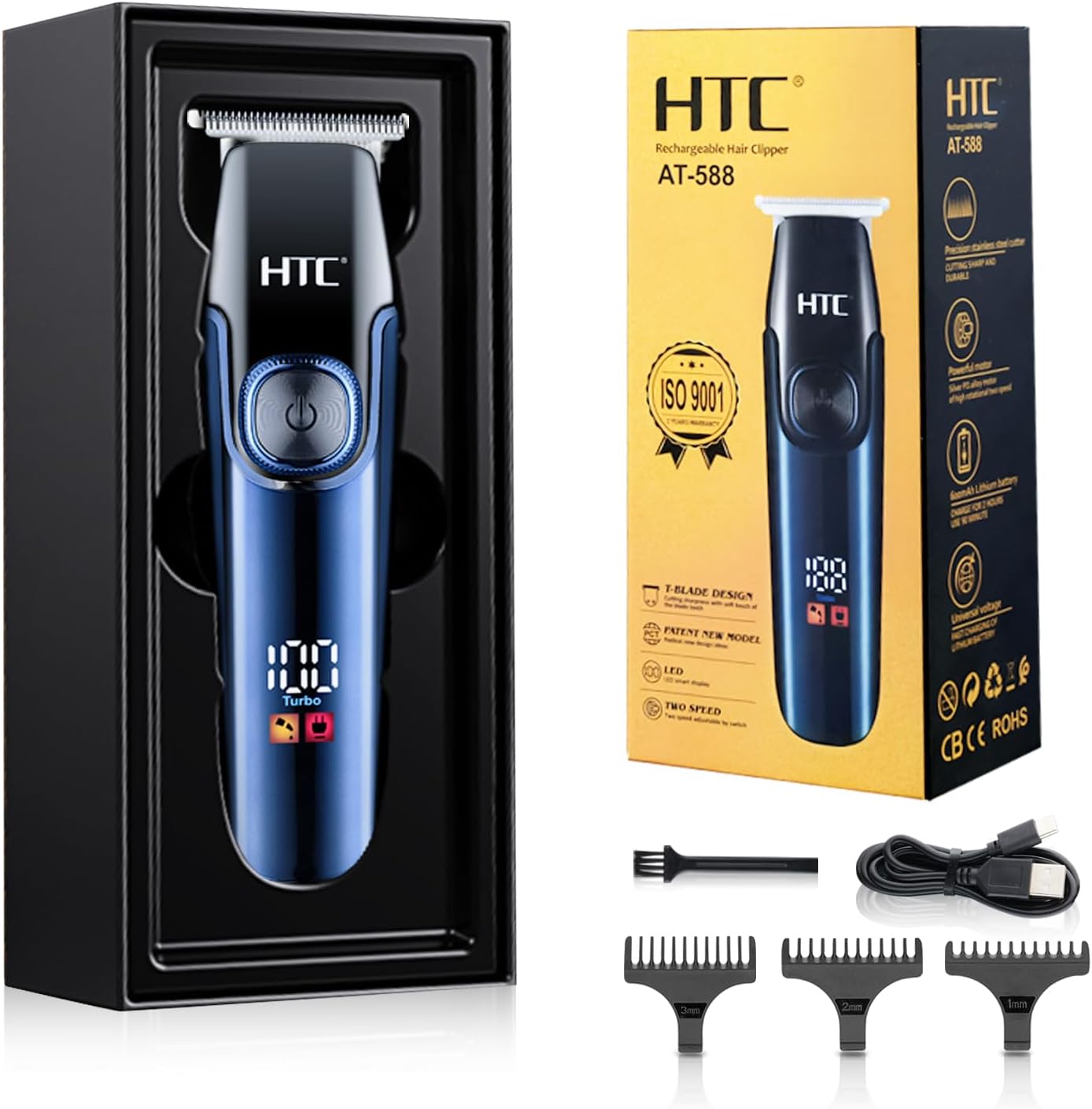
Figura 2.1: HTC AT588 Trimmer with included accessories (charging cable, cleaning brush, 1mm, 2mm, 3mm guide combs).
Komponenti Ewlenin:
- T-shaped Blade: Precision stainless steel blade designed for sharp, anti-pinching, and safe trimming.
- Buttuna tal-Qawwa: Controls power on/off and speed settings.
- Wiri Intelliġenti LED: Shows battery level, charging status, and current speed mode (e.g., "Turbo").
- Port tal-Iċċarġjar tal-USB: Għal iċċarġjar konvenjenti permezz tal-USB.
- Pettnijiet tal-Gwida: Three precision combs (1mm, 2mm, 3mm) for varying hair lengths.
- High-Frequency Copper Core Motor: Provides powerful and efficient trimming performance.

Figura 2.2: Detail of the T-shaped alloy sharp angle cutter head, designed for precision and skin protection.

Figura 2.3: Illustration of the high-frequency copper core motor, emphasizing its power and durability.
3. Setup u Iċċarġjar
3.1 Iċċarġjar inizjali
Before first use, fully charge the trimmer. The device is powered by a powerful Li-ion battery.
- Connect the provided USB charging cable to the trimmer's charging port.
- Plug the other end of the USB cable into a compatible USB power source (e.g., computer, power bank, or USB wall adapter).
- The LED display will indicate the charging status. A full charge takes approximately 2 hours and provides up to 90 minutes of cordless operation.
- The trimmer can also be used while connected to the charging cable (corded operation).

Figura 3.1: USB charging port and LED display indicating charging status. The trimmer supports charging via computer, power bank, or wall adapter.
3.2 Twaħħil tal-Moxtijiet Gwida
The trimmer comes with three precision guide combs (1mm, 2mm, 3mm) for different cutting lengths.
- Kun żgur li t-trimmer ikun mitfi qabel ma twaħħal jew tneħħi l-moxtijiet.
- Agħżel il-moxt gwida mixtieq.
- Allinja l-moxt max-xafra tat-trimmer u imbottah sew sakemm jikklikkja f'postu.
- Biex tneħħih, iġbed il-moxt bil-mod 'il bogħod mix-xafra.

Figura 3.2: The three precision limit combs (1mm, 2mm, 3mm) included with the trimmer for various cutting lengths.
4. Istruzzjonijiet Operattivi
4.1 Issettjar tal-Mixgħul/Mitfi u l-Veloċità
- Biex Tixgħel: Press and hold the power button for approximately 1 second. The trimmer will start in the default speed mode, and the LED light will illuminate.
- To Change Speed: While the trimmer is on, press the power button again briefly to switch to the high-speed mode (indicated by "Turbo" on the LED display). Pressing it again will cycle back to the standard speed.
- Biex Tifi: Press and hold the power button for approximately 1 second until the trimmer stops.

Figura 4.1: Close-up of the LED smart display and power button, showing the two levels of power adjustment.
4.2 Trimming Hair and Beard
The HTC AT588 is suitable for trimming hair on various body parts, including the head, beard, armpits, back, chest, and legs.
- Kun żgur li xagħrek ikun nadif u niexef qabel ma taqta’.
- Attach the desired guide comb for the preferred hair length. For precise edging or very short cuts, the trimmer can be used without a comb.
- Żomm it-trimmer bix-xafra ċatta mal-ġilda jew f'angolu żgħir, skont il-qtugħ mixtieq.
- Move the trimmer slowly and steadily against the direction of hair growth for an even cut.
- For detailing, outlining, or shaving, use the trimmer without a guide comb, exercising caution around sensitive areas.
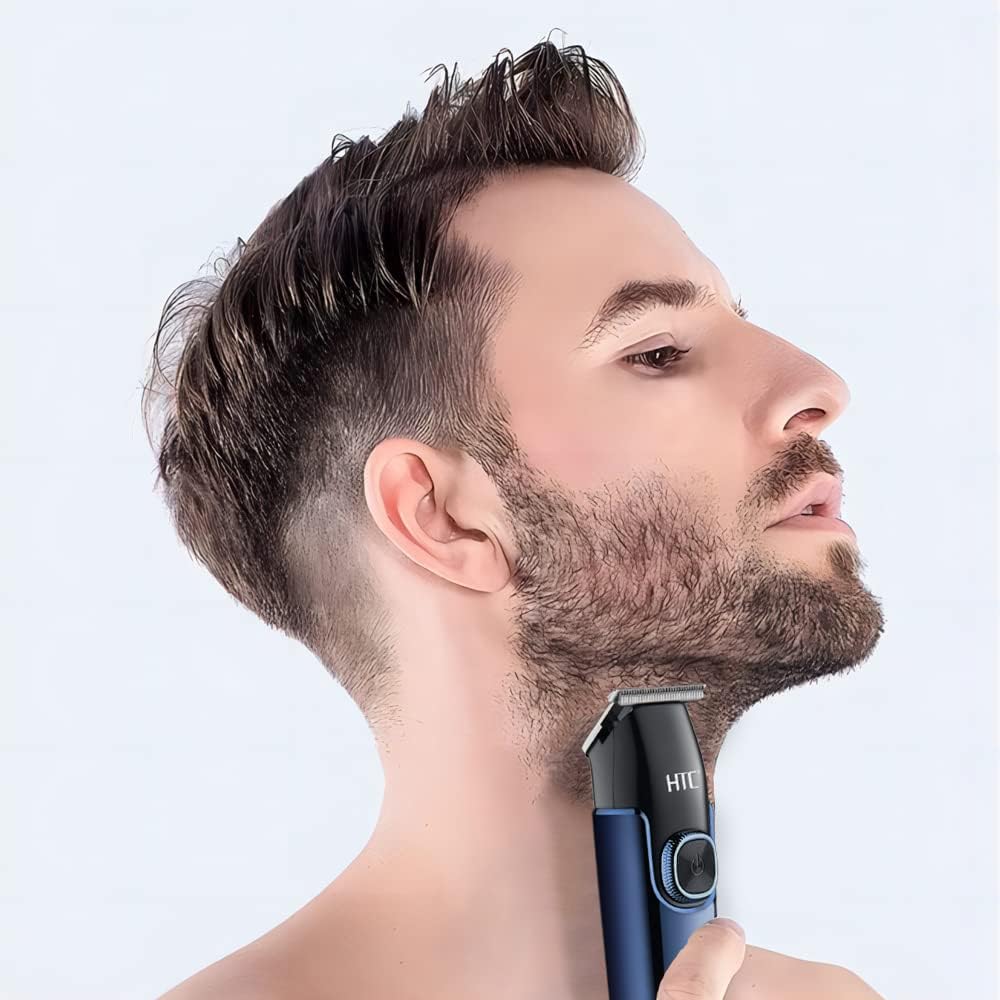
Figura 4.2: Example of using the HTC AT588 trimmer for beard grooming.
5. Manutenzjoni u Tindif
Regular cleaning and maintenance will ensure optimal performance and extend the lifespan of your trimmer.
- Wara Kull Użu: Turn off the trimmer and detach the guide comb. Use the provided cleaning brush to remove loose hairs from the blade and the trimmer body.
- Tindif tax-xafra: For a more thorough clean, the blade head can often be carefully removed (refer to specific instructions if provided, otherwise proceed with caution). Rinse the blade head under running water. Ensure it is completely dry before reattaching. Tgħaddasx il-parti prinċipali tat-trimmer fl-ilma.
- Lubrikazzjoni: Periodically apply a small drop of clipper oil (not included) to the blades to maintain smooth operation and prevent rust. Turn the trimmer on for a few seconds to distribute the oil.
- Ħażna: Store the trimmer and its accessories in a clean, dry place.
6 Issolvi l-problemi
If you encounter issues with your HTC AT588 trimmer, refer to the following common problems and solutions:
| Problema | Kawża Possibbli | Soluzzjoni |
|---|---|---|
| Trimmer ma jixgħelx. | Il-batterija hija eżawrita. | Iċċarġja t-trimmer kompletament. |
| It-trimmer jaħdem bil-mod jew jiġbed ix-xagħar. | Blades are dirty or not lubricated. Battery is low. | Clean the blades and apply clipper oil. Recharge the battery. |
| Guide comb does not attach securely. | Comb is misaligned or damaged. | Ensure correct alignment and firm attachment. Inspect comb for damage. |
Jekk il-problema tippersisti, jekk jogħġbok ikkuntattja l-appoġġ għall-klijenti.
7. Speċifikazzjonijiet
| Mudell: | AT588 |
| Ditta: | HTC |
| Sors tal-Enerġija: | Imħaddem bil-batterija (Li-ion) |
| Ħin tal-Iċċarġjar: | Appross. 2 sigħat |
| Ħin tat-Tħaddim: | Sa 90 minuta (mingħajr fili) |
| Materjal tax-xafra: | Azzar Inossidabbli b'Karbonju Għoli |
| Karatteristiċi Speċjali: | Rechargeable, Cordless, LED Display, 2 Speed Settings |
| Tulijiet tal-Moxt Gwida: | 1mm, 2mm, 3mm |
| Dimensjonijiet (Pakkett): | 18.7 x 8.3 x 5.7 ċm |
| Piż (Prodott): | 300 gramma |


