Introduzzjoni
The Brother MFC-J5740DW is a versatile 4-in-1 multifunction inkjet printer designed for small office environments. It offers printing, copying, scanning, and faxing capabilities with support for up to A3 paper size. This manual provides essential information for setting up, operating, maintaining, and troubleshooting your device to ensure optimal performance.
Il-karatteristiċi ewlenin jinkludu:
- 4-in-1 functionality: Print, Copy, Scan, Fax.
- Full duplex (double-sided) printing, scanning, copying, and faxing up to A4.
- Dual paper trays, each holding 250 sheets, plus a 100-sheet multi-purpose tray for up to A3 paper.
- Fast print speeds of up to 28 pages per minute (ISO/IEC 24734).
- High-quality pigment ink for durable prints.
- Connectivity via LAN, Wi-Fi, and USB.
- Compatibility with the Brother Mobile Connect app for mobile printing and scanning.
Setup
1. Żpakkjar u Pożizzjonament Inizjali
Carefully remove the printer from its packaging. Ensure all protective tapes and packing materials are removed from the exterior and interior of the device. Place the printer on a stable, level surface with adequate space for ventilation and paper trays.
2. Installazzjoni ta' Skrataċ tal-Linka
Open the ink cartridge cover located on the front of the printer. Install the four starter ink cartridges (Black, Cyan, Magenta, Yellow) into their corresponding slots. Ensure they click into place securely.
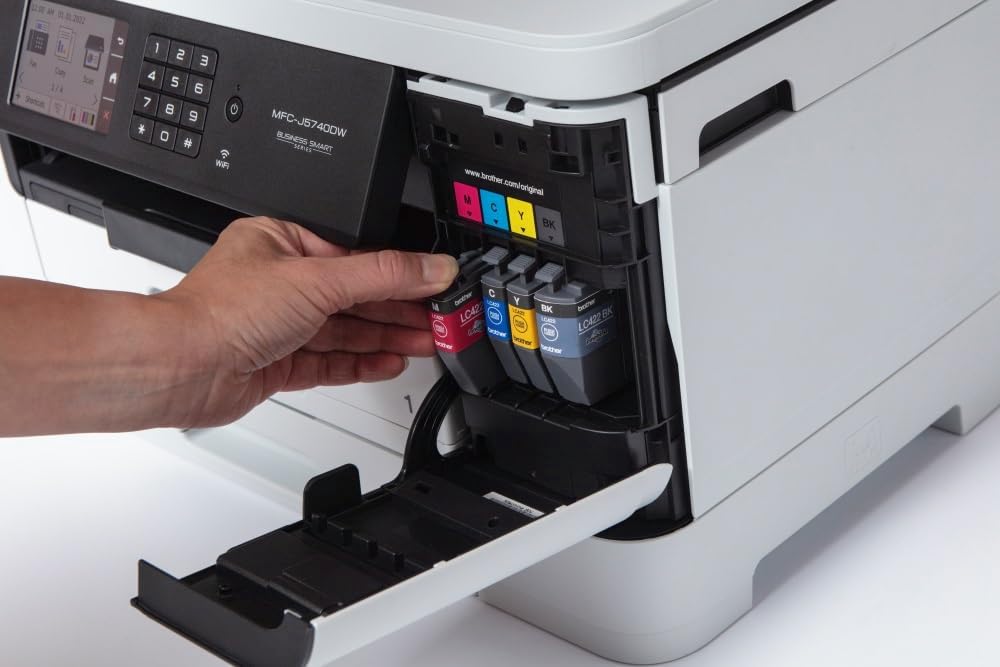
Image: A hand inserting a yellow ink cartridge into its designated slot in the Brother MFC-J5740DW printer. The other three cartridges (black, cyan, magenta) are already in place.
3. Tagħbija tal-Karta
The MFC-J5740DW features two main paper trays and a multi-purpose tray. For standard printing, open one of the paper trays, adjust the paper guides to fit your paper size (e.g., A4), and load the paper stack. For special media or larger sizes like A3, use the multi-purpose tray.

Image: A hand pulling out the lower paper tray from the Brother MFC-J5740DW printer, revealing the paper guides and loading area.

Image: A hand loading a stack of white paper into the open paper tray of the Brother MFC-J5740DW printer, with paper guides visible.
4. Connecting to Power and Network
Connect the power cable to the printer and then to an electrical outlet. For network connectivity, you can use an Ethernet cable for a wired connection or configure Wi-Fi directly from the printer's control panel. USB connection is also available for direct computer connection.
5. Installazzjoni ta' Software u Driver
Install the necessary drivers and software from the Brother support website or the included installation disc (if applicable). For mobile devices, download the Brother Mobile Connect app from your device's app store.
Tħaddem l-Istampatur
1. Bl-użu tal-Panew tal-Kontroll
The printer features an 8.8 cm LCD touchscreen for easy navigation and operation. Use the touchscreen to select functions like Print, Copy, Scan, or Fax, and to adjust settings.

Image: A hand touching the LCD screen of the Brother MFC-J5740DW printer's control panel, which displays various function icons.
2. Stampar Dokumenti
Send print jobs from your computer or mobile device. Select the desired paper source (tray 1, tray 2, or multi-purpose tray) and print settings (e.g., color, black & white, duplex, paper size up to A3).
3. Ikkupjar ta' Dokumenti
Place your document on the scanner glass or in the Automatic Document Feeder (ADF). Use the control panel to select 'Copy', choose settings like quantity, color/mono, and duplex, then start the copy process. The 50-sheet ADF supports duplex copying for A4 documents.

Image: A hand placing a document with text and graphics onto the flatbed scanner glass of the Brother MFC-J5740DW printer.

Image: A hand inserting a brown envelope into the automatic document feeder (ADF) of the Brother MFC-J5740DW printer.
4. Skennjar ta' Dokumenti
Place your document on the scanner glass or in the ADF. Select 'Scan' from the control panel and choose your scan destination (e.g., computer, email, cloud service, or mobile device via Brother Mobile Connect app). Adjust scan settings such as resolution and color mode.
5. Ibgħat Dokumenti bil-Faks
Load your document into the ADF or place it on the scanner glass. Enter the recipient's fax number using the control panel and select 'Fax'. The printer supports duplex faxing for A4 documents.
Manutenzjoni
1. Sostituzzjoni tal-Kartriġi tal-Linka
When an ink cartridge is low or empty, a message will appear on the LCD screen. Open the ink cartridge cover and replace the indicated cartridge with a new Brother LC422 series cartridge (LC422BK, LC422C, LC422M, LC422Y).
2. Tindif tal-Istampatur
Regularly clean the exterior of the printer with a soft, lint-free cloth. If print quality deteriorates, perform a print head cleaning or alignment from the printer's maintenance menu on the LCD screen. This helps prevent clogs and ensures clear prints.
3. Tneħħija tal-Karta Imblukkata
If a paper jam occurs, follow the instructions displayed on the LCD screen. Open the necessary covers and carefully remove any jammed paper, ensuring no torn pieces remain inside the printer.
Issolvi l-problemi
Din it-taqsima tindirizza kwistjonijiet komuni li tista' tiltaqa' magħhom mal-istampatur Brother MFC-J5740DW tiegħek.
1. Il-Printer Mhux Jirrispondi
- Iċċekkja l-konnessjonijiet tal-enerġija.
- Verify network connectivity (Wi-Fi or Ethernet).
- Ensure the printer is selected as the default printer on your computer.
- Erġa' ibda l-istampatur u l-kompjuter/router tiegħek.
2. Kwalità tal-Istampar Fqira
- Iċċekkja l-livelli tal-linka u ibdel kwalunkwe kartuċċa baxxa jew vojta.
- Agħmel tindif u allinjament tar-ras tal-istampar mill-menu tal-manutenzjoni tal-istampatur.
- Kun żgur li qed tuża karta xierqa għas-settings tal-istampar tiegħek.
3. Imblukkar tal-Karta
- Follow the on-screen instructions to locate and remove jammed paper.
- Kun żgur li l-karta tkun mgħobbija sew u mhux mimlija żżejjed fit-trejs.
- Uża karta li tissodisfa l-ispeċifikazzjonijiet tal-istampatur.
Għal aktar dettalji dwar is-soluzzjoni tal-problemi, irreferi għall-appoġġ ta' Brother webis-sit jew il-manwal elettroniku sħiħ.
Speċifikazzjonijiet
| Karatteristika | Speċifikazzjoni |
|---|---|
| Brand | Brother |
| Isem tal-Mudell | MFC-J5740DW |
| Numru tal-Mudell tal-Oġġett | MFCJ5740DW |
| Teknoloġija tal-Istampar | Inkjet |
| Output Printer | Kulur |
| Karatteristika Speċjali | Duplexing Awtomatiku |
| Teknoloġija tal-Konnettività | Ethernet, USB, Wi-Fi |
| Veloċità Massima tal-Istampar (Kulur) | 28 Paġni kull minuta |
| Veloċità Massima tal-Istampar (Monokromu) | 28 Paġni kull minuta |
| Riżoluzzjoni Massima tal-Istampar (Kulur) | 600 x 600 dpi |
| Riżoluzzjoni Massima tal-Istampar (Monokromu) | 600 x 600 dpi |
| Ħin tal-Istampa tal-Ewwel Paġna | 2 Sekondi |
| Tip ta' Skaner | Alimentatur Awtomatiku tad-Dokumenti (ADF) |
| Riżoluzzjoni tal-Iskaner | 1200 x 1200 dpi |
| Veloċità Massima tal-Kopja (Iswed u Abjad) | 10 Paġni kull minuta |
| Max Copy Resolution (Color) | 600 x 600 dpi |
| Daqs Max tal-Midja | A3 |
| Max Paper Capacity (Input) | 600 folja |
| Kapaċità tal-Folja tal-Output | 50 folja |
| Numru ta' Trejs | 3 (2 main, 1 multi-purpose) |
| Tip ta 'Wiri | LCD |
| Piż tal-oġġett | 20.5 Kilogrammi |
| Konsum tal-Enerġija | 4 Watt |
| Skartoċċ Kompatibbli | LC422BK, LC422C, LC422M, LC422Y |
Garanzija u Appoġġ
Informazzjoni dwar Garanzija
The Brother MFC-J5740DW comes with a 3-year limited warranty. Please refer to the warranty documentation included with your product or visit the official Brother website for detailed terms and conditions. Your statutory consumer rights remain unaffected by this warranty.
Appoġġ għall-Klijent
For further assistance, technical support, or to download the latest drivers and software, please visit the official Brother support website. You can also utilize the Brother Mobile Connect app for convenient access to printer functions and support resources from your smartphone or tablet.


