1. Introduzzjoni
Thank you for choosing the MEIHUA SWL-FL01 Rechargeable LED Work Light. This manual provides essential information for the safe and efficient operation, maintenance, and troubleshooting of your device. Please read it thoroughly before use and retain it for future reference.
This portable LED work light is designed for various applications, including camping, construction sites, garage work, fishing, and emergency situations. It features multiple lighting modes, adjustable brightness, and versatile charging options.
2. Komponenti tal-Prodott
Familiarize yourself with the different parts of your MEIHUA LED Work Light:

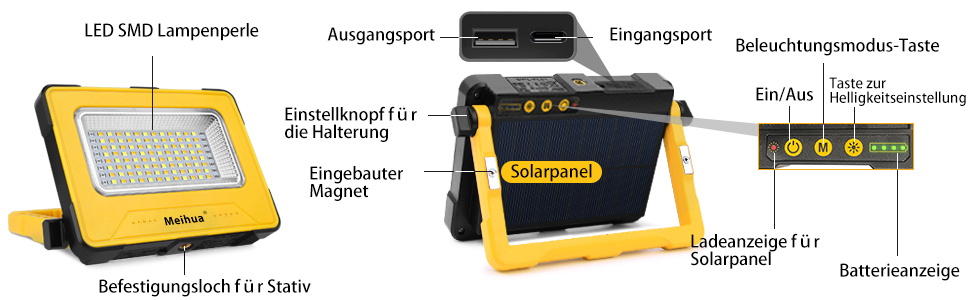
Stampa 2.1: Dettaljati view of the MEIHUA SWL-FL01 LED Work Light, highlighting its components. Key parts include the LED SMD lamp beads, output port (USB-A), input port (USB-C), lighting mode button, on/off button, adjustment knob for the stand, built-in magnet, solar panel, solar panel charging indicator, and battery indicator.
- LED SMD Lamp Żibeġ: The primary light source.
- Output Port (USB-A): Għall-iċċarġjar ta' apparati esterni (funzjoni ta' power bank).
- Input Port (USB-C): For charging the work light via USB cable.
- Lighting Mode Button: Cycles through different light modes.
- On/Off & Brightness Adjustment Button: Powers the device and adjusts brightness levels.
- Adjustment Knob for Stand: Allows 180-degree rotation of the stand for various angles.
- Kalamita inkorporata: For attaching the light to metallic surfaces.
- Panel Solari: For solar charging.
- Solar Panel Charging Indicator: Shows charging status when using solar power.
- Indikatur tal-batterija: Displays the remaining battery level.
- Mounting Hole for Tripod: For securing the light to a tripod (tripod not included).
3. Karatteristiċi
The MEIHUA SWL-FL01 LED Work Light offers a range of features for versatile use:
Stampa 3.1: Fuqview of the MEIHUA work light's key features, including a 12000mAh battery, 2A fast charge, solar power capability, suitability for tripods, and magnetic design.
- Constant Current Lighting: Maintains consistent brightness (e.g., 3000 lumens for 10 hours) without dimming as the battery discharges, unlike constant voltagsistemi e.
- Modi tad-Dawl Multipli: Features 4 distinct lighting modes:
- Dawl Saħħan (2700K)
- Dawl naturali (4000K)
- Cold Light (6000K)
- SOS Flash Mode (Red and Blue flashing for emergencies)
- Luminożità aġġustabbli: Offers 5 levels of brightness (100%, 75%, 50%, 25%, 10%) to suit various needs.
- Għażliet għall-Iċċarġjar Doppju: Can be charged via the integrated solar panel or a USB-C cable.
- Funzjoni tal-Bank tal-Enerġija: Equipped with a 12000mAh battery, allowing it to charge other devices like smartphones or tablets via its USB-A output port.
- Bażi manjetika: Strong built-in magnets on both sides enable secure attachment to metallic surfaces.
- 180-Degree Adjustable Stand: The integrated stand can be rotated 180 degrees for flexible positioning and illumination angles.
- Klassifikazzjoni IP44 li ma jgħaddix ilma minnha: Provides protection against splashing water from any direction, making it suitable for outdoor use in light rain.
- Disinn portabbli: Compact and lightweight (490g) with a comfortable handle for easy transport.
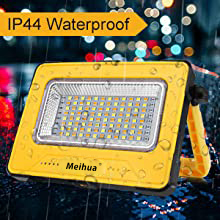
Stampa 3.2: The work light is rated IP44 waterproof, indicating its resistance to splashing water.
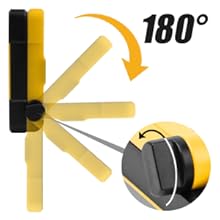
Stampa 3.3: The integrated stand allows for 180-degree adjustment, providing flexible lighting angles.
4. Setup
The MEIHUA LED Work Light requires minimal setup before first use.
4.1 Ħlas Inizjali
Before initial use, it is recommended to fully charge the work light using the USB-C cable. This ensures the internal battery is conditioned and ready for optimal performance.
- Connect the provided USB-C cable to the input port on the work light.
- Qabbad it-tarf l-ieħor tal-kejbil USB ma' adapter tal-enerġija USB kompatibbli (mhux inkluż) jew port USB tal-kompjuter.
- Id-dwal indikatur tal-batterija jixegħlu, u juru l-progress tal-iċċarġjar. Id-dwal kollha jkunu solidi meta tkun iċċarġjata kompletament.
4.2 Pożizzjonament tad-Dawl tax-Xogħol
The work light offers several positioning options:
- Freestanding: Use the adjustable stand to place the light on a flat surface. Adjust the stand to achieve the desired angle.
- Twaħħil manjetiku: Attach the light to any suitable metallic surface using the built-in magnets. Ensure the surface is clean and strong enough to hold the light securely.
- Immuntar ta' tripod: Secure the light to a compatible tripod using the mounting hole.

Stampa 4.1: The work light can be positioned using its 180-degree adjustable stand, attached to metal surfaces via magnets, or mounted on a tripod.
5. Istruzzjonijiet Operattivi
5.1 Powering On/Off and Brightness Adjustment
- Agħfas il- On/Off & Brightness Adjustment Button once to turn on the light at its last used brightness setting.
- While the light is on, press the On/Off & Brightness Adjustment Button repeatedly to cycle through the 5 brightness levels (100% > 75% > 50% > 25% > 10%).
- Agħfas u żomm il- On/Off & Brightness Adjustment Button for approximately 2 seconds to turn off the light.
5.2 Adjusting Light Modes
The work light features 4 distinct light modes:

Stampa 5.1: Illustration of the four light modes (Warm, Natural, Cold, SOS) and five brightness levels available on the MEIHUA work light.
- With the light on, press the Buttuna tal-Modalità tad-Dawl once to switch to the next light mode.
- The modes cycle in the following order: Warm Light > Natural Light > Cold Light > SOS Flash Mode.
- To exit SOS Flash Mode, press the Buttuna tal-Modalità tad-Dawl again to return to Warm Light, or turn off the device.
5.3 Charging the Work Light
Your work light can be charged using two methods:

Stampa 5.2: The work light supports both USB-C cable charging and solar panel charging. The solar panel automatically charges when exposed to sunlight.
- Iċċarġjar USB-C: Connect the provided USB-C cable to the input port and a power source. This is the fastest charging method.
- Iċċarġjar Solari: Place the work light with the solar panel facing direct sunlight. The solar panel charging indicator will flash during charging. Solar charging is slower and dependent on sunlight intensity.
The battery indicator lights will show the current charge level. Ensure timely charging when the battery level is low.
5.4 Funzjoni tal-Bank tal-Enerġija
The work light can serve as a power bank to charge other devices:

Stampa 5.3: The MEIHUA work light can charge external devices like tablets, functioning as a 12000mAh power bank.
- Connect your device's charging cable to the USB-A output port on the work light.
- Id-dawl tax-xogħol se jibda jiċċarġja l-apparat tiegħek.
- Monitor the battery indicator lights on the work light to ensure sufficient power for both the light and your external device.
6. Manutenzjoni
Proper maintenance ensures the longevity and optimal performance of your MEIHUA LED Work Light.
- Tindif: Imsaħ id-dawl b'artab, damp drapp. Tużax prodotti tat-tindif jew solventi li joborxu. Kun żgur li l-pannell solari jkun nadif għal iċċarġjar effiċjenti.
- Ħażna: Aħżen id-dawl tax-xogħol f'post frisk u niexef meta ma tkunx qed tużah. Jekk se taħżnu għal perjodi twal, iċċarġja l-batterija kull 3-6 xhur biex iżżommha f'saħħitha.
- Espożizzjoni għall-Ilma: While IP44 rated, avoid submerging the light in water. Dry thoroughly if exposed to rain.
- Kura tal-batterija: Do not attempt to replace the internal lithium-polymer battery. Dispose of the product responsibly according to local regulations when it reaches its end of life.
7 Issolvi l-problemi
If you encounter issues with your MEIHUA LED Work Light, refer to the following common problems and solutions:
| Problema | Kawża Possibbli | Soluzzjoni |
|---|---|---|
| Id-dawl ma jixgħelx. | Il-batterija hija eżawrita. | Charge the work light using the USB-C cable or solar panel. |
| Id-dawl huwa baxx jew jitteptep. | Livell baxx tal-batterija. | Erġa' ċċarġja d-dawl tax-xogħol. |
| L-iċċarġjar solari huwa bil-mod jew mhux qed jaħdem. | Insufficient sunlight or dirty solar panel. | Ensure the solar panel is in direct sunlight and clean its surface. Solar charging is slower than USB charging. |
| External device not charging via power bank function. | Il-batterija tad-dawl tax-xogħol hija baxxa jew il-kejbil huwa difettuż. | Ensure the work light has sufficient charge. Try a different USB cable. |
| Il-buttuni ma jirrispondux. | Problema temporanju tas-softwer. | Try turning the device off and on again. If unresponsive, allow the battery to fully deplete and then recharge. |
8. Speċifikazzjonijiet
Technical specifications for the MEIHUA SWL-FL01 LED Work Light:

Stampa 8.1: Dimensions of the MEIHUA SWL-FL01 work light: 15.4 cm (6.1 in) length, 11.4 cm (4.5 in) width, and 3.2 cm (1.26 in) thickness.
| Karatteristika | Dettall |
|---|---|
| Brand | MEIHUA |
| Numru tal-Mudell | SWL-FL01 |
| Qawwa | 60 Watts |
| Kapaċità tal-batterija | 12000mAh (Lithium-polymer) |
| Voltage | 5 Volts |
| Numru ta 'LEDs | 96 |
| Tip ta' Sors tad-Dawl | LED (Dijodu li Jarmi d-Dawl) |
| Fluss Luminuż | Up to 3000 lumens (at 100% brightness) |
| Modi tat-Temperatura tal-Kulur | Warm Light (2700K), Natural Light (4000K), Cold Light (6000K), SOS Flash Mode |
| Livelli ta 'luminożità | 5 (100%, 75%, 50%, 25%, 10%) |
| Metodi ta 'ċċarġjar | USB-C, Solar Panel |
| Materjal | Metal, Alloy Steel (lampdell) |
| Tip Finish | Aħrax |
| Kulur | Isfar |
| Dimensjonijiet (L x W x H) | 15.4 x 11.4 x 3.2 ċm (6.1 x 4.5 x 1.26 pulzieri) |
| Piż | 490 gramma |
| Klassifikazzjoni li ma jgħaddix ilma minnha | IP44 |
| Karatteristiċi Speċjali | Adjustable brightness, multiple lighting modes, SOS mode, Power Bank function, Magnetic, 180-degree adjustable stand |
Għal informazzjoni dettaljata dwar l-effiċjenza enerġetika, jekk jogħġbok irreferi għad-database tal-EPREL: https://eprel.ec.europa.eu/qr/979543
9. Garanzija u Appoġġ
Your MEIHUA SWL-FL01 Rechargeable LED Work Light comes with a 12-il xahar garanzija mid-data tax-xiri. Din il-garanzija tkopri difetti fil-manifattura u tiżgura li l-prodott ikun ħieles minn difetti fil-materjal u fix-xogħol taħt użu normali.
Barra minn hekk, a Politika ta 'ritorn ta' 30 jum is offered, allowing you to return the product within 30 days of receipt if you are not satisfied.
Appoġġ għall-Klijent
If you have any questions, require assistance, or need to claim warranty service, please do not hesitate to contact our customer support team. Please have your purchase details and model number (SWL-FL01) ready when contacting support.
Contact information for customer support can typically be found on the retailer's webis-sit jew il-fattura tax-xiri tiegħek.


