1. Introduzzjoni
This manual provides comprehensive instructions for the installation, operation, and maintenance of your Digiquest XJ DVB-T2 Digital Terrestrial Receiver, Model 125J. This device is designed to receive DVB-T2 digital terrestrial broadcasts with HEVC Main 10 (10-bit) decoding, ensuring high-quality video and audio. Please read this manual carefully before using the product to ensure proper functionality and to maximize your viewing esperjenza.
2. X'hemm fil-Kaxxa
Meta tiftaħ il-pakkett, jekk jogħġbok ivverifika li l-komponenti kollha li ġejjin huma inklużi:
- Digiquest XJ DVB-T2 Digital Terrestrial Receiver
- Kontroll mill-bogħod standard
- EASY 2-in-1 Remote Control (with large buttons)
- Provvista ta 'Enerġija Esterna
- User Manual and Quick Guide

Image: Contents of the Digiquest XJ DVB-T2 receiver package, showing the receiver, two remote controls, power supply, and documentation.
3. Prodott Aktarview
3.1 Panel ta 'Quddiem
The front panel features essential controls and indicators:
- Buttuna tal-Qawwa: Ixgħel jew jitfi r-riċevitur.
- Buttuni tal-Kanal 'l fuq/'l isfel: Navigates through channels.
- Alphanumeric Display: Shows channel number, time in standby, and other status information.
- Port tal-USB (ta' Quddiem): For connecting USB storage devices for media playback.
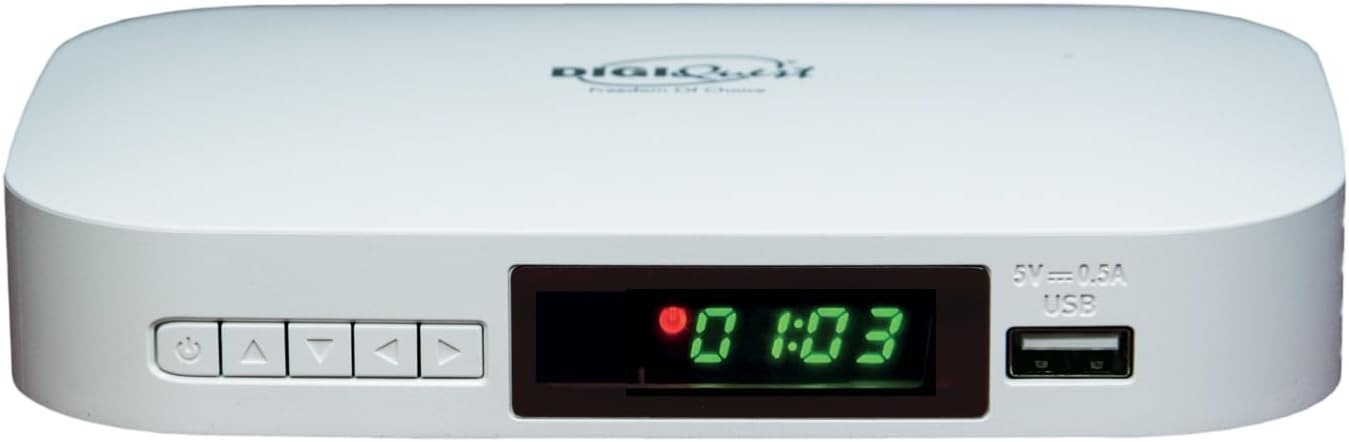
Immaġni: Quddiem view of the Digiquest XJ DVB-T2 receiver, showing the power button, channel navigation buttons, alphanumeric display, and front USB port.
3.2 Konnessjonijiet tal-Panew ta' wara
The rear panel provides all necessary connection ports:
- RF IN: Connect your terrestrial antenna cable here.
- HDMI: Connect an HDMI cable to your TV for high-definition video and audio output.
- SCART TV: Connect a SCART cable to older generation TVs.
- DC FI 12V: Connect the external power supply here.

Image: Diagram illustrating the rear panel connections of the Digiquest XJ DVB-T2 receiver, including RF IN, HDMI, SCART TV, and DC IN 12V ports.
3.3 Kontrolli mill-bogħod
The receiver comes with two remote controls for your convenience:
- Kontroll mill-bogħod standard: Offers full functionality for the receiver.
- EASY 2-in-1 Remote Control: Features larger buttons and can control both the receiver and basic functions of your television (e.g., power, volume). Refer to the included quick guide for TV pairing instructions.

Image: Both the standard remote control and the EASY 2-in-1 remote control with large buttons for the Digiquest XJ DVB-T2 receiver.
4. Setup
Follow these steps to set up your Digiquest XJ DVB-T2 receiver:
- Qabbad l-antenna: Connect your terrestrial antenna cable to the RF IN port on the rear panel of the receiver.
- Qabbad mat-TV:
- For modern TVs, connect an HDMI cable from the receiver's HDMI port to an available HDMI input on your TV.
- For older TVs, connect a SCART cable from the receiver's SCART TV port to the SCART input on your TV.
- Qabbad l-Enerġija: Connect the external power supply to the DC FI 12V port on the receiver, then plug the power adapter into a wall outlet.
- Qawwa Mixgħul: Turn on your TV and select the correct HDMI or SCART input source. Then, press the power button on the receiver or remote control to turn it on.
- Skennjar Inizjali: The receiver will typically guide you through an initial setup process, including language selection and an automatic channel scan. Follow the on-screen prompts to complete this process.
5. Istruzzjonijiet Operattivi
5.1 Ġestjoni tal-Kanal
- Skennjar Awtomatiku tal-Kanali: If channels are not found or you move to a new location, access the menu and select 'Channel Search' or 'Auto Scan' to find available channels.
- Manual Channel Sorting: To reorder channels, navigate to the 'Channel List' in the menu. Select the channel you wish to move, press the 'INFO' button (or equivalent on your remote), and enter the desired new channel number. Confirm your selection.
- Favorite Lists: Create personalized lists of your preferred channels for quick access. Refer to the menu for 'Favorite Channel' settings.
- Kontrolli tal-Ġenituri: Set up parental locks to restrict access to certain channels or programs based on age ratings.
5.2 Gwida Elettronika tal-Programm (EPG)
Agħfas il- EPG button on your remote control to view the Electronic Program Guide. This displays program schedules for current and upcoming broadcasts, allowing you to plan your viewing.
5.3 Media Player Function
The receiver includes a USB media player. Insert a USB storage device (e.g., USB flash drive) into the front USB port. Use the remote control to navigate to the 'Media Player' section in the menu. You can play video, audio (MP3), and view immaġni files maħżuna fuq it-tagħmir USB tiegħek.

Image: Icon representing the Media Player function.
5.4 CEC Function
If your television supports CEC (Consumer Electronics Control), you can enable this function on the receiver. CEC allows the receiver to control certain functions of your TV, such as power on/off or input switching, using a single remote control. Ensure CEC is enabled on both your TV and the receiver's settings.

Image: Icon representing the CEC (Consumer Electronics Control) function.
5.5 Teletext, Subtitles, and Dual Audio
Access Teletext by pressing the TTX button. If available for the current broadcast, you can enable subtitles or select alternative audio tracks (dual audio) through the respective options on your remote or in the menu.
6 Issolvi l-problemi
- Ebda Sinjal / Skrin Iswed:
- Check all cable connections (antenna, HDMI/SCART, power).
- Ensure your TV is on the correct input source (HDMI 1, AV, etc.).
- Perform an automatic channel scan.
- Verify your antenna is properly connected and positioned for optimal reception.
- Il-Kontroll mill-bogħod ma Jirrispondix:
- Kun żgur li l-batteriji huma mdaħħla sew u mhux eżawriti.
- Point the remote directly at the receiver's front panel.
- Neħħi kwalunkwe ostaklu bejn ir-remote u r-riċevitur.
- Channels are not in desired order:
- Access the 'Channel List' in the menu.
- Select the channel to move, press the 'INFO' button, and input the new desired channel number.
- Image turns green periodically (specific to some older TVs):
- This issue may occur with certain older television models. Try connecting the receiver to a different TV if possible.
- Power cycling the receiver (turning it off and on) may temporarily resolve the issue.
7. Speċifikazzjonijiet
| Brand | DIGIQUEST |
| Numru tal-Mudell | 0623098 (125J) |
| Dimensjonijiet | 20.2 x 14.2 x 7.2 ċm; 150 g |
| Teknoloġija tal-Konnettività | USB |
| Apparati Kompatibbli | Televiżjoni, Speaker |
| Karatteristiċi Speċjali | USB Media Player, CEC Function |
| Modalità tal-Ħruġ tal-Awdjo | Stereo |
| Tip ta' Output Awdjo | Bluetooth, HDMI, Optical, Internal |
| Surround Sound Channel Konfigurazzjoni | 7.1 |
| Kodifikazzjoni tal-vidjo | H.264 or H.265 (HEVC) |
| Output ta 'Qawwa | 10 Watts |
| Sors tal-Enerġija | Provvista ta 'Enerġija Esterna ta' 12V |
8. Manutenzjoni
- Tindif: Use a soft, dry cloth to clean the receiver. Do not use liquid cleaners or abrasive materials.
- Ventilazzjoni: Ensure the receiver has adequate ventilation. Do not block the ventilation holes on the sides or top of the unit.
- Ħażna: If storing the receiver for an extended period, disconnect it from the power supply and store it in a cool, dry place.
9. Garanzija u Appoġġ
For warranty information, please refer to the documentation included in your product package or contact your retailer. For technical support or further assistance, please visit the official DIGIQUEST websit jew ikkuntattja lid-dipartiment tas-servizz tal-konsumatur tagħhom.


