1. Introduzzjoni
Thank you for choosing the Shanrya Portable Humidifier GXZ-J623. This device is designed to enhance your environment by increasing humidity, improving air quality, and providing a soothing night light. Its compact size and USB power make it suitable for various settings, including homes, offices, and bedrooms.
Key features include a 500ml water capacity, two spray modes (continuous and intermittent), a warm night light, and double protection with automatic power-off.
2. Istruzzjonijiet tas-Sigurtà
- Tgħaddix l-umidifikatur fl-ilma jew likwidi oħra.
- Tiżgura l-provvista tal-enerġija voltage matches the device's specifications (DC5.0V).
- Żomm fejn ma jintlaħaqx mit-tfal u l-annimali domestiċi.
- Timblokkax l-iżbokk taċ-ċpar.
- Use only clean tap water or distilled water. Do not add essential oils directly into the water tank as this may damage the device.
- Skonnettja l-apparat qabel ma tnaddaf jew timlieh mill-ġdid.
- If the device is damaged, do not attempt to repair it yourself. Contact customer support.
3. Kontenut tal-Pakkett
Jekk jogħġbok iċċekkja l-pakkett għall-oġġetti li ġejjin:
- 1 x Shanrya Portable Humidifier GXZ-J623
- 1 x USB Cable
- 1 x Manwal għall-Utent

Image: Included USB Cable
4. Prodott Aktarview
Familiarize yourself with the components of your humidifier.

Immaġni: Quddiem view of the Shanrya Portable Humidifier GXZ-J623

Immaġni: Ġenb view showing the control button and USB port area.
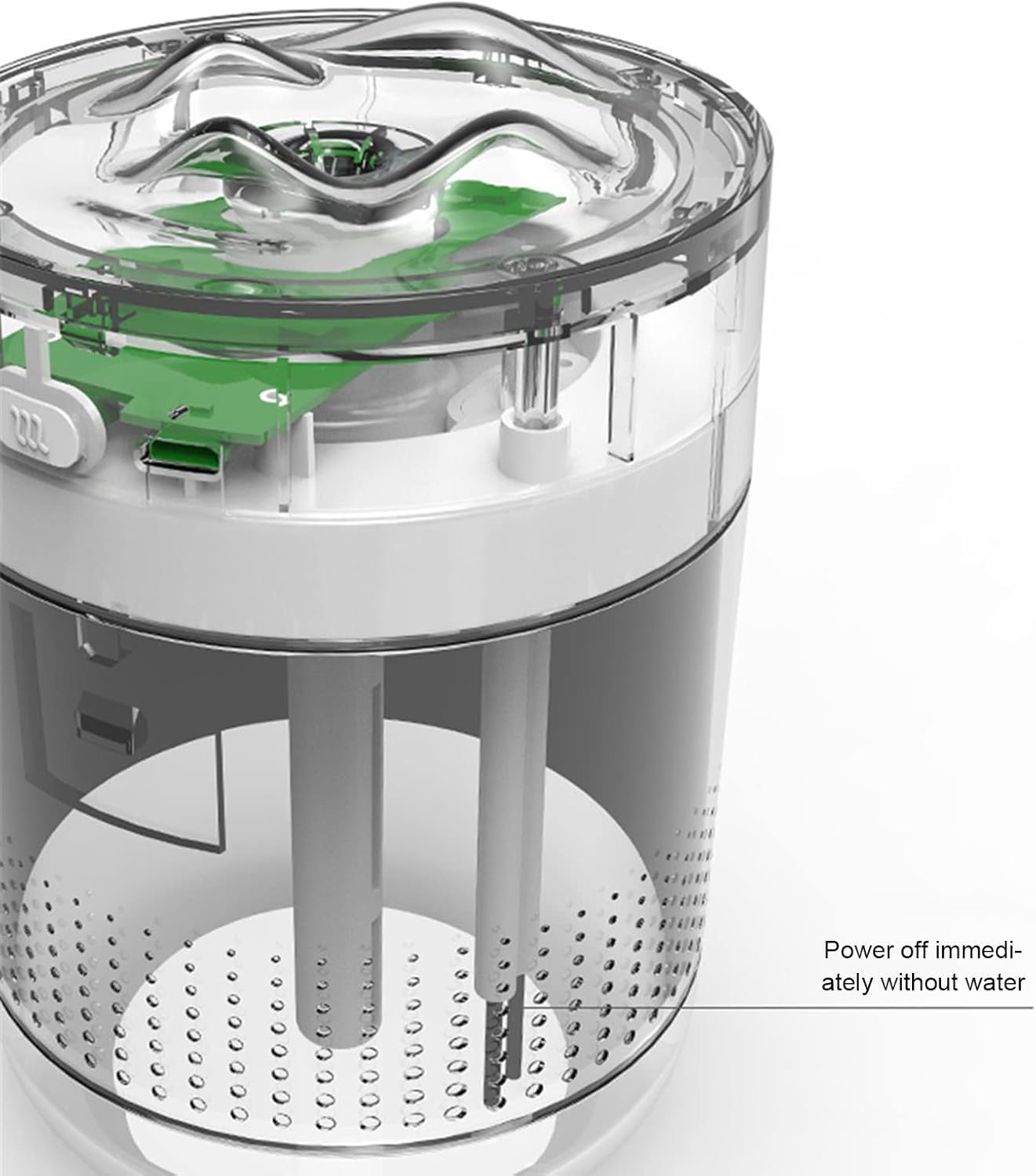
Immaġni: Interna view of the humidifier, illustrating the water reservoir and internal components.
5. Setup
- Open the Humidifier: Gently twist the top cover counter-clockwise to separate it from the water tank.
- Imla t-Tank tal-Ilma: Fill the water tank with clean tap water or distilled water up to the maximum fill line. Do not overfill. The capacity is 500ml.
- Close the Humidifier: Place the top cover back onto the water tank and twist clockwise to secure it.
- Qabbad l-Enerġija: Insert the small end of the provided USB cable into the humidifier's power port and the larger end into a compatible USB power source (e.g., computer, USB wall adapter).

Image: Humidifier in use on a desk, demonstrating typical setup.
6. Istruzzjonijiet Operattivi
The humidifier features a single control button for all functions.
- Power On / Continuous Spray Mode: Press the control button once to turn on the humidifier. It will start spraying continuously. This mode operates for 12 hours before automatically shutting off.
- Intermittent Spray Mode: Press the control button a second time to switch to intermittent spray mode. In this mode, the humidifier sprays for 3 seconds and then pauses for 2 seconds. This mode operates for 18 hours before automatically shutting off.
- Night Light On/Off: Press and hold the control button for 3 seconds to turn the warm night light on or off.
- Itfi: Press the control button a third time (after intermittent mode) to turn off the humidifier and the night light.

Image: Humidifier with its warm night light feature activated.

Image: Humidifier actively emitting mist while the night light is on.
7. Manutenzjoni
Tindif regolari jiżgura prestazzjoni ottimali u jestendi l-ħajja tal-umidifikatur tiegħek.
- Tindif ta 'Kuljum: Empty any remaining water from the tank and wipe it dry with a clean cloth.
- Tindif ta 'kull ġimgħa:
- Spluggja l-umidifikatur.
- Neħħi l-għatu ta 'fuq.
- Clean the water tank with a soft brush or cloth and mild detergent. Rinse thoroughly to remove any residue.
- Wipe the mist outlet and the inside of the top cover with a damp drapp.
- Kun żgur li l-partijiet kollha jkunu kompletament niexfa qabel ma jerġgħu jingħaqdu.
- Filter/Cotton Swab Replacement: The humidifier uses a cotton swab filter. If mist output decreases or the humidifier stops working, the cotton swab may need replacement. Refer to the manufacturer's guidelines for purchasing replacement swabs.
8 Issolvi l-problemi
| Problema | Kawża Possibbli | Soluzzjoni |
|---|---|---|
| L-ebda output taċ-ċpar | No water in tank; Cotton swab dry or clogged; Power not connected; Device malfunction. | Fill water tank; Ensure cotton swab is fully saturated; Check USB connection; Replace cotton swab; Contact support. |
| Output dgħajjef taċ-ċpar | Low water level; Clogged cotton swab; Mineral buildup on atomizer. | Refill water; Replace cotton swab; Clean atomizer gently with a cotton swab dipped in vinegar (then rinse). |
| Dawl bil-lejl ma jaħdimx | Light function not activated; Device malfunction. | Press and hold the control button for 3 seconds; Contact support. |
| Automatic shut-off occurs too soon | Low water level sensor activated; Timer function. | Refill water; Note that continuous mode runs for 12 hours and intermittent for 18 hours before auto shut-off. |
9. Speċifikazzjonijiet
| Karatteristika | Dettall |
|---|---|
| Mudell | GXZ-J623 |
| Materjal | ABS |
| Dimensjonijiet | Madwar 95 x 95 x 129mm (3.7 x 3.7 x 5.1 pulzieri) |
| Input Voltage | DC5.0V |
| Kurrent tax-Xogħol | 200-450mA |
| Konsum tal-Enerġija | 1.0-2.25W |
| Kapaċità tal-Flixkun tal-Ilma | 500ml |
| Spray Volum | 30ml-50ml/h |
| Modi ta' Operazzjoni | Continuous (12h auto-off), Intermittent (18h auto-off) |
| Karatteristiċi Speċjali | Warm Night Light, Quiet Operation, Automatic Power-off Protection |
| Kulur | Abjad |
| Piż | 0.3 Kilogrammi (10.4 uqija) |

Image: Diagram showing the dimensions of the humidifier (95mm x 95mm x 129mm).
10. Garanzija u Appoġġ
For warranty information, please refer to the documentation provided at the time of purchase or contact your retailer. If you encounter any issues or require technical assistance, please contact Shanrya customer support through your purchase platform or the official brand websit.


