1. Introduzzjoni
The Piko 56502 Smart Decoder XP 5.1 is a state-of-the-art locomotive decoder designed for model railway enthusiasts. This compact and powerful device, also known as PSD XP 5.1, integrates advanced features to enhance the control and realism of your model locomotives within a digital command control (DCC) system.
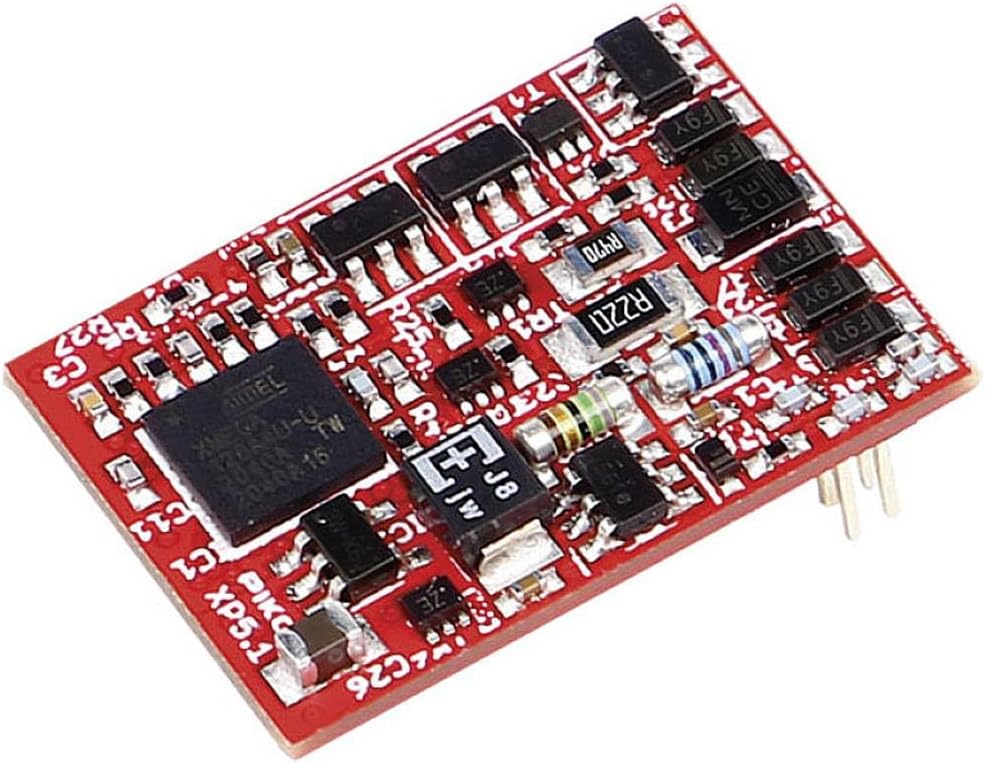
2. Karatteristiċi ewlenin
The Piko Smart Decoder XP 5.1 offers a range of functionalities for an enriched model railway experience:
- Latest generation decoder technology.
- Designed for digital command control (DCC) systems.
- Provides advanced control capabilities for model locomotives.
- Disinn kompatt għal integrazzjoni faċli.
- Supports various locomotive functions.
3. Setup u Installazzjoni
Proper installation is crucial for the optimal performance of your Piko Smart Decoder XP 5.1. Always ensure the locomotive is disconnected from power before beginning installation.
3.1. Preparazzjoni
- Refer to your locomotive's manual for instructions on accessing the decoder interface.
- Ensure you have the necessary tools (e.g., small screwdriver, tweezers).
3.2. Passi ta 'installazzjoni
- Carefully remove the locomotive shell to expose the internal components.
- Locate the existing decoder or the designated decoder interface (e.g., 8-pin NEM 652 socket).
- Gently plug the Piko 56502 Smart Decoder XP 5.1 into the corresponding socket, ensuring correct orientation. Refer to the decoder's pinout diagram if available.
- Verify all connections are secure and there are no short circuits.
- Replace the locomotive shell, ensuring no wires are pinched.
3.3. Test Inizjali
- Place the locomotive on a programming track connected to your DCC system.
- Read the decoder's default address (usually 3).
- If successful, move the locomotive to the main track and test basic functions like movement and lights.
4. Istruzzjonijiet Operattivi
The Piko Smart Decoder XP 5.1 operates under the Digital Command Control (DCC) standard, allowing precise control of your locomotive's speed, direction, and functions.
4.1. Operazzjoni Bażika
- Connect your DCC system to the track.
- Select the locomotive's address on your DCC controller.
- Use the speed control to adjust the locomotive's speed and direction.
- Activate functions (e.g., lights) using the function buttons on your DCC controller (F0, F1, etc.).
4.2. Programming Configuration Variables (CVs)
- The decoder's behavior can be customized by programming Configuration Variables (CVs).
- Refer to your DCC system's manual for instructions on how to program CVs.
- Common CVs include:
- CV1: Primary locomotive address (1-127)
- CV29: Configuration register (controls speed steps, analog mode, etc.)
- CV3-4: Acceleration and deceleration rates
- Consult the comprehensive Piko Smart Decoder XP 5.1 programming guide (available from Piko's official website) for a complete list of CVs and their functions.
5. Manutenzjoni
To ensure the longevity and reliable performance of your Piko Smart Decoder XP 5.1, follow these simple maintenance guidelines.
- Indafa: Keep the decoder free from dust and debris. Use a soft, dry brush or compressed air if necessary.
- Umdità: Avoid exposing the decoder to moisture or liquids. Operate in a dry environment.
- Immaniġġjar: Handle the decoder by its edges to prevent damage to components or static discharge.
- Ħażna: When not in use, store the decoder in a cool, dry place, away from direct sunlight and extreme temperatures.
6 Issolvi l-problemi
If you encounter issues with your Piko Smart Decoder XP 5.1, consult the following troubleshooting steps before seeking further assistance.
6.1. Locomotive Does Not Respond
- Iċċekkja l-Enerġija: Ensure the track has power and your DCC system is operational.
- Decoder Connection: Verify the decoder is correctly and securely plugged into the locomotive's interface.
- Locomotive Address: Confirm that the correct locomotive address is selected on your DCC controller.
- Short Circuit: Inspect for any visible short circuits on the decoder or within the locomotive wiring.
6.2. Erratic Behavior or Intermittent Operation
- Indafa tal-Binarji: Ensure tracks and locomotive wheels are clean for good electrical contact.
- DCC Signal: Check for strong and stable DCC signal from your controller.
- Reset Decoder: As a last resort, perform a factory reset of the decoder (consult Piko's programming guide for the specific CV value to reset).
6.3. Functions (Lights, etc.) Not Working
- Immappjar tal-Funzjonijiet: Verify that the functions are correctly mapped to the desired function buttons in the decoder's CV settings.
- Bulb/LED Check: Ensure that the locomotive's lights or other function components are not faulty.
If problems persist, contact Piko customer support or consult a qualified model railway technician.
7. Speċifikazzjonijiet
Detailed technical specifications for the Piko 56502 Smart Decoder XP 5.1.
| Karatteristika | Dettall |
|---|---|
| Brand | Piko |
| Numru tal-Mudell | 56502 |
| Tip ta' Decoder | Smart Decoder XP 5.1 (Lokdecoder) |
| Numru ta 'Kanali | 8 |
| Komponenti Inklużi | Materjal ta 'installazzjoni |
| Klassifikazzjoni tal-Protezzjoni Internazzjonali | IPX6 |
| ASIN | B09Q3H7CPF |
| Kulur | Diversi |
8. Garanzija u Appoġġ
Piko provides a manufacturer's warranty for the Smart Decoder XP 5.1. Please retain your proof of purchase for warranty claims.
- Perjodu ta' Garanzija: Spare parts availability is indicated as 1 year. Please refer to the official Piko warranty terms for full details.
- Appoġġ għall-Klijent: For technical assistance, warranty claims, or further information, please visit the official Piko websit jew ikkuntattja lid-dipartiment tas-servizz tal-konsumatur tagħhom.
- Riżorsi onlajn: Additional documentation, FAQs, and software updates (if applicable) may be available on the Piko websit.


