1. Prodott Aktarview
The EVGA GeForce RTX 3080 FTW3 Ultra Gaming graphics card is engineered for high-performance computing and gaming. It features advanced NVIDIA Ampere architecture, offering significant improvements in graphics processing and efficiency.
Karatteristiċi ewlenin:
- Riżoluzzjoni massima diġitali: 7680 x 4320 pixels, supporting high-fidelity visual experiences.
- Real Boost Clock: 1800 MHz, providing enhanced clock speeds for demanding applications.
- Memory Detail: 12288 MB GDDR6X, ensuring ample memory for complex textures and high-resolution gaming.
- Real-Time RAY TRACING: Delivers cutting-edge, hyper-realistic graphics in supported games.
- iCX3 Technology: Features triple fans and 9 iCX3 thermal sensors for superior cooling performance and reduced acoustic noise.
- All-Metal Backplate: Provides structural rigidity and aids in heat dissipation.
- Adjustable ARGB LED: Customizable lighting to match your system's aesthetic.
- PCI Express® Gen 4: High-speed interface for optimal data transfer.
- Microsoft DirectX® 12 Ultimate: Supports the latest graphics APIs for advanced rendering.
- NVIDIA DLSS: AI-powered rendering that boosts frame rates with uncompromised image quality.
- NVIDIA® GeForce Experience™: Optimizes game settings and provides driver updates.
- NVIDIA G-SYNC™: Delivers smooth, tear-free gameplay at refresh rates up to 360 Hz.
- NVIDIA GPU Boost™: Dynamically maximizes clock speeds based on workload and temperature.
- VR Lest: Optimized for virtual reality experiences.
- Appoġġ għall-Wiri: Supports 4K 120Hz HDR, 8K 60Hz HDR, and Variable Refresh Rate as specified in HDMI 2.1.
2. Setup u Installazzjoni
Proper installation of your EVGA GeForce RTX 3080 FTW3 Ultra Gaming graphics card is crucial for optimal performance and system stability. Always ensure your system is powered off and unplugged before beginning installation.
Passi ta' Installazzjoni:
- Ipprepara s-Sistema Tiegħek: Power down your computer and unplug all cables. Open your PC case.
- Sib is-Slott tal-PCIe: Identifika slott PCI Express x16 disponibbli fuq il-motherboard tiegħek.
- Neħħi l-Għotjien tas-Slott: Remove the necessary expansion slot covers from your PC case.
- Daħħal il-Karta tal-Grafika: Allinja bir-reqqa l-karta grafika mas-slott tal-PCIe u agħfas 'l isfel sew sakemm tkun imwaħħla sew. Kun żgur li l-klipp taż-żamma jissakkar f'postu.
- Karta Sikura: Use screws to secure the graphics card to the PC case.
- Qabbad l-Enerġija: Connect three 8-pin PCIe power connectors from your power supply to the corresponding ports on the graphics card. Ensure all connections are firm.
- Agħlaq il-Każ: Close your PC case, reconnect all cables, and power on your system.
- Installa Sewwieqa: Once your operating system loads, install the latest NVIDIA drivers from the official NVIDIA website or via NVIDIA GeForce Experience.

Image: General diagram illustrating the steps for graphics card installation into a PC case.
3. Istruzzjonijiet Operattivi
After successful installation, your EVGA GeForce RTX 3080 FTW3 Ultra Gaming graphics card is ready for operation. To maximize its potential, follow these guidelines:
Driver and Software Management:
- Esperjenza NVIDIA GeForce: Install NVIDIA GeForce Experience to automatically optimize game settings, record gameplay, and keep your drivers up-to-date.
- EVGA Precision X1: Download and install EVGA Precision X1 software for advanced monitoring, fan control, and customizable ARGB LED lighting effects. This software allows fine-tuning of performance parameters.
Rakkomandazzjonijiet dwar l-Użu:
- Logħob: For optimal gaming performance, ensure your display is connected to one of the graphics card's output ports (DisplayPort or HDMI). Adjust in-game settings to balance visual quality and frame rate according to your preference.
- Ħolqien tal-Kontenut: Leverage the GPU's power for tasks such as video editing, 3D rendering, and graphic design. Ensure your software is configured to utilize the NVIDIA GPU for accelerated processing.
- Setup ta' Multi-Monitor: The card supports multiple displays. Connect additional monitors to the available DisplayPort or HDMI outputs. Configure display settings within your operating system.
4. Manutenzjoni
Regular maintenance helps prolong the lifespan and maintain the performance of your graphics card.
Tindif:
- Tneħħija tat-Trab: Periodically clean dust from the fans and heatsink using compressed air. Ensure the system is powered off and unplugged before cleaning. Hold the fan blades gently to prevent them from spinning too fast during cleaning.
- Fluss tal-Arja tal-Kaxxa: Ensure your PC case has adequate airflow to prevent heat buildup. Clean case fans and filters regularly.
Manutenzjoni tas-Softwer:
- Aġġornamenti tas-sewwieq: Aġġorna s-sewwieqa tal-grafika tiegħek regolarment permezz ta' NVIDIA GeForce Experience jew l-NVIDIA website. Driver updates often include performance optimizations and bug fixes.
- Aġġornamenti tal-Firmware: Check the EVGA website for any available firmware updates for your specific graphics card model.
5 Issolvi l-problemi
Jekk tiltaqa' ma' problemi bil-karta grafika tiegħek, irreferi għall-passi komuni li ġejjin għas-soluzzjoni tal-problemi:
Kwistjonijiet Komuni u Soluzzjonijiet:
- Ebda Wiri/Skrin Iswed:
- Kun żgur li l-kejbil tal-monitor huwa konness sew mal-karta grafika u mal-monitor.
- Ivverifika li l-karta grafika tkun imdaħħla sew fl-islott tal-PCIe.
- Check that all three 8-pin PCIe power connectors are securely attached to the graphics card.
- Ittestja b'kejbil tad-displej jew monitor differenti jekk possibbli.
- Instabbiltà/Ħsarat tas-Sistema:
- Kun żgur li l-unità tal-provvista tal-enerġija (PSU) tiegħek tissodisfa l-minimu ta' wattstagIr-rekwiżiti għas-sistema tiegħek, inkluża l-karta grafika.
- Aġġorna s-sewwieqa tal-grafika tiegħek għall-aħħar verżjoni.
- Monitor GPU temperatures using EVGA Precision X1 or similar software. Excessive heat can cause instability.
- Iċċekkja għal xi softwer jew applikazzjonijiet fl-isfond li jkunu konfliġġenti.
- Poor Performance/Low Frame Rates:
- Verify that the latest graphics drivers are installed.
- Check in-game settings; reduce demanding options like ray tracing or resolution if necessary.
- Ensure your CPU and RAM are not bottlenecking the GPU.
- Monitor GPU utilization and temperatures to ensure the card is operating as expected.
- ARGB LED Not Working:
- Ensure EVGA Precision X1 software is installed and running.
- Check the ARGB settings within EVGA Precision X1.
6. Speċifikazzjonijiet
Detailed technical specifications for the EVGA GeForce RTX 3080 FTW3 Ultra Gaming graphics card.
| Speċifikazzjoni | Valur |
|---|---|
| Riżoluzzjoni Massima tal-Iskrin | 7680x4320 Pixel |
| Veloċità tal-Memorja | 19000 MHz |
| Koproċessur tal-Grafika | NVIDIA GeForce RTX 3080 |
| Chipset Brand | NVIDIA |
| Deskrizzjoni tal-Kard | NVIDIA GeForce RTX 3080 |
| Daqs tar-RAM tal-Karta tal-Grafika | 12 GB |
| Brand | EVGA |
| Serje | RTX 3080 12GB FTW3 |
| Numru tal-mudell tal-oġġett | 12G-P5-4877-KL |
| Piż tal-oġġett | 4.66 liri |
| Dimensjonijiet tal-Prodott | 11.81 x 2.75 x 5.38 pulzieri |
| Dimensjonijiet tal-oġġett LxWxH | 11.81 x 2.75 x 5.38 pulzieri |
| Manifattur | EVGA |
| ASIN | B09Q3DH7V3 |
| Data L-Ewwel Disponibbli | 11 ta’ Jannar, 2022 |
| Interface tal-Output tal-Vidjo | HDMI |
| Manifattur tal-Proċessur tal-Grafika | NVIDIA |
7. Garanzija u Appoġġ
Your EVGA GeForce RTX 3080 FTW3 Ultra Gaming graphics card comes with comprehensive support and warranty coverage.
- Garanzija: This product includes a 3-year warranty from EVGA. Please retain your proof of purchase for warranty claims.
- Appoġġ Tekniku: For technical assistance, driver downloads, or software inquiries, please visit the official EVGA website or contact EVGA's technical support team.
- Riżorsi onlajn: Additional resources, FAQs, and community forums can be found on the EVGA support pages.
8. Viżwali tal-Prodott

Image: The EVGA GeForce RTX 3080 FTW3 Ultra Gaming graphics card displayed alongside its retail packaging.

Immaġni: Quddiem view tal-karta grafika, wirjaasing its triple-fan design with the ARGB LEDs turned off.

Immaġni: Quddiem view of the graphics card, highlighting the customizable ARGB LED lighting in operation.

Immaġni: Side profile of the graphics card, showing the heatsink and power connectors with LEDs off.

Immaġni: Side profile of the graphics card, illustrating the illuminated ARGB LED strip.
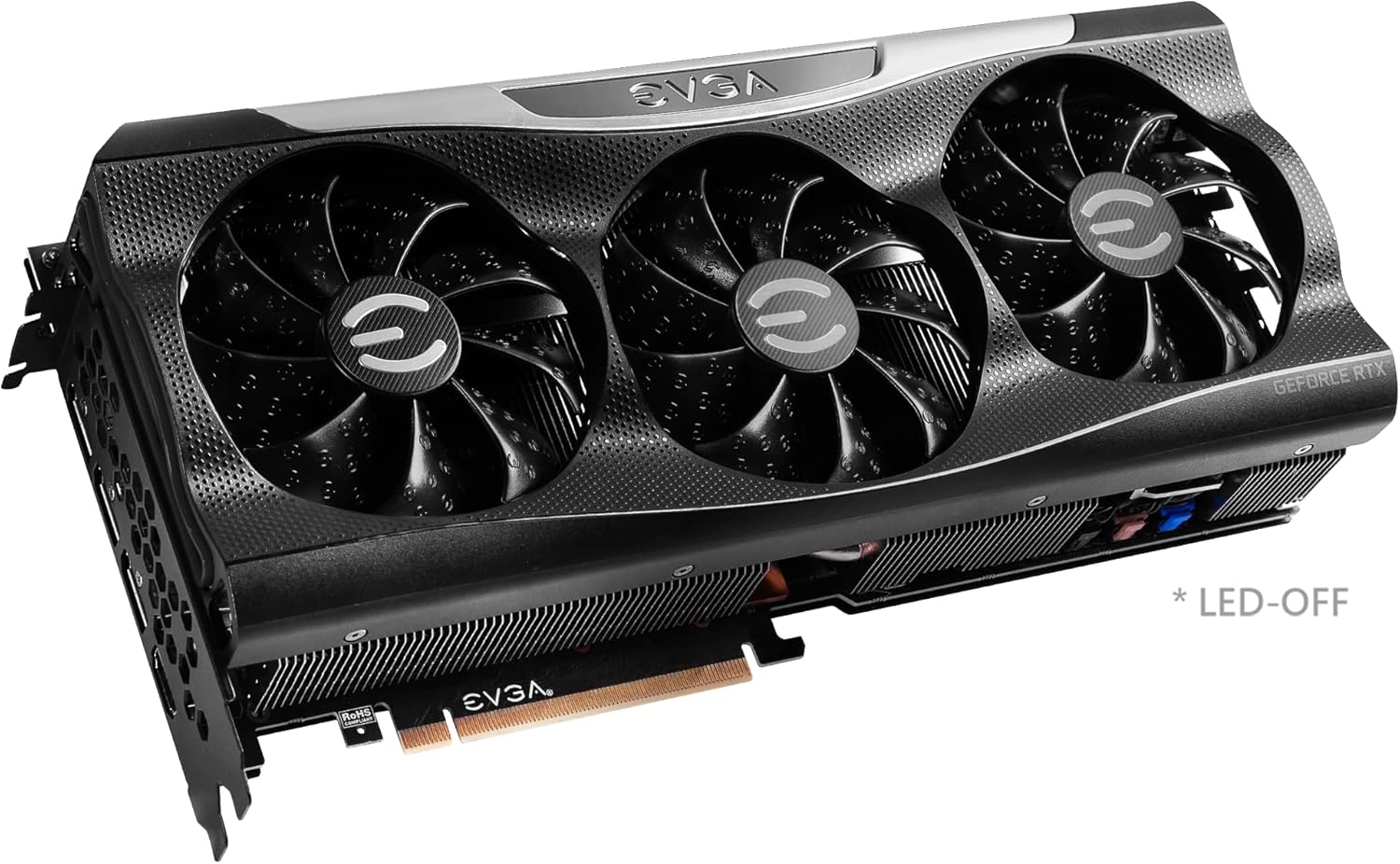
Image: Close-up of the graphics card's output ports, including DisplayPort and HDMI connectors.

Immaġni: Wara view of the graphics card, showing the metal backplate and illuminated EVGA logo.

Image: Branding for the EVGA GeForce RTX 3080 12GB FTW3 and XC3 Series.

Image: Visual representation of the 2nd Gen RT Cores, 3rd Gen Tensor Cores, and New Streaming Multiprocessors (SM) technology.

Image: A chart comparing the 12GB memory of the RTX 3080 to the 10GB memory of a previous model.

Image: Diagram detailing the iCX3 Interactive Cooling system, showing thermal contact surface, triple fans, and smart cut-outs for improved airflow.

Image: A comprehensive list of features and detailed specifications for the graphics card.
9. Vidjows Uffiċjali tal-Prodott
Video: An unboxing and installation guide for the EVGA GeForce RTX 3080 FTW3 Ultra 12GB graphics card, provided by Systematic Hardware.


