1. Introduzzjoni
This manual provides detailed instructions for the safe and effective use of your DEPSTECH DS350DL Dual Lens Endoscope. Please read this manual thoroughly before operating the device and retain it for future reference.
The DEPSTECH DS350DL is a high-definition borescope inspection camera designed for examining hard-to-reach areas. It features dual lenses for simultaneous front and side viewing, a 4.3-inch LCD display, adjustable LED lights, and a waterproof semi-rigid cable.
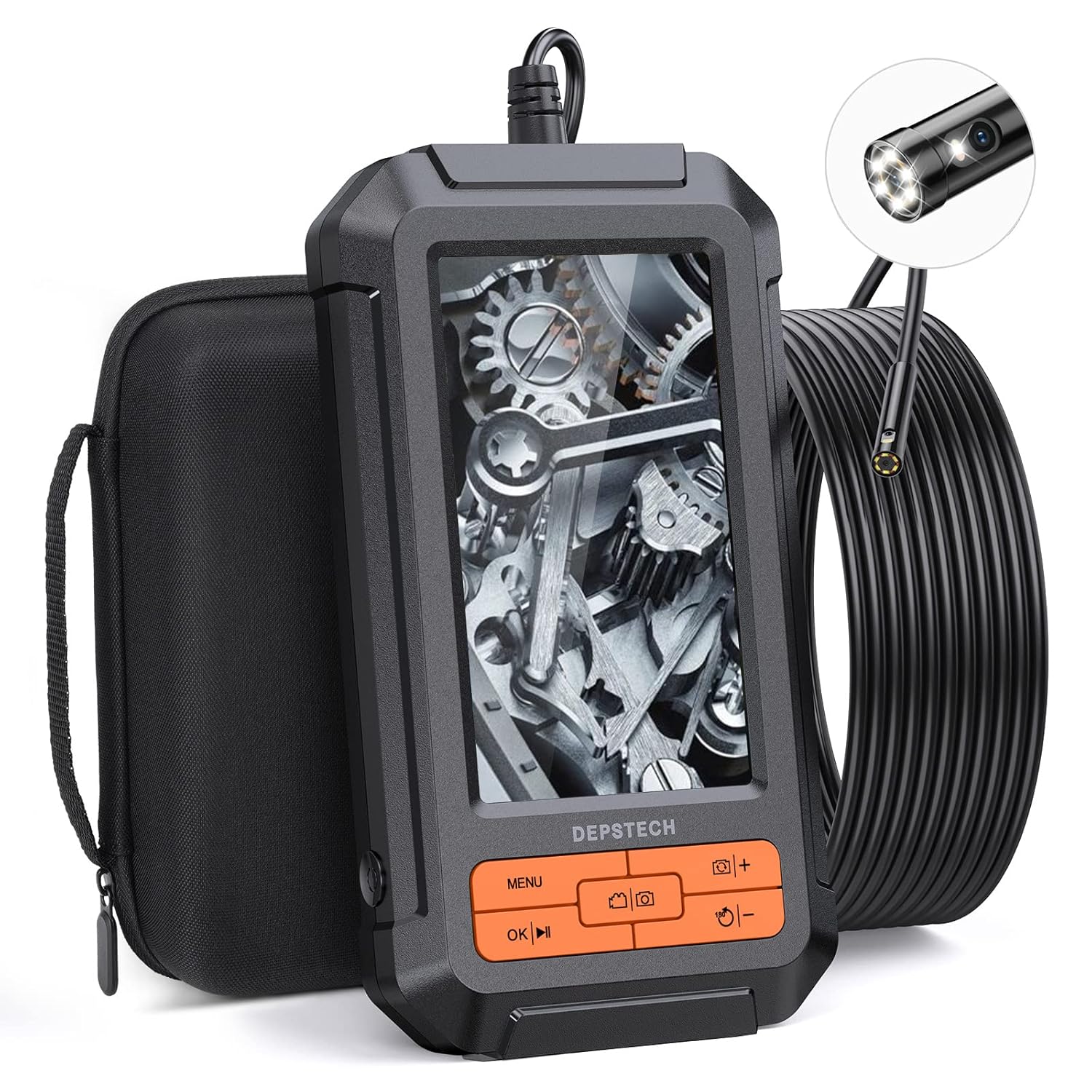
Image: The DEPSTECH DS350DL Dual Lens Endoscope, showing the main unit, coiled cable, and carrying case.
2. Prodott Aktarview
The DS350DL endoscope is equipped with advanced features for comprehensive inspections:
- Sistema ta' Lenti Doppju: Features both a front-facing and a side-facing camera, allowing for simultaneous or switchable views.
- Riżoluzzjoni HD 1080P: Captures clear and detailed images and videos with BLUART tech and an improved digital image sensor.
- Dwal LED aġġustabbli: Seven adjustable LED lights provide illumination in dark environments, reducing glare and shadows.
- Display LCD ta '4.3 pulzieri: A vivid, anti-glare screen with a 178° viewing angle and 60Hz refresh rate for smooth viewing.
- 16.5ft Semi-Rigid Cable: A durable, waterproof (IP67) cable with a 7.9mm camera head for navigating tight spaces.
- Batterija Rikarikabbli Inkorporata: Provides approximately four hours of continuous operation on a full charge.
- Operazzjoni Diretta: No Wi-Fi, apps, or external devices required for operation.
3. Kontenut tal-Pakkett
Ivverifika li l-oġġetti kollha huma preżenti fil-pakkett:
- DEPSTECH DS350DL Dual Lens Endoscope Unit
- 16.5ft Semi-Rigid Camera Cable with Dual Lenses
- Kawża tal-Ġarr
- Cable tal-Iċċarġjar tal-USB
- It-twaħħil tal-ganċ
- It-twaħħil tal-kalamita
- Manwal għall-Utent (dan id-dokument)
- Karta Micro SD ta' 32GB (installata minn qabel jew inkluża separatament)

Image: All components included in the DEPSTECH DS350DL package, neatly arranged.
4. Setup
- Iċċarġja l-Apparat: Before first use, fully charge the endoscope using the provided USB charging cable. Connect the cable to the charging port on the device and a standard USB power adapter (not included). The charging indicator will show the charging status.
- Daħħal Mikro SD Card: Ensure the 32GB Micro SD card is properly inserted into the designated slot on the side of the device. This card is necessary for saving photos and videos.
- Waħħal l-Aċċessorji (Mhux obbligatorju): If needed, attach the hook or magnet accessory to the camera head. These can be useful for retrieving small objects or navigating in specific environments.

Image: A diagram illustrating the correct insertion of the Micro SD card into the endoscope unit.
5. Istruzzjonijiet Operattivi
5.1 Power On/Off
- To power on, press and hold the Power button until the screen illuminates.
- To power off, press and hold the Power button until the screen turns off.
5.2 Kamera View Modi
The DS350DL offers three viewmodi ta' tħaddim:
- Quddiem View: Displays the image from the front-facing camera.
- Ġenb View: Juri l-immaġni mill-kamera li tħares lejn il-ġenb.
- Split-Screen View: Displays both front and side views simultaneously on the screen.
Agħfas il- Swiċċ tal-kamera button (often labeled with a camera icon or "M") to cycle through these viewmodi ing.

Image: Visual representation of the three viewing modes: Front View, Ġenb View, and Dual View (split-screen).

Image: A user holding the endoscope, demonstrating the split-screen dual view karatteristika.
5.3 Aġġustament tal-Luminożità tal-LED
The camera probe features adjustable LED lights to illuminate dark inspection areas. Use the buttuni +/- on the device to increase or decrease the brightness level of the LEDs.

Immaġni: Close-up view of the endoscope's camera head, highlighting the seven adjustable LED lights.
5.4 Qbid ta' Ritratti u Vidjows
- Biex tieħu ritratt, agħfas il- Buttuna tar-ritratti (often labeled with a camera icon).
- Biex tibda tirreġistra vidjo, agħfas il- Buttuna tal-vidjo (often labeled with a video camera icon). Press it again to stop recording.
- All captured media will be saved to the inserted Micro SD card.
5.5 Navigazzjoni tal-Menùs u Daqq
- Agħfas il- buttuna tal-menu to access settings and playback options.
- Uża l- Buttuni tal-vleġġa 'l fuq/'l isfel to navigate through menu options or media files.
- Agħfas il- buttuna OK to confirm a selection or play a video.
- During video playback, use the OK/Play/Pause button biex tikkontrolla l-plejbek.

Immaġni: Dettaljata view of the endoscope's control panel, showing the various buttons for operation.
6. Manutenzjoni
- Tindif: After each use, especially in dirty or wet environments, gently wipe the camera probe and lens with a soft, damp cloth. Ensure no debris remains on the lens for clear imaging.
- Ħażna: Store the endoscope and its accessories in the provided carrying case to protect them from dust, moisture, and physical damage. Keep the cable neatly coiled.
- Kura tal-batterija: Biex ittawwal il-ħajja tal-batterija, evita li tiċċarġja kompletament il-batterija ta' spiss. Iċċarġja l-apparat regolarment, anke jekk ma jkunx qed jintuża għal perjodi twal.
- Reżistenza għall-Ilma: The camera probe is IP67 waterproof, meaning it can withstand immersion in up to 1 meter of water for 30 minutes. The main unit is not waterproof; avoid exposing it to liquids.
7 Issolvi l-problemi
| Problema | Kawża Possibbli | Soluzzjoni |
|---|---|---|
| L-apparat ma jixgħelx. | Batterija baxxa. | Iċċarġja l-apparat għal kollox. |
| L-ebda immaġni fuq l-iskrin. | Camera cable not securely connected. | Ensure the camera cable is firmly plugged into the main unit. |
| L-immaġni hija mċajpra jew mhux ċara. | Lens is dirty or scratched; insufficient lighting. | Clean the camera lens. Adjust LED brightness. Ensure the object is within the macro focus range (1.18 to 3.15 inches). |
| Ma nistax insalva r-ritratti/vidjows. | Micro SD card is full, not inserted, or corrupted. | Check if the Micro SD card is inserted correctly. Delete unnecessary files or replace the card. Format the card if necessary (refer to menu options). |
| Cable is difficult to maneuver around bends. | Tight angles or obstructions. | The cable is semi-rigid; for very sharp turns, gentle manipulation may be required. Avoid excessive force. |
8. Speċifikazzjonijiet
| Karatteristika | Dettall |
|---|---|
| Numru tal-Mudell | DS350DL |
| Display Screen | LCD ta '4.3 pulzieri |
| Riżoluzzjoni tal-Qbid tal-Vidjo | 1080p |
| Dijametru tal-Kamera | 7.9 mm |
| Tul tal-Cable | 16.5 pied (5 metru) |
| Klassifikazzjoni li ma jgħaddix ilma minnha | IP67 (għas-sonda tal-kamera biss) |
| Firxa ta' Fokus Makro | 1.18 sa 3.15 pulzieri (3 sa 8 ċm) |
| Ħajja tal-batterija | Madwar sagħtejn |
| Ħażna | Jappoġġja kard Micro SD (32GB inkluża) |
| Kulur | Oranġjo |
9. Garanzija u Appoġġ
DEPSTECH offers a worry-free 24-month warranty for the DS350DL Dual Lens Endoscope. For warranty claims, technical support, or any inquiries, please contact DEPSTECH customer service through the following channels:
- Visit the official DEPSTECH websit: www.depstech.com
- Refer to the contact information provided on the product packaging or the official DEPSTECH store page on Amazon.
Please have your model number (DS350DL) and purchase details ready when contacting support.


