1. Introduzzjoni
Thank you for choosing the Tribit StormBox Blast Portable Speaker. This manual provides essential information for setting up, operating, and maintaining your speaker. Please read it thoroughly to ensure optimal performance and longevity of your device.
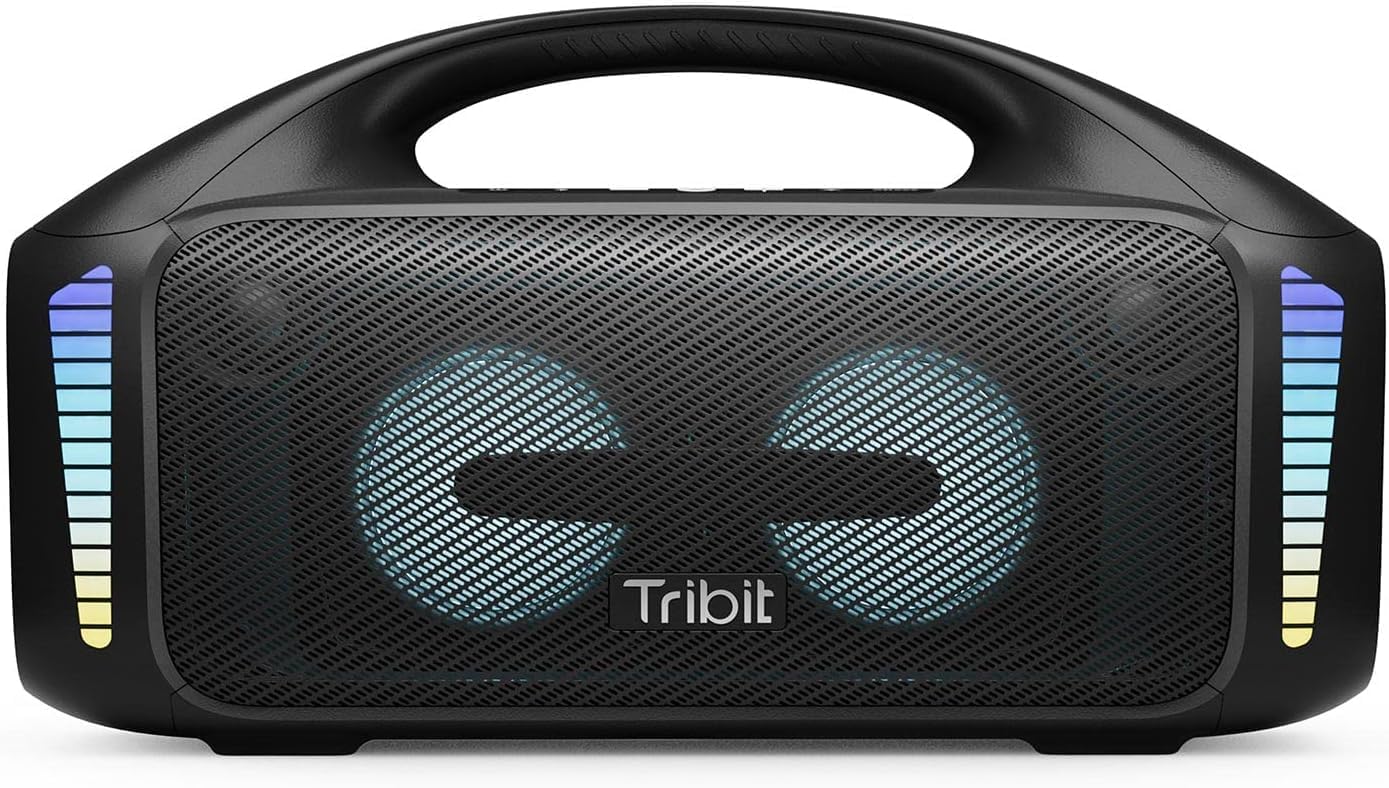
The Tribit StormBox Blast, a powerful portable speaker with integrated LED lights.
2. X'hemm fil-Kaxxa
- Tribit StormBox Blast Speaker x1
- Kejbil tal-Enerġija x1
- Manwal għall-Utent x1
3. Prodott Aktarview
3.1. Buttuni u Kontrolli

Fuqview of the control panel on the Tribit StormBox Blast.
- Buttuna mixgħul/mitfi: Agħfas u żomm biex tixgħel jew titfi l-ispiker.
- Buttuna Bluetooth: Agħfas biex tidħol fil-mod ta 'tqabbil Bluetooth.
- Volum 'l isfel (-): Naqqas il-volum tal-plejbek.
- Multi-function Button (Circle): Daqq/Ippawża l-mużika, wieġeb/temm it-telefonati.
- Volum 'il fuq (+): Żid il-volum tal-plejbek.
- Light Adjustment Button: Cycle through LED light modes.
- XBass Effect Switch: Activate or deactivate the XBass sound enhancement.
3.2. Portijiet u Indikaturi

Rear panel of the speaker with charging and auxiliary input ports.
- Port tal-Iċċarġjar USB-C: Għall-iċċarġjar tal-ispiker.
- Port tal-Ħruġ USB-A: For using the speaker as a power bank.
- Input AUX: Għal konnessjoni awdjo bil-fili.
- Dwal Indikaturi tal-Batterija: Uri l-livell attwali tal-batterija.
4. Setup
4.1. Ħlas Inizjali
Before first use, fully charge your Tribit StormBox Blast. Connect the provided power cable to the USB-C charging port on the speaker and plug it into a power outlet. The battery indicator lights will show charging progress and turn solid when fully charged.
4.2. Tixgħil / Mitfi
Agħfas u żomm il- Qawwa mixgħul/mitfi button for 2 seconds to turn the speaker on or off. A sound prompt will indicate the power status.
5. Istruzzjonijiet Operattivi
5.1. Tqabbil tal-Bluetooth
- Turn on the Tribit StormBox Blast. It will automatically enter Bluetooth pairing mode, indicated by a flashing blue LED.
- Fuq l-apparat tiegħek (smartphone, tablet, eċċ.), attiva l-Bluetooth u fittex apparati disponibbli.
- Select "Tribit StormBox Blast" from the list. Once connected, the LED will turn solid blue, and you will hear a confirmation sound.
- If pairing fails, clear the Bluetooth history on your device and try again.
5.2. Daqq tal-mużika
- Agħfas il- Buttuna b'ħafna funzjonijiet biex iddoqq jew nieqaf mużika.
- Agħfas il- Volum 'il fuq (+) or Volum 'l isfel (-) buttuni biex taġġusta l-volum.
- For next track, double-press the Buttuna b'ħafna funzjonijiet.
- For previous track, triple-press the Buttuna b'ħafna funzjonijiet.
5.3. XBass Technology

Intern view highlighting the speaker's drivers and XBass technology for enhanced bass.
The Tribit StormBox Blast features XBass technology for a deeper, richer bass experience. Press the XBass Effect Switch button on the top panel to toggle this feature on or off. When XBass is active, you will notice a significant boost in low-frequency sound.
5.4. Modi tad-Dawl LED
The speaker is equipped with 32 LED lights that sync to the beat of your music. Press the Buttuna ta' Aġġustament tad-Dawl to cycle through different lighting modes or to turn the lights off. Experiment with the modes to find your preferred visual experience.
5.5. Tqabbil ta' Stereo Wireless Veru (TWS)
If you have two Tribit StormBox Blast speakers, you can pair them together for a true wireless stereo experience, providing a wider soundstage and more immersive audio.
- Kun żgur li ż-żewġ kelliema huma mixgħula u mhumiex konnessi ma' xi apparat Bluetooth ieħor.
- On one speaker, press and hold the Bluetooth button for 5 seconds until you hear a prompt indicating TWS pairing mode.
- The second speaker will automatically connect. Once connected, both speakers will play audio in stereo.
- Connect your device to one of the paired speakers via Bluetooth.
6. Tribit App

The Tribit app interface for customizing sound and settings.
Enhance your experience by downloading the Tribit App from your device's app store. The app allows you to:
- Customize EQ modes to tailor the sound to your preferences.
- Control LED light settings.
- Update speaker firmware.
- Access additional features and controls.
7. Funzjoni tal-Iċċarġjar u tal-Bank tal-Enerġija
7.1. Ħajja tal-batterija

The speaker offers extended playtime, ideal for outdoor use.
The Tribit StormBox Blast provides up to 30 hours of playtime on a single charge, depending on volume level and LED light usage. For optimal battery life, it is recommended to fully charge the speaker before extended use.
7.2. Funzjoni tal-Bank tal-Enerġija
The speaker can also function as a power bank to charge your other devices. Connect your device to the USB-A output port on the back of the speaker using a compatible charging cable. This feature is useful for charging smartphones or other small electronics on the go.
8. Impermeabilizzazzjoni (IPX7)

The speaker's IPX7 waterproof rating makes it suitable for poolside or beach use.
The Tribit StormBox Blast is IPX7 waterproof, meaning it can be submerged in water up to 1 meter (3.3 feet) for up to 30 minutes. This makes it suitable for use by the pool, at the beach, or in rainy conditions. Ensure all port covers are securely closed before exposing the speaker to water.
9. Manutenzjoni
- Naddaf il-kelliem b'artab, damp drapp. Tużax kimiċi ħarxa jew materjali li joborxu.
- Aħżen l-ispiker f'post frisk u niexef meta ma jkunx qed jintuża.
- Evita li tesponi l-kelliem għal temperaturi estremi jew dawl tax-xemx dirett għal perjodi twal.
- Tippruvax tiżżarma jew issewwi l-ispiker int stess, għax dan jannulla l-garanzija.
10 Issolvi l-problemi
| Problema | Kawża Possibbli | Soluzzjoni |
|---|---|---|
| L-ispeaker ma jixgħelx | Batterija baxxa; Il-buttuna tal-qawwa mhux ippressata għal żmien twil biżżejjed | Charge the speaker; Press and hold the power button for 2 seconds |
| L-ebda ħoss | Volume too low; Device not connected; Incorrect input source | Increase volume on speaker and device; Re-pair Bluetooth; Check AUX cable connection |
| Il-konnessjoni Bluetooth instabbli/tiskonnettja | Apparat wisq 'il bogħod; Ostakli; Interferenza | Move device closer to speaker (within 150 ft); Remove obstructions; Avoid strong Wi-Fi signals |
| Cannot pair two speakers for TWS | L-ispikers diġà konnessi ma' apparati oħra; Proċedura ta' tqabbil mhux korretta | Kun żgur li ż-żewġ kelliema huma skonnettjati minn apparati oħra; Segwi l-passi ta' tqabbil tat-TWS bir-reqqa |
11. Speċifikazzjonijiet

Physical dimensions of the Tribit StormBox Blast.
| Karatteristika | Dettall |
|---|---|
| Isem tal-Mudell | StormBox Blast |
| Numru tal-Mudell | BTS52 |
| Tip ta' Kelliem | Subwoofer |
| Qawwa tal-Ħruġ Massimu tal-Ispeaker | 90 Watts |
| Teknoloġija tal-Konnettività | Bluetooth 5.3, Awżiljarju, USB |
| Medda ta 'Komunikazzjoni bla Fili | Sa 30 metri (150 pied) |
| Livell ta 'Reżistenza għall-Ilma | IPX7 (Li ma jgħaddix ilma minnha) |
| Ħajja tal-batterija | Sa 30-il Siegħa (jvarja skont l-użu) |
| Ħin tal-Iċċarġjar | Madwar sagħtejn |
| Dimensjonijiet tal-Prodott | 6.41"D x 15.9"W x 8.89"H |
| Piż tal-oġġett | 12.01 Liri |
| Komponenti Inklużi | Speaker, Power Cable, User Manual |
12. Garanzija u Appoġġ
The Tribit StormBox Blast comes with a full warranty. For detailed warranty information, product support, or technical assistance, please visit the official Tribit webis-sit jew ikkuntattja s-servizz tal-konsumatur tagħhom. Żomm l-irċevuta tax-xiri tiegħek bħala prova tax-xiri għal talbiet ta' garanzija.
Tribit Official Websit: www.tribit.com


