1. Prodott Aktarview
L-AIYIMA DAC-A5pro huwa Konvertitur Diġitali għal Analogu (DAC) aġġornat u headphone ampLifer iddisinjat biex itejjeb l-esperjenza awdjo tiegħek. Għandu għażliet multipli ta' input inklużi Ottiku, Koassjali, u USB, li jippermettu konnessjoni ma' diversi sorsi awdjo diġitali. Mgħammar b'komponenti ta' kwalità għolja bħaċ-ċipep CM6642, ESS9018K2M, OPA2134, NE5532, u TPA6120, jappoġġja awdjo b'riżoluzzjoni għolja sa 24Bit/192kHz. Dan l-apparat huwa adattat għal setups awdjo tad-desktop, billi jipprovdi kemm line-out għal esterni. amplifiers/speakers u output dedikat għall-headphones.
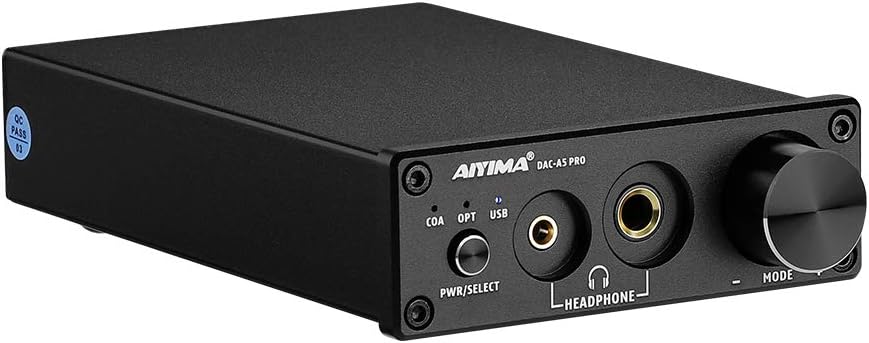
Immaġni: Quddiem view tal-AIYIMA DAC-A5pro, wirjaasinix-chassis iswed kompatt tiegħu, il-kontrolli tal-pannell ta' quddiem, u l-outputs tal-headphones.
2. Kontenut tal-Pakkett
Jekk jogħġbok iċċekkja l-pakkett għall-oġġetti li ġejjin:
- Dekoder AIYIMA DAC-A5pro x 1
- Manwal għall-Utent x 1
- Kejbil tal-PC-USB x 1
- Kejbil tal-Enerġija DC 12V x 1

Immaġni: Kontenut tal-pakkett AIYIMA DAC-A5pro, inkluż l-unità DAC, il-manwal tal-utent, il-kejbil USB, u l-adapter tal-enerġija.
3. Kontrolli u Interfaces
3.1 Panel ta 'Quddiem

Immaġni: Dettaljata view tal-pannell ta' quddiem tad-DAC-A5pro, li jenfasizza l-buttuna tal-qawwa/għażla, l-indikaturi tad-dħul (COA, OPT, USB), il-ħruġ tal-headphones ta' 3.5mm u 6.35mm, u l-pum tal-volum/modalità.
- Buttuna PWR/SELECT: Agħfas fit-tul biex tixgħel/titfi l-apparat. Agħfas fil-qosor biex tiċċaqlaq bejn il-modi ta' input (Koassjali, Ottiku, USB).
- Indikaturi tad-Dħul (COA, OPT, USB): L-LEDs jixegħlu biex juru s-sors tad-dħul magħżul bħalissa.
- Ħruġ tal-headphones ta' 3.5mm: Għall-konnessjoni ta' headphones b'jack ta' 3.5mm.
- Ħruġ tal-headphones ta' 6.35mm: Għall-konnessjoni ta' headphones b'jack ta' 6.35mm (1/4 pulzier).
- Pum tal-MODALITÀ: Dawwar biex taġġusta l-volum. Ikklikkja biex titfi/tneħħi l-ħoss tal-ħruġ tal-awdjo.
3.2 Panel ta 'wara

Immaġni: Dettaljata view tal-pannell ta' wara tad-DAC-A5pro, li juri l-inputs tal-awdjo PC-USB, Ottiċi, Koassjali, l-outputs tal-awdjo RCA L/R, u l-input tal-enerġija DC 12V.
- Input tal-PC-USB: Jikkonnettja ma' kompjuter permezz ta' kejbil USB għat-trażmissjoni tal-awdjo diġitali.
- Input OTTIKU: Jikkonnettja ma' apparati b'output awdjo diġitali ottiku (Toslink).
- Input COAXIAL: Jikkonnettja ma' apparati b'output awdjo diġitali koassjali.
- Ħruġ tal-Awdjo RCA L/R: Jikkonnettja ma' estern ampamplificatur jew kelliema bil-qawwa bl-użu ta' kejbils RCA.
- Input ta' Enerġija DC 12V: Jikkonnettja mal-adapter tal-enerġija 12V DC provdut.
4. Istruzzjonijiet ta' Setup
Segwi dawn il-passi biex tissettja l-AIYIMA DAC-A5pro tiegħek:
- Qabbad is-Sors tal-Awdjo: Agħżel l-input awdjo diġitali mixtieq tiegħek (PC-USB, Ottiku, jew Koassjali) u qabbdu mal-port tad-dħul korrispondenti fuq il-pannell ta' wara tad-DAC-A5pro. Għal PC-USB, uża l-kejbil USB provdut biex tikkonnettja mal-kompjuter tiegħek.
- Qabbad Output tal-Awdjo:
- Għal Esterni AmpKelliema li jsaħħnu/powered: Qabbad il-kejbils RCA mill-Output tal-Awdjo RCA L/R fuq il-pannell ta' wara tad-DAC-A5pro mal-input tal-awdjo tiegħek amplifier jew kelliema powered.
- Għall-headphones: Ipplaggja l-headphones tiegħek fil-jack tal-output tal-headphones ta' 3.5mm jew 6.35mm fuq il-pannell ta' quddiem. Innota li l-konnessjoni tal-headphones awtomatikament tissettja l-output tal-RCA.
- Qabbad l-Enerġija: Qabbad l-adapter tal-enerġija DC 12V provdut mad-DC 12V Power Input fuq il-pannell ta' wara, imbagħad daħħal l-adapter f'sokit tal-enerġija.
- Qawwa Mixgħul: Agħfas fit-tul il-buttuna PWR/SELECT fuq il-pannell ta' quddiem biex tixgħel id-DAC-A5pro.
- Agħżel Input: Agħfas fil-qosor il-buttuna PWR/SELECT biex tiċċikla bejn il-modi ta' input (COA, OPT, USB) sakemm l-LED għas-sors konness tiegħek jixgħel.
- Konfigurazzjoni tal-Kompjuter (għal input PC-USB): Il-kompjuter tiegħek għandu jirrikonoxxi awtomatikament id-DAC-A5pro bħala apparat awdjo. Jekk le, jista' jkollok bżonn tagħżlu bħala l-apparat tal-plejbek awtomatiku fis-settings tal-ħoss tas-sistema operattiva tiegħek.
- Konfigurazzjoni tat-TV (għal input Ottiku/Koassjali): Jekk qed tikkonnettja ma' TV, kun żgur li l-output tal-awdjo tat-TV huwa ssettjat għal output Ottiku jew Koassjali fis-settings tas-sistema tiegħu. Aġġusta l-volum intern tat-TV għal 0 jekk ma tesperjenza l-ebda ħoss jew ħoss distort, għax xi TVs jistgħu ma joħorġux awdjo jekk l-ispikers interni tagħhom ikunu attivi.

Immaġni: Id-DAC-A5pro konness ma' laptop permezz ta' USB u ma' kejbil estern amplifier, li juri setup tipiku għad-daqq tal-awdjo permezz tal-ispikers.

Immaġni: Gwida viżwali dwar kif tikkonfigura s-settings tat-TV għal output awdjo ottiku jew koassjali biex tiżgura trażmissjoni xierqa tal-ħoss lid-DAC-A5pro.
Vidjo ta' Dimostrazzjoni tas-Setup
Vidjo: Dimostrazzjoni li turi l-AIYIMA DAC-A5pro konness ma' AIYIMA A07 amplifer u kelliema, li juru l-proċess ta' konnessjoni u d-daqq tal-awdjo. Il-filmat juri wkoll il-bdil bejn l-input tal-PC-USB u l-prijorità tal-output tal-headphones.
5. Istruzzjonijiet Operattivi
- Power On/Off: Agħfas fit-tul il-buttuna PWR/SELECT biex tixgħel jew titfi l-unità.
- Għażla tal-Input: Agħfas fil-qosor il-buttuna PWR/SELECT biex taqleb bejn l-inputs diġitali disponibbli: Koassjali (COA), Ottiku (OPT), u USB. L-indikatur LED korrispondenti se jixgħel biex juri l-input attiv.
- Kontroll tal-Volum: Dawwar il-pum tal-MODE lejn l-arloġġ biex iżżid il-volum u kontra l-arloġġ biex tnaqqas il-volum.
- Funzjoni Mute: Ikklikkja l-pum MODE biex titfi jew tneħħi l-ħoss tal-ħruġ tal-awdjo.
- Prijorità tal-Ħruġ tal-Headphones: Meta l-headphones ikunu mdaħħla fil-jack ta' 3.5mm jew 6.35mm, l-RCA line-out jiġi mute awtomatikament. Jekk tneħħi l-headphones mill-plagg, l-awdjo jerġa' lura għall-outputs tal-RCA.
6. Manutenzjoni
- Żomm l-apparat f'post niexef u ventilat sew, 'il bogħod mix-xemx diretta, sorsi ta' sħana, u umdità.
- Naddaf il-barra tal-unità b'ċarruta ratba u niexfa. Tużax prodotti tat-tindif likwidi jew materjali li joborxu.
- Evita li timblokka l-fetħiet tal-ventilazzjoni biex tevita sħana żejda.
- Tippruvax tiżżarma jew issewwi l-unità int stess. Irreferi għal persunal tas-servizz kwalifikat għal kwalunkwe tiswija.
7 Issolvi l-problemi
- Ebda Ħsejjes tal-Ħsejjes:
- Kun żgur li d-DAC-A5pro huwa mixgħul u li s-sors tad-dħul korrett huwa magħżul (l-indikatur COA, OPT, jew USB mixgħul).
- Iċċekkja l-konnessjonijiet kollha tal-kejbil (sors tad-dħul, RCA għal ampamplificatur/kelliema, qawwa).
- Ivverifika li l-volum mhux siekta (ikklikkja l-pum MODE) u li jkun għoli biżżejjed.
- Jekk qed tuża headphones, kun żgur li huma pplaggjati sew. Ftakar li l-outputs RCA huma mute meta l-headphones ikunu konnessi.
- Għal konnessjonijiet tat-TV, ikkonferma li s-settings tal-output tal-awdjo tat-TV huma kkonfigurati għal output ottiku jew koassjali u li l-volum intern tat-TV huwa ssettjat għal żero.
- Għal PC-USB, kun żgur li d-DAC-A5pro huwa magħżul bħala l-apparat tal-plejbek awtomatiku fis-settings tal-ħoss tal-kompjuter tiegħek.
- Ħoss Mgħawġ:
- Iċċekkja għal konnessjonijiet tal-kejbil maħlula.
- Kun żgur li l-volum tas-sors tad-dħul mhuwiex għoli wisq, għax jista' jikkawża qtugħ.
- Ivverifika li s-sampIs-settings tar-rata tal-fajl u l-fond tal-bit fuq l-apparat sors tiegħek jaqblu mal-kapaċitajiet tad-DAC-A5pro (sa 24Bit/192kHz).
- Awdjo Intermittenti:
- Spezzjona l-kejbils għal ħsara.
- Kun żgur li l-adapter tal-enerġija huwa konness sew u jipprovdi enerġija stabbli.
8. Speċifikazzjonijiet

Immaġni: Id-DAC-A5pro bid-dimensjonijiet immarkati, li juru tul ta' 147mm (5.79 pulzieri), wisa' ta' 95mm (3.74 pulzieri), u għoli ta' 30mm (1.18 pulzieri).
- Ditta: AIYIMA
- Mudell: DAC A5 PRO
- Tip ta' Interface: Koassjali, USB, Ottiku
- Provvista Massima Voltage: 12 Volts (DC)
- Numru ta' kanali: 1
- Dimensjonijiet tal-Prodott: 5.85"T x 3.86"W (madwar 14.86cm T x 9.80cm W)
- Piż tal-oġġett: 1.58 liri (madwar 0.72 kg)
- Materjal: Ram (jirreferi għal komponenti interni jew ċasing)
- Manifattur: YIMA TECH
- ASIN: B09PMDN86V
- UPC: 782846056327
- Data L-Ewwel Disponibbli: 12 ta’ Jannar, 2022

Immaġni: Close-up viewtaċ-ċirkwiti interni u l-komponenti tal-AIYIMA DAC-A5pro, li jenfasizzaw il-kwalità tal-bini u ċ-ċipep użati.
9. Garanzija u Appoġġ
L-AIYIMA tipprovdi Servizz ta' wara l-bejgħ mingħajr inkwiet għal sentejn għal dan il-prodott. Għal appoġġ tekniku, assistenza għas-soluzzjoni ta' problemi, jew talbiet għal garanzija, jekk jogħġbok ikkuntattja lis-servizz tal-klijenti tal-AIYIMA permezz tal-pjattaforma tax-xiri tiegħek jew il-websajt uffiċjali tal-AIYIMA. websit. Jekk jogħġbok żomm il-prova tax-xiri tiegħek għall-validazzjoni tal-garanzija.


