1. Introduzzjoni
This manual provides comprehensive instructions for the installation, operation, and maintenance of your COUGAR Archon 2 RGB Mid Tower Case. Please read this manual carefully before beginning installation to ensure proper setup and to maximize the performance and longevity of your product.

Figura 1.1: Angolat view of the COUGAR Archon 2 RGB Mid Tower Case, showcasing the tempered glass side panel and front RGB fans.
2. Karatteristiċi tal-prodott
The COUGAR Archon 2 RGB Mid Tower Case is designed for PC enthusiasts seeking a balance of aesthetics, airflow, and functionality. Key features include:
- Elegant Design with Tempered Glass: A sleek black finish combined with a tempered glass side panel allows for a clear view tal-komponenti interni u d-dawl RGB.
- Fluss tal-Arja Ottimizzat: Supports multiple fan configurations and includes three pre-installed 120mm ARGB fans at the front for efficient cooling.
- Kompatibilità estensiva: Accommodates Mini ITX, Micro ATX, and ATX motherboards.
- Ample Storage Options: Provides bays for both 3.5" HDDs and 2.5" SSDs.
- Convenient Front I/O: Features USB 3.0 and USB 2.0 ports for easy peripheral connectivity.
- Kontroll tad-Dawl RGB: Integrated ARGB fans offer customizable lighting effects.

Figura 2.1: Quddiem view of the COUGAR Archon 2 RGB case, highlighting the three pre-installed ARGB fans.
3. Gwida ta' Setup
Follow these steps to properly install your components into the COUGAR Archon 2 RGB case.
3.1. Lista ta' Kontroll ta' Qabel l-Installazzjoni
- Ensure you have all necessary components: motherboard, CPU, RAM, GPU, power supply, storage drives, and appropriate tools (screwdriver, zip ties).
- Aħdem fuq wiċċ nadif u ħieles mill-elettriku statiku. Ikkunsidra li tuża ċinga tal-polz antistatika.
3.2. Il-Ftuħ tal-Każ
- Carefully remove the tempered glass side panel by unscrewing the thumbscrews located at the rear of the case. Set the panel aside on a soft, flat surface to prevent scratches.
- Remove the opposite metal side panel by unscrewing its thumbscrews and sliding it backward.
3.3. Installazzjoni tal-Motherboard
- Installa l-I/O shield (jekk mhux imwaħħal minn qabel mal-motherboard tiegħek) fil-ftuħ ta' wara tal-kaxxa.
- Align your motherboard with the standoffs inside the case. Ensure all standoffs match the screw holes on your motherboard.
- Secure the motherboard using the provided screws. Do not overtighten.
3.4. Installazzjoni tal-Unità tal-Provvista tal-Enerġija (PSU)
- Sib iż-żona tal-immuntar tal-PSU fil-qiegħ ta' wara tal-kaxxa.
- Slide your PSU into the designated bay from the rear of the case, ensuring the fan faces downwards for optimal cooling (if the case has a bottom vent).
- Waħħal il-PSU bil-viti minn wara tal-kaxxa.
3.5. Installazzjoni tad-Drajv tal-Ħażna
The Archon 2 RGB supports both 3.5" HDDs and 2.5" SSDs.
- For 3.5" HDDs: Locate the drive cage usually beneath the PSU shroud. Slide the HDD into the drive bay and secure it with screws.
- For 2.5" SSDs: Mount SSDs to the designated mounting points on the back of the motherboard tray or within the drive cage, securing them with screws.
3.6. Installazzjoni tal-Karta tal-Espansjoni (GPU)
- Neħħi l-għata meħtieġa tas-slott tal-PCIe minn wara tal-kaxxa.
- Insert your graphics card or other expansion cards into the appropriate PCIe slot on the motherboard.
- Secure the card with screws to the case.
3.7. Cable Management and Front Panel Connections
Route all power and data cables neatly behind the motherboard tray. Connect the front panel I/O cables (USB, audio, power switch, reset switch, LED indicators) to their respective headers on the motherboard according to your motherboard manual.

Figure 3.1: Dimensions of the COUGAR Archon 2 RGB case, useful for planning component fit and space.
4. Istruzzjonijiet Operattivi
4.1. Tixgħel
Once all components are installed and cables are connected, replace both side panels. Connect your monitor, keyboard, mouse, and power cable to the PSU. Press the power button on the top panel of the case to start your system.
4.2. Kontroll tad-Dawl RGB
The pre-installed ARGB fans are typically controlled via a dedicated button on the case's front I/O panel or through your motherboard's RGB software (if connected to an ARGB header). Refer to your motherboard manual for software-based control options.
5. Manutenzjoni
Manutenzjoni regolari tgħin biex tiżgura prestazzjoni ottimali u lonġevità tal-komponenti tal-PC tiegħek.
- Tindif tat-Trab: Naddaf il-filtri tat-trab (jekk preżenti) u l-komponenti interni perjodikament bl-użu ta' arja kkompressata. Kun żgur li s-sistema tkun mitfija u skonnettjata qabel ma tnaddaf.
- Ġestjoni tal-Kejbil: Ensure cables are neatly routed to avoid obstructing airflow.
- Spezzjoni tal-fann: Check fans for dust buildup or obstructions that could impede their operation.
6 Issolvi l-problemi
Jekk tiltaqa' ma' problemi, irreferi għall-passi komuni li ġejjin għas-soluzzjoni tal-problemi:
- Is-Sistema Mhux Tixgħel:
- Check all power connections, including the PSU to the wall outlet, PSU to motherboard (24-pin and CPU 8-pin), and front panel power switch header.
- Kun żgur li s-swiċċ tal-PSU jkun fil-pożizzjoni 'ON'.
- Il-Fannijiet Ma Jdurux / L-RGB Ma Jaħdimx:
- Verify fan power cables are securely connected to the motherboard or fan controller.
- Check ARGB headers for proper connection to the motherboard or RGB controller.
- Ensure RGB software or case button is correctly configured.
- L-ebda Output tal-Wiri:
- Confirm the monitor cable is connected to the graphics card (not the motherboard integrated graphics, unless no dedicated GPU is present).
- Erġa' poġġi l-karta grafika u l-moduli tar-RAM.
7. Speċifikazzjonijiet
Detailed specifications for the COUGAR Archon 2 RGB Mid Tower Case:
| Karatteristika | Dettall |
|---|---|
| Isem tal-Mudell | ARCHON 2 RGB |
| Tip ta' Każ | Torri tan-Nofs |
| Kompatibbiltà tal-motherboard | Mini ITX, Micro ATX, ATX |
| Dimensjonijiet (LxWxH) | 14.96 x 8.27 x 18.5 pulzieri (380 x 210 x 470 mm) |
| Piż tal-oġġett | 11.37 liri (5.17 kg) |
| Materjal | Metall, Ħġieġ ittemprat |
| Kulur | Iswed |
| Fannijiet installati minn qabel | 3 x 120mm ARGB fans (Front) |
| Appoġġ tal-Fann (Quddiem) | 3 x 120mm jew 2 x 140mm |
| Portijiet I/O | 1 x USB 2.0, 2 x USB 3.0, Dħul/Ħruġ tal-Awdjo |
| Tip ta' Immuntar tal-Provvista tal-Enerġija | Mount tal-qiegħ |
| Metodu tat-tkessiħ | Arja |
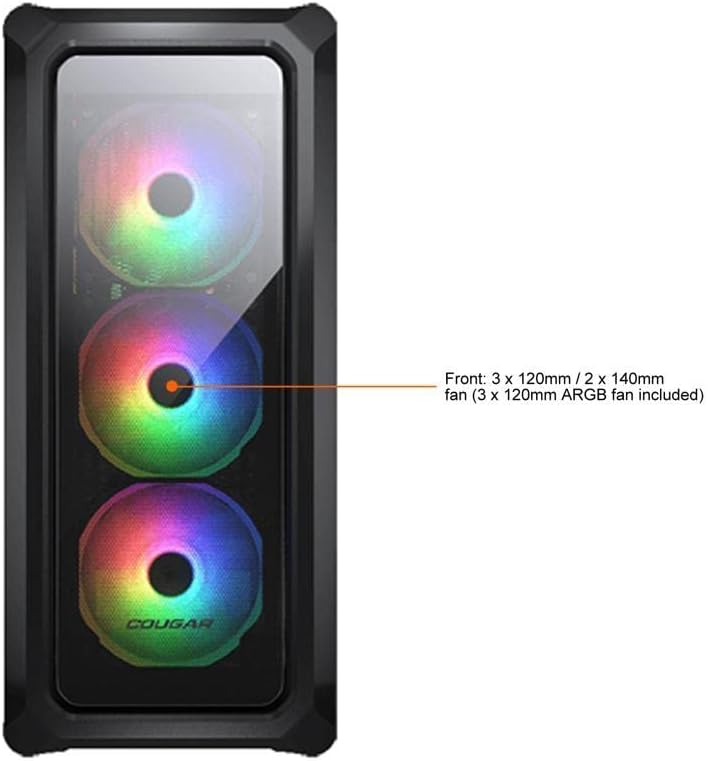
Figure 7.1: Front panel fan configuration and size options for the COUGAR Archon 2 RGB case.
8. Garanzija u Appoġġ
For warranty information and technical support, please refer to the official COUGAR webis-sit jew ikkuntattja lid-dipartiment tas-servizz tal-konsumatur tagħhom. Żomm il-prova tax-xiri tiegħek għal talbiet ta’ garanzija.
Uffiċjali tal-COUGAR Websit: cougargaming.com


