1. Introduzzjoni
L-Iswedweb BWA21HO008C 1440p 5 Megapixel USB Webcam is designed to provide high-quality video and still image capture for your personal computer. It features an integrated adjustable light ring to ensure optimal illumination in various environments, enhancing your communication and recording experience. This manual provides instructions for setting up, operating, maintaining, and troubleshooting your webcam.
2. Karatteristiċi tal-prodott
- Up to 1440p Resolution @ 30 frames per second (fps) for clear video.
- 5 Megapixel still image resolution for high-quality photos.
- Built-in adjustable 3-level LED ring light to provide optimal lighting.
- Adjustable base designed to fit various sizes of computer monitors, laptop screens, or stand on flat surfaces.
- USB plug and play functionality for easy setup without additional drivers.
3. Kontenut tal-Pakkett
Jekk jogħġbok iċċekkja l-pakkett għall-oġġetti li ġejjin:
- 1 x Iswedweb USB ta' 5 Megapixels b'riżoluzzjoni ta' 1440p Webcam (Model: BWA21HO008C)
- 1 x Manwal għall-Utent
4. Gwida ta' Setup
4.1 Konfigurazzjoni Fiżika
- Pożizzjonament il Webcam: Open the adjustable base of the webcam. Place the webcam on top of your computer monitor or laptop screen, ensuring the front lip of the base rests securely on the front of the screen and the rear clip holds the back. Alternatively, the base can be folded to allow the webcam to stand on a flat surface such as a desk.
- Konnessjoni mal-Kompjuter tiegħek: Insert the USB cable from the webcam f'port USB disponibbli fuq il-kompjuter tiegħek.

Immaġni: Ġenb view tal-Iswedweb webcam demonstrating its adjustable base for mounting on a monitor or laptop screen.
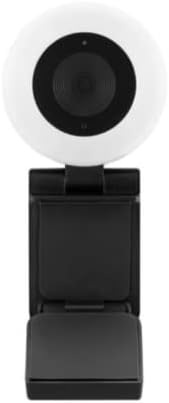
Immaġni: Quddiem view tal-Iswedweb webcam, highlighting the central lens and the surrounding adjustable light ring.
4.2 Setup tas-Software
L-Iswedweb BWA21HO008C webcam is a plug-and-play device, requiring no additional driver installation for most operating systems (Windows, macOS, Chrome OS). Upon connecting, your computer should automatically detect and configure the webcam.
- Sejbien Awtomatiku: Once connected, your operating system should recognize the webcam as a new video device.
- Application Selection: Biex tuża l- webcam, open your preferred video conferencing software (e.g., Zoom, Microsoft Teams, Skype) or recording application. Navigate to the video/camera settings within the application and select "Blackweb BWA21HO008C" (or similar name) as your video input device.
5. Istruzzjonijiet Operattivi
5.1 Uża l- Webcam
Once connected and recognized by your system and chosen in your application, the webcam is ready for use in video calls, live streaming, or recording.
- Ensure your chosen application is open and the webcam is selected as the active camera source.
- Aġġusta l- webcam's angle manually to frame your desired view.
5.2 Adjusting the Light Ring
Il- webcam features a built-in adjustable 3-level LED light ring to improve illumination in low-light conditions.
- Locate the light control button, typically found on the top or side of the webcam body.
- Press the button repeatedly to cycle through the brightness levels: Low, Medium, High, and Off. Select the level that best suits your lighting needs.

Immaġni: Angolata view tal-Iswedweb webcam, highlighting the prominent light ring and the camera lens.
6. Manutenzjoni
- Tindif: Biex tnaddaf il- webcam lens and body, use a soft, dry, lint-free cloth. Avoid using harsh chemicals, abrasive materials, or excessive moisture, as these can damage the device. Ensure the device is disconnected from your computer before cleaning.
- Ħażna: Meta ma tkunx qed tużah, aħżen webcam in a cool, dry place, away from direct sunlight, extreme temperatures, and high humidity.
7 Issolvi l-problemi
- Ebda Immaġni/Vidjo:
- Kun żgur li l-kejbil tal-USB huwa konness sew maż-żewġ webil-kamera u l-kompjuter tiegħek.
- Ipprova qabbad il- webcam ma' port USB differenti fuq il-kompjuter tiegħek.
- Ivverifika li l- webcam is selected as the active video input device in your application's settings.
- Ibda mill-ġdid il-kompjuter tiegħek.
- Kwalità Fqira tal-Vidjo:
- Ensure adequate lighting in your environment; use the built-in light ring if necessary.
- Naddaf il- webcam lens with a soft, dry cloth.
- Confirm your application settings are configured for 1440p resolution if desired and your internet connection is stable if streaming.
- Light Ring Not Working:
- Tiżgura l- webcam is connected to a powered USB port.
- Press the light control button multiple times to cycle through all brightness settings.
- If the issue persists, try connecting the webcam to a different USB port or computer.
8. Speċifikazzjonijiet
| Numru tal-Mudell | BWA21HO008C |
| Riżoluzzjoni tal-vidjo | Up to 1440p @ 30 fps |
| Riżoluzzjoni tal-Immaġni Ftit | 5 Megapixel |
| Konnettività | USB |
| Karatteristiċi Speċjali | Adjustable 3-level LED light ring, Low Light capability |
| Apparati Kompatibbli | Kompjuter Personali |
| Kulur | Iswed |
| Dimensjonijiet (L x W x H) | 16.2 x 10.5 x 5.9 ċm (dimensjonijiet approssimattivi tal-pakkett) |
| Piż | 170 g (piż approssimattiv tal-pakkett) |
9. Informazzjoni dwar is-Sigurtà
- Do not expose the device to water, rain, or excessive moisture.
- Tippruvax tiżżarma, timmodifika, jew issewwi l-apparat int stess. Irreferi għal kull manutenzjoni f'idejn persunal kwalifikat.
- Żomm l-apparat fejn ma jintlaħaqx mit-tfal u l-annimali domestiċi.
- Use only with compatible devices and power sources as specified.
- Evita li tpoġġi l- webcam in direct sunlight or near heat sources.
10. Garanzija u Appoġġ
For warranty information, technical support, or customer service inquiries regarding your Blackweb BWA21HO008C webcam, please refer to the documentation provided at the point of purchase or contact your retailer. You may also visit the official Blackweb appoġġ website for further assistance, if available.


