1. Introduzzjoni
This manual provides detailed instructions for the safe and effective use, setup, operation, and maintenance of your KTC BRSW3 9.5 sq. Swivel Ratchet Handle. Please read this manual thoroughly before using the tool and retain it for future reference.
2. Informazzjoni dwar is-Sigurtà
Dejjem osserva l-prekawzjonijiet ta' sigurtà li ġejjin biex tevita korriment jew ħsara lill-għodda.
- Ilbes tagħmir protettiv personali xieraq, bħal nuċċalijiet tas-sigurtà, meta tuża għodda tal-idejn.
- Ensure the socket is securely attached to the ratchet drive before applying force.
- Do not use the ratchet handle if it is damaged or appears to be malfunctioning.
- Evita li tapplika forza eċċessiva lil hinn mill-kapaċità maħsuba tal-għodda.
- Keep the tool clean and free from grease or oil to maintain a secure grip.
- Aħżen l-għodda f'post xott u sigur, fejn ma jintlaħaqx mit-tfal.
3. Karatteristiċi tal-prodott
The KTC BRSW3 Swivel Ratchet Handle is designed for versatility and efficiency in various applications. Key features include:
- Compact Swivel Head: Features the smallest head size for improved access in confined spaces. The head can rotate over 180 degrees, allowing it to function like a ratchet driver.
- 72-Tooth Gear Mechanism: Provides a fine 5-degree feed angle for precise adjustments and operation in tight areas.
- Kostruzzjoni tal-Metall Durabbli: The handle is constructed from metal, ensuring durability and a solid feel.
- Knurled Grip: The handle features knurling for enhanced grip and smooth, fast turning.
- Adjustable Oscillation: The swivel head's oscillation hardness can be adjusted using a 2.5 mm hex key, providing customizable resistance.
- Efficient Direction Switching: A 3-fork shaped lever allows for smooth and quick changes in rotational direction, even while swinging the tool.
- Enhanced Neck Rigidity: Designed with increased neck rigidity to provide strength for tightening applications.

Figura 3.1: Aktarview of the KTC BRSW3 9.5 sq. Swivel Ratchet Handle.

Figure 3.2: The swivel head design allows for angular access with a socket attached.

Figure 3.3: Illustration demonstrating the 180-degree swivel capability of the ratchet head.
4. Setup
4.1 Twaħħil ta' Sokit
- Select the appropriate 9.5 sq. (3/8 inch) drive socket for your fastener.
- Align the square drive of the socket with the drive anvil on the ratchet head.
- Push the socket firmly onto the drive anvil until it clicks into place, indicating a secure connection.
4.2 Adjusting Swivel Head Tension
- Locate the hex hole on the side of the swivel head.
- Insert a 2.5 mm hex key into the hole.
- Turn the hex key clockwise to increase the tension (make the swivel stiffer) or counter-clockwise to decrease the tension (make the swivel looser). Adjust to your preferred level of resistance.
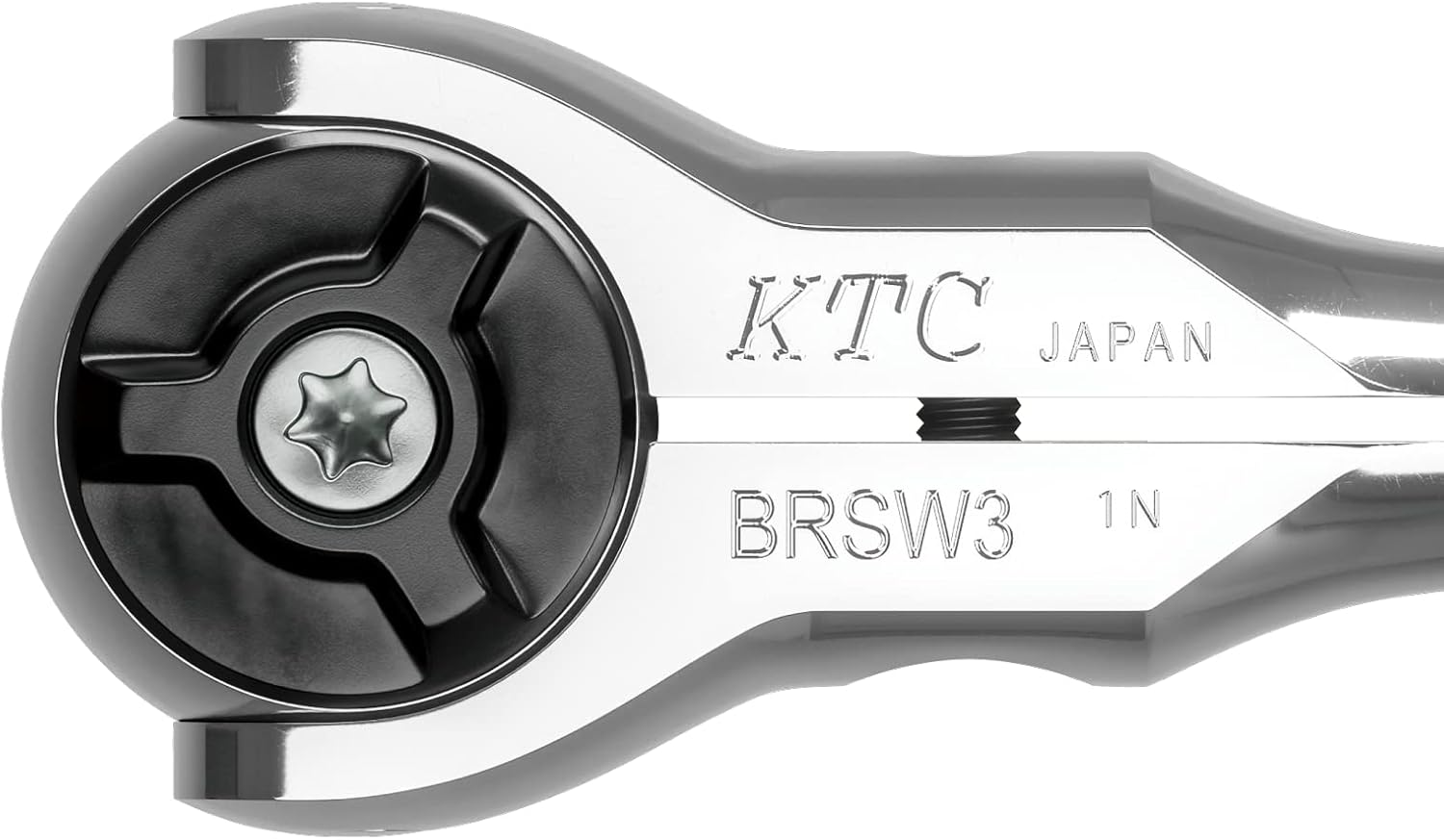
Figure 4.1: Close-up of the ratchet head, showing the drive anvil and the hex adjustment screw.
5. Istruzzjonijiet Operattivi
5.1 Basic Ratchet Operation
- Attach the appropriate socket to the ratchet head as described in Section 4.1.
- Place the socket onto the fastener (bolt or nut).
- To tighten, ensure the direction switch lever is set for clockwise rotation. To loosen, set it for counter-clockwise rotation.
- Apply steady force to the handle to turn the fastener. The 72-tooth mechanism allows for small arcs of movement.
- When the handle reaches the end of its swing, pull it back to engage the next tooth without turning the fastener. Repeat until the fastener is tightened or loosened as required.
5.2 Using the Swivel Head
The swivel head allows the handle to pivot over 180 degrees relative to the drive, providing access in awkward angles or functioning as a speed driver.
- Adjust the swivel head tension as needed (Section 4.2).
- Pivot the head to the desired angle to reach the fastener.
- For quick turning of loose fasteners, hold the head stationary and rotate the handle like a screwdriver. The knurled handle provides excellent grip for this application.
5.3 Switching Rotational Direction
The 3-fork shaped lever on the ratchet head controls the direction of rotation.
- Locate the lever on the ratchet head.
- Push the lever to one side for clockwise rotation (tightening) and to the other side for counter-clockwise rotation (loosening). The design allows for smooth switching even during operation.

Figure 5.1: The knurled section of the handle provides a secure grip for various operations.
6. Manutenzjoni
Proper maintenance ensures the longevity and optimal performance of your KTC BRSW3 Swivel Ratchet Handle.
- Tindif: After each use, wipe the tool clean with a dry cloth to remove dirt, grease, and debris. For stubborn grime, use a mild solvent and ensure the tool is thoroughly dried afterwards.
- Lubrikazzjoni: Periodically apply a small amount of light machine oil to the ratchet mechanism and swivel joint to ensure smooth operation. Avoid over-lubricating, as this can attract dirt.
- Spezzjoni: Regularly inspect the ratchet for any signs of wear, damage, or loose components. Pay close attention to the drive anvil, gear mechanism, and swivel joint.
- Ħażna: Aħżen ir-ratchet f'ambjent nadif u niexef biex tevita s-sadid u l-korrużjoni.
7 Issolvi l-problemi
If you encounter issues with your KTC BRSW3 Swivel Ratchet Handle, consider the following:
- Ratchet mechanism not engaging: Ensure the direction switch lever is fully engaged in either the tightening or loosening position. Check for debris in the gear mechanism and clean if necessary.
- Swivel head too loose or too stiff: Adjust the swivel head tension using a 2.5 mm hex key as described in Section 4.2.
- Is-sokit mhux imwaħħal sew: Ensure the socket is the correct 9.5 sq. drive size and that the drive anvil is free from obstruction or damage.
For issues not resolved by these steps, please contact KTC customer support.
8. Speċifikazzjonijiet
| Attribut | Speċifikazzjoni |
|---|---|
| Numru tal-Mudell | BRSW3 |
| Daqs tas-sewqan | 9.5 sq. (3/8 inch) |
| Gear Snien | 72 |
| Feed Angle | 5 grad |
| Materjal | Metall |
| Temm | Illustrat |
| Kulur | Fidda |
| Tul tal-Oġġett | 180 mm |
| Piż tal-oġġett | 260 g (9.2 uqija) |
| Stil tar-ras | Swivel / Hex |
| Manifattur | KTC (Kyoto Tool Co.) |
9. Garanzija u Appoġġ
For warranty information or technical support regarding your KTC BRSW3 Swivel Ratchet Handle, please refer to the official KTC website or contact your authorized KTC dealer. Keep your purchase receipt as proof of purchase.


