Introduzzjoni
The SCHWAIGER UFB3802 533-8 is a versatile 8-in-1 universal remote control designed to operate up to eight different audio/video devices. This remote serves as an ideal replacement for lost or broken original remote controls, offering compatibility with a wide range of brands and an extensive code database. Please read this manual carefully to ensure proper setup and operation of your new universal remote control.

Immaġni: Quddiem view of the SCHWAIGER UFB3802 533-8 Universal Remote Control. This image displays the full layout of the remote's buttons, including number keys, navigation, volume, channel, and device selection buttons, all in a dark grey finish.
Setup
1. Installazzjoni tal-batterija
The SCHWAIGER UFB3802 533-8 requires two AAA (LR03) alkaline batteries. These are typically included with the product.
- Sib il-kompartiment tal-batterija fuq wara tal-kontroll remot.
- Żerżaq l-għatu tal-kompartiment tal-batterija 'l isfel jew agħfas il-lukkett u erfa' biex tiftaħ.
- Daħħal żewġ batteriji AAA, waqt li tiżgura l-polarità korretta (+ u -) kif indikat ġewwa l-kompartiment.
- Erġa’ poġġi l-għatu tal-kompartiment tal-batterija sakemm tikklikkja sew f’postu.

Immaġni: Lura view of the SCHWAIGER UFB3802 533-8 Universal Remote Control. This image highlights the battery compartment cover and product information label on the rear of the remote.
2. Programming Your Devices (Code Setup)
The remote control can be programmed using direct code entry or an automatic search function. Refer to the included code list for your specific device brands. The remote has an extensive database with over 2000 codes.
General Programming Steps (Example for TV):
- Turn on the device you wish to control (e.g., your television).
- Agħfas u żomm il- SET button (if available, or a combination like SET + TV1) until the indicator light stays on.
- Agħfas il-buttuna tal-apparat mixtieq (eż., TV1). The indicator light will blink once and then remain on.
- Enter the 3 or 4-digit code for your device brand from the code list. After entering the last digit, the indicator light should turn off.
- Ittestja r-remote billi tagħfas il-buttuna QAWWA button. If the device turns off, the code is correct.
- If the device does not respond, repeat the process with the next code listed for your brand.
Tiftix Awtomatiku tal-Kodiċi:
- Ixgħel l-apparat li tixtieq tikkontrolla.
- Agħfas u żomm il- SET button (or equivalent) until the indicator light stays on.
- Agħfas il-buttuna tal-apparat mixtieq (eż., TV1).
- Ipponta r-remote lejn l-apparat u agħfas ripetutament il-buttuna QAWWA buttuna (jew CH+) slowly until the device turns off.
- Ladarba l-apparat jintefa, agħfas immedjatament il-buttuna SET button (or equivalent) to save the code. The indicator light will turn off.
- Test other functions like volume and channel. If they work, the programming is complete. If not, restart the automatic search.
It-tħaddim tal-Kontroll mill-bogħod
Once programmed, the remote control functions similarly to your original device remotes. Ensure you select the correct device mode before operating.
Buttuni tal-Għażla tal-Apparat
- TV1, TV2, TV3: For controlling up to three different televisions.
- VCR: For controlling a Video Cassette Recorder.
- SAT1, SAT2: For controlling up to two different satellite receivers.
- DVD: For controlling a DVD player.
- DVB-T: For controlling a Digital Video Broadcasting - Terrestrial receiver.
Funzjonijiet Komuni
- QAWWA (Butuna Ħamra): Jixgħel jew jitfi l-apparat magħżul.
- MUTE (Speaker Icon): Issikket jew jitneħħa l-awdjo.
- 0-9 (Number Buttons): For direct channel entry or menu navigation.
- VOL+ / VOL-: Jaġġusta l-volum 'il fuq jew 'l isfel.
- CH+ / CH-: Tibdel il-kanal 'il fuq jew 'l isfel.
- MENU: Jaċċessa l-menù prinċipali tal-apparat.
- LURA / ĦRUĠ: Jirritorna għall-iskrin preċedenti jew joħroġ minn menu.
- FAV: Jaċċessa l-kanali favoriti.
- LISTA: Juri lista ta' kanali jew midja.
- TA’: Switches between input sources (e.g., HDMI, AV1).
- PICT: Aġġusta s-settings tal-istampa.
- ZOOM: Jagħmel zoom in jew zoom out fuq id-displej.
- DISP: Juri informazzjoni dwar il-programm jew l-input kurrenti.
- TEST: Activates teletext (if supported by the device).
- Navigation (Up, Down, Left, Right, OK): Għan-navigazzjoni u l-għażla tal-menù.
- Rqad: Sets a sleep timer for the device.
- Buttuni tal-Kulur (Aħmar, Aħdar, Isfar, Blu): Functionality varies by device and menu context.
- Buttuni tal-Kontroll tal-Midja (Daqq, Pawża, Waqfien, Rewind, Avvanza Mgħaġġel, Aqbeż): For controlling playback on compatible devices like DVD players or VCRs.

Immaġni: Angolat view of the SCHWAIGER UFB3802 533-8 Universal Remote Control. This perspective provides a clear view of the ergonomic design and the arrangement of various function buttons, including the navigation pad and media controls.
Manutenzjoni
Proper care will extend the life of your universal remote control.
- Tindif: Use a soft, dry cloth to clean the remote control. Do not use abrasive cleaners, solvents, or alcohol, as these can damage the surface and buttons.
- Sostituzzjoni tal-batterija: Replace batteries when the remote's performance degrades or the indicator light does not illuminate. Always replace both batteries at the same time with new AAA alkaline batteries.
- Ħażna: If the remote will not be used for an extended period, remove the batteries to prevent leakage and potential damage. Store in a cool, dry place away from direct sunlight.
- Fatturi Ambjentali: Avoid exposing the remote to extreme temperatures, high humidity, or direct water contact.
Issolvi l-problemi
If you encounter issues with your universal remote control, refer to the following common solutions:
| Problema | Kawża Possibbli | Soluzzjoni |
|---|---|---|
| Remote does not work at all. | Batteriji mejta jew imdaħħla ħażin. | Iċċekkja l-polarità tal-batterija. Ibdel b'batteriji AAA ġodda. |
| L-apparat ma jirrispondix għall-kmandi. | Incorrect device code programmed or remote not in correct device mode. | Ensure the correct device button (e.g., TV1, DVD) is selected. Reprogram the device using a different code from the code list or use the automatic search function. |
| Xi funzjonijiet biss jaħdmu. | Partially compatible code or device limitations. | Try another code for your device brand. Some advanced functions may not be supported by universal remotes. |
| Indicator light does not illuminate during programming. | Programming steps not followed correctly. | Review the programming steps carefully and repeat the process. Ensure buttons are pressed and held for the correct duration. |
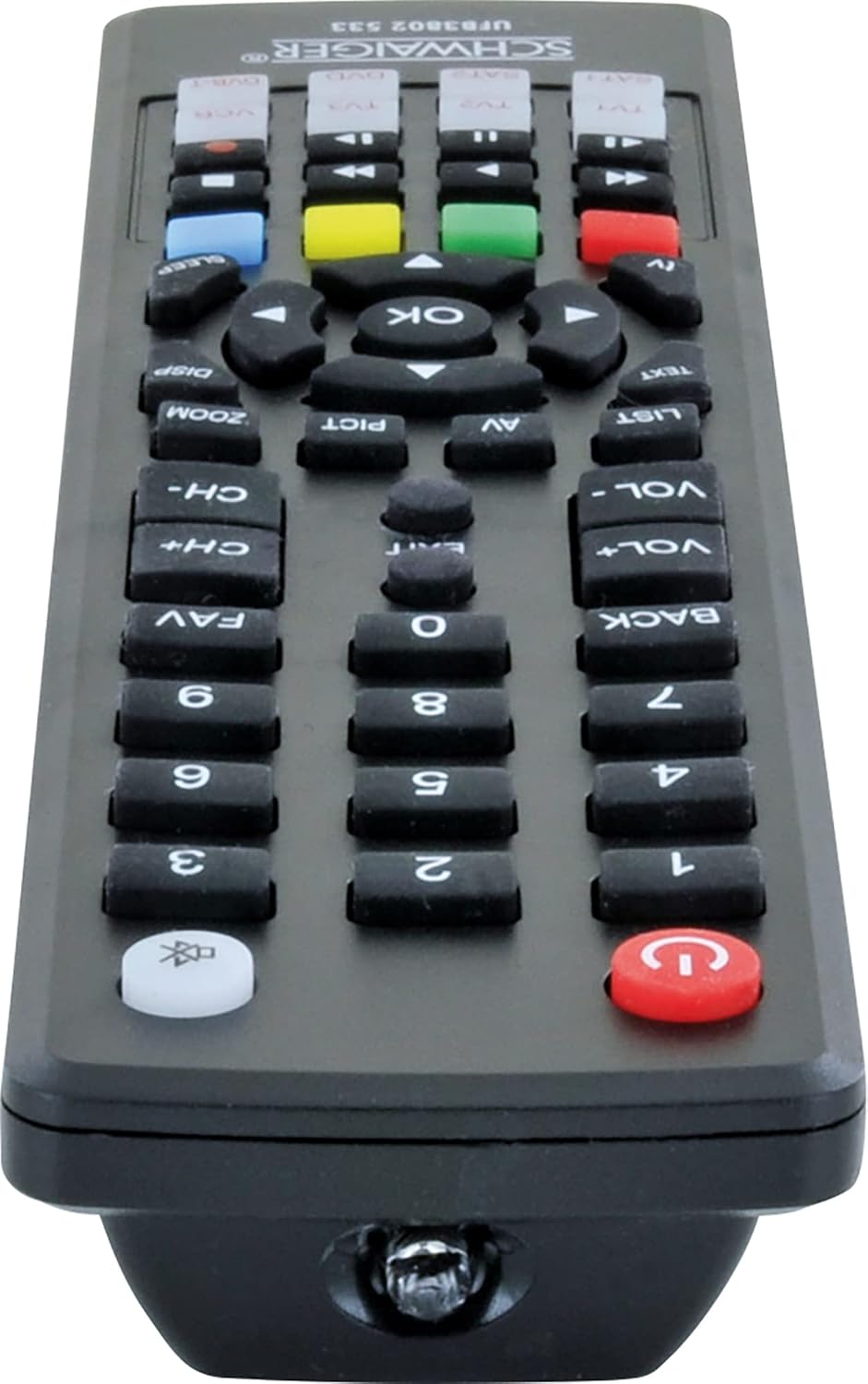
Immaġni: Qiegħ view of the SCHWAIGER UFB3802 533-8 Universal Remote Control. This image shows the infrared (IR) emitter at the front tip of the remote, which transmits signals to your devices.
Speċifikazzjonijiet
- Ditta: SCHWAIGER
- Mudell: UFB3802 533-8
- Numru tal-Mudell tal-Manifattur: 4004005032864
- Apparati Kompatibbli: Television, VCR, Satellite Receiver, DVD Player, DVB-T Receiver (up to 8 devices)
- Karatteristika Speċjali: Kompatibilità universali
- Kulur: Iswed
- Tip ta' Materjal: Akriliku
- Tip ta' Konnettur: Infra-aħmar (IR)
- Batteriji Meħtieġa: 2 x AAA (LR03) Alkaline (included)
- Dimensjonijiet tal-Prodott: 27 x 4.3 x 4.3 ċm
- Piż tal-oġġett: 190 g
Garanzija u Appoġġ
For warranty information or technical support, please refer to the documentation provided with your purchase or contact SCHWAIGER customer service directly. Contact details can typically be found on the manufacturer's official webis-sit jew fuq l-imballaġġ tal-prodott.


