1. Introduzzjoni
Thank you for choosing the iPega PG-P4008 Wireless Game Controller. This manual provides detailed instructions on how to set up, operate, and maintain your controller. The PG-P4008 offers broad compatibility with PS4, PS3, Android (10.0+), iOS (13.0+), and Windows PC, connecting wirelessly via Bluetooth for an enhanced gaming experience.
2. Prodott Aktarview
The iPega PG-P4008 is designed for versatile gaming across multiple platforms. It features a comfortable ergonomic design, responsive controls, and several advanced functionalities to immerse you in your games.
Karatteristiċi ewlenin:
- Wireless Bluetooth connectivity (BT2.1+EDR) with up to 8 meters range.
- No driver installation required for connection.
- Integrated colored LED light indicator for operational status.
- Dual motors for realistic vibration feedback during gameplay.
- Built-in three-dimensional acceleration sensor and gyroscope sensor with six-axis induction.
- Integrated speaker and 3.5mm earphone jack for game audio.
- Dual-point capacitive touchpad for enhanced control.
- Compatible with PS4, PS3, Android (10.0+), iOS (13.0+), and Windows PC.
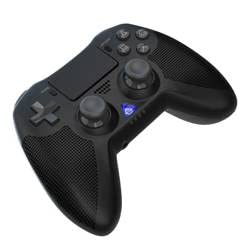
Stampa 1: Quddiem view of the iPega PG-P4008 Wireless Game Controller. This image displays the controller's ergonomic design, dual analog sticks, D-pad, action buttons, touchpad, and the central LED indicator.
3. Setup u Konnessjoni
The PG-P4008 controller connects wirelessly via Bluetooth. Follow these steps to pair your controller with your device:
- Qawwa Mixgħul: Ensure the controller is charged. Press and hold the Buttuna PS (or equivalent power button) to turn on the controller.
- Mod ta 'tqabbil:
- For PS4/PS3: Connect the controller to the console using a USB cable. Once recognized, you can disconnect the cable for wireless play. The connection method is similar to the official P4 controller.
- For Android/iOS: Activate Bluetooth on your mobile device. On the controller, press and hold the SHARE button + PS button simultaneously until the LED indicator flashes rapidly, indicating pairing mode. Select "PG-P4008" (or similar) from your device's Bluetooth list to connect.
- For Windows PC: Ensure your PC has Bluetooth capability. On the controller, press and hold the PS button + OPTIONS button simultaneously until the LED indicator flashes rapidly. On your PC, go to Bluetooth settings, add a new device, and select "PG-P4008" (or similar) to pair.
- Konnessjoni b'suċċess: Once connected, the LED indicator on the controller will change to a solid color, indicating a successful pairing.
Nota: No additional driver software is required for operation. The controller supports a stable connection up to 8 meters.
4. Istruzzjonijiet Operattivi
Indikatur LED:
The built-in colored LED light indicates the controller's operational status and player assignment, similar to the official PS4 controller. Different colors will signify different stages or player numbers.
Feedback tal-Vibrazzjoni:
The controller features dual motors embedded in the handles, providing tactile vibration feedback to enhance your gaming immersion. This feedback will vary based on in-game events.
Touchpad:
The dual-point capacitive touchpad allows for intuitive control in games that support touch input, offering an additional layer of interaction.
Funzjonalità tal-Awdjo:
Connect your 3.5mm earphones to the integrated jack on the controller to experience game audio directly, providing a private and immersive sound experience.
5. Manutenzjoni
- Keep the controller dry and away from moisture to prevent damage to internal components.
- Naddaf il-kontrollur regolarment b'ċarruta ratba u niexfa. Evita li tuża kimiċi ħarxa jew materjali li joborxu.
- Aħżen il-kontrollur f'post frisk u niexef meta ma tkunx qed tuża.
- Avoid exposing the controller to extreme temperatures or direct sunlight.
- Do not attempt to disassemble or modify the controller, as this will void any potential warranty and may cause damage.
6 Issolvi l-problemi
- Il-kontrollur mhux qed jikkonnettja:
- Kun żgur li l-kontrollur huwa ċċarġjat kompletament.
- Iċċekkja li l-Bluetooth huwa attivat fuq l-apparat tiegħek.
- Make sure the controller is in the correct pairing mode for your device (refer to Section 3).
- Ipprova erġa' ibda kemm il-kontrollur kif ukoll l-apparat tiegħek.
- Remove previous pairings from your device's Bluetooth list and try pairing again.
- Dewmien jew skonnessjoni fl-input:
- Ensure you are within the 8-meter operating range.
- Imminimizza l-interferenza minn apparati oħra mingħajr fili.
- Check for any physical obstructions between the controller and the device.
- Il-vibrazzjoni ma taħdimx:
- Kun żgur li l-logħba li qed tilgħab tappoġġja feedback tal-vibrazzjoni.
- Iċċekkja s-settings fil-logħba biex tiżgura li l-vibrazzjoni hija attivata.
- Audio not working via 3.5mm jack:
- Ensure your earphones are properly plugged in.
- Check the volume settings on your device and in-game.
- Test with another pair of earphones to rule out earphone issues.
7. Speċifikazzjonijiet
| Numru tal-Mudell | PG-P4008 |
| Brand | iPega |
| Konnettività | Bluetooth (BT2.1+EDR) |
| Firxa Wireless | Sa 8 metri |
| Apparati Kompatibbli | PS4, PS3, Android (10.0+), iOS (13.0+), Windows PC |
| Karatteristiċi Speċjali | Wireless, Touchpad, Vibration, 6-axis Gyroscope, Built-in Speaker, 3.5mm Audio Jack |
| Kwantità tal-Buttuni | 17 |
| Sors tal-Enerġija | Mħaddma bil-batterija |
8. Garanzija u Appoġġ
Information regarding product warranty and customer support is not provided within this manual. Please refer to the product packaging or the retailer's websit għal dettalji dwar il-kopertura tal-garanzija u kif tikkuntattja l-appoġġ għall-klijenti għall-assistenza.


