1. Prodott Aktarview
This manual provides detailed instructions for the Fossil FS5889 Retro Analogue-Digital Watch. This timepiece combines classic analog hands with a modern digital display, offering versatile timekeeping and additional functions. It features a durable stainless steel case and strap, a gold-toned finish, and is water-resistant up to 5 ATM.

2. Setup
2.1 Issettjar tal-Ħin Inizjali
Your watch comes with a pre-installed battery. Upon first use, you may need to set the time and date. Refer to the 'Operating Instructions' section for detailed steps on setting both the analog and digital displays.
2.2 Strap Adjustment and Replacement
The watch features a metal strap that may require adjustment for a comfortable fit. If you wish to replace the strap, follow these steps:
- Push the button on the spring bar to the center position.
- Carefully remove the strap from the watch case.
- Align the new strap at the junction points on the watch case.
- Push the button on the new strap's spring bar to insert it into the connection point on the watch case. Ensure it clicks securely into place.

3. Istruzzjonijiet Operattivi
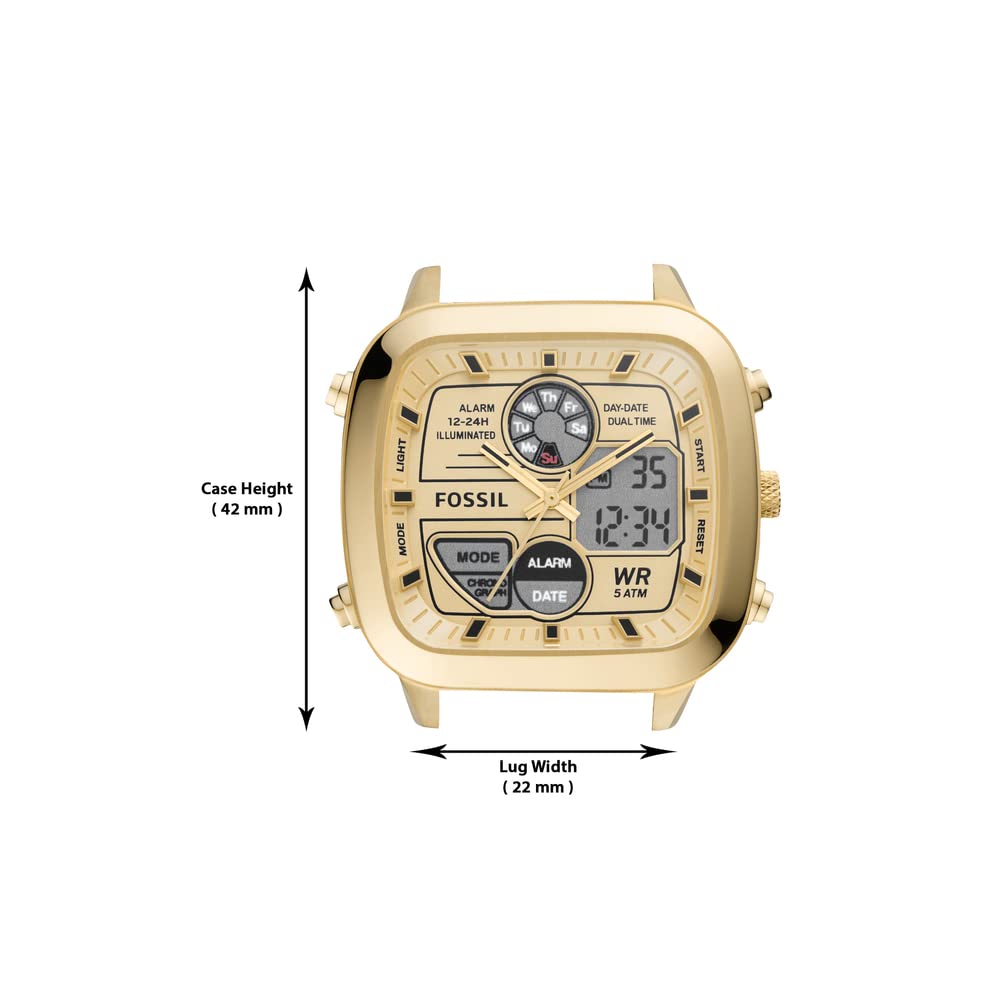
The Fossil FS5889 watch features multiple buttons for various functions. Familiarize yourself with their locations and purposes.

3.1 Funzjonijiet tal-buttuni
- Buttuna MODE: Cycles through digital display modes (Time, Alarm, Chronograph, Date).
- Buttuna DAWL: Jattiva d-dawl ta' wara għad-displej diġitali.
- Buttuna START: Used to start/stop the chronograph or adjust settings in setting mode.
- Buttuna RESET: Used to reset the chronograph or confirm settings in setting mode.
- Kuruna: Adjusts the analog time. Pull out to set, push in to engage.
3.2 Issettjar tal-Ħin Analogu
- Iġbed il-kuruna 'l barra għall-ewwel pożizzjoni.
- Turn the crown to move the analog hands to the desired time.
- Push the crown back in to its normal position to start the analog movement.
3.3 Issettjar tal-Ħin u d-Data Diġitali
- Agħfas il- MODALITÀ Agħfas il-buttuna ripetutament sakemm il-wiri diġitali tal-ħin jteptep jew jidħol fil-modalità tas-settings.
- Uża l- BIDU buttuna biex taġġusta ċ-ċifra li teptip (sigħat, minuti, sekondi).
- Uża l- RESET button to move to the next setting (e.g., from hours to minutes).
- Repeat steps 2 and 3 for setting the date (month, day, year) and day of the week.
- Ladarba s-settings kollha jkunu kompluti, agħfas il-buttuna MODALITÀ buttuna biex toħroġ mill-modalità tas-settings.
3.4 L-Użu tal-Funzjoni tal-Allarm
- Agħfas il- MODALITÀ button until 'ALARM' is displayed.
- Biex tissettja l-ħin tal-allarm, agħfas u żomm il-buttuna BIDU Agħfas il-buttuna sakemm il-ħin tal-allarm jteptep.
- Uża l- BIDU button to adjust the hours and the RESET button to move to minutes.
- Agħfas MODALITÀ biex tikkonferma l-ħin tal-allarm.
- Biex tattiva/tiddiżattiva l-allarm, agħfas il-buttuna BIDU buttuna waqt li tkun fil-modalità tal-allarm. Tidher/tisparixxi ikona tal-allarm.
3.5 L-Użu tal-Kronografu (Stopwatch)
- Agħfas il- MODALITÀ button until 'CHRONO' or 'STOPWATCH' is displayed.
- Agħfas il- BIDU buttuna biex tibda l-ħin.
- Agħfas il- BIDU Agħfas il-buttuna mill-ġdid biex twaqqaf il-ħin.
- Agħfas il- RESET button to clear the timed measurement.
3.6 Funzjoni tad-Dawl
Agħfas il- DAWL button to illuminate the digital display for a few seconds, improving visibility in low-light conditions.
3.7 Reżistenza għall-Ilma
This watch is water-resistant up to 5 ATM (50 meters). This means it is suitable for short periods of recreational swimming, but not for diving or snorkeling. Avoid pressing buttons or operating the crown while the watch is wet or submerged, as this can compromise the water resistance.
4. Manutenzjoni
4.1 Tindif tal-Arloġġ Tiegħek
To maintain the appearance of your watch, wipe the case and strap regularly with a soft, dry cloth. For stainless steel components, a slightly damp cloth can be used, followed by immediate drying. Avoid using harsh chemicals, solvents, or abrasive cleaners, as these can damage the watch's finish.
4.2 Kura tar-Reżistenza għall-Ilma
To preserve the water resistance of your watch, ensure the crown is always pushed in completely. Avoid exposing the watch to extreme temperature changes (e.g., hot showers followed by cold water), as this can cause seals to expand and contract, potentially leading to water intrusion. Do not operate buttons or the crown while the watch is submerged or wet.
4.3 Sostituzzjoni tal-batterija
The watch is powered by a Lithium battery. When the digital display becomes dim or stops functioning, the battery may need replacement. Battery replacement should be performed by a qualified watch technician to ensure proper sealing and maintain water resistance. Attempting to replace the battery yourself may void the warranty and damage the watch.
5 Issolvi l-problemi
If you encounter issues with your Fossil FS5889 watch, refer to the following common problems and solutions:
- Il-Wiri Diġitali huwa Vojt jew Mudlama: This usually indicates a low battery. Arrange for professional battery replacement.
- Analog Hands Not Moving or Incorrect Time: Check if the crown is pushed in completely. If the issue persists, the battery may be low, or the movement may require service.
- Buttuni li ma jirrispondux: Ensure the watch is dry. If buttons are stuck, gently clean around them. If they remain unresponsive, professional inspection is recommended.
- Ilma Ġewwa l-Għassa: If condensation or water droplets appear under the crystal, immediately take the watch to a service center. This indicates a breach in water resistance.
For problems not listed here, or if solutions do not resolve the issue, contact Fossil customer support or an authorized service center.
6. Speċifikazzjonijiet
Key technical specifications for the Fossil FS5889 Retro Analogue-Digital Watch:
| Karatteristika | Speċifikazzjoni |
|---|---|
| Numru tal-Mudell | FS5889 |
| Materjal tal-Każ | Stainless Steel |
| Materjal taċ-ċinga | Stainless Steel |
| Kulur tal-Arloġġ | Deheb |
| Kulur tal-Banda | Deheb |
| Tip ta 'Wiri | Analogue-Digital |
| Reżistenza għall-Ilma | 5 ATM (50 metru) |
| Dimensjonijiet tal-Prodott | 10 x 10 x 10 ċm |
| Piż tal-oġġett | 430 g |
| UPC | 796483555037 |
| Tip ta 'batterija | Lithium |
7. Garanzija u Appoġġ
7.1 Informazzjoni dwar Garanzija
Your Fossil FS5889 watch is covered by a manufacturer's warranty. Details regarding the warranty period and coverage can typically be found on the official Fossil website or within the warranty card included with your purchase. The warranty generally covers manufacturing defects but may not cover damage resulting from improper use, accidents, or unauthorized repairs.
7.2 Appoġġ għall-Klijent
For any questions, service requests, or warranty claims, please contact Fossil customer service. You can usually find contact information, including phone numbers and email addresses, on the official Fossil website or through your point of purchase. When contacting support, please have your watch model number (FS5889) and proof of purchase readily available.
For more information, you may visit the official Fossil Store: Ħanut tal-Fossili fuq Amazon


