1. Introduzzjoni
This instruction manual provides comprehensive guidance for the Gvirtue Universal Vizio Control VZ-7LC remote. This remote is designed to replace your original Vizio Smart TV remote, offering broad compatibility and ease of use without requiring complex programming.
2. Karatteristiċi ewlenin
- Kompatibilità Universali: Designed for a wide range of Vizio Smart TVs, including LED, QLED, LCD, 4K UHD, HDR, and SmartCast D, E, M, P, V Series.
- Ebda Programmazzjoni Meħtieġa: Ready to use directly out of the box with compatible Vizio TVs.
- Dedicated Quick Access Hotkeys: Features direct access buttons for popular streaming services like Vudu, Netflix, Prime Video, Xumo, Hulu, iHeartRadio, Crackle, Sleep, Redbox, and Watch Free.
- Teknoloġija infrared: Ensures reliable signal transmission to your television.
- Kostruzzjoni Durabbli: Made from ABS material with soft plastic buttons for comfortable use.

Image: Gvirtue VZ-7LC remote highlighting key features such as stable performance and no programming requirement.
3. Kompatibilità
The Gvirtue VZ-7LC remote is compatible with various Vizio Smart TV models and series, including but not limited to:
- Vizio SmartCast D, E, M, P, V Series
- Vizio 4K LED, LCD, HDR, UHD Smart TVs
- Vizio LED, QLED, LCD TVs of various sizes (e.g., 24, 32, 40, 43, 48, 50, 55, 60, 65, 70, 75 inches)

Image: The Gvirtue VZ-7LC remote demonstrating compatibility with different Vizio Smart TV types.
4. Getting Started: Battery Installation
To begin using your Gvirtue VZ-7LC remote, you will need to install two AAA batteries (not included). Follow these steps:
- Sib l-għatu tal-kompartiment tal-batterija fuq wara tal-kontroll remot.
- Żerżaq l-għatu 'l isfel jew agħfas il-lukkett (jekk preżenti) biex tiftaħ il-kompartiment.
- Insert two new AAA batteries, ensuring the positive (+) and negative (-) ends align correctly with the markings inside the compartment.
- Żerżaq l-għatu tal-kompartiment tal-batterija lura f'postu sakemm tikklikkja sew.

Immaġni: Dettaljata view of the remote's battery compartment and proper battery insertion.
5. Twaqqif u Użu Inizjali
The Gvirtue VZ-7LC remote is designed for immediate use with most Vizio Smart TVs without any complex setup or programming. Simply insert the batteries, point the remote at your Vizio TV, and it should function directly.

Image: The remote ready for use with a Vizio TV, emphasizing no setup is needed.
Video: Demonstration of the Gvirtue universal remote control for Vizio Smart TVs, showing its functionality and ease of use.
6. Operating Instructions: Button Functions
The Gvirtue VZ-7LC remote features a standard layout for intuitive control of your Vizio Smart TV. Below is a general overview of the main buttons and their functions:
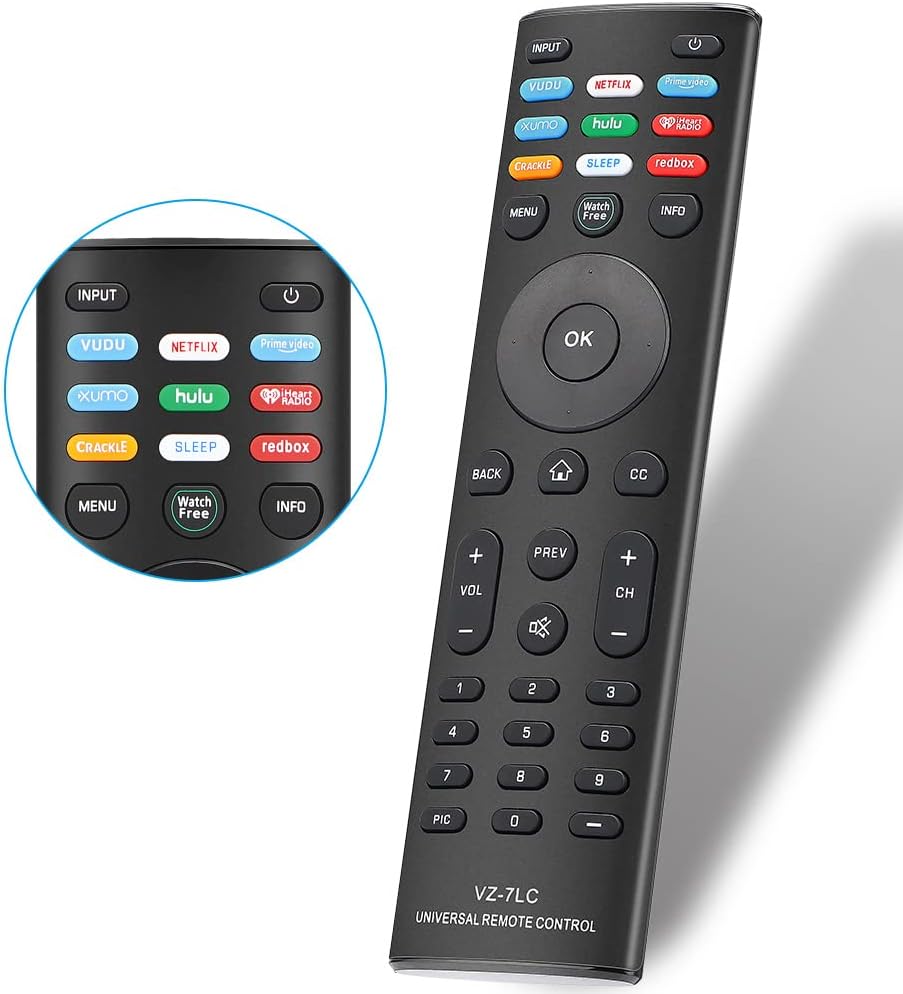
Immaġni: Quddiem view of the Gvirtue VZ-7LC remote, displaying all control buttons.
- Buttuna tal-Qawwa (⏻): Ixgħel jew jitfi t-TV.
- Input: Cycles through available input sources (HDMI 1, HDMI 2, etc.).
- Pad tan-Navigazzjoni ('Il fuq, 'l isfel, Xellug, Lemin, OK): Użat biex tinnaviga l-menus u tagħżel l-għażliet.
- Dahar: Terġa' lura għall-iskrin jew il-menu preċedenti.
- Dar (⌂): Accesses the SmartCast home screen or main menu.
- CC (Closed Captioning): Jixgħel jew jitfi s-sottotitli.
- Volum (+/-): Jaġġusta l-volum tat-TV.
- Mute (🔇): Iċċekkja jew jaqleb is-sordina l-awdjo tat-TV.
- Kanal (+/-): Tibdel il-kanal tat-TV.
- Tastiera numerika (0-9): Idaħħal direttament in-numri tal-kanali.
- Quick Access Hotkeys: Dedicated buttons for Vudu, Netflix, Prime Video, Xumo, Hulu, iHeartRadio, Crackle, Sleep, Redbox, and Watch Free for instant access to these applications.
- Menu: Opens the TV's main settings menu.
- Informazzjoni: Juri informazzjoni dwar il-programm jew l-input kurrenti.

Image: The remote's quick access hotkeys for popular streaming platforms.
7 Issolvi l-problemi
If you encounter issues with your Gvirtue VZ-7LC remote, please refer to the following common troubleshooting steps:
- Remote Mhux Jirrispondi:
- Ensure batteries are inserted correctly with proper polarity (+/-).
- Ibdel il-batteriji qodma b'batteriji AAA ġodda.
- Iċċekkja għal xi ostruzzjonijiet bejn ir-remote u s-senser infra-aħmar tat-TV.
- Ensure you are within the effective operating range of the TV.
- Buttuni Speċifiċi Mhux Jaħdmu:
- Iċċekkja li r-remote huwa ppuntat direttament lejn it-TV.
- Clean the remote's infrared emitter (the small LED at the front) and the TV's IR receiver with a soft, dry cloth.
- TV Not Turning On/Off:
- Confirm the TV is plugged into a working power outlet.
- Try using the power button directly on the TV to rule out a TV issue.
Vidjo: Fil-qosor dwarview of a replacement remote for Vizio Smart TVs, demonstrating basic functionality which can be helpful for troubleshooting.
8. Speċifikazzjonijiet
| Numru tal-Mudell | VZ-7LC |
| Brand | Gvirtu |
| Apparati Kompatibbli | Vizio Smart TVs (LED, QLED, LCD, 4K UHD, HDR, SmartCast D/E/M/P/V Series) |
| Teknoloġija tal-Konnettività | Infra-aħmar |
| Sors tal-Enerġija | 2 x Batteriji AAA (mhux inklużi) |
| Materjal | ABS |
| Dimensjonijiet | 17.1 x 4.7 x 2.1 ċm (madwar 6.73 x 1.85 x 0.83 pulzieri) |
| Piż | 80 g (madwar 2.82 oz) |

Image: Physical dimensions of the Gvirtue VZ-7LC remote.
9. Manutenzjoni
Biex tiżgura l-lonġevità u l-prestazzjoni ottimali tal-kontroll remot tiegħek, segwi dawn il-linji gwida ta' manutenzjoni:
- Tindif: Use a soft, dry cloth to clean the remote. Avoid using liquid cleaners or abrasive materials.
- Kura tal-batterija: Remove batteries if the remote will not be used for an extended period to prevent leakage. Replace batteries promptly when they are depleted.
- Ħażna: Aħżen il-kontroll remot f'post frisk u niexef 'il bogħod mix-xemx diretta u minn temperaturi estremi.
- Immaniġġjar: Evita li twaqqa’ r-remote jew li tesponih għal forza eċċessiva, għax dan jista’ jagħmel ħsara lill-komponenti interni.
10. Garanzija u Appoġġ
For any warranty claims, technical support, or further inquiries regarding your Gvirtue VZ-7LC remote control, please refer to the contact information provided with your product packaging or visit the official Gvirtue websit għad-dettalji tas-servizz tal-klijent.