Prodott Overview
The Qifutan Phone Mount for Car Vent is designed to securely hold your smartphone in your vehicle, providing a hands-free experience for navigation, calls, and media. Featuring an upgraded metal clip and innovative hollow silicone rubber, it ensures stability and protection for your device. The mount offers a 360-degree adjustable view għall-aħjar pożizzjonament.

Image: Qifutan Phone Mount securely holding a smartphone in a car's air vent.
Setup u Installazzjoni
Follow these steps to properly install your Qifutan Phone Mount:
- Identify Compatible Vent Type: This car mount is BISS compatible with horizontal blade air vents. Round vents (e.g., Mercedes-Benz, Wrangler) are not compatible.
- Attach the Mount to the Vent: Securely install the upgraded metal vent clip onto a horizontal air vent blade. Ensure the clip is tightened sufficiently to prevent movement. (Caution: Do not overtighten the hook clip to avoid damaging the vent blade.)
- Adjust Support Ring: The phone holder features an adjustable support ring that can be rotated to any angle without obstructing the vents. Adjust it for optimal stability.
- Adjust Bottom Foot: The adjustable bottom foot can be extended or retracted to fit various phone sizes.

Image: Close-up of the upgraded metal vent clip, highlighting its design for horizontal air vents.
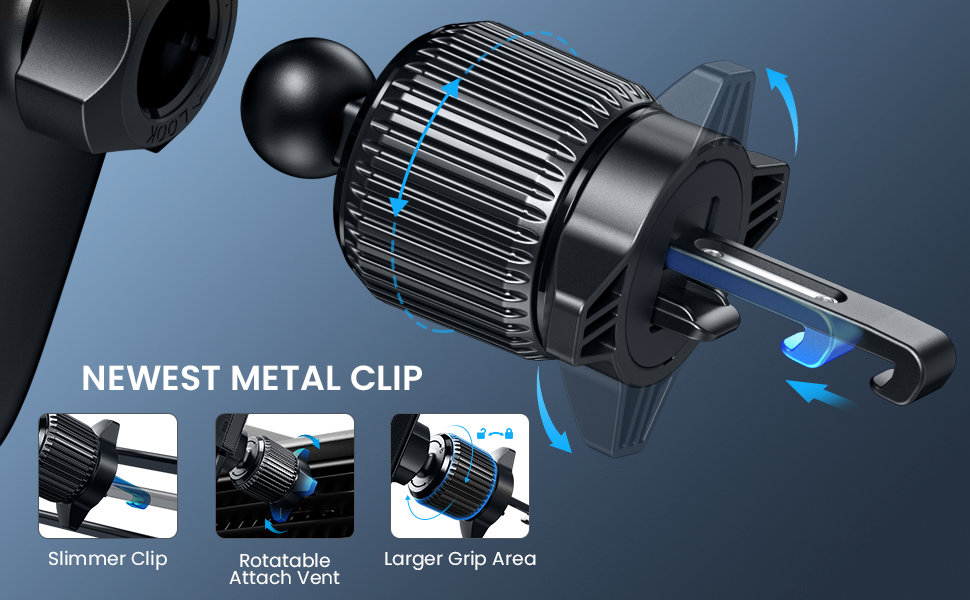
Image: Diagram illustrating the features of the newest metal clip, including its slimmer profile, rotatable attachment, and larger grip area.
Istruzzjonijiet Operattivi
Using your Qifutan Phone Mount is simple and intuitive:
- Daħħal it-Telefon Tiegħek: Agħfas il-clamp arm to open the cradle. Gently place your phone into the mount, ensuring it rests fully on the hollow silicone rubber cushion. This ensures maximum clamping force and prevents accidental drops.
- Aġġusta ViewIng Angolu: Utilize the 360° rotating and pivoting ball joint to adjust your phone to any desired viewing angle. You can quickly switch between vertical and horizontal orientations.
- Charging Access: The design allows for easy access to your phone's charging port while mounted.

Immaġni: Close-up view of the innovative hollow silicone rubber, designed to securely cushion and prevent the phone from falling.

Image: The phone mount demonstrating its 360-degree adjustable view, allowing flexible positioning.

Image: Diagram illustrating the wide compatibility of the mount, suitable for smartphones ranging from 4 to 7 inches.
Manutenzjoni
To ensure the longevity and optimal performance of your Qifutan Phone Mount:
- Tindif: Wipe the mount periodically with a soft, damp cloth to remove dust and grime. Avoid harsh chemicals or abrasive cleaners.
- Vent Clip Tightness: It is recommended to retighten the vent clip once every two weeks to ensure it remains stable and securely attached to your car's air vent.
- Silicone Care: The thick layer of silicone provides perfect protection for your smartphone. Ensure it remains free of debris to maintain its grip.
Issolvi l-problemi
If you encounter any issues with your phone mount, refer to the following common solutions:
- Mount is not stable or falls off the vent:
- Ensure your car's air vent is a horizontal blade type. Round vents are not compatible.
- Verify that the vent clip is fully tightened. Refer to the 'Setup and Installation' section for proper tightening.
- Check if the vent blade length is within the supported range (0.4-1.2 inches) and thickness (0.13 inches).
- Phone does not feel secure in the cradle:
- Make sure you press the clamp arm to fully engage the phone with the hollow silicone rubber cushion.
- Ensure the adjustable bottom foot is correctly positioned to support your phone's size.
Speċifikazzjonijiet
| Karatteristika | Dettall |
|---|---|
| Numru tal-Mudell | HD-C78 |
| Dimensjonijiet tal-Pakkett | 4.8 x 3.03 x 2.91 pulzieri |
| Piż tal-oġġett | 5.3 uqija |
| Kulur | Iswed |
| Tip ta 'Immuntar | Karozza Vent |
| Apparati Kompatibbli | Smartphones (4"-7" screen size) |
| Karatteristiċi Speċjali | Adjustable, Rotatable, Hands-Free |
Garanzija u Appoġġ
Qifutan stands behind the quality of its products. Your Qifutan Phone Mount comes with a garanzija ta 'sena.
For any questions, concerns, or support needs, please contact our professional customer service team, available 7 ijiem fil-ġimgħa, 24 siegħa kuljum.
Żur il- Qifutan Store on Amazon għal aktar informazzjoni u offerti ta' prodotti.


