1. Introduzzjoni
Grazzi tax-xiriasing the eKids Cocomelon Karaoke Machine, Model CO-550. This portable Bluetooth party speaker is designed to provide hours of musical fun for children, featuring built-in Cocomelon songs, a real working microphone, and versatile connectivity options. This manual provides essential information for safe and optimal use of your new karaoke machine.
2. Prodott Aktarview
2.1 Karatteristiċi ewlenin
- Konnettività Bluetooth: Wirelessly stream audio from any compatible Bluetooth device.
- Kanzunetti inkorporati: Includes 24 popular Cocomelon songs for immediate entertainment.
- Plejer tal-Awdjo USB: Connect a USB drive to play your own MP3 music files.
- Real Working Microphone: Sing along with the included wired microphone.
- Disinn favur it-tfal: Lightweight and portable with a built-in handle.
- Batterija rikarikabbli: Enjoy portable use with the integrated rechargeable battery (USB charging cable included).
- Jack tal-headphone: Għal smigħ privat.
2.2 Komponenti
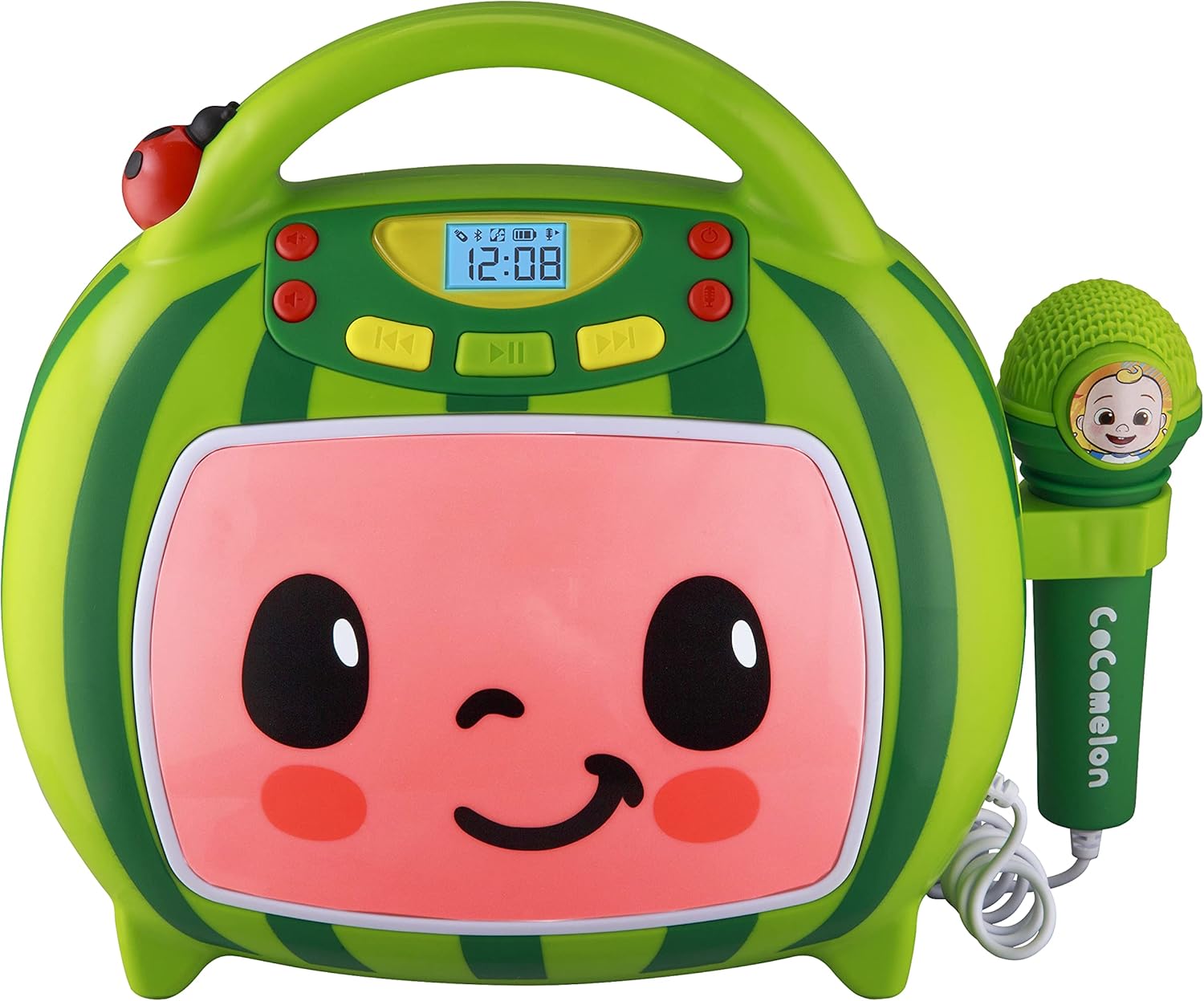
Quddiem view of the eKids Cocomelon Karaoke Machine, featuring the watermelon-themed design and integrated microphone.

An annotated diagram detailing the dimensions, control buttons (volume, play/pause, power), microphone jack, USB port, and battery compartment of the karaoke machine.
Il-pakkett jinkludi:
- eKids Cocomelon Karaoke Machine
- Mikrofonu bil-fili
- Cable tal-Iċċarġjar tal-USB
3. Setup
3.1 Installazzjoni tal-batterija
The karaoke machine requires 1 Lithium Ion battery. Ensure the battery is correctly installed according to the polarity markings in the battery compartment, located on the back of the unit.
3.2 Qawwa Inizjali
- Locate the Power ON/OFF button on the unit.
- Press and hold the Power ON/OFF button to turn on the device. The display will illuminate.
4. Istruzzjonijiet Operattivi
4.1 Tqabbil tal-Bluetooth
- Ixgħel il-magna tal-karaoke. Din tidħol awtomatikament fil-modalità ta' tqabbil Bluetooth.
- On your compatible device (e.g., smartphone, tablet), enable Bluetooth and search for available devices.
- Select 'eKids Cocomelon' from the list of devices to pair.
- Once paired, you can stream audio wirelessly from your device to the karaoke machine.

The karaoke machine is shown with icons indicating its compatibility with various Bluetooth-enabled devices such as PCs, smartwatches, tablets, and mobile phones.
This video demonstrates the Bluetooth pairing process for the eKids Cocomelon Karaoke Machine, showing how to connect a mobile device to stream music wirelessly.
4.2 Daqq tal-Awdjo tal-USB
- Insert a USB drive containing MP3 music files into the USB port located on the back of the unit.
- The machine will automatically detect the USB drive and begin playing music.
- Use the playback controls (Play/Pause, Forward, Reverse) to navigate your music.
4.3 Kanzunetti Inkorporati
The karaoke machine comes pre-loaded with 24 Cocomelon songs. To play these songs, ensure no Bluetooth device is connected and no USB drive is inserted. Use the playback controls to select and play the desired song.

A visual representation of the 24 pre-loaded Cocomelon songs, including popular titles like 'Hello Song' and 'Wheels on the Bus'.
4.4 Użu tal-Mikrofonu
- Plug the wired microphone into the microphone jack on the side of the unit.
- Aġġusta l-volum tal-mikrofonu billi tuża l-kontrolli apposta.
- Sing along to your favorite tunes!

A young child engaging with the eKids Cocomelon Karaoke Machine, holding the microphone and singing along.
An fuqview wirja tal-vidjoasing the eKids Cocomelon Karaoke Machine in action, highlighting its portability, microphone, and various functions for children's entertainment.
4.5 Kontrolli
- Qawwa ON/OFF: Ixgħel jew jitfi l-unità.
- Volume UP/DOWN: Adjusts the overall sound volume.
- Play/Pawsa: Jibda jew iwaqqaf il-plejbek.
- Quddiem/Reverse: Jaqbeż għat-trakka li jmiss jew ta’ qabel.
- Mikrofonu mixgħul/mitfi: Activates or deactivates the microphone.
5. Manutenzjoni
- Tindif: Wipe the unit with a soft, dry cloth. Do not use abrasive cleaners or immerse in water.
- Ħażna: Store the karaoke machine in a cool, dry place away from direct sunlight when not in use.
- Kura tal-batterija: Jekk l-unità ma tkunx se tintuża għal perjodu twil ta' żmien, neħħi l-batterija biex tevita t-tnixxija.
6 Issolvi l-problemi
| Problema | Soluzzjoni |
|---|---|
| L-unità ma tixgħelx. | Check battery installation and ensure the battery is charged. |
| L-ebda ħoss mill-ispiker. | Increase volume. Ensure Bluetooth device is connected and playing, or USB is inserted correctly. |
| Il-Bluetooth mhux qed jikkonnettja. | Ensure the unit is in pairing mode. Turn off and on Bluetooth on your device. Move closer to the unit. |
| Il-mikrofonu mhux qed jaħdem. | Ensure the microphone is securely plugged in and the microphone ON/OFF switch is activated. |
7. Speċifikazzjonijiet
| Karatteristika | Dettall |
|---|---|
| Numru tal-Mudell | CO-550 |
| Piż tal-oġġett | 2.12 liri |
| Dimensjonijiet tal-Prodott | 12 x 4 x 1 pulzieri |
| Batteriji | 1 batterija tal-jone tal-litju meħtieġa |
| Konnettività | Bluetooth, USB |
| Għadd tal-Kelliem | 1 |
| Komponenti Inklużi | Cable USB |
8. Garanzija u Appoġġ
For warranty information or technical support, please refer to the contact details provided on the product packaging or visit the official eKids websit. Żomm l-irċevuta tax-xiri tiegħek bħala prova tax-xiri.
9. Informazzjoni dwar is-Sigurtà
- Dan il-prodott huwa maħsub għal tfal minn 18 xhur 'il fuq.
- Is-superviżjoni tal-adulti hija rakkomandata waqt l-użu.
- Tesponix l-unità għall-ilma jew għal umdità eċċessiva.
- Tippruvax iżarma jew timmodifika l-unità.
- Keep the USB cable and microphone cord away from young children to prevent choking hazards.
- Armi l-batteriji b'mod responsabbli skont ir-regolamenti lokali.


