1. Istruzzjonijiet tas-Sigurtà
Dejjem osserva l-prekawzjonijiet bażiċi ta’ sigurtà meta tuża għodda elettrika biex tnaqqas ir-riskju ta’ nar, xokk elettriku, u korriment personali. Aqra l-istruzzjonijiet kollha qabel ma tħaddem din l-għodda.
Twissijiet Ġenerali dwar is-Sigurtà tal-Għodda tal-Enerġija
- Sigurtà taż-Żona tax-Xogħol: Żomm iż-żona tax-xogħol nadifa u mixgħula sew. Żoni imbarazz jew skuri jistiednu inċidenti. Tħaddimx għodod elettriċi f'atmosferi splussivi, bħal fil-preżenza ta' likwidi, gassijiet jew trab li jaqbdu. Għodod tal-enerġija joħolqu xrar li jistgħu jaqbdu t-trab jew dħaħen. Żomm lit-tfal u lil dawk li jkunu fil-qrib 'il bogħod waqt li tħaddem għodda tal-enerġija. Distrazzjonijiet jistgħu jikkawżaw inti titlef il-kontroll.
- Sigurtà Elettrika: Il-plakek tal-għodod tal-enerġija għandhom jaqblu mas-sokit. Qatt timmodifika l-plakek bl-ebda mod. Tużax plakek adapter ma' għodod tal-enerġija ertjati (ertjati). Plakek mhux modifikati u sokits li jaqblu jnaqqsu r-riskju ta' xokk elettriku. Evita kuntatt mal-ġisem tiegħek ma' uċuħ ertjati jew ertjati, bħal pajpijiet, radjaturi, fuklar u refriġeraturi. Hemm riskju akbar ta' xokk elettriku jekk ġismek ikun ertjat jew ertjat. Tesponix għodod tal-enerġija għax-xita jew għal kundizzjonijiet imxarrbin. L-ilma li jidħol f'għodda tal-enerġija jżid ir-riskju ta' xokk elettriku. Tabbużax il-korda. Qatt tuża l-korda biex iġġorr, tiġbed jew skonnettja l-għodda tal-enerġija. Żomm il-korda 'l bogħod mis-sħana, żejt, truf li jaqtgħu jew partijiet li jiċċaqalqu. Kordi bil-ħsara jew imħabbla jżidu r-riskju ta' xokk elettriku.
- Sigurtà Personali: Stay alert, watch what you are doing and use common sense when operating a power tool. Do not use a power tool while you are tired or under the influence of drugs, alcohol or medication. A moment of inattention while operating power tools may result in serious personal injury. Use personal protective equipment. Always wear eye protection. Protective equipment such as dust mask, non-skid safety shoes, hard hat, or hearing protection used for appropriate conditions will reduce personal injuries. Prevent unintentional starting. Ensure the switch is in the off-position before connecting to power source, picking up or carrying the tool. Carrying power tools with your finger on the switch or energising power tools that have the switch on invites accidents. Remove any adjusting key or wrench before turning the power tool on. A wrench or a key left attached to a rotating part of the power tool may result in personal injury. Do not overreach. Keep proper footing and balance at all times. This enables better control of the power tool in unexpected situations. Dress properly. Do not wear loose clothing or jewellery. Keep your hair and clothing away from moving parts. Loose clothes, jewellery or long hair can be caught in moving parts. If devices are provided for the connection of dust extraction and collection facilities, ensure these are connected and properly used. Use of dust collection can reduce dust-related hazards.
- Użu u Kura tal-Għodda tal-Enerġija: Do not force the power tool. Use the correct power tool for your application. The correct power tool will do the job better and safer at the rate for which it was designed. Do not use the power tool if the switch does not turn it on and off. Any power tool that cannot be controlled with the switch is dangerous and must be repaired. Disconnect the plug from the power source and/or the battery pack from the power tool before making any adjustments, changing accessories, or storing power tools. Such preventive safety measures reduce the risk of starting the power tool accidentally. Store idle power tools out of the reach of children and do not allow persons unfamiliar with the power tool or these instructions to operate the power tool. Power tools are dangerous in the hands of untrained users. Maintain power tools and accessories. Check for misalignment or binding of moving parts, breakage of parts and any other condition that may affect the power tool’s operation. If damaged, have the power tool repaired before use. Many accidents are caused by poorly maintained power tools. Keep cutting tools sharp and clean. Properly maintained cutting tools with sharp cutting edges are less likely to bind and are easier to control. Use the power tool, accessories and tool bits etc. in accordance with these instructions, taking into account the working conditions and the work to be performed. Use of the power tool for operations different from those intended could result in a hazardous situation.
- Użu u Kura tal-Għodda tal-batterija: Iċċarġja mill-ġdid biss bil-ċarġer speċifikat mill-manifattur. Ċarġer li huwa adattat għal tip wieħed ta' pakkett ta' batterija jista' joħloq riskju ta' nar meta jintuża ma' pakkett ta' batterija ieħor. Uża power tools biss b'pakketti ta' batteriji magħżula speċifikament. L-użu ta' kwalunkwe pakkett ta' batteriji ieħor jista' joħloq riskju ta' korriment u nar. Meta l-pakkett tal-batterija ma jkunx qed jintuża, żommu 'l bogħod minn oġġetti oħra tal-metall, bħal klipps tal-karti, muniti, ċwievet, imsiemer, viti jew oġġetti żgħar oħra tal-metall, li jistgħu jagħmlu konnessjoni minn terminal għal ieħor. Tqassar it-terminali tal-batterija flimkien jista 'jikkawża ħruq jew nar. Taħt kundizzjonijiet abbużivi, likwidu jista 'jinħareġ mill-batterija; evita kuntatt. Jekk iseħħ kuntatt aċċidentalment, laħlaħ bl-ilma. Jekk il-likwidu jikkuntattja l-għajnejn, fittex ukoll għajnuna medika. Likwidu li joħroġ mill-batterija jista 'jikkawża irritazzjoni jew ħruq.
- Servizz: Ħalli l-għodda tal-enerġija tiegħek isservisjata minn persuna ta' tiswija kwalifikata li tuża biss partijiet ta' sostituzzjoni identiċi. Dan jiżgura li tinżamm is-sigurtà tal-għodda tal-enerġija.
2. Prodott Aktarview
The POWERPLUS POWDP15200 is a versatile 20V cordless impact drill driver designed for various drilling and screwing applications. It is part of the Dual Power range, meaning its battery and charger (sold separately) are compatible with other Dual Power tools.
Karatteristiċi ewlenin:
- Adjustable Speed and Rotation: Two-speed gearbox (0-450 min-1 / 0-1800 min-1) and a forward/reverse switch for optimal control.
- Kapaċità ta' Materjali Multipli: Drills up to 25 mm in wood, 10 mm in steel, and 10 mm in concrete.
- Funzjonalità 3-in-1: Offers screwing, drilling, and impact drilling modes with 23+2 torque settings.
- Prestazzjoni qawwija: Delivers up to 50 Nm of torque and an impact rate of 7200-28800 strokes per minute.
- Viżibilità Mtejba: Integrated LED work light illuminates the work area.
- Mekkaniżmi tas-Sigurtà: Features soft start, quick stop, and overload protection.
- Quick Accessory Change: Spindle lock for easy chuck and bit changes.
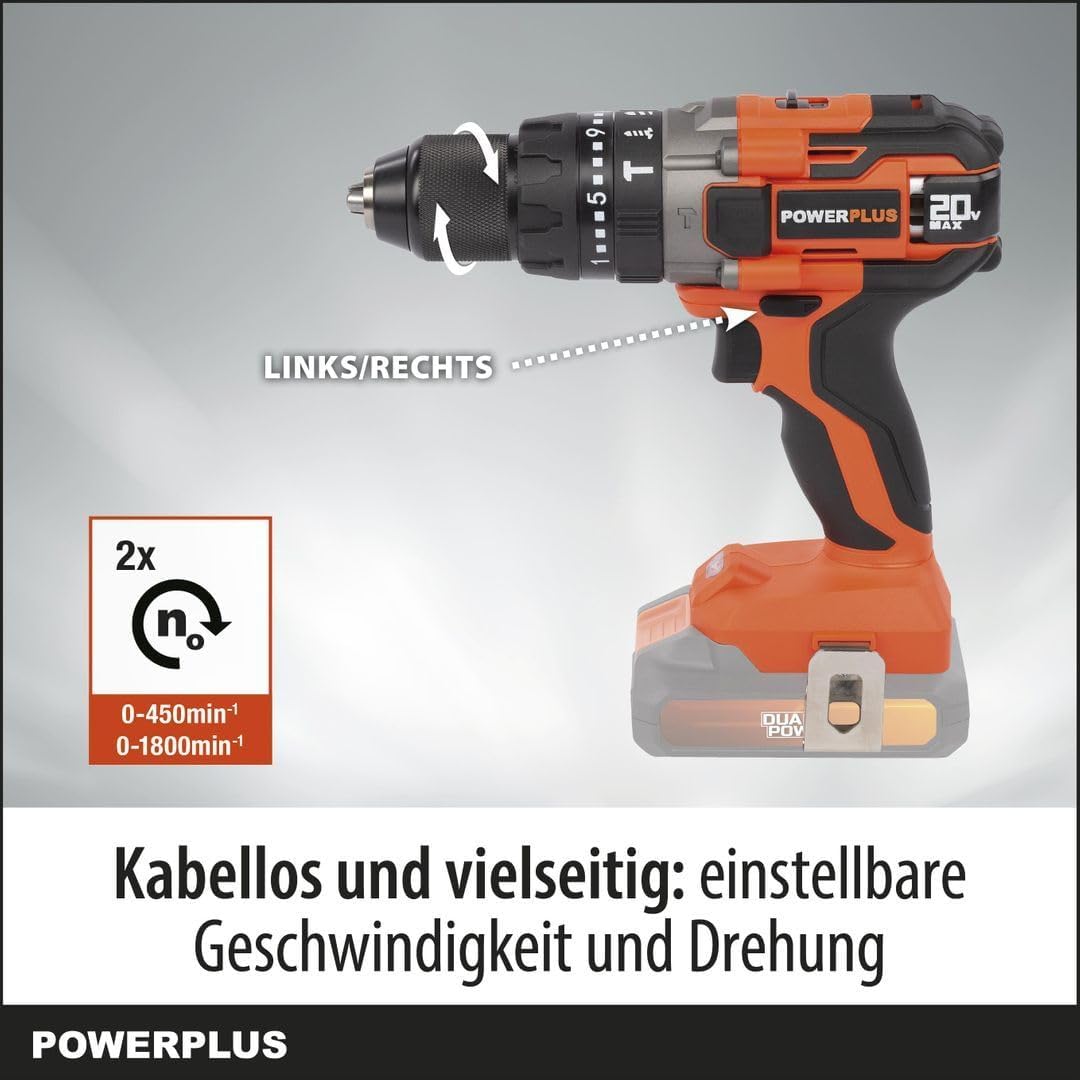
Figura 2.1: Quddiem view of the POWERPLUS POWDP15200 Cordless Impact Drill Driver. This image shows the overall design of the tool, including the chuck, speed selector, and handle.
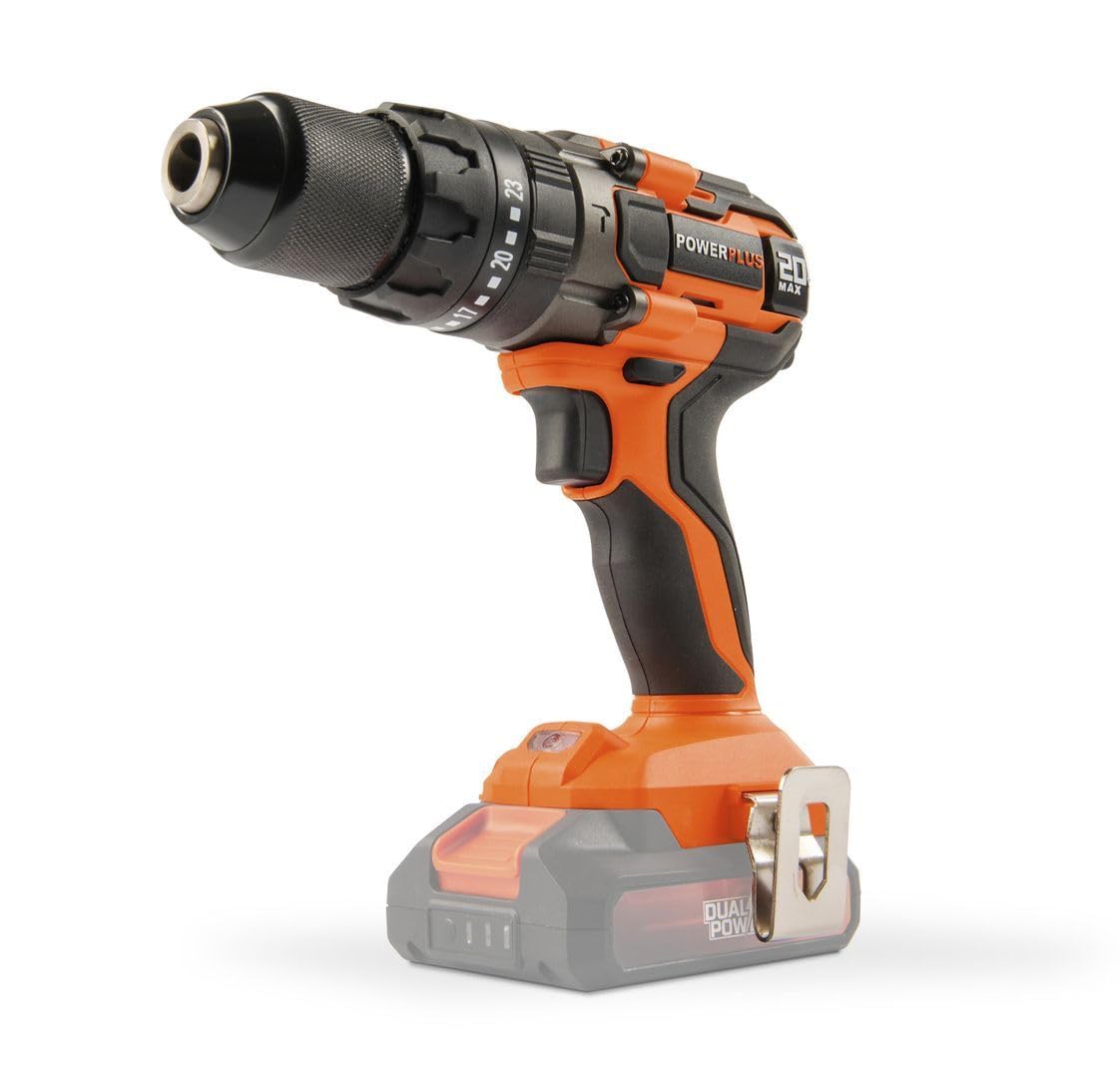
Figure 2.2: The POWERPLUS POWDP15200 drill driver with a compatible Dual Power battery attached. Note that the battery and charger are sold separately.
3. Setup
3.1. Installazzjoni u Iċċarġjar tal-batterija
This tool requires a 20V Dual Power battery and a compatible charger, which are not included and must be purchased separately. Ensure the battery is fully charged before first use.
- To install the battery, align the battery pack with the slot in the base of the drill handle.
- Żerżaq il-batterija fil-post sakemm tikklikkja sew.
- Biex tneħħi l-batterija, agħfas il-buttuna(i) tar-rilaxx fuq il-ġnub tal-pakkett tal-batterija u żżerżaqha 'l barra.

Figura 3.1: Wara view of the drill driver, showing the battery compartment where the Dual Power battery slides in.
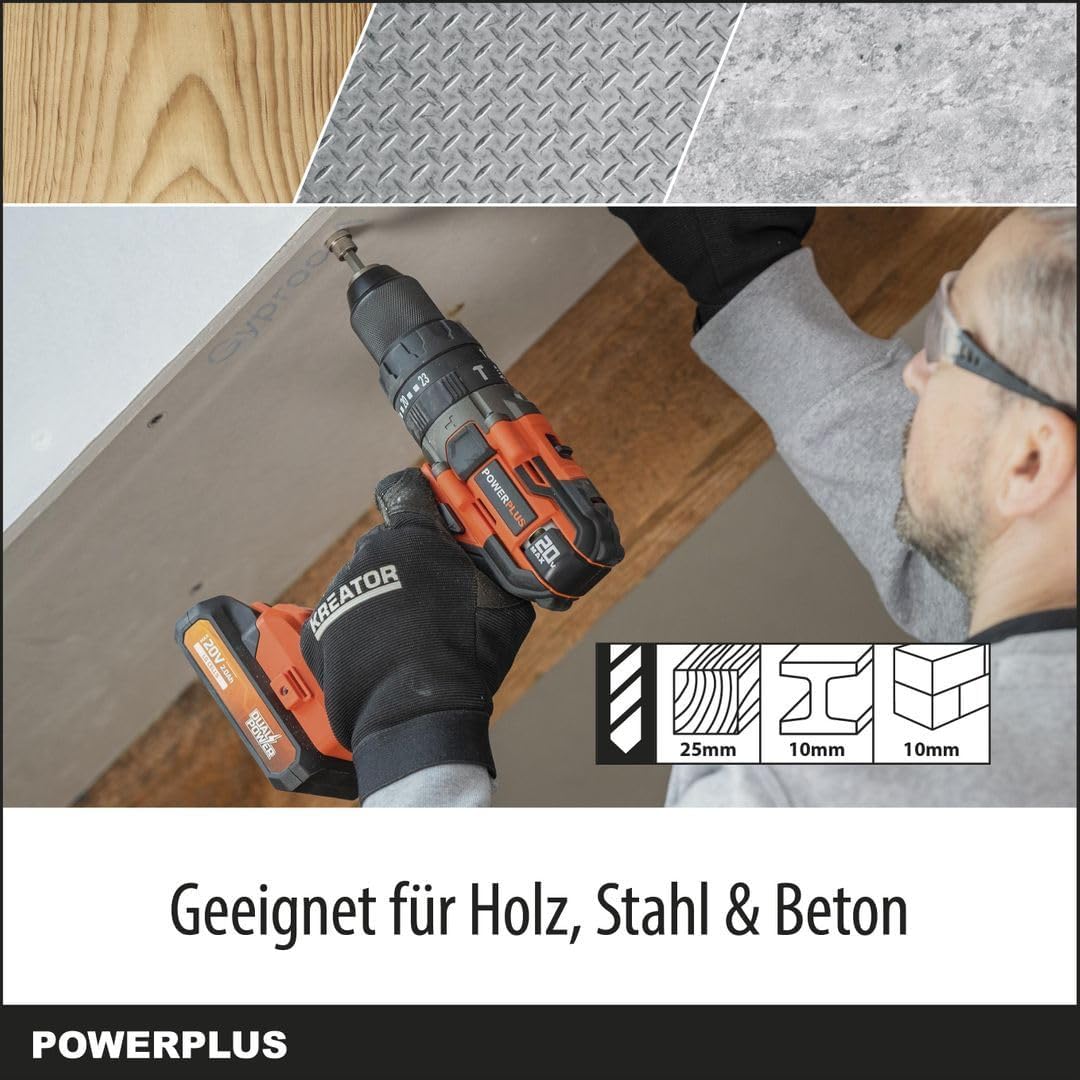
Figura 3.2: Ġenb view of the drill driver, illustrating the ergonomic handle and the battery interface.

Figure 3.3: Close-up of the drill chuck and torque adjustment ring. This ring allows selection of 23 torque settings for screwing, a drill mode, and an impact drill mode.
3.2. Installazzjoni ta' Bits tat-Trapan jew Bits tat-Tornavit
- Kun żgur li l-għodda tkun mitfija u li l-batterija tkun tneħħiet għas-sigurtà.
- Dawwar iċ-chuck kontra l-arloġġ biex tiftaħ ix-xedaq.
- Insert the desired drill bit or screwdriver bit into the chuck. Ensure the bit is centered and fully inserted.
- Rotate the chuck clockwise to tighten the jaws firmly around the bit. The spindle lock feature assists in holding the chuck steady during this process.
- Pull on the bit to ensure it is securely fastened.
4. Operazzjoni
4.1. Selecting Speed and Rotation Direction
The drill driver features a two-speed gearbox and a forward/reverse selector.
- Selettur tal-veloċità: Use the switch on top of the drill to select between two speeds:
- Position 1 (Low Speed): 0-450 min-1, ideal for screwing and larger drilling diameters.
- Position 2 (High Speed): 0-1800 min-1, suitable for smaller drilling diameters and faster work.
- Swiċċ 'il Quddiem/Lura: Located above the trigger, this switch controls the rotation direction.
- Push left for forward rotation (screwing in, drilling).
- Push right for reverse rotation (unscrewing, removing bits).
- Il-pożizzjoni taċ-ċentru tissakkar il-grillu għas-sigurtà waqt il-ħażna jew il-bidliet tal-bit.

Figure 4.1: Illustration of the speed selector (2x n0) and the forward/reverse switch (LINKS/RECHTS). The image highlights the two speed ranges: 0-450 min-1 and 0-1800 min-1.
4.2. Adjusting Torque and Mode
The torque adjustment ring allows you to select the appropriate torque for screwing or switch to drilling or impact drilling modes.
- Modalità tal-Invitar: Rotate the ring to select one of the 23 torque settings. Lower numbers are for smaller screws and softer materials, higher numbers for larger screws and harder materials. This prevents over-tightening and stripping screw heads.
- Modalità tat-Tħaffir (Ikona tal-Biċċa tat-Tħaffir): Select this mode for general drilling without impact. The clutch will not engage, providing full power.
- Modalità tat-Tħaffir bl-Impatt (Hammer Drill Icon): Select this mode for drilling into masonry or concrete. This mode combines rotation with a hammering action.
Figure 4.2: Close-up of the chuck and torque adjustment ring, showing the 23 torque settings, drill icon, and impact drill icon.
4.3. Kif Tibda u Twaqqif tal-Għodda
- To start the tool, press the trigger switch. The tool features a soft start mechanism for controlled acceleration.
- The integrated LED work light will illuminate when the trigger is pressed, providing visibility to the work area.
- To stop the tool, release the trigger switch. The quick stop feature will rapidly halt the chuck's rotation.

Figure 4.3: The drill driver with its LED work light activated, illuminating the area in front of the chuck for improved visibility.
4.4. Drilling and Screwing Tips
- Always use sharp, appropriate bits for the material and task.
- For drilling, apply steady, even pressure. Do not force the tool.
- For screwing, start with a lower torque setting and increase if necessary to avoid stripping screw heads.
- When drilling into hard materials or concrete, use the impact drilling mode and ensure the bit is designed for impact use.
- The tool is suitable for drilling up to 25mm in wood, 10mm in steel, and 10mm in concrete.

Figure 4.4: The drill driver being used to drill into a wooden surface, demonstrating its capability for wood applications up to 25mm.

Figure 4.5: The drill driver in operation, illustrating its powerful 50 Nm torque and controlled performance for various tasks.
5. Manutenzjoni
Regular maintenance ensures the longevity and optimal performance of your POWERPLUS POWDP15200 drill driver.
5.1. Tindif
- Dejjem skonnettja l-batterija qabel ma tnaddafha.
- Keep the ventilation openings clean to prevent overheating. Use a soft brush or compressed air to clear dust and debris.
- Imsaħ il-kaxxa tal-għodda b'ċarruta ratba u damp drapp. Tużax kimiċi ħarxa jew tindif li joborxu.
- Naddaf il-ponot taċ-chuck regolarment biex tiżgura qabda xierqa fuq il-bits.
5.2. Ħażna
- Aħżen l-għodda f'post niexef u sigur, fejn ma jintlaħaqx mit-tfal.
- Neħħi l-batterija mill-għodda qabel ma taħżinha għal perjodi twal.
- Aħżen il-batteriji f'post frisk u niexef, 'il bogħod mix-xemx diretta u minn temperaturi estremi.
6 Issolvi l-problemi
If you encounter issues with your drill driver, refer to the following common problems and solutions:
| Problema | Kawża Possibbli | Soluzzjoni |
|---|---|---|
| Għodda ma tibda. | Il-batterija mhix installata sew jew skargata. Il-lock tal-grillu huwa attivat. | Ensure battery is fully charged and properly inserted. Check that the forward/reverse switch is not in the center (locked) position. |
| Reduced power or stops during operation. | Battery low. Overload protection activated. | Recharge the battery. Reduce pressure on the tool or use a lower speed/torque setting. Allow the tool to cool down if it has overheated. |
| Il-bit jiżloq fil-mandrin. | Mandrin mhux issikkat biżżejjed. Ix-xkub tal-bit huwa maħmuġ jew bil-ħsara. | Tighten the chuck firmly. Clean the bit shank or replace damaged bits. |
| Vibrazzjoni jew storbju eċċessiv. | Biċċa bil-ħsara. Komponenti maħlula. | Replace the bit. Check for any loose parts. If the problem persists, contact customer support. |
7. Speċifikazzjonijiet
| Karatteristika | Speċifikazzjoni |
|---|---|
| Numru tal-Mudell | POWDP15200 |
| Brand | POWERPLUS |
| Vol nominalitage | 20 V |
| Max. Torque | 50 Nm |
| Veloċità mingħajr tagħbija (Gear 1) | 0 - 450 minuta-1 |
| Veloċità mingħajr tagħbija (Gear 2) | 0 - 1800 minuta-1 |
| Impact Rate (Gear 1) | 0 - 7200 strokes/min |
| Impact Rate (Gear 2) | 0 - 28800 strokes/min |
| Kapaċità Chuck | Max. Ø13 mm |
| Settings tat-torque | 23 + 1 (Drill) + 1 (Impact Drill) |
| Kapaċità tat-Tħaffir (Injam) | 25 mm |
| Kapaċità tat-Tħaffir (Azzar) | 10 mm |
| Kapaċità tat-Tħaffir (Konkrit) | 10 mm |
| Piż (mingħajr batterija) | 1.36 kg |
| Dimensjonijiet (L x W x H) | 22 x 8 x 19.8 ċm |
| Material (Motor winding) | Ram |
| Materjal (Djar) | PA6-GF30 |
| Material (Gear housing) | Aluminju |
| Karatteristiċi Speċjali | Automatic stop, Integrated LED work light, Soft start, Quick stop, Overload protection, Spindle lock |
| Komponenti Inklużi | 1x belt clip, 1x instruction manual, 1x screw |
| Batterija / Ċarġer tal | Not included, required (Dual Power compatible) |
8. Garanzija u Appoġġ
For warranty information, please refer to the documentation provided with your purchase or visit the official POWERPLUS websit. Żomm il-prova tax-xiri tiegħek għal kwalunkwe talba ta' garanzija.
For technical support, spare parts, or service inquiries, please contact your local POWERPLUS dealer or authorized service center. Contact information can typically be found on the manufacturer's websit jew fid-dokumentazzjoni inkluża.


