1. Introduzzjoni
This manual provides essential information for setting up, operating, and maintaining your Intel NUC 11 NUC11PAHi7 Mini PC. Please read this manual thoroughly before using the product to ensure proper functionality and safety.
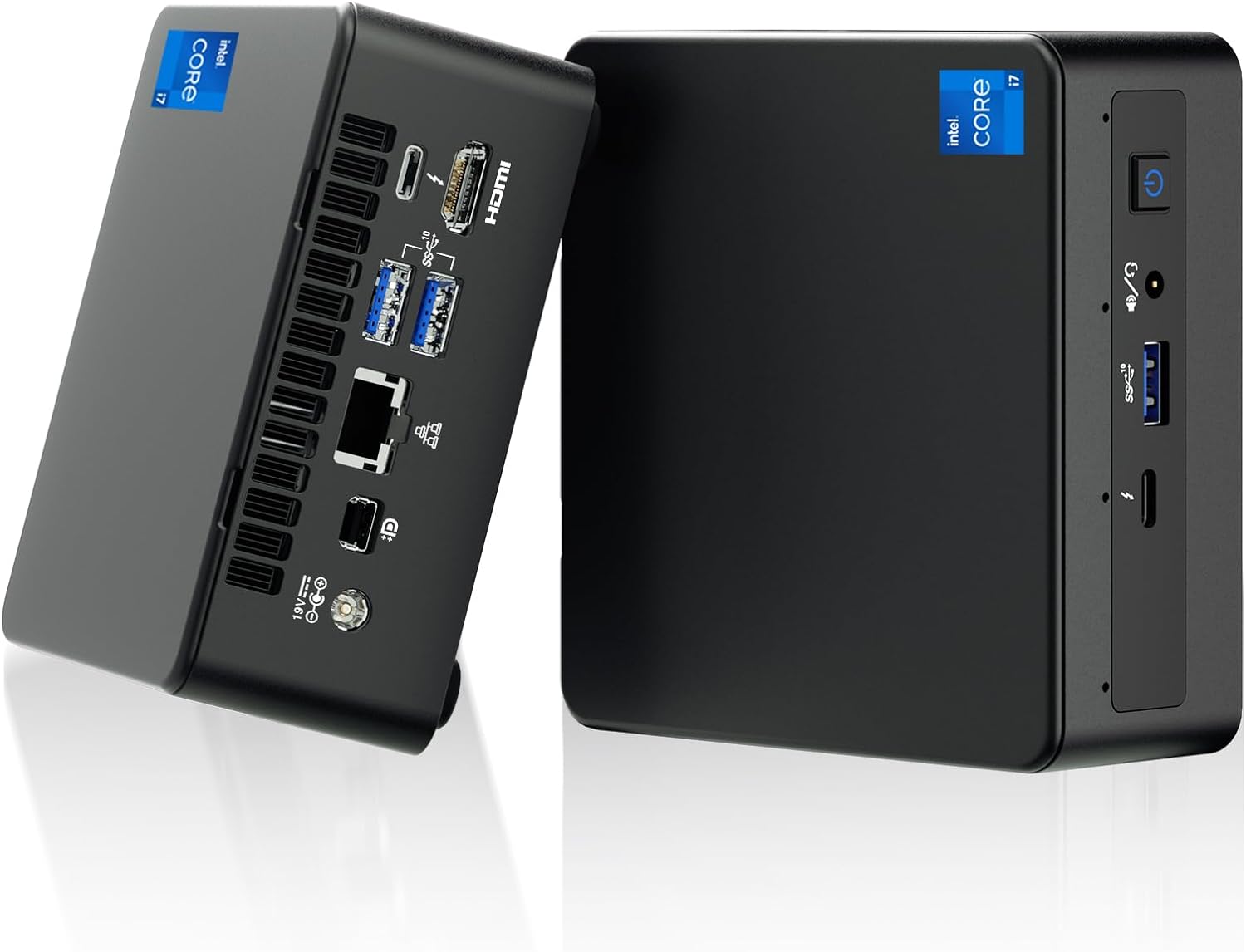
Figura 1: Quddiem u wara view of the Intel NUC 11 Mini PC, showcasing id-disinn kompatt tiegħu u l-portijiet varji tiegħu.
2. X'hemm fil-Kaxxa
Ivverifika li l-komponenti kollha huma preżenti fl-imballaġġ qabel ma tipproċedi bis-setup.
- Intel NUC 11 Mini PC
- Adapter tal-Enerġija
- Korda AC tal-Istati Uniti
- Muntatura VESA
- Mounting Screws and M.2 Screws (10 pieces)
- Manwal ta' Istruzzjoni
- Safety Information Documents (2 pieces)

Figure 2: All items included in the Intel NUC 11 Mini PC packaging, including the mini PC, power adapter, VESA mount, and documentation.
3. Karatteristiċi tal-prodott
The Intel NUC 11 NUC11PAHi7 Mini PC offers a range of advanced features for various computing needs.
- Proċessur: Intel Core i7-1165G7 tal-11-il Ġenerazzjoni (12M Cache, sa 4.70 GHz)
- Grafika: Intel Iris Xe Graphics, supporting 4K UHD and quad-screen display.
- Memorja: 16GB SODIMM DDR4 (3200MHz), dual-channel, upgradeable to 64GB.
- Ħażna: 512GB M.2 PCIe 2280 SSD, with support for external 2.5-inch 7mm HDD expansion.
- Konnettività:
- Żewġ portijiet Thunderbolt 3
- Port HDMI 2.0b
- Mini DisplayPort 1.4 port
- Three USB 3.1 Gen2 ports
- Intel Ethernet Controller i225-V (Gigabit 2500Mb/s)
- Intel Wi-Fi 6
- Bluetooth 5.2
- Slot SDXC b'appoġġ UHS-II
- Jack headset stereo ta 'quddiem ta' 3.5mm
- Front consumer infrared port
- Sistema Operattiva: Preinstalled with Windows 11 Pro.
- Karatteristiċi addizzjonali: Beam-forming, far-field, quad-mic array with Alexa support, Kensington Lock Ready.

Figura 3: Aktarview of the Intel NUC 11's core specifications, highlighting the i7 processor, Iris Xe graphics, memory, storage, and network capabilities.

Figure 4: Illustration of the various input/output ports available on the Intel NUC 11, including Thunderbolt 3, HDMI, Mini DisplayPort, USB, LAN, and an SD Card slot.
4. Gwida ta' Setup
4.1 Konnessjoni Inizjali
- Qabbad id-Displej: Connect your monitor(s) to the HDMI, Mini DisplayPort, or Thunderbolt 3 ports using appropriate cables. The NUC supports up to four displays.
- Ikkonnettja l-Periferali: Plug in your keyboard, mouse, and any other USB devices into the available USB 3.1 Gen2 ports.
- Konnessjoni tan-Netwerk: For a wired connection, connect an Ethernet cable to the LAN port. For wireless, ensure your Wi-Fi network is available.
- Konnessjoni tal-Enerġija: Connect the power adapter to the DC-in port on the NUC and then plug the AC cord into a power outlet.
4.2 Tixgħel
Press the power button located on the front of the unit. The system will boot into Windows 11 Pro. Follow the on-screen instructions for initial Windows setup if this is the first time powering on.
5. Istruzzjonijiet Operattivi
5.1 Operazzjoni Bażika
- Sistema Operattiva: Your Intel NUC comes preinstalled with Windows 11 Pro. Familiarize yourself with the Windows interface for daily tasks.
- Konfigurazzjoni ta' Wiri Multiplu: Utilize the multiple display outputs (HDMI, Mini DisplayPort, Thunderbolt 3) to extend your desktop across several monitors for enhanced productivity.
- Konnettività Wireless: Connect to Wi-Fi 6 networks for high-speed wireless internet access. Use Bluetooth 5.2 for connecting wireless peripherals like headphones or keyboards.
- USB and Thunderbolt Ports: Use the USB 3.1 Gen2 ports for high-speed data transfer with external drives and peripherals. The Thunderbolt 3 ports offer even faster data transfer, video output, and power delivery capabilities.

Figure 5: The Intel NUC 11 connected to a monitor, illustrating its advanced networking capabilities with WiFi 6 and Bluetooth 5.2.
6. Manutenzjoni u Aġġornamenti
6.1 Manutenzjoni Ġenerali
- Żomm l-apparat f'żona b'ventilazzjoni tajba biex tevita sħana żejda.
- Naddaf il-barra regolarment b'ċarruta ratba u niexfa. Evita prodotti tat-tindif likwidi.
- Ensure software and drivers are updated for optimal performance and security.
6.2 Memory and Storage Upgrades
The Intel NUC 11 allows for memory and storage expansion:
- RAM: The device supports dual-channel DDR4 SODIMM memory, upgradeable to a maximum of 64GB (2 x 32GB, up to 3200MHz).
- SSD: The preinstalled 512GB M.2 PCIe 2280 SSD can be upgraded. Additionally, the unit supports an external 2.5-inch 7mm HDD expansion (not included) for increased storage capacity.
Caution: Before performing any internal upgrades, ensure the device is powered off and unplugged. Refer to the detailed instructions in the Intel NUC technical documentation for proper installation procedures. Removing memory and SSD before aftermarket service is recommended for privacy and security.

Figure 6: Illustration of the internal components, specifically the 512GB M.2 SSD and 16GB DDR4 RAM modules, indicating upgrade potential.
7 Issolvi l-problemi
Din it-taqsima tipprovdi soluzzjonijiet għal kwistjonijiet komuni li tista’ tiltaqa’ magħhom.
- Ebda Qawwa:
- Kun żgur li l-adapter tal-enerġija huwa konness sew kemm man-NUC kif ukoll ma' sokit tal-enerġija li jaħdem.
- Ivverifika li s-sokit tal-enerġija jaħdem billi tittestjah b'apparat ieħor.
- Ebda Display:
- Check all display cable connections (HDMI, Mini DisplayPort, Thunderbolt 3) between the NUC and the monitor.
- Kun żgur li l-monitor ikun mixgħul u ssettjat għas-sors tad-dħul korrett.
- Ipprova qabbad ma' display differenti jew uża kejbil differenti.
- Ebda Konnessjoni tal-Internet:
- Għal konnessjonijiet bil-fili, kun żgur li l-kejbil Ethernet huwa konness sew u li r-router tiegħek qed jaħdem.
- For Wi-Fi, check if Wi-Fi is enabled in Windows settings and if you are connected to the correct network with the right password.
- Restart your router and the NUC.
- Tnaqqis tas-Sistema:
- Agħlaq l-applikazzjonijiet bla bżonn li jkunu qed jaħdmu fl-isfond.
- Iċċekkja t-Task Manager għal proċessi li jikkunsmaw ħafna CPU jew RAM.
- Kun żgur li l-Windows u s-sewwieqa huma aġġornati.
- Consider performing a disk cleanup or defragmentation (for HDDs, not SSDs).
8. Speċifikazzjonijiet
| Karatteristika | Dettall |
|---|---|
| Proċessur | 11th Gen Intel Core i7-1165G7 (2.8 GHz, up to 4.7 GHz Turbo, 4 cores, 8 threads, 12 MB Cache) |
| Grafika | Grafika Intel Iris Xe (Integrata) |
| RAM | 16 GB DDR4 (3200MHz), expandable to 64 GB |
| Ħażna | 512 GB M.2 PCIe SSD (NVMe PCIe Gen4) |
| Sistema Operattiva | Windows 11 Pro |
| Konnettività bla fili | Intel Wi-Fi 6, Bluetooth 5.2 |
| Konnettività bil-fili | Intel Ethernet Controller i225-V (2.5 Gigabit) |
| Portijiet (ta' Quddiem) | 1x USB 3.1 Gen2, 1x Thunderbolt 3, 3.5mm Headset Jack, Power Button |
| Portijiet (ta' wara) | 2x USB 3.1 Gen2, 1x Thunderbolt 3, HDMI 2.0b, Mini DisplayPort 1.4, LAN, DC-in |
| Other Ports/Slots | SDXC slot with UHS-II support, Kensington Security Slot, Front Consumer Infrared Port |
| Dimensjonijiet (LxWxH) | 4.6 x 4.4 x 2 pulzieri |
| Piż | 3.1 liri (madwar 1.4 kg) |
| Kulur | Iswed |

Figure 7: A detailed comparison table outlining the specifications for different Intel NUC 11 Performance Mini PC and Kit configurations, including processor, graphics, memory, and storage options.
9. Informazzjoni dwar is-Sigurtà
Please observe the following safety guidelines to prevent damage to the device or personal injury.
- Use only the provided power adapter and AC cord.
- Tesponix l-apparat għal temperaturi estremi, umdità, jew dawl tax-xemx dirett.
- Evita li tpoġġi l-apparat ħdejn sorsi ta’ sħana jew f’żoni b’ventilazzjoni ħażina.
- Do not open the chassis unless performing authorized upgrades (RAM/SSD) and always disconnect power first.
- Żomm l-apparat 'il bogħod minn likwidi.
- If you encounter any issues, refer to the troubleshooting section or contact support before attempting repairs.

Figure 8: Important safety warnings and precautions provided in multiple languages, covering electrical safety, environmental conditions, and proper usage.
10. Garanzija u Appoġġ
Your Intel NUC 11 Mini PC comes with a comprehensive warranty and support:
- Garanzija: A 3-year global warranty from Intel and GEEK+ is provided. This includes a 3-year free Warranty Service from Intel for the NUC Barebone part. RAM, SSD, and OS are covered by a three-year warranty provided by GEEK+.
- Appoġġ: For issues with the NUC Barebone part, you can contact local Intel NUC after-sales locations directly. For other inquiries or assistance, send a message to GEEK+ for help.
- Privatezza u Sigurtà: To ensure your privacy and security, it is recommended to remove the Memory and SSD before sending the unit for aftermarket service.
For further assistance, please refer to the official Intel NUC support websit jew ikkuntattja lill-bejjiegħ bl-imnut tiegħek.


