Prodott Overview
The Cosmic Byte CB-GK-22 Veritas is a Tenkeyless (TKL) membrane keyboard designed for various computing tasks, including gaming. It features RGB LED backlighting with multiple effects, double injection keycaps for durability, and 25-key anti-ghosting capabilities.

Figura 1: Minn fuq għal isfel view of the Cosmic Byte CB-GK-22 Veritas TKL Membrane Keyboard with RGB lighting activated.
Setup Istruzzjonijiet
Follow these steps to set up your Cosmic Byte CB-GK-22 Veritas keyboard:
- Ħoll it-Tastiera: Oħroġ bir-reqqa t-tastiera u kwalunkwe aċċessorji inklużi mill-imballaġġ.
- Qabbad mal-Kompjuter: Sib port USB disponibbli fuq il-kompjuter tiegħek. Daħħal il-konnettur USB tat-tastiera fil-port USB.
- Installazzjoni tas-sewwieq: The keyboard is plug-and-play. Your operating system (Windows, Linux, macOS) should automatically detect and install the necessary drivers. No additional software installation is typically required.
- Ivverifika l-Funzjonalità: Once connected, the keyboard's RGB lighting should illuminate. Test typing in a text editor to ensure all keys are responsive.
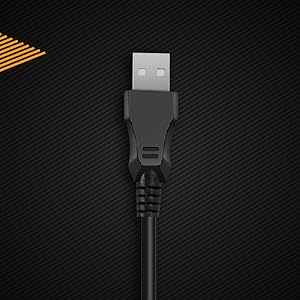
Figura 2: Close-up view of the keyboard's USB connector, ready for connection to a computer.

Figure 3: The keyboard is compatible with various operating systems, including Windows, Linux, and macOS.
Istruzzjonijiet Operattivi
Funzjonijiet Bażiċi tat-Tastiera
The CB-GK-22 Veritas functions as a standard TKL keyboard. All keys perform their labeled functions. The keyboard features 25-key anti-ghosting, allowing multiple key presses to be registered simultaneously, which is beneficial for fast-paced typing and gaming.
Kontroll tad-Dawl ta' Wara RGB
The keyboard features 7-color RGB backlighting with various effects. Use the following key combinations to control the lighting:
- Aġġustament tal-luminożità: Agħfas Fn + Paġna Fuq to increase brightness (5 levels). Press Fn + Paġna 'l isfel to decrease brightness (5 levels).
- Effetti tad-dawl ta' wara: The keyboard supports 9 backlight effects, including 6 dazzling effects. Specific key combinations for cycling through effects are typically indicated on the keyboard itself or in a quick start guide. Common combinations include Fn + Scroll Lock or Fn + Daħħal.
- Sonic Spectrum Mode: This mode allows the RGB lighting to react to ambient sound. Activate this mode using the designated key combination, often Fn + Dar or Fn + Tmiem.

Figure 4: The keyboard features a Tenkeyless layout and includes Sonic Spectrum and sound-reactive LED lighting modes.
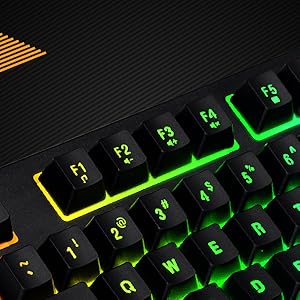
Figure 5: Detail of the function keys (F1-F12) with active RGB backlighting.
Double Injection Keycaps
The keycaps are manufactured using a double injection process, which ensures that the legends (characters on the keys) are scratch-resistant and will not fade over time. This design also makes the keys easier to clean.
Manutenzjoni
Manutenzjoni xierqa tgħin biex testendi l-ħajja tat-tastiera tiegħek:
- Tindif regolari: Use a soft, dry cloth to wipe down the keycaps and keyboard surface. For dust and debris between keys, use compressed air.
- Tindif fil-Fond: Għal ħmieġ iebes, neħħi ftitampen a cloth with water or a mild, non-abrasive cleaning solution. Ensure no liquid enters the keyboard.
- Evita t-tixrid: Keep liquids away from the keyboard to prevent damage to internal components. If a spill occurs, immediately disconnect the keyboard and allow it to dry completely before reconnecting.
- Ħażna: When not in use for extended periods, store the keyboard in a clean, dry environment away from direct sunlight or extreme temperatures.
Issolvi l-problemi
Jekk tiltaqa' ma' problemi bit-tastiera tiegħek, irreferi għas-soluzzjonijiet komuni li ġejjin:
- It-Tastiera Mhux Tirrispondi:
- Kun żgur li l-kejbil USB huwa konness sew kemm mat-tastiera kif ukoll mal-kompjuter.
- Ipprova qabbad it-tastiera ma' port USB differenti fuq il-kompjuter tiegħek.
- Ittestja t-tastiera fuq kompjuter ieħor biex tiddetermina jekk il-problema hijiex fit-tastiera jew fil-kompjuter oriġinali.
- Ibda mill-ġdid il-kompjuter tiegħek.
- Id-Dawl ta' Wara Mhux Jaħdem jew Mhux Korrett:
- Check if the brightness is set to the lowest level. Use Fn + Paġna Fuq biex tiżdied il-luminożità.
- Cycle through backlight effects using the designated key combinations (e.g., Fn + Scroll Lock or Fn + Daħħal).
- Ensure no software is overriding the keyboard's lighting settings (though this keyboard typically does not require software).
- Ċwievet Mhux Reġistrati jew Ghosting:
- Clean around the affected keys to remove any debris that might be obstructing the key mechanism.
- The keyboard supports 25-key anti-ghosting. If more than 25 keys are pressed simultaneously, some inputs may not register.
Speċifikazzjonijiet
| Karatteristika | Dettall |
|---|---|
| Isem tal-Mudell | CB-GK-22 Veritas |
| Brand | Byte Kożmiku |
| Tip ta' Tastiera | TKL Membrane Keyboard |
| Dawl ta' wara | 7-Color RGB Backlit, 9 Effects, Sonic Spectrum Mode |
| Livelli ta 'luminożità | 5 Livelli |
| Kontra l-Ghosting | 25 Ċwievet |
| Tappijiet ewlenin | Injezzjoni Doppja |
| Konnettività | USB |
| Dimensjonijiet tal-Prodott | 37.2 x 15.1 x 3.7 ċm |
| Piż tal-oġġett | 629 g |
| Komponenti Inklużi | Cable USB |
| Lingwa | Ingliż |
| ASIN | B09K5GYWBH |
Garanzija u Appoġġ
Informazzjoni dwar Garanzija
The Cosmic Byte CB-GK-22 Veritas TKL Membrane Keyboard comes with a Garanzija limitata ta 'sena mid-data tax-xiri. Din il-garanzija tkopri difetti fil-manifattura taħt użu normali. Ma tkoprix ħsara kkawżata minn użu ħażin, inċidenti, modifiki mhux awtorizzati, jew xedd u kedd normali.
Jekk jogħġbok żomm il-prova tax-xiri tiegħek għal pretensjonijiet ta' garanzija.
Appoġġ għall-Klijent
For technical assistance, warranty claims, or any product-related inquiries, please contact Cosmic Byte customer support:
- Kuntatt tal-manifattur: 1800 31300 7700
- Brand Websit: Visit the official Cosmic Byte websit għal riżorsi u appoġġ addizzjonali.


