1. Introduzzjoni
Thank you for choosing the TechniSat DIGITRADIO CD 2GO BT. This portable device combines a CD player with DAB+ and FM radio reception, along with Bluetooth connectivity, offering versatile audio entertainment. This manual provides essential information for the safe and efficient use of your device, including setup, operation, and maintenance.
Jekk jogħġbok aqra dan il-manwal bir-reqqa qabel ma tuża l-apparat u żommu għal referenza futura.
2. Informazzjoni dwar is-Sigurtà
Osserva l-prekawzjonijiet ta' sigurtà li ġejjin biex tevita ħsara lill-apparat jew korriment lilek innifsek:
- Tesponix l-apparat għax-xita, umdità, jew temperaturi estremi.
- Evita li tpoġġi l-apparat ħdejn sorsi tas-sħana jew fid-dawl tax-xemx dirett.
- Tiftaħx l-apparat casing. Irreferi s-servizz kollu lil persunal kwalifikat.
- Uża biss l-adapter tal-enerġija u l-batteriji speċifikati.
- Kun żgur li jkun hemm ventilazzjoni xierqa madwar l-apparat waqt it-tħaddim.
- Evita li tisma' f'volumi għoljin wisq għal perjodi twal biex tevita ħsara fis-smigħ.
3. Kontenut tal-Pakkett
Jekk jogħġbok iċċekkja li l-oġġetti kollha huma preżenti fil-pakkett:
- TechniSat DIGITRADIO CD 2GO BT unit
- Headphones
- 2 x BL5C rechargeable batteries
- External power cable (AC adapter)
- Manwal għall-Utent (dan id-dokument)
4. Prodott Aktarview
Familiarize yourself with the main components and controls of your DIGITRADIO CD 2GO BT.

Figura 4.1: Quddiem view of the TechniSat DIGITRADIO CD 2GO BT, showing the display, navigation buttons (ON/OFF OK, SKIP UP, SKIP DOWN), playback controls (PLAY/PAUSE, STOP/SEARCH), and function buttons (MENU, EQ/BT, MODE).
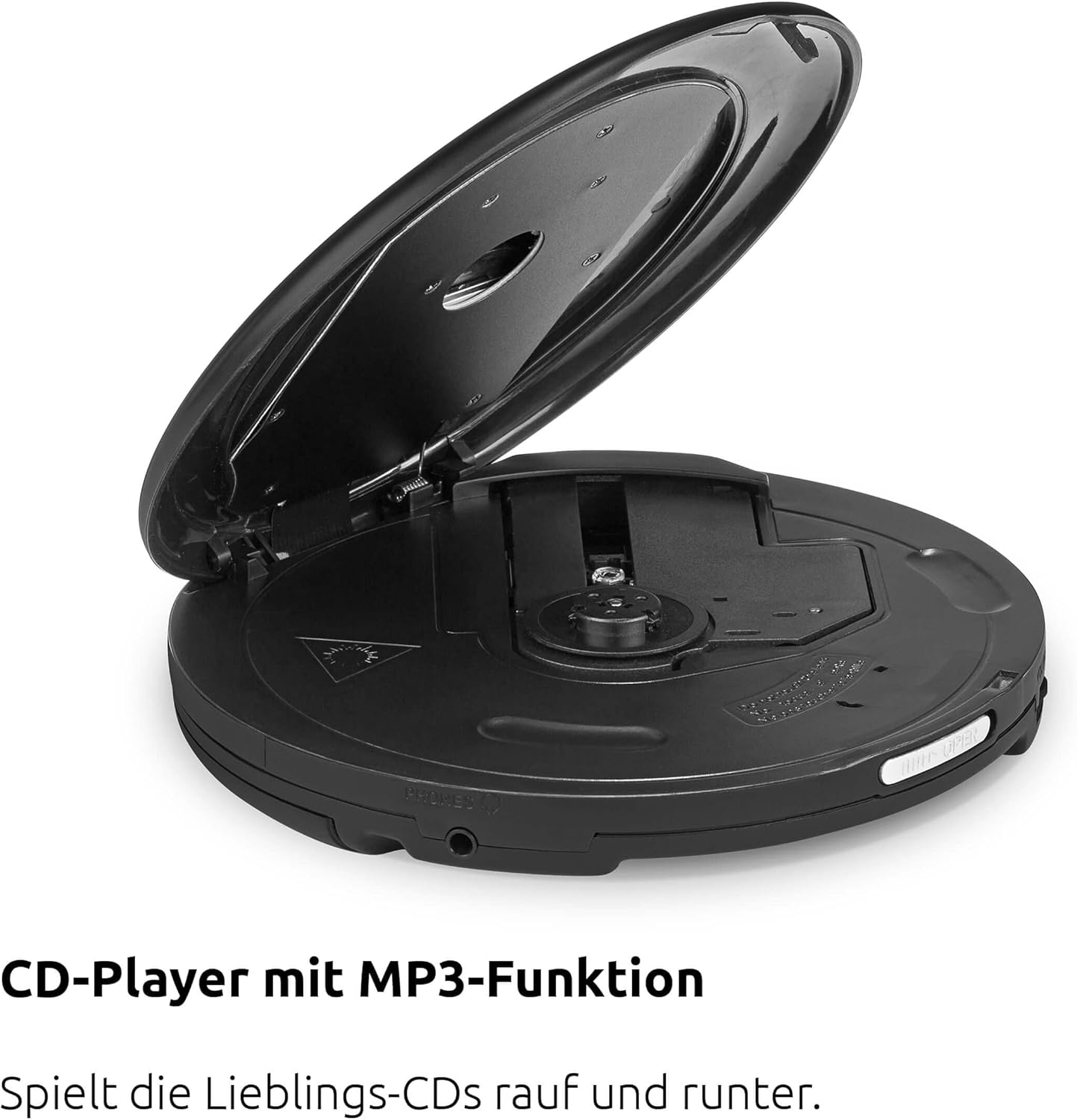
Figura 4.2: Fuq view of the device with the CD compartment open, revealing the CD spindle and loading area. This is where audio CDs, MP3 CDs, CD-R, and CD-RW discs are inserted.

Figura 4.3: Ġenb view illustrating the 3.5mm headphone jack, which also serves as the antenna for FM and DAB+ radio reception when headphones are connected.
Kontrolli:
- ON/OFF OK: Power on/off, confirm selection.
- DABBA/PAWŻA: Ibda jew waqqaf id-daqq.
- STOP/SEARCH: Stop playback, initiate station search in radio mode.
- SKIP UP / SKIP DOWN: Skip tracks on CD, navigate menus, tune radio stations.
- MENU: Aċċess għall-għażliet tal-menu.
- EQ/BT: Access equalizer settings, activate Bluetooth pairing.
- MODALITÀ: Switch between CD, DAB+, FM, and Bluetooth modes.
5. Setup
5.1. Installazzjoni tal-batterija
The DIGITRADIO CD 2GO BT operates on two BL5C rechargeable batteries. To install:
- Sib il-kompartiment tal-batterija fuq in-naħa ta' taħt tal-apparat.
- Iftaħ l-għatu tal-kompartiment tal-batterija.
- Insert the two BL5C batteries, ensuring correct polarity (+/-).
- Agħlaq l-għatu tal-kompartiment tal-batterija sew.
5.2. It-Tħaddim tal-Apparat
You can power the device using the included AC adapter or the installed rechargeable batteries.
- Qawwa AC: Connect the external power cable to the DC IN port on the device and plug the adapter into a wall outlet.
- Qawwa tal-batterija: Ensure the batteries are charged. The device will automatically switch to battery power when disconnected from AC.
5.3. L-Ewwel Tixgħil
Agħfas u żomm il- ON/OFF OK button to power on the device. The display will illuminate. If this is the first time powering on, the device may prompt you for initial setup options such as language or perform an automatic DAB+ station scan.
6. Istruzzjonijiet Operattivi
6.1. CD Playback
The DIGITRADIO CD 2GO BT supports audio CDs, MP3 CDs, CD-R, and CD-RW formats.

Figura 6.1: The portable design of the DIGITRADIO CD 2GO BT makes it suitable for on-the-go use.
- Iftaħ l-għatu tal-kompartiment tas-CD.
- Place a CD onto the spindle with the label side facing up.
- Agħlaq l-għatu tal-kompartiment tas-CD sew sakemm tikklikkja.
- Agħfas il- MODALITÀ sakemm tintgħażel il-modalità "CD".
- Agħfas il- DĦABBA/PAWŻA buttuna biex tibda d-daqq.
- Użu SKIP UP u AQBEŻ NIŻEL biex tinnaviga bejn il-binarji.
- Agħfas DĦABBA/PAWŻA to pause, and STOP/SEARCH biex twaqqaf daqq.
Funzjoni ta' Reżume: The player will automatically resume playback from the last listened position after being turned off and on again, ideal for audiobooks.
Anti-Shock Protection (ASP): This feature helps prevent playback interruptions during movement, ensuring a smooth listening experience.

Figura 6.2: The Anti-Shock Protection (ASP) feature ensures uninterrupted audio playback even during activities like cycling or walking.
6.2. Radju DAB+
DAB+ (Digital Audio Broadcasting Plus) offers high-quality digital radio reception.

Figura 6.3: Enjoy a wide variety of digital radio programs with DAB+ reception.
- Connect the included headphones to the 3.5mm jack; they act as the antenna.
- Agħfas il- MODALITÀ button until "DAB+" mode is selected.
- If this is the first time in DAB+ mode, the device will perform an automatic scan for available stations.
- Użu SKIP UP u AQBEŻ NIŻEL to browse through available DAB+ stations.
- To save a favorite station, press and hold the MENU button, navigate to "Preset Store", select a preset number (1-10), and press ON/OFF OK biex tikkonferma.
- To recall a favorite station, press the MENU button, navigate to "Preset Recall", select the desired preset, and press ON/OFF OK.
6.3. Radju FM
For traditional analog radio reception.
- Connect the included headphones to the 3.5mm jack; they act as the antenna.
- Agħfas il- MODALITÀ button until "FM" mode is selected.
- Agħfas STOP/SEARCH to automatically scan for the next available FM station.
- Alternattivament, uża SKIP UP u AQBEŻ NIŻEL għall-irfinar manwali.
- To save a favorite station, press and hold the MENU button, navigate to "Preset Store", select a preset number (1-10), and press ON/OFF OK biex tikkonferma.
- To recall a favorite station, press the MENU button, navigate to "Preset Recall", select the desired preset, and press ON/OFF OK.
6.4. Konnessjoni Bluetooth
Connect your DIGITRADIO CD 2GO BT to Bluetooth headphones or speakers.
- Agħfas il- MODALITÀ button until "Bluetooth" mode is selected. The device will enter pairing mode, indicated by a flashing Bluetooth icon on the display.
- Activate Bluetooth on your external audio device (e.g., headphones, speaker) and set it to pairing mode.
- On the DIGITRADIO CD 2GO BT, press and hold the EQ/BT button to initiate a search for nearby Bluetooth devices.
- Select your desired device from the list on the DIGITRADIO CD 2GO BT's display using SKIP UP/DOWN u tikkonferma ma ON/OFF OK.
- Once connected, the Bluetooth icon will become solid. Audio will now be streamed to the connected device.
6.5. Kontroll tal-Volum
Adjust the volume using the dedicated volume buttons (often integrated with SKIP UP/DOWN or separate buttons, refer to your device's specific button layout if different from general description). Note that due to European standards, a default volume limitation is active. To deactivate this and increase the maximum volume, press and hold the MENU button for a few seconds. Navigate through the menu options to find the "Volume Limit" setting and adjust it as desired. Refer to page 17 of the original printed manual for precise instructions on this setting.
6.6. Settings Equalizer
Ippersonalizza l-esperjenza awdjo tiegħek bl-ekwalizzatur integrat.
- Agħfas il- EQ/BT button (short press) to cycle through preset equalizer modes (e.g., Pop, Rock, Jazz, Classic, Flat).
- Some models may offer a custom equalizer setting, allowing manual adjustment of bass and treble. Consult the device display for available options.
7. Manutenzjoni
7.1. Tindif
Biex iżżomm id-dehra u l-funzjonalità tat-tagħmir tiegħek:
- Imsaħ il-barra b'ċarruta ratba u niexfa.
- Għal marki iebsa, uża ftit damp ċarruta b'deterġent ħafif, imbagħad imsaħ niexef.
- Tużax prodotti tat-tindif li joborxu, solventi, jew alkoħol, għax dawn jistgħu jagħmlu ħsara lill-wiċċ.
- Naddaf il-lenti tas-CD perjodikament b'diska speċjalizzata għat-tindif tal-lentijiet tas-CD.
7.2. Kura tal-batterija
Biex ittawwal il-ħajja tal-batterija:
- Iċċarġja kompletament il-batteriji qabel l-ewwel użu.
- Jekk l-apparat ma jkunx se jintuża għal perjodu twil ta' żmien, neħħi l-batteriji biex tevita t-tnixxija.
- Armi batteriji użati skont ir-regolamenti lokali.
8 Issolvi l-problemi
If you encounter issues with your DIGITRADIO CD 2GO BT, refer to the following table:
| Problema | Kawża Possibbli | Soluzzjoni |
|---|---|---|
| L-apparat ma jixgħelx. | Batteries are depleted or incorrectly inserted. AC adapter not connected or faulty. | Check battery charge and polarity. Ensure AC adapter is securely connected and functional. |
| L-ebda ħoss mill-headphones. | Headphones not properly connected. Volume too low. Volume limit active. | Ensure headphones are fully plugged in. Increase volume. Deactivate volume limit (see Section 6.5). |
| Is-CD jaqbeż jew ma jindaqqx. | CD is dirty, scratched, or inserted incorrectly. CD compartment not closed. | Clean the CD. Ensure it is inserted correctly. Close the CD compartment firmly. |
| Riċeviment tar-radju fqir (DAB+/FM). | Headphones not connected or poorly positioned. Weak signal in current location. | Ensure headphones are connected and fully extended. Try repositioning the device or moving to a different location. |
| Tqabbil Bluetooth ifalli. | Device not in pairing mode. External device too far or not in pairing mode. | Kun żgur li ż-żewġ apparati jinsabu fil-modalità ta' tqabbil u fil-firxa. Ipprova erġa' ibda ż-żewġ apparati. |
9. Speċifikazzjonijiet
| Karatteristika | Dettall |
|---|---|
| Isem tal-Mudell | DIGITRADIO CD 2GO BT |
| Numru tal-Mudell | 0000/3970 |
| Brand | TechniSat |
| Teknoloġija tal-Konnettività | Bluetooth |
| Karatteristiċi Speċjali | Replaceable Battery, Anti-Shock Function, Resume Function |
| Apparati Kompatibbli | Headphones |
| Formati Awdjo Appoġġjati | MP3, WMA, AAC |
| Numru ta' Diski | 1 |
| Tip ta' Konnettur | 3.5 mm Jack |
| Sors tal-Enerġija | 2 x Lithium-ion batteries (included), AC adapter |
| Batterija Rikarikabbli | Iva |
| Użu | Ġewwa u Barra |
| Dimensjonijiet (W x H x D) | 14 x 2.50 x 14 cm (approximate, from feature bullets) |
10. Garanzija u Appoġġ
For warranty information and customer support, please refer to the warranty card included with your product or visit the official TechniSat websit. Żomm il-prova tax-xiri tiegħek għal kwalunkwe talba ta' garanzija.
Please note that spare parts availability is currently listed as "unavailable" according to product specifications. Software updates are also listed as "information not available".


