Introduzzjoni
This user manual provides comprehensive instructions for the operation and maintenance of your Albrecht DR 86 Small Senior Radio. Please read this manual carefully before using the device to ensure proper function and safety. Keep this manual for future reference.
Istruzzjonijiet tas-Sigurtà
- Do not expose the radio to water, moisture, or extreme temperatures.
- Evita li twaqqa’ jew tissuġġetta l-apparat għal impatti qawwija.
- Tippruvax tiżżarma jew issewwi r-radju int stess. Irreferi għal kull manutenzjoni f'idejn persunal kwalifikat.
- Uża biss il-provvista tal-enerġija pprovduta għall-iċċarġjar.
- Keep the radio away from heat sources and direct sunlight.
- Aċċerta ruħek li jkun hemm ventilazzjoni xierqa meta tħaddem l-apparat.
Kontenut tal-Pakkett
Jekk jogħġbok iċċekkja li l-oġġetti kollha huma preżenti fil-pakkett:
- Radju Albrecht DR 86
- Integrated 2200 mAh Battery (pre-installed)
- Unità tal-Provvista tal-Enerġija
- Manwal għall-Utent (dan id-dokument)
Prodott Overview
Familiarize yourself with the main components and controls of your Albrecht DR 86 radio.

Figura 1: Quddiem view of the Albrecht DR 86 radio, showing the display, speaker grille, and control buttons. Key controls include the power button, menu button, OK button, navigation/volume knob, and dedicated preset buttons (1-5).
Kontrolli u Wiri
- Display LCD ta '2.4 pulzieri: Shows station information, time, menu options, and battery status. Designed for clear readability with large fonts.
- Buttuna tal-Qawwa (●): Ixgħel jew jitfi r-radju.
- Buttuna tal-menu: Accesses the radio's settings and options.
- Buttuna OK: Jikkonferma l-għażliet fil-menù.
- Navigation/Volume Knob: Rotates to navigate menus or adjust volume. Press to select.
- Buttuna DAB/FM: Switches between DAB+ and FM radio modes.
- Buttuna BT: Activates Bluetooth mode for music streaming.
- Buttuni Predefiniti (1-5): Directly access your stored favorite stations.
Portijiet u Konnessjonijiet
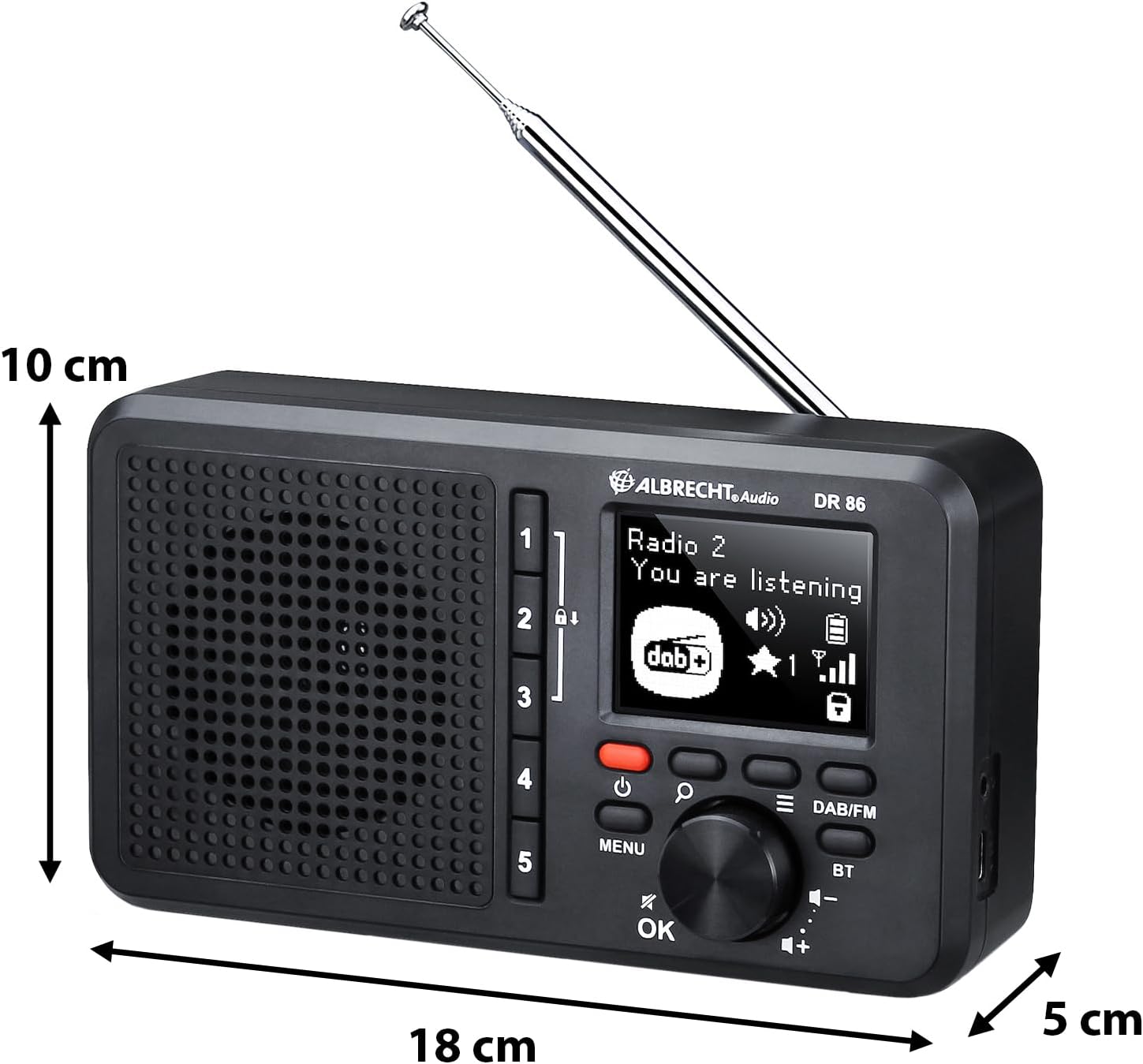
Figura 2: Ġenb view of the Albrecht DR 86 radio, illustrating its compact dimensions and the location of the telescopic antenna and USB-C charging port.
- Socket tal-Iċċarġjar USB-C: For connecting the power supply to charge the integrated battery.
- Jack tal-headphone: For private listening (headphones not included).
- Antenna teleskopika: Iġġebbed kompletament għal riċezzjoni ottimali tar-radju.
Setup
L-Ewwel Tixgħel u l-Iċċarġjar
- Connect the provided power supply to the USB-C charging socket on the radio and plug it into a wall outlet. The battery icon on the display will indicate charging status.
- Agħfas u żomm il-buttuna Power (●) to turn on the radio.
- Upon first power-on, the radio will automatically perform a station scan for DAB+ and FM stations. This may take a few minutes.
Setting Up Senior Mode
The Senior Mode simplifies operation by limiting functions to only essential controls, preventing accidental changes. Follow these steps to activate it:
- Ensure the radio has completed its initial station scan.
- Tune to your desired DAB+ or FM stations using the standard mode (if not already in Senior Mode).
- To store a favorite station, tune to the station, then press and hold one of the Preset buttons (1-5) until "Preset Saved" appears on the display. Repeat for up to 5 favorite stations.
- To enable Senior Mode, navigate through the menu (using the Menu button and Navigation knob) to find the "Senior Mode" option and select "On". Once activated, only the Power button, Volume control, and Preset buttons (1-5) will be active.
Operazzjoni
Switching Operating Modes (Senior vs. Standard)
The radio offers two operating modes:
- Senior Mode: Provides simplified operation with only power on/off, volume adjustment, and direct access to 5 preset stations. All other settings are locked to prevent accidental changes.
- Modalità Standard: Offers full functionality, including station search, station list browsing, and access to all settings. This mode is used for initial setup and advanced configurations.
To switch between modes, access the "Senior Mode" option in the system settings menu. Note that Senior Mode can only be disabled from Standard Mode.
Operazzjoni tar-Radju DAB+
- Agħfas il- DAB / FM buttuna biex tagħżel il-modalità DAB+.
- If a station scan has not been performed recently, the radio may initiate one.
- Rotate the Navigation knob to browse available DAB+ stations. Press the knob or OK biex tagħżel stazzjon.
- To save a favorite station, tune to it, then press and hold one of the Preset buttons (1-5).
Operazzjoni tar-Radju FM
- Agħfas il- DAB / FM buttuna biex tagħżel il-mod FM.
- Rotate the Navigation knob to manually tune to a frequency.
- To auto-scan for the next available station, press and hold the Navigation knob briefly.
- To save a favorite station, tune to it, then press and hold one of the Preset buttons (1-5).
Music Streaming via Bluetooth

Figura 3: The Albrecht DR 86 radio connected via Bluetooth to a smartphone, ready for music streaming.
- Agħfas il- BT button on the radio to enter Bluetooth pairing mode. The display will show "Pairing".
- On your smartphone or tablet, enable Bluetooth and search for available devices. Select "Albrecht DR 86" from the list.
- Once paired, the radio will indicate a successful connection. You can now stream audio from your device to the radio.
- Control playback (play/pause, skip tracks) from your connected device. Volume can be adjusted on both the radio and your device.
Iċċarġjar u Batterija
The Albrecht DR 86 features an integrated 2200 mAh Lithium-Ion battery for portable operation.
- Iċċarġjar: Connect the radio to the power supply using the USB-C port. The battery indicator on the display will show charging progress.
- Ħajja tal-batterija: A fully charged battery provides approximately 7 hours of playback at 50% volume. Actual battery life may vary depending on volume level and usage.
- Kura tal-batterija: For optimal battery longevity, avoid fully discharging the battery frequently. If storing the radio for an extended period, charge it to about 50% before storage.
Manutenzjoni
- Tindif: Use a soft, dry cloth to clean the radio's exterior. Do not use abrasive cleaners, waxes, or solvents.
- Ħażna: Aħżen ir-radju f'post frisk u niexef 'il bogħod mix-xemx diretta u minn temperaturi estremi meta ma tkunx qed tużah għal perjodi twal.
- Antenna: Immaniġġja l-antenna teleskopika b'attenzjoni biex tevita li titgħawweġ jew tinkiser.
Issolvi l-problemi
| Problema | Kawża Possibbli | Soluzzjoni |
|---|---|---|
| Ir-radju ma jixgħelx. | Il-batterija hija skarikata. | Connect the radio to the power supply and charge the battery. |
| L-ebda ħoss jew volum baxx. | Volume is too low; Mute is active; Poor signal. | Increase volume; Check if headphones are connected; Extend antenna fully; Perform a station scan. |
| Riċeviment tar-radju fqir (DAB+/FM). | Antenna mhux estiża; Żona b'sinjal dgħajjef. | Fully extend the telescopic antenna. Try repositioning the radio. Perform a new station scan. |
| Tqabbil Bluetooth ifalli. | Radio not in pairing mode; Device too far; Bluetooth disabled on device. | Ensure radio is in BT pairing mode; Move devices closer; Enable Bluetooth on your smartphone/tablet. |
| Buttons are unresponsive (Senior Mode). | Radio is in Senior Mode. | This is normal behavior in Senior Mode. To access full functionality, disable Senior Mode via the menu (if accessible, or consult someone who can disable it). |
Speċifikazzjonijiet
| Karatteristika | Dettall |
|---|---|
| Numru tal-Mudell | 27861 |
| Dimensjonijiet (L x W x H) | 18.1 x 4.9 x 10.1 ċm |
| Piż | 420 g |
| Batterija | Integrated 2200 mAh Lithium Ion |
| Sors tal-Enerġija | Battery Powered / USB-C |
| Qawwa tal-Ħruġ Awdjo | 3 watt |
| Wiri | 2.4 pulzier LCD |
| Tuner tar-Radju | DAB+, FM |
| Konnettività | Bluetooth, USB-C (charging), Headphone Jack |
Garanzija u Appoġġ
For warranty information or technical support, please refer to the warranty card included with your product or visit the official Albrecht Audio websit. Tista' wkoll tikkuntattja lill-bejjiegħ lokali tiegħek għall-għajnuna.
Nota: L-ispeċifikazzjonijiet u l-karatteristiċi tal-prodott jistgħu jinbidlu mingħajr avviż minn qabel.


