1. Prodott Aktarview
This manual provides detailed instructions for the installation, operation, and maintenance of your ESSGOO 9-inch Double Din Android Car Stereo. This unit features a high-definition 2.5D touchscreen, Android operating system, Bluetooth, WiFi, GPS navigation, FM radio, support for Android/iOS phone mirror link, steering wheel control (SWC), dual USB ports, and includes a backup camera.

Image: The ESSGOO 9-inch Double Din Android Car Stereo unit, along with the included backup camera, microphone, and wiring harness.
2. Setup u Installazzjoni
2.1 X'hemm fil-Kaxxa
Iċċekkja li l-komponenti kollha huma preżenti qabel tibda l-installazzjoni:
- 9-inch Android Car Stereo Unit
- Backup Camera
- Mikrofonu
- Antenna tal-GPS
- Kejbil tal-Input tal-Kamera
- 2 Kejbils USB
- Kejbils tad-Dħul/Ħruġ RCA
- Power Cable (ISO Power Cable)
- Fixed Brackets
- Fjus Spare
- Manwal għall-Utent (dan id-dokument)

Image: A visual representation of all components included in the product package, such as the main unit, cables, camera, and accessories.
2.2 Wiring u Konnessjonijiet
Proper wiring is crucial for the stereo's functionality. Refer to the wiring diagram below for correct connections. It is recommended to have this unit installed by a professional car audio technician.
- Cable tal-Enerġija: Connect to your vehicle's power supply (B+ Battery, ACC, GND).
- Riżultati tal-Ispeaker: Connect to your vehicle's speakers (FRONT L+, FRONT L-, FRONT R+, FRONT R-, REAR L+, REAR L-, REAR R+, REAR R-).
- Antenna tal-GPS: Connect for navigation functionality.
- Antenna tar-radju: Connect for FM/AM radio reception.
- Input tal-Kamera ta' Riżerva: Connect the included backup camera for rear view wiri.
- Kejbils USB: Għall-konnessjoni ta' apparati USB u l-iċċarġjar.
- Kejbils RCA: For external audio/video input/output, subwoofer, and ampkonnessjonijiet ta 'lifier.
- KEY1/KEY2: Għall-konnessjonijiet tal-kontroll tal-istering.
- Lura: For reverse gear detection (triggers backup camera display).

Image: A comprehensive diagram illustrating all connection points on the back of the stereo unit and the corresponding wiring harness connections.

Image: The ISO Power Cable, showing the standard wiring colors for power and speaker connections.
2.3 Dimensjonijiet
Ensure the dimensions of the unit are compatible with your vehicle's dashboard opening.
- Daqs tal-iskrin: 9 pulzieri (23 ċm)
- Unit Dimensions (approx.): 228mm (Wisa) x 130mm (Għoli) x 40mm (Fond)

Image: A diagram showing the physical dimensions of the car stereo unit, including width, height, and depth.
3. Istruzzjonijiet Operattivi
3.1 Capacitive Touch Screen
The unit features a 9-inch HD 2.5D capacitive touchscreen with a resolution of 1024 x 600 pixels, providing clear visuals and responsive touch control.

Image: The 9-inch capacitive touchscreen displaying its HD resolution and indicating the unit's 2GB RAM, 32GB ROM, Android OS, and Quad-core processor.
3.2 Navigazzjoni GPS
The stereo supports both online and offline GPS navigation. You can download various GPS applications from the pre-installed app store or via internet connection.
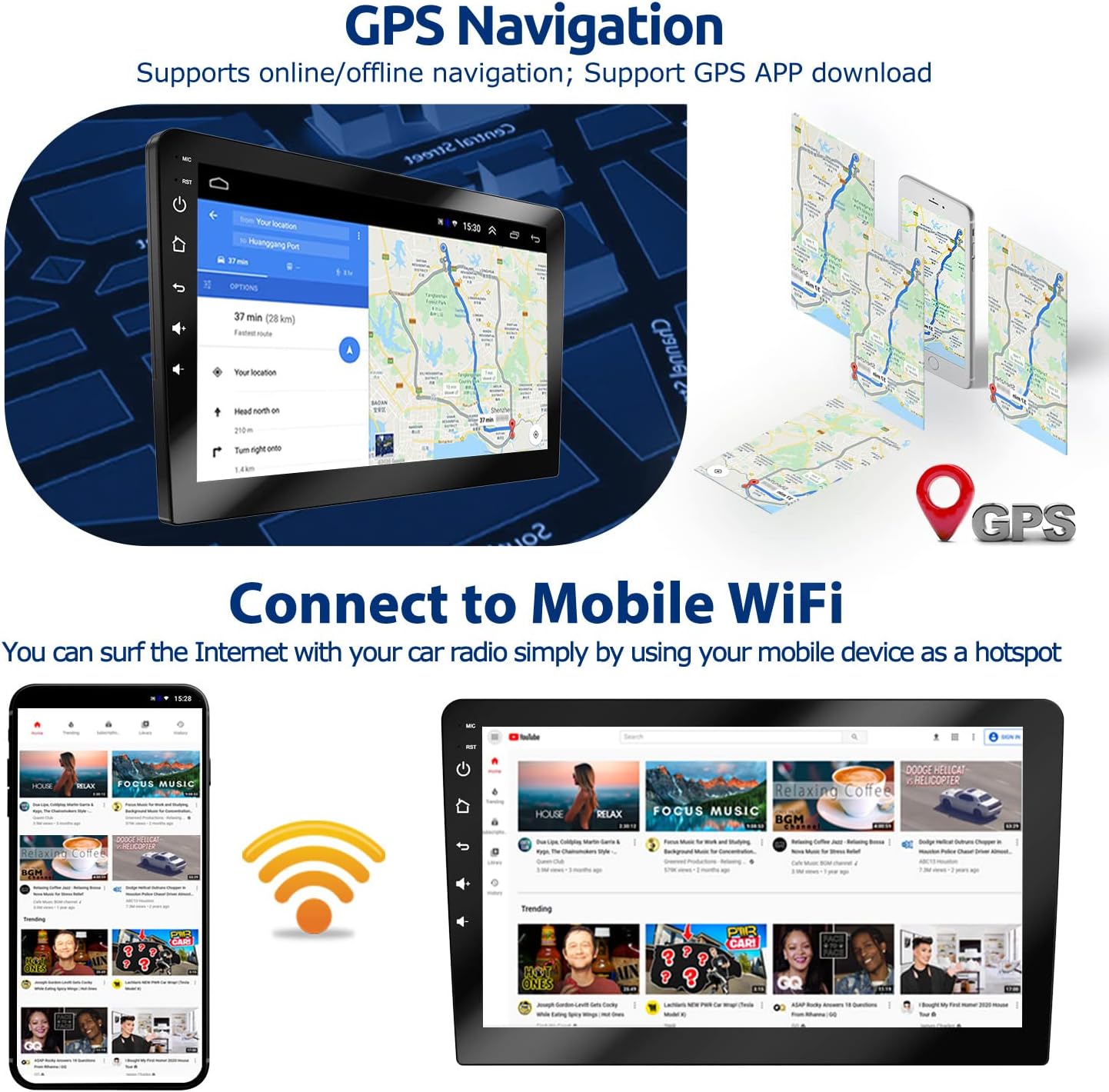
Image: The GPS navigation interface showing a map and route, alongside illustrations of mobile WiFi connectivity for internet access.
3.3 Funzjonalità tal-Bluetooth
Connect your smartphone via Bluetooth for hands-free calling and wireless music playback. Access your phonebook, dial numbers directly from the stereo, and stream audio.

Image: The Bluetooth interface showing options for hands-free calling with a dial pad and music playback controls.
3.4 Kontrolli tal-Istering Wheel (SWC)
The unit supports learning functions for your vehicle's steering wheel controls, allowing you to manage audio, calls, and other functions without taking your hands off the wheel.

Image: The interface for programming steering wheel controls, showing various button functions that can be assigned.
3.5 Radju FM
Tune into your favorite FM radio stations. The unit supports automatic station scanning and saving presets.

Image: The FM radio interface displaying frequency tuning and controls, along with a separate image showing the rear view camera display in a parking scenario.
3.6 Wara View Image (Backup Camera)
When the vehicle is shifted into reverse, the display automatically switches to the backup camera feed, providing a clear view taż-żona wara l-vettura tiegħek għal parkeġġ u manuvrar aktar sikuri.

Immaġni: L-iskrin tal-istereo tal-karozza li juri d-dahar view from the backup camera, including parking guidelines.
3.7 Link tal-Mera
Mirror Link allows you to display your smartphone's screen directly on the car stereo. Android phones support two-way control (from phone to radio or radio to phone), while iOS phones support one-way control (from phone to radio).

Image: Illustrations showing how Android and iOS phones connect via WiFi or USB cable for Mirror Link, displaying the phone's screen on the car stereo.
3.8 Split Screen
Utilize the split-screen feature to run two applications simultaneously, such as navigation on one side and music playback on the other.

Image: The car stereo screen demonstrating split-screen mode, with a navigation map on one side and a media player on the other.
3.9 EQ Setting
Adjust audio output with the built-in equalizer (EQ) settings to customize sound profiles according to your preferences.

Image: The graphical equalizer interface on the car stereo, allowing users to adjust audio frequencies.
4. Manutenzjoni
Biex tiżgura l-lonġevità u l-prestazzjoni ottimali tal-istereo tal-karozza tiegħek, segwi dawn il-linji gwida ta' manutenzjoni:
- Tindif tal-Iskrin: Uża drapp artab u mingħajr suf biex timsaħ bil-mod it-touchscreen. Għal tbajja' persistenti, nixxef ftit.ampNaddaf id-drapp bl-ilma jew b'prodott tat-tindif li ma jagħmilx ħsara lill-iskrin. Evita materjali li joborxu jew kimiċi ħarxa.
- Tindif Ġenerali: Żomm l-unità ħielsa mit-trab u l-fdalijiet. Uża pinzell artab jew arja kkompressata biex tnaddaf il-ventijiet u l-portijiet.
- Kontroll tat-temperatura: Evita li tesponi l-unità għal temperaturi estremi, kemm sħan kif ukoll kesħin, għal perjodi twal.
- Konnessjonijiet tal-kejbil: Iċċekkja perjodikament il-konnessjonijiet tal-kejbil kollha biex tiżgura li huma sikuri u ħielsa minn ħsara.
5 Issolvi l-problemi
If you encounter issues with your ESSGOO car stereo, refer to the following common problems and solutions:
| Problema | Kawża Possibbli | Soluzzjoni |
|---|---|---|
| Ebda Qawwa | Konnessjoni tal-enerġija maħlula, fjus maħruq, problema bil-batterija tal-vettura. | Check power cable connections. Inspect the fuse (a spare is included). Verify vehicle battery health. |
| Ebda Ħoss | Speaker wires disconnected, volume too low, incorrect audio output settings. | Ensure speaker wires are securely connected. Increase volume. Check audio settings (e.g., EQ, balance/fader). |
| GPS Navigation Not Working / Inaccurate | GPS antenna not connected or improperly placed, no internet connection for online maps, outdated map data. | Kun żgur li l-antenna tal-GPS hija konnessa sew u għandha viżibilità ċara view of the sky. Connect to WiFi for online maps. Update map data if necessary. |
| Kwistjonijiet ta' Konnettività Bluetooth | Bluetooth mhux attivat, apparat mhux skopert, interferenza. | Ensure Bluetooth is enabled on both the stereo and your device. Make sure your device is in pairing mode. Try restarting both devices. |
| Touchscreen ma jirrispondix | Is-sistema ffriżata, problema temporanja tas-softwer. | Perform a soft reset (refer to the device's reset button, usually a small pinhole). If persistent, contact support. |
| Kamera ta' Backup Mhux Tidher | Camera cable loose, reverse trigger wire not connected, faulty camera. | Check the camera input cable connection. Ensure the 'BACK' wire is correctly connected to the vehicle's reverse light trigger. |
| Poor WiFi Signal | Weak hotspot signal, interference. | Ensure your mobile hotspot is close to the unit and has a strong signal. Minimize other wireless interference. |
If the problem persists after attempting these solutions, please contact ESSGOO customer support for further assistance.
6. Speċifikazzjonijiet
| Karatteristika | Dettall |
|---|---|
| Dimensjonijiet tal-Prodott | 9.06 x 5.12 x 3.15 pulzieri |
| Piż tal-oġġett | 3.06 liri |
| Daqs tal-Iskrin | 9 Pulzier (23 ċm) |
| Riżoluzzjoni | 1024 x 600 |
| Sistema Operattiva | Android |
| RAM | 2GB |
| ROM | 32GB |
| Karatteristiċi Speċjali | Bluetooth, Touchscreen, GPS Navigation, WiFi, Mirror Link, SWC, FM Radio, Backup Camera Support |
| Teknoloġija tal-Konnettività | Cellular (for internet access via hotspot), Bluetooth, WiFi |
| Tip ta' Mappa | Triq |
| Modalità tal-Ħruġ tal-Awdjo | Stereo |
| Tip ta 'Immuntar | Dashboard Mount |
| Komponenti Inklużi | Dashboard Mount, Backup Camera |
7. Garanzija u Appoġġ
ESSGOO is committed to providing high-quality products and customer service.
- Assigurazzjoni tal-Kwalità: Il-prodott jiġi b'garanzija ta' kwalità ta' sena.
- Servizz tal-Klijent: For any questions, technical guidance, or after-sales support, please contact ESSGOO Support via Amazon Messages or Amazon email. Professional customer service is available with online replies typically within 24 hours.


