1. Prodott Aktarview
The Barkan S40 Table Top TV Stand provides a stable and secure solution for mounting flat or curved television screens ranging from 32 to 70 inches. It is designed to support TVs weighing up to 50 kg (110 lbs). This stand is particularly useful for situations where original TV legs are lost or when a TV needs to be placed on a counter or table surface, offering a robust alternative to wall mounting.
Il-karatteristiċi ewlenin jinkludu:
- High load capacity for various TV sizes.
- Wide VESA compatibility for diverse TV models.
- Adjustable height settings for optimal viewing.
- Anti-scratch design to protect surfaces.
- Kostruzzjoni tal-azzar liga durabbli.

Figure 1: Barkan S40 Table Top TV Stand components and packaging.
2. Setup u Installazzjoni
Carefully follow these instructions to ensure proper and safe installation of your Barkan S40 TV Stand.
2.1. Għodda Meħtieġa
- Wrench (13/32" - 10mm)
- Screwdriver (No. 2+3)
- Anchoring safety cable (included)

Figure 2: Tools required for assembly, including a wrench, screwdriver, and anchoring safety cable.
2.2. Passi tal-Assemblea
- Ħoll il-Komponenti: Carefully remove all parts from the packaging. Verify that all components listed in the assembly instructions are present.
- Attach Mounting Brackets to TV: Identify the correct screws and spacers from the hardware kit that match your TV's VESA mounting holes. Secure the vertical mounting brackets to the back of your television. Ensure they are firmly attached and aligned.
- Connect Stand Legs: Attach the stand legs to the vertical mounting brackets. The design allows for flexible positioning to accommodate various TV widths.
- Aġġusta l-Għoli: The stand offers multiple height adjustment points. Select the desired height for your television before tightening all fasteners.
- Secure Anchoring Safety Cable: For added stability and safety, attach the provided anchoring safety cable from the TV stand to a secure point on your furniture or wall.
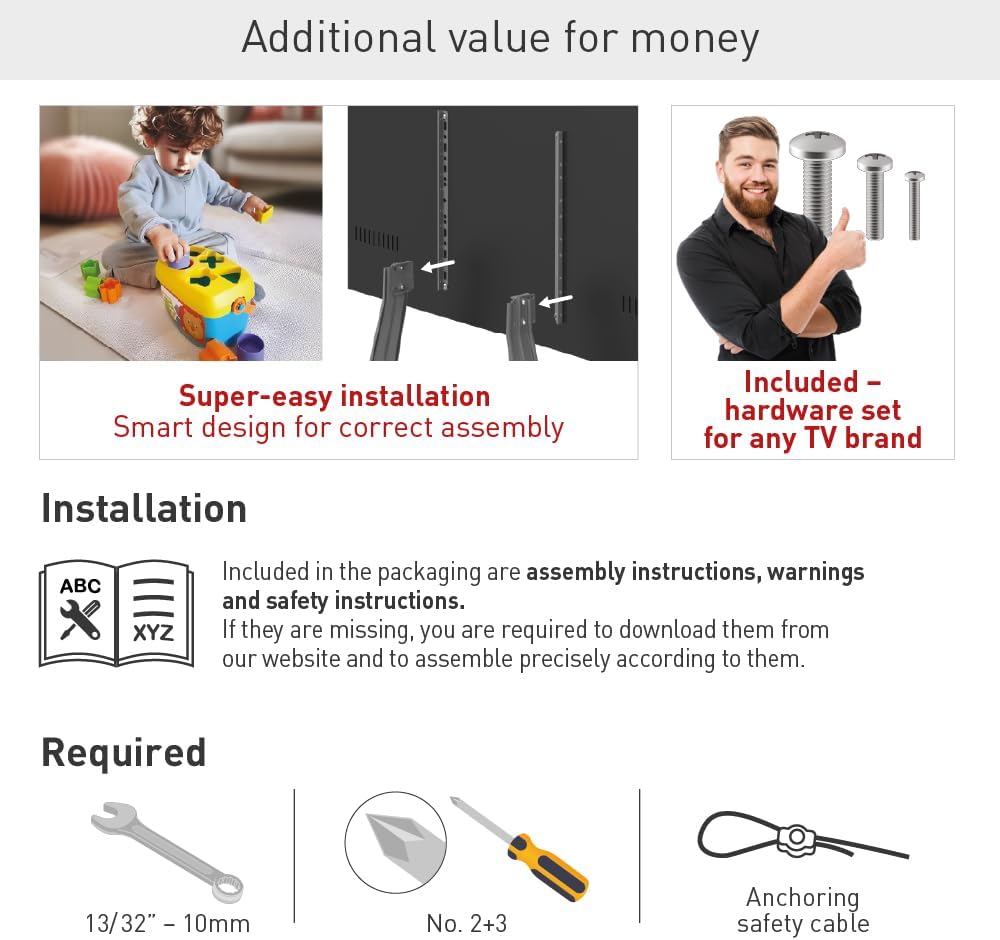
Figure 3: Visual guide for attaching the stand to the television, demonstrating the secure connection points.
Importanti: Always refer to the detailed assembly instructions included in your product packaging for specific diagrams and screw selection guides. If your instructions are missing, please download them from the official Barkan websit.
3. Istruzzjonijiet Operattivi
The Barkan S40 Table Top TV Stand is designed for straightforward use once assembled.
3.1. Pożizzjonament tat-TV
Place the assembled TV and stand on a flat, stable, and level surface. Ensure the surface can safely support the combined weight of the TV and the stand. Maintain adequate clearance around the TV for ventilation and cable management.
3.2. Aġġustament tal-Għoli
The stand allows for height adjustment during the initial setup phase. The TV can be positioned at various heights between 19.7 inches (50 cm) and 30.3 inches (77 cm) from the tabletop to the top of the TV. To change the height after initial assembly, you will need to partially disassemble the stand from the TV, adjust the mounting points on the vertical brackets, and then reassemble.
3.3. Movement Type
The Barkan S40 is a fixed tabletop stand. It does not offer swivel or tilt functionality once installed. Any adjustments to viewing angle or height must be made during the assembly process or by repositioning the entire stand.

Figure 4: The Barkan S40 TV Stand in use, demonstrating its compatibility with various TV sizes and its maximum load capacity.
4. Manutenzjoni
Proper maintenance ensures the longevity and continued safe operation of your TV stand.
- Tindif: Use a soft, dry cloth to clean the stand. Avoid using abrasive cleaners, solvents, or chemical sprays, as these can damage the finish.
- Kontrolli regolari: Periodically inspect all screws and connections to ensure they remain tight. Loose connections can compromise stability.
- Protezzjoni tal-wiċċ: The stand features an anti-scratch design. However, avoid dragging the stand across surfaces to prevent potential damage to both the stand and the furniture.
5 Issolvi l-problemi
If you encounter issues with your Barkan S40 TV Stand, refer to the following common solutions:
- TV Not Stable:
- Kun żgur li l-viti kollha tal-assemblaġġ huma ssikkati sew.
- Verify that the TV's weight and size are within the stand's specified limits (max 50 kg / 110 lbs, 32-70 inches).
- Confirm the stand is placed on a flat, level, and sturdy surface.
- Ensure the anchoring safety cable is properly installed and secured.
- Stand Does Not Fit TV:
- Check your TV's VESA mounting pattern against the stand's compatibility list (100x100 to 800x400 mm).
- Ensure you are using the correct screws and spacers from the hardware kit for your specific TV model.
6. Speċifikazzjonijiet
Detailed technical specifications for the Barkan S40 Table Top TV Stand:
- Ditta: Barkan
- Mudell: S40
- Daqsijiet tat-TV Kompatibbli: 32 - 70 pulzieri
- Kapaċità massima tat-Tagħbija: 50 kg (110 lbs)
- Kompatibbiltà VESA: 100x100, 100x200, 200x100, 200x200, 300x300, 300x400, 400x200, 400x300, 400x400, 600x400, 800x400 mm, and non-VESA patterns.
- Aġġustament Għoli: 19.7" - 30.3" (50 - 77 cm)
- Materjal: Azzar Liga
- Kulur: Iswed
- Tip ta 'Immuntar: Immonta fuq il-mejda
- Tip ta' Moviment: Fiss
- Dimensjonijiet tal-Prodott: 44.4 x 10.5 x 4.2 ċm; 2.71 kg

Figure 5: Detailed specifications including VESA patterns and height adjustment ranges.
7. Informazzjoni dwar Garanzija
The Barkan S40 Table Top TV Stand is backed by a Lifetime Warranty, reflecting the manufacturer's commitment to quality and durability. This warranty covers defects in materials and workmanship under normal use.
For specific terms and conditions of the warranty, please refer to the documentation included with your product or visit the official Barkan websit.

Figure 6: Barkan's commitment to quality, highlighted by over 35 years of innovation and a Lifetime Warranty.
8. Appoġġ
For additional assistance, troubleshooting, or to download assembly instructions, please visit the official Barkan website or contact Barkan customer support. Contact information can typically be found on the product packaging or on the manufacturer's websit.


