Rapoo Multi-Device Silent Wireless Mouse User Manual
Mudell: M300G
Prodott Overview
This manual provides detailed instructions for the Rapoo Multi-Device Silent Wireless Mouse. This mouse is designed for versatile use across multiple devices, offering silent clicks, adjustable DPI, and an ergonomic design for comfortable, extended use.
Il-karatteristiċi ewlenin jinkludu:
- Multi-device connectivity (USB receiver or Bluetooth) for up to 3 devices.
- Silent click design for a quiet working environment.
- 4 adjustable DPI levels (600/1000/1300/1600) for precise control.
- Ergonomic design for right-hand comfort.
- High precision optical engine for use on various surfaces.
- Extended battery life with low-power technology.
Vidjo ta' Dimostrazzjoni tal-Prodott
Video: An official product video demonstrating the features and usage of the Rapoo Multi-Device Bluetooth Mouse, including its silent clicks and multi-mode connectivity.
Gwida ta' Setup
1. Kontenut tal-Pakkett
Kun żgur li l-oġġetti kollha huma preżenti fil-pakkett:
- Rapoo Multi-Device Silent Wireless Mouse
- USB Receiver (usually stored inside the mouse)
- Manwal għall-Utent
2. Installazzjoni tal-batterija
The mouse uses one AA battery (not included). Open the battery compartment on the bottom of the mouse and insert the battery, ensuring correct polarity.
3. Konnessjoni tal-Maws
The Rapoo Multi-Device Mouse supports three connection modes: Bluetooth 3.0, Bluetooth 4.0, and 2.4G Wireless (via USB receiver). You can switch between these modes using the button on the bottom of the mouse.
3.1. 2.4G Wireless Connection (USB Receiver)
- Locate the USB receiver, typically stored in a slot on the bottom of the mouse.
- Ipplaggja r-riċevitur USB f'port USB disponibbli fuq il-kompjuter tiegħek.
- Ixgħel il-maws billi tuża l-iswiċċ tal-enerġija fuq il-qiegħ.
- The mouse should automatically connect. No driver installation is usually required.

Image: The Rapoo mouse connected to a laptop via its 2.4G USB receiver, illustrating the wireless connection.
3.2. Bluetooth Connection (Bluetooth 3.0 / Bluetooth 4.0)
- Ixgħel is-swiċċ tal-qawwa tal-maws.
- Press the Bluetooth connection switch button on the bottom of the mouse to select either Bluetooth 1 or Bluetooth 2 channel. The corresponding indicator light (blue or green) will flash slowly.
- Long press the Bluetooth button for more than 3 seconds to start pairing. The indicator light will flash rapidly.
- On your device (laptop, tablet, or smartphone), go to Bluetooth settings and search for new devices.
- Select "RAPOO BT3.0 Mouse" or "RAPOO BleMouse" (Bluetooth 4.0) from the list of available devices to pair.
- Ladarba tkun konnessa, id-dawl indikatur jieqaf iteptep.

Image: A diagram illustrating the steps to connect the Rapoo mouse via Bluetooth 3.0 or 4.0, showing the pairing process with indicator lights.
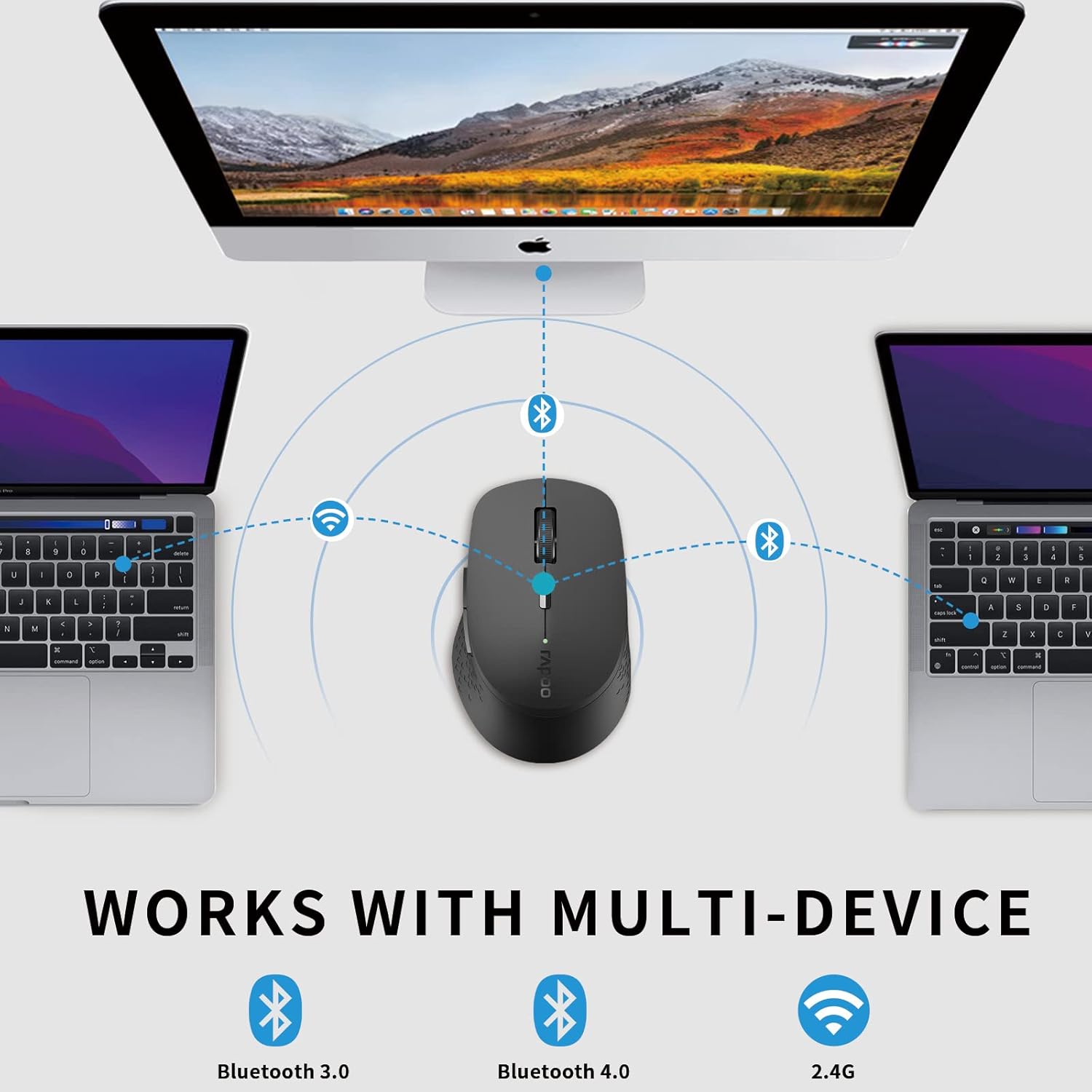
Image: An illustration demonstrating the multi-device capability of the Rapoo mouse, connecting to two laptops via Bluetooth and a desktop via 2.4G wireless.
Istruzzjonijiet Operattivi
1. Funzjonijiet tal-buttuna

Image: A labeled diagram showing the functions of each button on the Rapoo mouse, including left/right click, scroll wheel, DPI switch, multi-device indicator, and forward/backward buttons.
- Buttuna tal-Ikklikkjar tax-Xellug: Għażla u attivazzjoni standard.
- Buttuna tal-Ikklikkjar bil-Lemin: Jiftaħ menus tal-kuntest.
- Scroll Wheel: Tiskrollja fid-dokumenti u web paġni. Tista' wkoll tiġi ppressata għall-funzjonalità tal-ikklikkja tan-nofs.
- Buttuna tas-Swiċċ tad-DPI: Jiċċikla bejn is-settings tad-DPI (600/1000/1300/1600).
- Indikatur tal-Konverżjoni ta' Apparati Multipli: Shows the currently active device channel.
- Buttuna 'l quddiem: Jinnaviga 'l quddiem ġewwa web browsers jew file esploraturi.
- Buttuna b'lura: Jinnaviga lura ġewwa web browsers jew file esploraturi.
2. Tibdil bejn Apparati
To switch between connected devices (up to 3), short press the Bluetooth connection switch button on the bottom of the mouse. The indicator light will change to reflect the active channel (Bluetooth 1, Bluetooth 2, or 2.4G wireless).
3. Aġġustament tad-DPI (Sensittività)
Press the DPI switch button located behind the scroll wheel to cycle through the four available DPI settings: 600, 1000, 1300, and 1600. Choose the sensitivity that best suits your task and screen resolution.

Image: A visual representation of the adjustable DPI settings (600, 1000, 1300, 1600) for the Rapoo mouse, indicating how cursor sensitivity can be changed.
4. Karatteristika ta' Klikk Sieket
The mouse features a silent click design, reducing click noise by 90%. This allows for a quiet working environment, ideal for offices, libraries, or late-night use.

Image: The Rapoo mouse highlighting its noiseless and durable click feature, with a sleeping baby in the background to emphasize the quiet operation.
5. Disinn Ergonomiku
The mouse is ergonomically designed for right-hand users, with a flat radian that fits the curve of the hand, reducing fatigue during prolonged use.

Immaġni: Minn fuq għal isfel view of the black Rapoo Bluetooth mouse, showcasinil-forma ergonomika tagħha.
Manutenzjoni
1. Tindif
Biex tnaddaf il-maws, uża drapp artab u niexef. Għal ħmieġ iebes, nixxef ftit.ampLaħlaħ id-drapp bl-ilma jew b'soluzzjoni ħafifa tat-tindif. Evita li tuża kimiċi ħarxa jew materjali li joborxu.
2. Sostituzzjoni tal-batterija
When the mouse's performance degrades or the low battery indicator (if present) activates, replace the AA battery. Ensure the power switch is off before replacing the battery.

Image: The Rapoo mouse illustrating its low power consumption, indicating an extended battery life of up to 12 months.
3. Ħażna
Meta ma tkunx qed tużah għal perjodi twal, itfi l-maws biex tikkonserva l-ħajja tal-batterija. Aħżen ir-riċevitur USB ġewwa s-slott apposta tal-maws biex tevita t-telf.
Issolvi l-problemi
| Problema | Kawża Possibbli | Soluzzjoni |
|---|---|---|
| Il-ġurdien ma jirrispondix | Low battery; Power switch off; USB receiver disconnected; Bluetooth not paired. | Replace battery; Turn on power switch; Re-insert USB receiver; Re-pair Bluetooth. |
| Moviment tal-kursur li jittardja jew li ma jkunx korrett | Interference; Dirty optical sensor; Mouse used on unsuitable surface. | Move closer to receiver/device; Clean optical sensor; Use on a flat, non-reflective surface or mouse pad. |
| Ma nistax naqleb bejn apparati | Incorrect button press; Device not properly paired. | Ensure short press of the multi-device switch button; Verify all devices are paired correctly. |
| Tqabbil Bluetooth ifalli | Mouse not in pairing mode; Device Bluetooth off; Interference. | Long press Bluetooth button for 3 seconds; Enable Bluetooth on device; Move away from other wireless devices. |
Speċifikazzjonijiet
- Ditta: Rapoo
- Mudell: M300G
- Teknoloġija tal-Konnettività: Bluetooth (3.0/4.0), 2.4G Wireless (USB)
- Teknoloġija ta 'Sejbien tal-Moviment: Ottiċi
- DPI: 600/1000/1300/1600 adjustable
- Ikklikkja Siekta: Yes (90% noise reduction)
- Disinn Ergonomiku: Right-hand specific
- Ħajja tal-batterija: Up to 9-12 months (depending on usage)
- Dimensjonijiet tal-Prodott: 3.94 x 2.76 x 1.57 pulzieri (madwar 10.0 x 7.0 x 4.0 ċm)
- Piż tal-oġġett: 3.84 uqija (madwar 108.87 gramma)
- Kulur: Iswed
- Manifattur: RAPOO
- L-Ewwel Disponibbli: 15 ta’ April, 2021

Image: The underside of the Rapoo mouse, detailing its dimensions (10.39 cm / 4.09 in length, 6.54 cm / 2.57 in width), weight (83.2g), power switch, Bluetooth connection switch, and invisible optical sensor.
Garanzija u Appoġġ
Rapoo provides a one-year warranty for this product. In case of any issues, please contact Rapoo customer support for assistance. The product also comes with a hassle-free 30-day return and refund or replacement policy.
For further support, visit the official Rapoo webis-sit jew ikkuntattja l-kanali tas-servizz tal-klijenti tagħhom.


