1. Introduzzjoni
The Phomemo P12 PRO is a compact, portable Bluetooth thermal label maker designed for various labeling needs in home, office, and school environments. This device utilizes thermal printing technology, eliminating the need for ink or toner. It connects wirelessly to your smartphone or tablet via Bluetooth, allowing you to design and print labels using the dedicated 'Print Master' application.
The P12 PRO supports a variety of label materials, including standard plastic labels, satin ribbons, and iron-on labels, offering versatility for organizing, crafting, and personalizing items. Its built-in rechargeable battery ensures portability and convenience.

Figure 1: Phomemo P12 PRO Label Maker with a roll of label tape and a smartphone displaying the 'Print Master' app.
2. Setup
2.1. X'hemm fil-Kaxxa
- Phomemo P12 PRO Label Maker
- Label Tape Roll (pre-installed or included separately)
- Cable tal-Iċċarġjar tal-USB tat-Tip-Ċ
- Manwal għall-Utent (dan id-dokument)
2.2. Iċċarġjar tal-Apparat
Before initial use, fully charge the P12 PRO. Connect the provided USB Type-C cable to the charging port on the device and to a standard USB power adapter (not included) or a computer's USB port. The charging indicator light will provide feedback on the charging status.
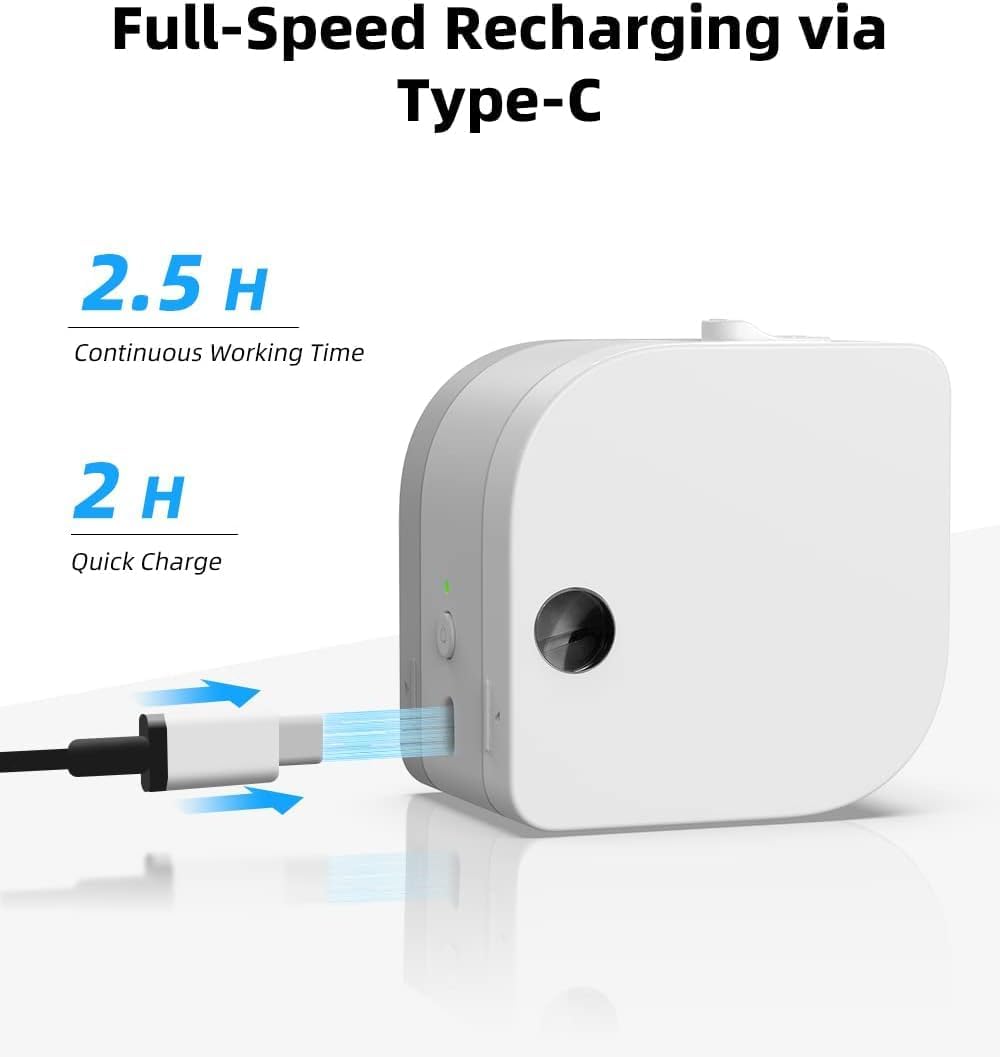
Figure 2: The P12 PRO charging via its Type-C port. A full charge takes approximately 2 hours and provides up to 2.5 hours of continuous working time.
2.3. Installazzjoni tal-App u Tqabbil tal-Bluetooth
The Phomemo P12 PRO operates via the 'Print Master' application. Follow these steps to install the app and pair your device:
- Niżżel l-App: Fittex għal 'Print Master' in the Apple App Store (for iOS devices) or Google Play Store (for Android devices) and install it.
- Qawwa Mixgħul: Press and hold the power button on the P12 PRO until the indicator light turns on.
- Ippermetti Bluetooth: Kun żgur li l-Bluetooth huwa attivat fuq l-ismartphone jew it-tablet tiegħek.
- Open App and Connect: Open the 'Print Master' app. The app will automatically search for available Phomemo devices. Select 'P12 PRO' from the list to establish a connection. The device indicator light will change to confirm a successful connection.

Figure 3: The 'Print Master' app interface, demonstrating Bluetooth connectivity and options for customizing labels with borders and icons.
3. Istruzzjonijiet Operattivi
3.1. Tagħbija tat-Tejp tat-Tikketti
- Qoxra Miftuħa: Gently push the cover release button (if present) or lift the top cover of the device.
- Daħħal it-tejp: Place the label tape roll into the compartment with the label end extending out through the printer's output slot. Ensure the tape is aligned correctly.
- Agħlaq il-Qoxra: Agħlaq l-għatu sew sakemm jikklikkja f'postu.
3.2. Ħolqien u Stampar ta' Tikketti
The 'Print Master' app provides extensive customization options for your labels:
- Input tat-Test: Enter your desired text. The app supports multiple lines of text.
- Fonts and Styles: Choose from over 154 fonts and adjust text size, bolding, italics, and alignment.
- Borders and Icons: Select from 78 frames and thousands of icons, graphics, and symbols to enhance your labels.
- Karatteristiċi Speċjali: Create barcodes, QR codes, and utilize various templates for specific applications (e.g., date labels, price tags).

Figura 4: Eżamples of labels with clear text and icons, suitable for school items and organization.

Figure 5: The P12 PRO's versatility in creating labels for kitchen organization, including date and content labels.
3.3. Supported Label Types
The P12 PRO is compatible with 12mm wide label tapes and supports various materials:
- Plastic Labels: Water-resistant, abrasion-resistant, oil-resistant, and strong adhesive for general use.
- Satin Ribbon Labels: Ideal for gift wrapping, crafts, and decorative purposes.
- Iron-on Labels: For labeling clothing and fabric items.
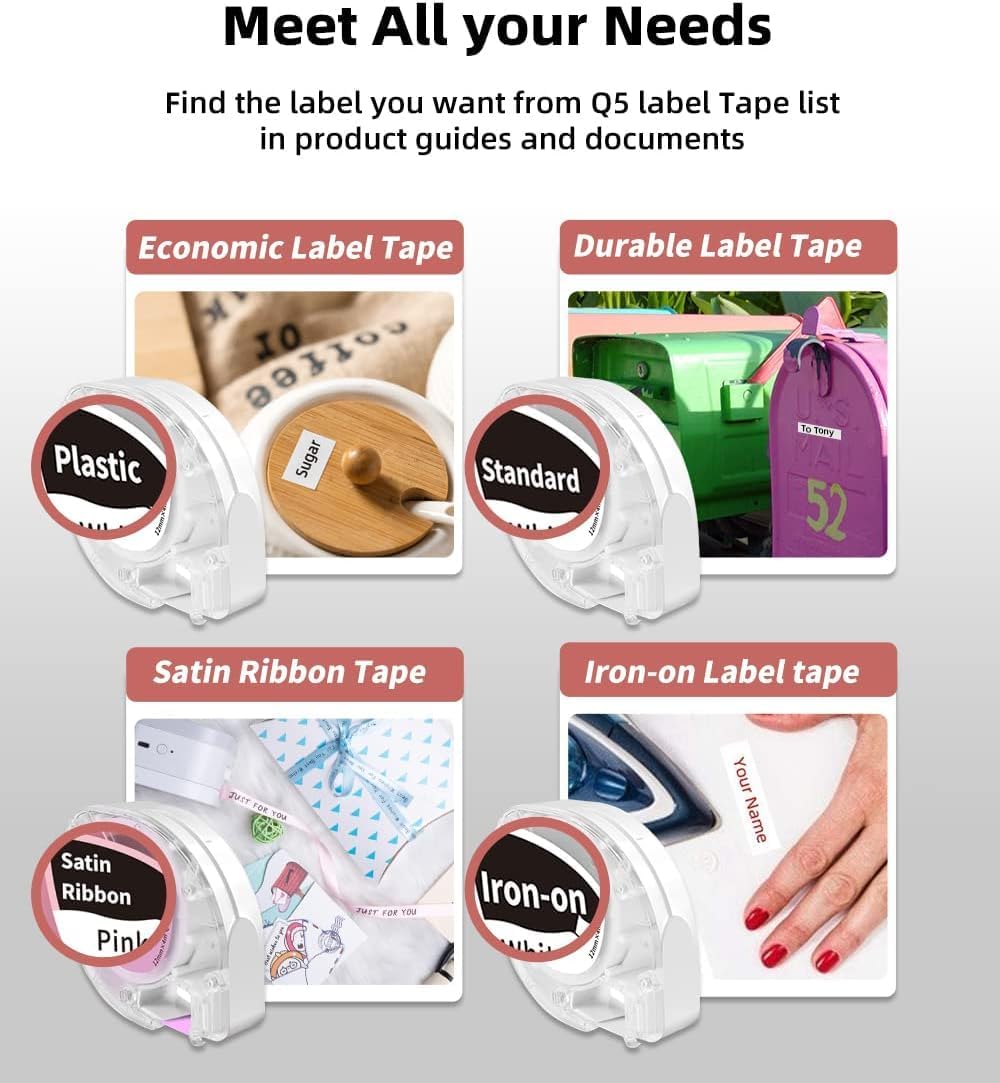
Figure 6: A selection of label tape types compatible with the Phomemo P12 PRO, including plastic, standard, satin ribbon, and iron-on options.

Figure 7: Demonstrating the application of an iron-on label for clothing, a feature supported by the P12 PRO.
3.4. Qtugħ tat-Tikketti
After printing, use the built-in serrated tear-off knife to cleanly cut the label from the tape roll. This ensures a smooth and quick cut.
4. Manutenzjoni
4.1. Tindif tar-Ras tal-Istampar
Biex iżżomm kwalità ottimali tal-istampar, naddaf ir-ras tal-istampar perjodikament. Uża drapp artab u mingħajr suf nixxef ħafif.ampened with isopropyl alcohol. Gently wipe the print head surface. Ensure the device is powered off before cleaning.
4.2. Kura tal-batterija
The P12 PRO features a built-in lithium-ion battery. To prolong battery life:
- Evita li tiċċarġja l-batterija kompletament ta' spiss.
- Aħżen l-apparat f'post frisk u niexef meta ma jkunx qed jintuża għal perjodi twal.
- If the device will not be used for a long time, charge it to about 50% every few months.
5 Issolvi l-problemi
5.1. L-Apparat Mhux Qed Jixgħel
- Ensure the device is fully charged. Connect it to a power source using the Type-C cable.
- Agħfas u żomm il-buttuna tal-qawwa għal ftit sekondi.
5.2. Cannot Connect via Bluetooth
- Verify that the P12 PRO is powered on and within range of your mobile device.
- Kun żgur li l-Bluetooth huwa attivat fuq it-tagħmir mobbli tiegħek.
- Restart the 'Print Master' app and try connecting again.
- If issues persist, try restarting both the P12 PRO and your mobile device.
5.3. Kwalità tal-Istampar Fqira
- Check if the label tape is correctly installed and not jammed.
- Naddaf ir-ras tal-istampar kif deskritt fit-taqsima tal-Manutenzjoni.
- Ensure you are using genuine Phomemo label tapes.
- Check the battery level; low battery can affect print quality.
5.4. Label Jamming
- Itfi l-apparat immedjatament.
- Open the cover and carefully remove any jammed label tape.
- Reinstall the label tape, ensuring it is properly aligned.
6. Speċifikazzjonijiet
| Karatteristika | Dettall |
|---|---|
| Isem tal-Mudell | Phomemo P12 Pro |
| Teknoloġija tal-Istampar | Termali |
| Riżoluzzjoni | 203 dpi |
| Konnettività | Bluetooth 4.0 or above, USB Type-C |
| Sistemi Kompatibbli | Android, iOS |
| Max Label Width | 12mm |
| Kapaċità tal-batterija | 1000mAh Lithium Ion (rikarikabbli) |
| Ħin tal-Iċċarġjar | Appross. 2 sigħat |
| Ħin ta' Ħidma Kontinwu | Appross. 2.5 sigħat |
| Itfi Awtomatiku | Wara 15-il minuta ta' inattività |
| Dimensjonijiet | 4.8 x 4.5 x 2.67 pulzieri |
| Piż tal-oġġett | 7.8 uqija |
7. Garanzija u Appoġġ
7.1. Informazzjoni dwar Garanzija
The Phomemo P12 PRO Label Maker Machine comes with a garanzija ta 'sena mid-data tax-xiri. Din il-garanzija tkopri difetti fil-manifattura u malfunzjonamenti taħt użu normali. Jekk jogħġbok żomm il-prova tax-xiri tiegħek għal talbiet ta' garanzija.
7.2. Appoġġ għall-Klijent
For technical assistance, troubleshooting not covered in this manual, or warranty inquiries, please contact Phomemo customer support through their official website or the contact information provided with your product packaging. Please have your model number (P12 Pro) and purchase details ready when contacting support.


