Introduzzjoni
This manual provides detailed instructions for the Ozeri Touch III Digital Kitchen Scale with Calorie Counter. This scale is designed for precise measurement of food items and includes a built-in calorie counter for specific food types. Please read this manual thoroughly before using your scale to ensure proper operation and longevity.
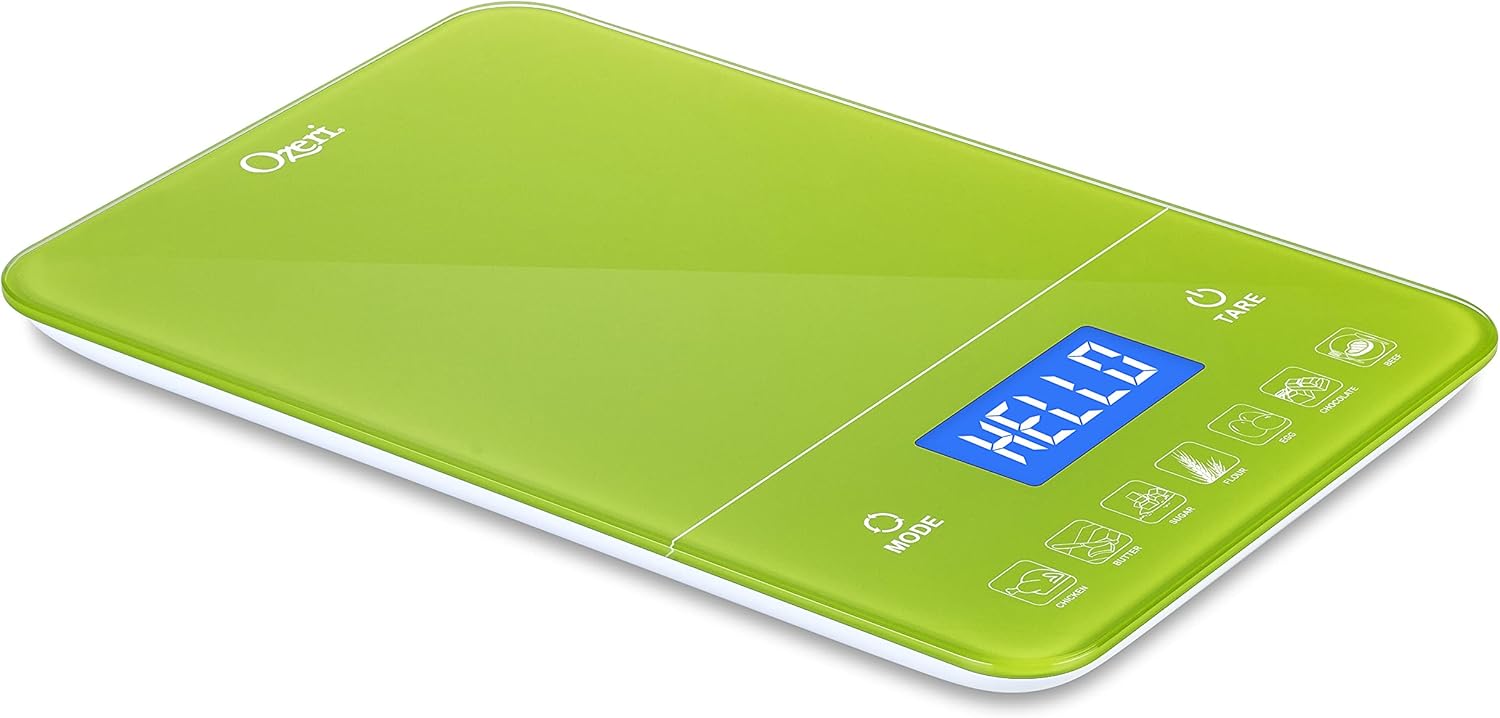
Figure 1: Ozeri Touch III Digital Kitchen Scale (Lime Green)
Setup
Installazzjoni tal-batterija
The Ozeri Touch III scale requires 4 AAA batteries (included). Locate the battery compartment on the underside of the scale. Open the compartment cover, insert the batteries, ensuring correct polarity (+/-), and then close the cover securely.
Kalibrazzjoni Inizjali
Place the scale on a firm, flat, and stable surface. Press the 'TARE' button to power on the scale. The display will show "HELLO" and then settle to "0 g". This indicates the scale is calibrated and ready for use. If using a container, place it on the scale qabel pressing 'TARE' to zero out its weight.

Figure 2: Scale displaying "HELLO" during startup
Istruzzjonijiet Operattivi
Qawwa mixgħul/mitfi
- To power on: Press the 'TARE' button.
- To power off: Press and hold the 'TARE' button until the display turns off. The scale will automatically turn off after approximately 2 minutes of inactivity to conserve battery life.
Konverżjoni ta' Unità
The scale can measure in various units: grams (g), pounds and ounces (lb:oz), ounces (oz), milliliters for water (water ml), and milliliters for milk (milk ml). To switch between units, press the 'MODALITÀ' button repeatedly until your desired unit is displayed.

Figure 3: Scale displaying weight in pounds and ounces
Funzjoni Tara
The Tare function allows you to subtract the weight of a container or previously added ingredients, enabling you to measure subsequent ingredients accurately within the same container.
- Poġġi kontenitur vojt fuq l-iskala.
- Agħfas il-'TARE' button. The display will reset to "0 g" (or the currently selected unit).
- Add your ingredient to the container. The display will show only the net weight of the ingredient.

Figure 4: Using the Tare function to weigh flour
Calorie Counter Function
The Ozeri Touch III includes a built-in calorie counter for 7 common food items: Chicken, Butter, Sugar, Flour, Egg, Chocolate, and Beef. This feature provides an estimated caloric (Kcal) value based on the weight of the selected food item.
- Weigh the food item using the standard weighing function (ensure the display shows the weight in grams).
- Press the corresponding food icon button located at the bottom of the scale (e.g., 'EGG' for eggs, 'BUTTER' for butter).
- The display will then show the estimated caloric (Kcal) value for the weighed portion.

Figure 5: Scale displaying 352 Kcal for a food item

Figure 6: Weighing eggs before checking calorie count
Manutenzjoni
Tindif
The Ozeri Touch III scale features a tempered glass surface, which is designed for easy cleaning. To clean, simply wipe the surface with a soft, damp cloth. Avoid using abrasive cleaners, harsh chemicals, or immersing the scale in water, as this can damage the electronic components.
Sostituzzjoni tal-batterija
When the low battery indicator ("Lo") appears on the display, it is time to replace the batteries. Open the battery compartment on the underside of the scale and replace all 4 AAA batteries with new ones. Ensure proper polarity during installation.
Issolvi l-problemi
Kwistjonijiet Komuni u Soluzzjonijiet
- Id-displej juri "Lo": This indicates low battery power. Replace all 4 AAA batteries.
- Id-displej juri "O-Ld": This indicates an overload. The weight on the scale exceeds its maximum capacity of 22 lbs (10 kg). Remove items immediately to prevent damage to the scale.
- Inaccurate or Fluctuating Readings: Ensure the scale is placed on a completely flat, hard, and stable surface. Soft or uneven surfaces can affect accuracy. Try turning the scale off and on again to recalibrate. If using a container, ensure you use the Tare function correctly to zero out its weight before adding ingredients. Note that the scale may not register very small weights (typically below 5-6 grams) due to its power-saving design.
- L-iskala ma tixgħelx: Iċċekkja jekk il-batteriji humiex imdaħħla sew bil-polarità t-tajba. Ibdel il-batteriji jekk ikunu qodma jew eżawriti.
Speċifikazzjonijiet
Dettalji tal-Prodott
| Karatteristika | Dettall |
|---|---|
| Brand | Ozeri |
| Mudell | ZK19-LG |
| Limitu tal-Piż | 22 lbs (10 kg) |
| Preċiżjoni tal-Qari | 0.05 oz / 1 g |
| Tip ta 'Wiri | LED, LCD |
| Materjal | Ħġieġ ittemprat |
| Sors tal-Enerġija | 4 batteriji AAA (inklużi) |
| Karatteristiċi Speċjali | High-Precision Sensors, Touch-Sensitive Buttons, Built-in Calorie Counter |
| Dimensjonijiet | 11.39 x 7.88 x 1.73 pulzieri |
| Piż tal-oġġett | 2.57 libbra (1.17 Kilogrammi) |
| UPC | 815817013675 |
Garanzija u Appoġġ
For detailed warranty information, technical assistance, or any questions regarding your Ozeri Touch III Digital Kitchen Scale, please refer to the product packaging or visit the official Ozeri website. You can also visit the Ozeri Store on Amazon for more product information and support resources.


