Introduzzjoni
The HTC True Wireless Earbuds 2 offer a seamless audio experience with advanced features designed for comfort and convenience. These earbuds utilize the latest Bluetooth 5.1 technology for instant pairing and stable connections across various devices. Enjoy extended listening times, intuitive touch controls, and a comfortable, ergonomic fit for all-day use.

Image: HTC True Wireless Earbuds 2 in their pink charging case, showcasinid-disinn kompatt.

Image: A display of HTC True Wireless Earbuds 2 in three available colors: white, black, and pink.
Vidjo: Uffiċjal lestview of the HTC True Wireless Bluetooth Earbuds, highlighting key features and design.
X'hemm fil-Kaxxa
Your HTC True Wireless Earbuds 2 package includes the following items:
- HTC True Wireless Earbuds 2 (Left and Right)
- Cable tal-Iċċarġjar tal-USB-C
- Rubber Eartips (Two pairs: Large and Small sizes, in addition to the pre-installed medium size)
- Kawża tal-Iċċarġjar
Video: An unboxing video for the HTC True Wireless Earbuds 2, showing the contents of the package.
Setup
1. Iċċarġjar tal-Earbuds u l-Kaxxa
Before first use, ensure both the earbuds and the charging case are fully charged. Connect the provided USB-C cable to the charging port on the case and plug the other end into a compatible USB power source. The indicator light on the case will show charging status. A full charge provides up to 8 hours of listening time for the earbuds and up to 32 hours total with the charging case.

Image: Pink HTC True Wireless Earbuds 2 and their charging case, illustrating the 30-hour combined battery life.
2. It-tqabbil mat-Tagħmir Tiegħek
- Iftaħ il-kaxxa tal-iċċarġjar. Il-earbuds jidħlu awtomatikament fil-modalità ta' tqabbil.
- Fuq l-apparat tiegħek (smartphone, tablet, laptop), mur fis-settings tal-Bluetooth.
- Select "HTC True Wireless Earbuds 2" from the list of available devices.
- Ladarba tkun konness, tisma' sinjal awdjo, u d-dawl indikatur fuq il-earbuds jinbidel.
The earbuds utilize Bluetooth 5.1 for quick and stable connections. They are compatible with iOS, Android, and Windows devices.

Image: A diagram illustrating the quick pairing process and wide compatibility of the HTC True Wireless Earbuds 2 with various devices.
3. Achieving Optimal Comfort
The earbuds are ergonomically crafted for a secure and comfortable in-ear fit. Experiment with the included rubber eartips (small, medium, large) to find the size that provides the best seal and comfort for your ears. A proper fit enhances sound quality and noise isolation.

Image: A woman wearing pink HTC True Wireless Earbuds 2 while working on a laptop, emphasizing the ultra-lightweight comfort and ergonomic design.
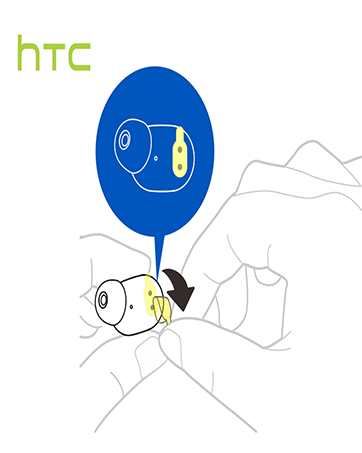
Image: A diagram illustrating the correct method for inserting an earbud to ensure a secure and comfortable fit.
Istruzzjonijiet Operattivi
Touch Kontrolli
The HTC True Wireless Earbuds 2 feature intuitive touch controls on each earbud for easy management of your audio and calls:
- Play/Pawsa: Tap left/right earbud once.
- Irrispondi Sejħa: Tap left earbud once.
- Sejjaħ Hang Up: Tap right earbud once.
- Irrifjuta Sejħa: Tap and hold left/right earbud for 2 seconds.
- Track preċedenti: Tap and hold left earbud for 2 seconds.
- Track li jmiss: Tap and hold right earbud for 2 seconds.
- Volum 'il fuq: Tap left earbud twice.
- Volum 'l isfel: Tap right earbud twice.
- Attiva l-Assistent tal-Vuċi: Tap left/right earbud three times.

Image: A visual guide detailing the simple touch controls for the pink HTC True Wireless Earbuds 2.

Image: A visual guide detailing the simple touch controls for the black HTC True Wireless Earbuds 2.
Użu Uniku tal-Earbud
You can use either earbud independently for mono audio or calls. Simply take one earbud out of the case, and it will automatically connect to your device. This feature allows for versatility depending on your listening needs.

Image: Two smartphones connected to individual pink HTC True Wireless Earbuds 2, showcasing the versatility of using one or both earbuds.

Image: A diagram illustrating the versatility of using one or both black HTC True Wireless Earbuds 2 with different devices.
Manutenzjoni
Tindif u Kura
- Naddaf il-earbuds u l-kaxxa tal-iċċarġjar regolarment b'ċarruta ratba u niexfa.
- Neħħi l-eartips u naddafhom b'sapun ħafif u ilma jekk meħtieġ, waqt li tiżgura li jkunu niexfa għalkollox qabel ma terġa' twaħħalhom.
- Evita li tuża materjali li joborxu jew kimiċi ħarxa.
Reżistenza għall-Ilma
The HTC True Wireless Earbuds 2 are IPX5 waterproof, meaning they are protected against low-pressure water jets from any direction. This makes them suitable for workouts and light rain. However, they are not designed for submersion in water.
Issolvi l-problemi
If you encounter any issues with your HTC True Wireless Earbuds 2, please refer to the following common solutions:
| Problema | Soluzzjoni |
|---|---|
| Earbuds ma jingħaqdux | Ensure earbuds are charged. Place them back in the case, close, then reopen to re-enter pairing mode. Check your device's Bluetooth settings and forget/remove previous connections if necessary. |
| L-ebda ħoss minn earbud wieħed | Kun żgur li ż-żewġ earbuds huma ċċarġjati. Ipprova poġġihom it-tnejn lura fil-kaxxa u oħroġhom mill-ġdid. Erġa' qabbadhom mat-tagħmir tiegħek. |
| Il-kontrolli tal-mess ma jirrispondux | Ensure earbuds are clean and dry. Restart your device and re-pair the earbuds. |
| Kwalità tal-ħoss fqira | Adjust the eartips for a better seal. Ensure your device is within the 10m Bluetooth range. Check for interference from other wireless devices. |
Speċifikazzjonijiet
| Karatteristika | Dettall |
|---|---|
| Isem tal-Mudell | HTC True Wireless Earbuds 2 |
| Numru tal-Mudell tal-Oġġett | HTC TWS3 |
| Teknoloġija tal-Konnettività | Mingħajr fili (Bluetooth 5.1) |
| Ħajja tal-Batterija (Earbuds) | Sa 8 sigħat fuq ħlas wieħed |
| Ħajja tal-Batterija (bil-Kaxxa tal-Iċċarġjar) | Sa 32 sigħat |
| Kawża tal-Iċċarġjar Kapaċità tal-Batterija | 500 mAh |
| Livell ta 'Reżistenza għall-Ilma | IPX5 (Reżistenti għall-Ilma) |
| Tip ta' Kontroll | Touch Control (Volume, Play/Pause, Call Management, Voice Assistant) |
| Tqegħid tal-widnejn | Fil-widnejn |
| Medda ta' Frekwenzi | 20-20,000 Hz |
| Piż tal-oġġett | 2.82 uqija |
| Dimensjonijiet tal-Prodott | 1.71 x 1.71 x 1.36 pulzieri |
Garanzija u Appoġġ
HTC provides a 12-month warranty for the True Wireless Earbuds 2. For any support inquiries or warranty claims, please contact HTC customer service through their official websit jew il-bejjiegħ bl-imnut minn fejn inxtara l-prodott.
Għal aktar informazzjoni, żur l-uffiċjal Ħanut HTC fuq Amazon.


