1. Introduzzjoni
This manual provides essential information for the safe and efficient operation of your RCF Art 945-A Powered Speaker. Please read this manual thoroughly before using the product and retain it for future reference. The RCF Art 945-A is a high-performance, bi-amplified active speaker designed for professional audio applications, featuring a 15-inch neodymium woofer and a 4-inch titanium/neodymium compression driver, delivering 2,100W of power.
2. Informazzjoni dwar is-Sigurtà
Istruzzjonijiet Importanti dwar is-Sigurtà:
- Aqra dawn l-istruzzjonijiet.
- Żomm dawn l-istruzzjonijiet.
- Oqgħod attent għat-twissijiet kollha.
- Segwi l-istruzzjonijiet kollha.
- Tużax dan l-apparat ħdejn l-ilma.
- Naddaf biss b'ċarruta niexfa.
- Timblokka l-ebda fetħiet tal-ventilazzjoni. Installa skond l-istruzzjonijiet tal-manifattur.
- Tinstallax ħdejn xi sorsi tas-sħana bħal radjaturi, reġistri tas-sħana, stufi, jew apparat ieħor (inkluż amplifiers) li jipproduċu sħana.
- M'għandekx tegħleb l-iskop tas-sigurtà tal-plagg polarizzat jew tat-tip ta 'l-ert. Plagg polarizzat għandu żewġ xfafar b'waħda usa 'mill-oħra. Plagg tat-tip ta 'l-ert għandu żewġ xfafar u t-tielet prong ta' l-ert. Ix-xafra wiesgħa jew it-tielet prong huma pprovduti għas-sigurtà tiegħek. Jekk il-plagg ipprovdut ma jidħolx fl-iżbokk tiegħek, ikkonsulta elettriċista għas-sostituzzjoni tal-iżbokk skadut.
- Ipproteġi l-korda tad-dawl milli timxi fuqha jew maqrusa, partikolarment fil-plakek, ir-reċipjenti tal-konvenjenza, u l-punt fejn joħorġu mill-apparat.
- Uża biss aċċessorji/aċċessorji speċifikati mill-manifattur.
- Aqla’ dan l-apparat waqt maltempati tas-sajjetti jew meta ma jintużax għal perjodi twal ta’ żmien.
- Irreferi l-manutenzjoni kollha lil persunal tas-servizz kwalifikat. Is-servizz huwa meħtieġ meta l-apparat ikun ġie bil-ħsara b'xi mod, bħal korda tal-provvista tal-enerġija jew plagg ikun bil-ħsara, likwidu jkun inxtered jew oġġetti jkunu waqgħu fl-apparat, l-apparat ikun ġie espost għax-xita jew umdità, ma jaħdimx b'mod normali , jew twaqqgħet.
Attenzjoni: To prevent electrical shock, do not remove the cover. No user-serviceable parts inside. Refer servicing to qualified personnel.
3. Kontenut tal-Pakkett
Iċċekkja li l-oġġetti kollha elenkati hawn taħt huma inklużi fil-pakkett tiegħek:
- RCF Art 945-A Powered Speaker
- Kejbil tal-Enerġija
- Vertical mount bracket
- Muntatura fuq l-arblu
- Protezzjoni mix-xita
- Manwal għall-Utent (dan id-dokument)
4. Prodott Aktarview

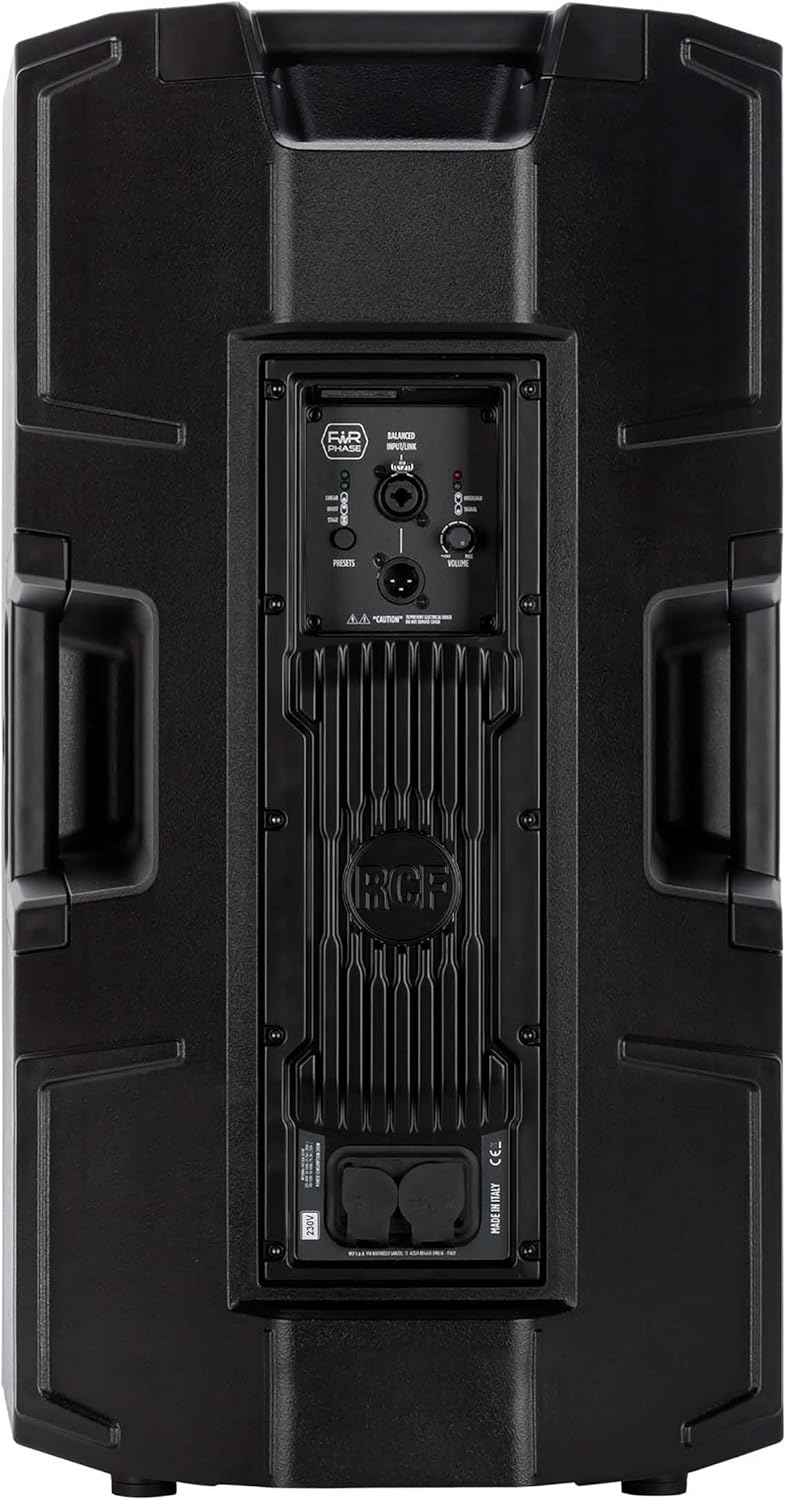


4.1. Rear Panel Controls and Connections
- BALANCED INPUT/LINK (XLR): XLR input for audio signal and XLR link output to connect to another speaker.
- PRESETS Button: Cycles through different DSP presets (LINEAR, BOOST, STAGE) to optimize sound for various applications.
- LINEAR LED: Indicates the 'Linear' preset is active, providing a flat frequency response.
- BOOST LED: Indicates the 'Boost' preset is active, enhancing bass and treble frequencies.
- STAGE LED: Indicates the 'Stage' preset is active, optimized for stagApplikazzjonijiet ta 'monitoraġġ.
- Buttuna tal-VOLUM: Jaġġusta l-livell ġenerali tal-ħruġ tal-ispiker.
- LED TA' TAGĦBIJA ŻEJDA: Illuminates when the input signal is too high, indicating potential clipping. Reduce input level if this LED lights up consistently.
- LED SINJAL: Illuminates when an audio signal is present at the input.
- POWERCON TRUE1 Input: Secure power connector for AC mains input.
- POWERCON TRUE1 Link: Power output to link power to another speaker.
5. Setup
5.1 Tqegħid
The RCF Art 945-A speaker can be used in various configurations:
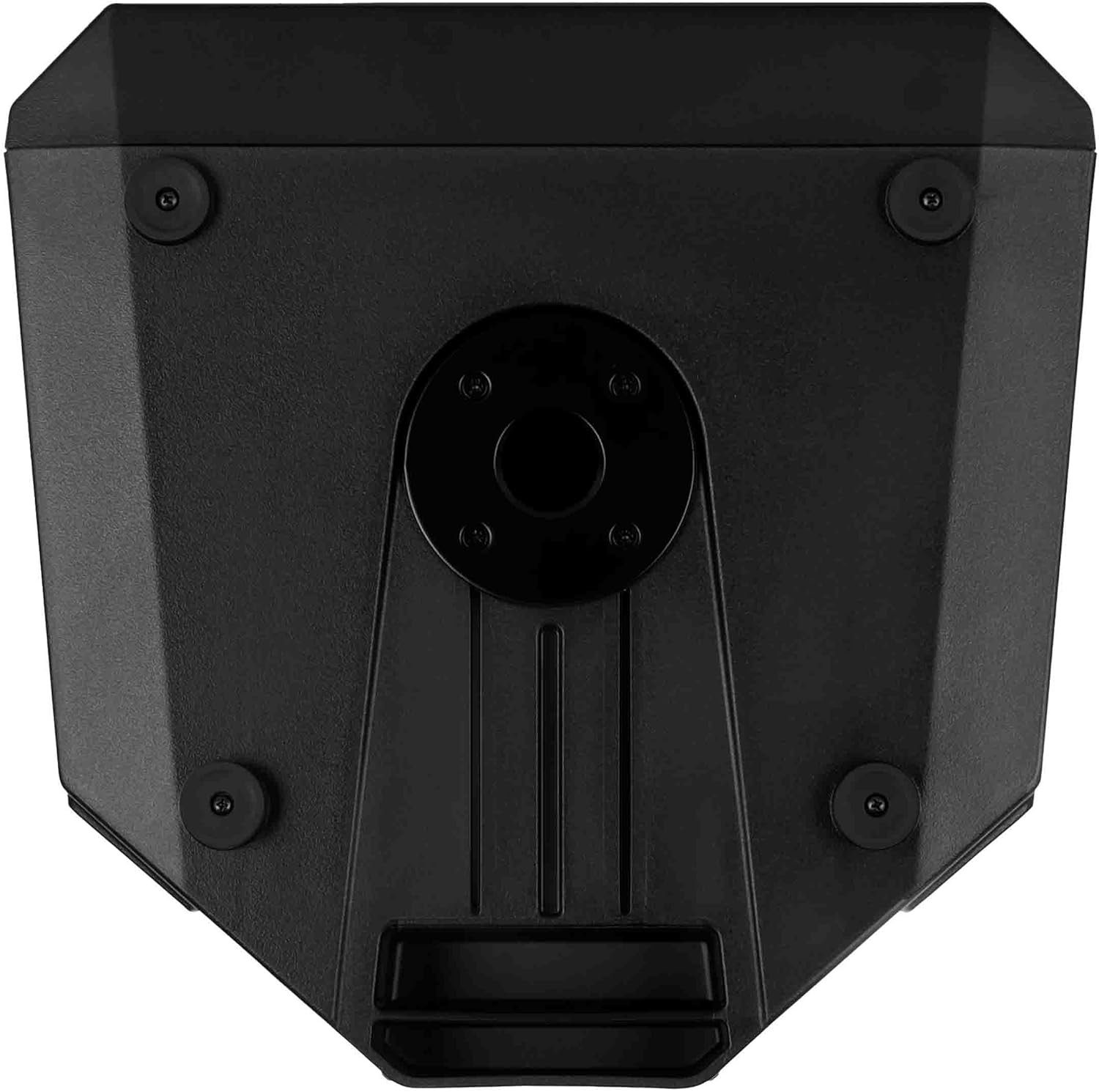
- Immuntar tal-arblu: Insert the speaker onto a standard 35mm speaker pole or tripod stand using the integrated pole mount socket on the bottom of the speaker. Ensure the stand is stable and rated for the speaker's weight (approximately 49.3 lbs / 22.4 kg).
- Tqegħid fl-Art: The speaker can be placed directly on a flat, stable surface. The rubber feet on the bottom provide stability and isolation.
- Stage Monitor: The cabinet design allows for use as a stage monitor. Position the speaker on its side with the appropriate angle for monitoring.
- Immuntar tal-ħajt: Utilize the provided vertical mount bracket for secure wall installation. Ensure the wall structure can support the speaker's weight.
5.2. Konnessjoni tal-Enerġija
- Ensure the speaker's VOLUME knob is set to minimum (fully counter-clockwise).
- Connect the supplied Powercon TRUE1 power cable to the POWERCON TRUE1 Input on the rear panel of the speaker.
- Connect the other end of the power cable to a suitable AC mains outlet. Verify that the voltage matches the speaker's requirements (e.g., 100-120V or 220-240V).
- If linking power to another speaker, use a Powercon TRUE1 link cable from the POWERCON TRUE1 Link output to the input of the next speaker.
5.3. Konnessjonijiet tal-Awdjo
- Connect your audio source (e.g., mixer, audio interface) to the BALANCED INPUT (XLR) on the rear panel using a balanced XLR cable.
- If connecting multiple speakers in a daisy chain, use an XLR cable from the BALANCED LINK output of the first speaker to the input of the next speaker.
6. Joperaw
6.1. Tixgħil / Mitfi
- Before powering on, ensure all connections are secure and the VOLUME knob is at its minimum setting.
- Locate the power switch (typically near the power input) and switch it to the 'ON' position. The power LED on the front of the speaker will illuminate.
- To power off, set the VOLUME knob to minimum, then switch the power switch to 'OFF'.
6.2. Kontroll tal-Volum
The VOLUME knob on the rear panel controls the output level of the speaker. Slowly turn the knob clockwise to increase the volume to the desired level. Monitor the OVERLOAD LED to prevent clipping.
6.3. Preset Selection
The PRESETS button allows you to select between three different DSP modes:
- LINEARI: Provides a flat frequency response, suitable for general sound reinforcement where a neutral sound is desired.
- BOOST: Enhances low and high frequencies, often used for music playback or when a more pronounced bass and treble response is needed.
- STAGE: Ottimizzat għall-użu bħala bħalatage monitor, providing clarity and feedback suppression for performers.
Press the PRESETS button repeatedly to cycle through these modes. The corresponding LED (LINEAR, BOOST, or STAGE) will illuminate to indicate the active preset.
6.4. Signal and Overload Indicators
- LED SINJAL: This green LED illuminates when an audio signal is detected at the input. It indicates that the speaker is receiving an audio signal.
- LED TA' TAGĦBIJA ŻEJDA: This red LED illuminates when the input signal level is too high, causing the amplifier to clip. If this LED lights up frequently or stays on, reduce the input level from your source or the speaker's VOLUME knob to prevent distortion and potential damage.
7. Manutenzjoni
7.1. Tindif
Biex iżżomm id-dehra u l-prestazzjoni tal-ispiker tiegħek:
- Disconnect the speaker from the power supply before cleaning.
- Use a soft, dry cloth to wipe down the cabinet.
- Għal ħmieġ iebes, ftit damp Jista' jintuża drapp b'sapun ħafif, segwit minn drapp niexef.
- Tużax prodotti tat-tindif li joborxu, solventi, jew kimiċi ħarxa, għax dawn jistgħu jagħmlu ħsara lill-finitura.
- Keep the grille free of dust and debris to ensure proper sound dispersion.
7.2. Ħażna
Meta ma tkunx qed tintuża għal perjodi twal:
- Aħżen l-ispiker f'post frisk u niexef, 'il bogħod mix-xemx diretta u minn temperaturi estremi.
- If possible, use the original packaging or a protective cover to shield the speaker from dust and physical damage.
8 Issolvi l-problemi
This section addresses common issues you might encounter with your RCF Art 945-A speaker.
| Problema | Kawża Possibbli | Soluzzjoni |
|---|---|---|
| Ebda output tal-ħoss |
|
|
| Distorted sound / OVERLOAD LED on |
|
|
| Ħsejjes ta’ daqq jew żanżin |
|
|
| Speaker mhux mixgħul |
|
|
Jekk il-problema tippersisti wara li tipprova dawn is-soluzzjonijiet, jekk jogħġbok ikkuntattja l-appoġġ għall-klijenti tal-RCF jew tekniku tas-servizz kwalifikat.
9. Speċifikazzjonijiet
The following table outlines the technical specifications for the RCF Art 945-A Powered Speaker:
| Karatteristika | Speċifikazzjoni |
|---|---|
| Isem tal-Mudell | 13000691 |
| Numru tal-Mudell tal-Oġġett | ART945-A |
| Tip ta' Kelliem | Woofer |
| Dijametru tal-Woofer | 15 Pulzier |
| Dijametru tat-Tweeter | 4 Pulzier |
| Qawwa tal-Ħruġ Massimu tal-Ispeaker | 2100 Watts |
| Modalità tal-Ħruġ tal-Awdjo | Klassi D |
| Teknoloġija tal-Konnettività | Coaxial |
| Sors tal-Enerġija | Corded Elettriku |
| Metodu ta' Kontroll | Touch (for presets) |
| Dimensjonijiet tal-Prodott | 16.34"W x 28.23"Għ |
| Piż tal-oġġett | 49.3 libbra (22.4 Kilogrammi) |
| Komponenti Inklużi | Vertical mount bracket, pole mount, rain protection |
| Tip ta 'Immuntar | Muntaġġ tal-Ħajt, Muntatura tal-Arblu |
| Huwa Waterproof | FALZ |
| Manifattur | RCF |
| ASIN | B09GWCSX7R |
10. Garanzija
The RCF Art 945-A Powered Speaker comes with a Garanzija Limitata. Specific terms and conditions of the warranty may vary by region and retailer. Please refer to the warranty card included with your product or visit the official RCF website for detailed warranty information. Retain your proof of purchase for any warranty claims.
11. Appoġġ
For technical assistance, service, or further information regarding your RCF Art 945-A Powered Speaker, please contact RCF customer support:
- Appoġġ onlajn: Żur l-RCF uffiċjali websit (www.rcf.it) for FAQs, product registration, and support resources.
- Informazzjoni ta' Kuntatt: Refer to the contact section on the RCF website for regional phone numbers or email support.
When contacting support, please have your product model (ART945-A) and serial number (if applicable) ready.


