1. Prodott Aktarview
The Anderic OEM NSRCFNA21 Smart Remote is an original equipment manufacturer (OEM) replacement remote control specifically designed for various Insignia TV models. This remote provides seamless functionality and user-friendly operation, ensuring reliable control over your television.
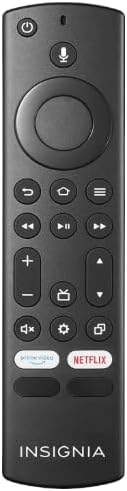
Stampa 1.1: The Anderic OEM NSRCFNA21 Smart Remote. This image displays the front view of the black remote control, featuring various buttons for power, voice control, navigation, volume, channel, and dedicated streaming service buttons.
Il-karatteristiċi ewlenin jinkludu:
- Original Quality: An authentic OEM product, ensuring performance and reliability comparable to the remote originally supplied with your TV.
- Disinn faċli għall-utent: Intuitive buttons and controls for easy navigation, volume adjustment, channel changes, and access to various TV functions.
- Prestazzjoni Affidabbli: Provides a stable and responsive connection for accurate command execution.
2. Istruzzjonijiet ta' Konfigurazzjoni u Tqabbil
To ensure proper functionality, the remote control must be paired with your Insignia TV. Follow these steps carefully:
- Irrisettja t-TV: Unplug your Insignia TV from its power source. Wait for approximately 30 seconds.
- Power On TV: Plug the TV back into the power source and turn it on. Allow the TV to fully boot up.
- Ibda Tqabbil: Once the TV has completely booted up and is displaying content, press and hold the Dar button on the Anderic NSRCFNA21 remote control for up to 30 seconds.
- Remote Update (if prompted): Your TV may display a message indicating that the remote needs an update. If prompted, allow the TV to proceed with the update. This process may take 1 to 3 minutes to complete.
- Verifika: After the update (if any) and pairing process, test the remote's functions (e.g., volume, channel, navigation) to confirm successful pairing.
If the remote does not pair after following these steps, repeat the process or refer to the troubleshooting section.
3. It-tħaddim tal-Kontroll mill-bogħod
The Anderic NSRCFNA21 remote control features an intuitive layout for easy operation of your Insignia TV. Below are the general functions of the primary buttons:
- Buttuna tal-Qawwa: Ixgħel jew jitfi t-TV.
- Buttuna tal-Kontroll tal-Vuċi: Activates voice commands for searching content or controlling the TV.
- Navigation Pad (Directional Buttons and Select): Użat biex tiċċaqlaq fil-menus u tagħżel oġġetti.
- Buttuna tad-dar: Returns to the TV's main home screen.
- Buttuna Lura: Terġa' lura għall-iskrin jew il-menu preċedenti.
- Menu/Options Button: Accesses additional menu options or settings.
- Volum 'il fuq/Niżżel: Adjusts the TV's audio volume.
- Kanal 'l fuq/'l isfel: Jibdel il-kanali tat-TV.
- Buttuna Mute: Mutes or unmutes the TV's audio.
- Buttuna tal-issettjar: Opens the TV's settings menu.
- Buttuna tad-Dħul/Sors: Changes the TV's input source (e.g., HDMI 1, HDMI 2).
- Dedicated Streaming Service Buttons: Provides quick access to popular streaming applications (e.g., Amazon Prime Video, Netflix).
4. Kompatibilità
The Anderic OEM NSRCFNA21 Smart Remote is compatible with the following Insignia TV models:
- NS24DF310NA21
- NS39DF310NA21
- NS50DF710NA21
- NS55DF710NA21
This remote also replaces the following models:
- NSRCFNA19 Rev B Fire
- NSRCFNA19revB
- NSRCFNA21 Fire
- NSRCFNA21 Rev E
- NSRCFNA21-Rev-E
Ensure your TV model is listed above for optimal performance.
5. Manutenzjoni
Proper maintenance can extend the life and functionality of your remote control.
- Sostituzzjoni tal-batterija: The remote requires two AAA batteries. Replace batteries when the remote's responsiveness decreases or it stops functioning. Ensure correct polarity when inserting new batteries.
- Tindif: Use a soft, dry cloth to clean the remote's surface. Avoid using liquid cleaners or abrasive materials, as these can damage the remote.
- Ħażna: Aħżen ir-remote f'post niexef, 'il bogħod minn temperaturi estremi u dawl tax-xemx dirett.
6 Issolvi l-problemi
If you encounter issues with your Anderic NSRCFNA21 Smart Remote, try the following troubleshooting steps:
- Remote Mhux Jirrispondi:
- Check the batteries. Replace them with fresh AAA batteries, ensuring correct polarity.
- Kun żgur li m'hemm l-ebda ostaklu bejn ir-remote u s-sensor tat-TV.
- Erġa' pprova l-proċess ta' tqabbil kif deskritt fit-Taqsima 2.
- Funzjonalità intermittenti:
- Dan jista' jindika li l-batterija hija baxxa. Ibdel il-batteriji.
- Ensure you are within the effective range of the TV's sensor.
- Pairing Fails:
- Confirm your TV model is listed in the compatibility section (Section 4).
- Ensure the TV is fully booted up before attempting to hold the Home button.
- Try unplugging the TV for a longer period (e.g., 1-2 minutes) before plugging it back in and re-attempting pairing.
If problems persist after attempting these steps, contact customer support for further assistance.
7. Speċifikazzjonijiet
| Brand | Anderiku |
| Numru tal-Mudell | NSRCFNA21 Rev B |
| Apparati Kompatibbli | Insignia Televisions |
| Sors tal-Enerġija | 2 batteriji AAA (meħtieġa) |
| Piż tal-oġġett | 1.76 uqija |
| Dimensjonijiet tal-Pakkett | 6.3 x 2.95 x 0.67 pulzieri |
| Kulur | Iswed |
| Manifattur | Dan's Electronics Etc., Inc. |
8. Garanzija u Appoġġ
For warranty information or technical support, please contact the manufacturer, Anderic (Dan's Electronics Etc., Inc.). Refer to the product packaging or the official Anderic webis-sit għal dettalji ta' kuntatt speċifiċi u termini ta' garanzija.
Tista 'żżur il- Ħanut Anderic fuq Amazon għal aktar informazzjoni.


