1. Introduzzjoni
This manual provides comprehensive instructions for the safe and effective operation, maintenance, and troubleshooting of your Mytee S300-H Tempo Heated Spotter. Please read this manual thoroughly before operating the unit and retain it for future reference.
1.1 Informazzjoni dwar is-Sigurtà
Always observe basic safety precautions when using electrical appliances to reduce the risk of fire, electric shock, or injury. This includes:
- Aqra l-istruzzjonijiet kollha qabel l-użu.
- Qabbad ma' żbokk ertjat sew biss.
- Tgħaddix l-unità fl-ilma.
- Toperax b'korda jew plagg bil-ħsara.
- Żomm it-tfal u l-annimali domestiċi 'l bogħod mill-unità waqt it-tħaddim.
- Use only recommended cleaning solutions.
2. Prodott Aktarview
The Mytee S300-H Tempo Heated Spotter is a compact and powerful heated carpet extractor designed for efficient spot cleaning and interior maintenance. Its features include:
- Powerful Vacuum Motor: Produces 85 inches of water lift for maximum extraction, reducing drying times with its two-stage disinn.
- Disinn faċli għall-utent: Features one-switch operation and easy-to-open caps for solution and recovery tanks, enhancing convenience and safety.
- Kostruzzjoni Durabbli: Built with Mytee’s robust roto-molded housing for long-lasting performance, and includes an Air Lite Upholstery Tool.
- Portabbli u Kompatt: With a 1-gallon tank capacity and weighing only 26 pounds, it is easy to transport and store.
2.1 Komponenti
Familiarize yourself with the main components of your S300-H Tempo Heated Spotter:

Figura 1: Sħiħ view of the Mytee S300-H Tempo Heated Spotter, showing the main unit, vacuum hose, solution hose, and upholstery tool.

Figura 2: Ġenb view of the unit, highlighting the control panel with power switches and the quick-connect fitting for the solution hose.
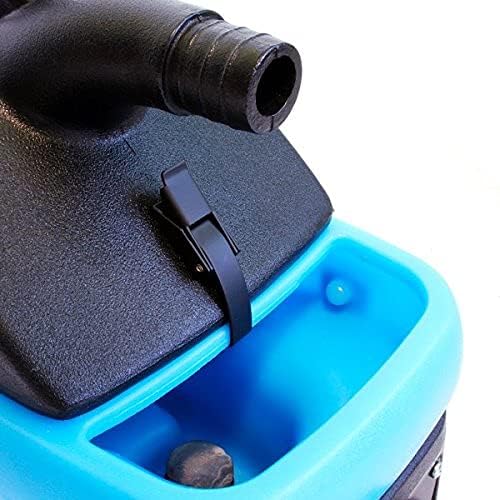
Figura 3: Close-up of the easy-to-open cap for the solution tank, located on the top of the unit.
3. Setup
3.1 Assemblaġġ Inizjali
- Ħoll il-komponenti kollha mill-imballaġġ.
- Ensure all hoses and the upholstery tool are present.
- Attach the vacuum hose to the vacuum port on the unit.
- Connect the solution hose to the quick-connect fitting on the unit and to the upholstery tool.
3.2 Imla t-Tank tas-Soluzzjoni
- Open the solution tank cap (refer to Figure 3).
- Fill the tank with clean water and the recommended carpet cleaning solution according to the solution manufacturer's instructions. Do not overfill.
- Securely close the solution tank cap.
4. Istruzzjonijiet Operattivi
4.1 Tixgħel
- Ipplaggja l-korda tad-dawl fi żbokk elettriku ertjat.
- Turn on the "Vacuum" switch.
- Turn on the "Pump" switch.
- If heated cleaning is desired, turn on the "Heater" switch. Allow a few minutes for the water to heat up.
4.2 Proċess ta' Tindif
- Pre-test the cleaning solution on an inconspicuous area of the material to be cleaned for colorfastness.
- Position the upholstery tool over the area to be cleaned.
- Press the trigger on the upholstery tool to spray the cleaning solution onto the surface.
- While spraying, pull the tool slowly across the surface to extract the dirty solution. Overlap passes slightly.
- For heavily soiled areas, repeat the process. For best results, perform a final pass without spraying solution to maximize extraction of moisture.
- Monitor the recovery tank for dirty water.
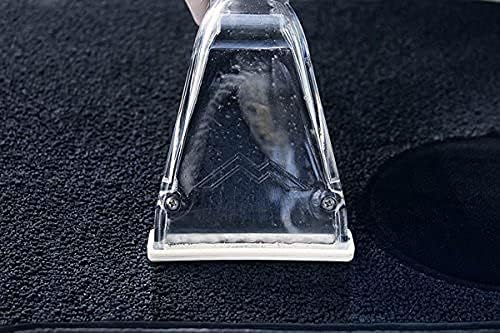
Figura 4: The upholstery tool in action, demonstrating the cleaning process on a carpeted surface.
4.3 Emptying the Recovery Tank
- Turn off all switches and unplug the unit.
- Locate the recovery tank drain.
- Carefully drain the dirty water into a suitable receptacle.
- Rinse the recovery tank with clean water if necessary.
5. Manutenzjoni
5.1 Tindif ta' Rutina
- After each use, empty and rinse both the solution and recovery tanks thoroughly.
- Flush the solution lines by running clean water through the system.
- Clean the upholstery tool, removing any debris from the nozzle and extraction head.
- Imsaħ il-barra ta 'l-unità bl-adamp drapp.
5.2 Ħażna
Store the unit in a clean, dry place, away from extreme temperatures. Ensure all tanks are empty and hoses are properly coiled to prevent damage.
6 Issolvi l-problemi
| Problema | Kawża Possibbli | Soluzzjoni |
|---|---|---|
| L-unità ma tixgħelx. | Not plugged in; circuit breaker tripped; faulty power switch. | Check power connection; reset circuit breaker; contact service center. |
| No spray from upholstery tool. | Solution tank empty; pump switch off; clogged nozzle; kinked solution hose. | Refill solution tank; turn on pump switch; clean nozzle; straighten hose. |
| Ġbid baxx. | Recovery tank full; vacuum hose clogged or disconnected; vacuum motor issue. | Empty recovery tank; check hose connections and clear obstructions; contact service center. |
| Heater mhux qed jaħdem. | Heater switch off; electrical issue. | Turn on heater switch; ensure adequate power supply; contact service center. |
| Ilma inixxi mill-unità. | Loose hose connection; damaged tank or seal; internal component issue. | Check all connections; inspect tanks and seals for damage; contact service center. |
For issues not listed or if solutions do not resolve the problem, please contact Mytee customer support.
7. Speċifikazzjonijiet
| Karatteristika | Dettall |
|---|---|
| Numru tal-Mudell | S300-H |
| Manifattur | Mytee |
| Piż tal-oġġett | 26 Liri |
| Dimensjonijiet tal-Pakkett | 24.25 x 22 x 10 pulzieri |
| Kapaċità tat-Tank | 1 Gallon (Solution & Recovery) |
| Lift tal-Ilma | 85 pulzieri |
| Mutur tal-Vakwu | Żewġ-stage |
| Kulur | White (Unit housing is black and blue) |
| ASIN | B09GPR8VY3 |
8. Garanzija u Appoġġ
8.1 Informazzjoni dwar Garanzija
Mytee offers a limited lifetime warranty on the body of the S300-H Tempo Heated Spotter. Additionally, there is a one-year warranty covering the pump, vacuum motor, and heating system. Please retain your proof of purchase for warranty claims.
8.2 Appoġġ għall-Klijent
For technical assistance, warranty service, or to locate a service center, please visit the official Mytee website or contact their customer support directly. Mytee maintains a national network of authorized service centers to assist you.


