1. Introduzzjoni
Welcome to the user manual for your Logitech G333 VR Gaming Earphones. These earphones are specifically designed to enhance your virtual reality experience with the Oculus Quest 2, providing immersive audio and a comfortable fit. This manual will guide you through the setup, operation, maintenance, and troubleshooting of your G333 earphones.
2. X'hemm fil-Kaxxa
The Logitech G333 VR Gaming Earphones package includes the following components:
- G333 VR Gaming Earphones
- 3 different ear tips sizes (S, M, L)
- 3 Velcro straps for cable management
- Manwal għall-Utent
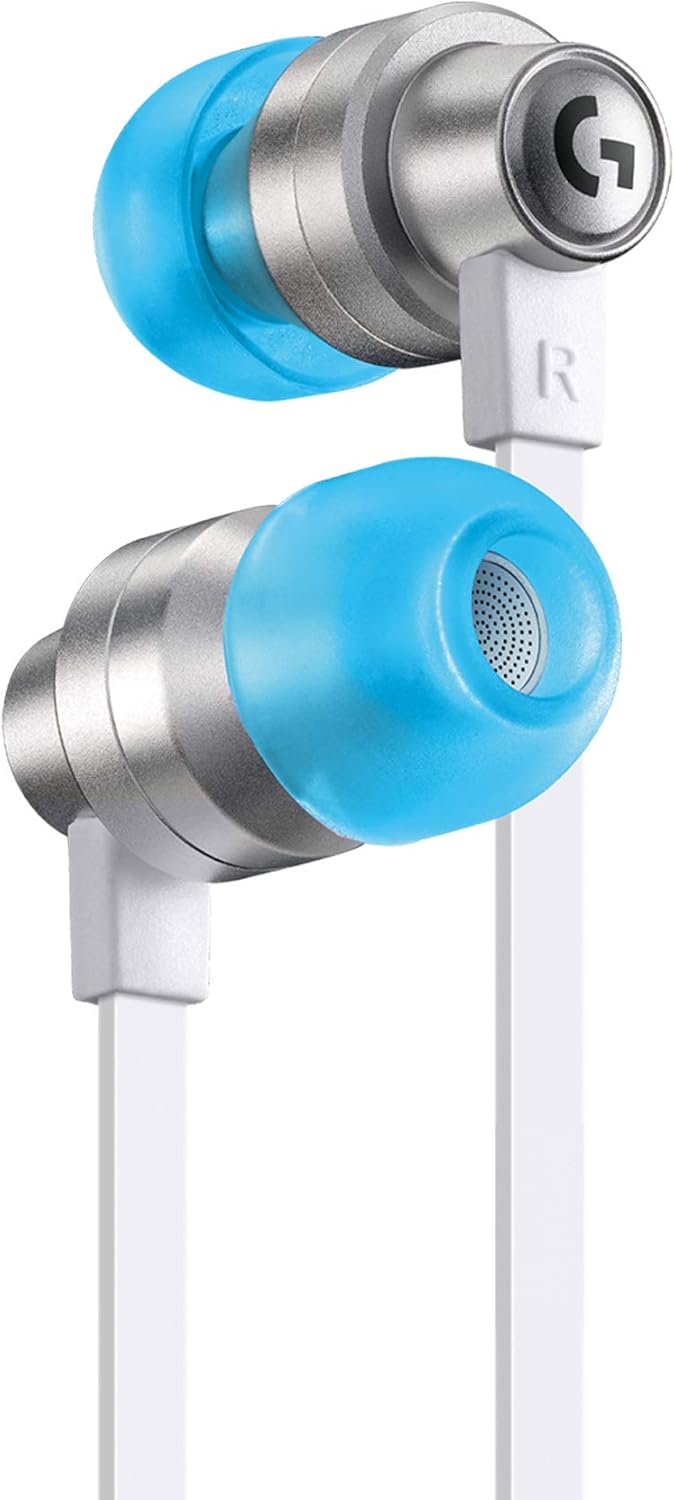
Image 2.1: Logitech G333 VR Gaming Earphones, showcasing the main product with blue ear tips.
3. Setup
3.1 Connecting to Oculus Quest 2
The Logitech G333 earphones connect directly to your Oculus Quest 2 via a 3.5 mm auxiliary jack.
- Locate the 3.5 mm audio port on your Oculus Quest 2 headset.
- Insert the 3.5 mm jack of the G333 earphones firmly into the port.
- Adjust the custom-length cable and use the included Velcro straps for cable management to ensure a secure and comfortable fit during VR sessions.
3.2 Choosing Ear Tips
The G333 earphones come with three different sizes of soft silicone ear tips (Small, Medium, Large) to ensure optimal comfort and sound isolation.
- Gently remove the pre-installed ear tips.
- Select the ear tip size that provides the most comfortable and secure fit in your ear canal. A good fit is crucial for sound quality and noise isolation.
- Attach the chosen ear tips firmly to the earphone nozzles.

Immaġni 3.1: Splodiet view of the G333 earphone highlighting its components, including ear tips, dual audio drivers, aluminum housing, and custom-length cable.

Image 3.2: Selection of small, medium, and large soft silicone ear tips for personalized comfort and fit.
4. Joperaw
4.1 Kontroll tal-Awdjo
The G333 earphones feature an in-line remote for media control.
- Aġġustament tal-Volum: Use the volume buttons on the in-line remote to increase or decrease audio levels.
- Play/Pawsa: Press the central button once to play or pause audio.
- Aqbeż il-binarji: Double-press the central button to skip to the next track. Triple-press to go to the previous track.
4.2 Użu tal-Mikrofonu
The integrated microphone allows for clear communication in multiplayer VR environments. Ensure the microphone is positioned appropriately for optimal voice pickup.

Image 4.1: User experiencing VR with the G333 earphones, highlighting their integration with the Oculus Quest 2 for immersive audio.
5. Manutenzjoni
5.1 Tindif
- Tips tal-widnejn: Neħħi l-ponot tal-widnejn tas-silikon u aħsilhom b'sapun ħafif u ilma. Laħlaħhom sewwa u ħallihom jinxfu kompletament qabel ma terġa' twaħħalhom.
- Korp tal-Earphone: Wipe the aluminum housing and cables with a soft, dry, lint-free cloth. Avoid using harsh chemicals or abrasive materials.
- Awdjo Jack: Keep the 3.5 mm audio jack clean and free of debris to ensure a reliable connection.
5.2 Ħażna
When not in use, store the earphones in a clean, dry place. Use the included cable management straps to prevent tangling and damage to the cable.
6 Issolvi l-problemi
6.1 Ebda Ħoss jew Volum Baxx
- Ensure the 3.5 mm jack is fully inserted into the Oculus Quest 2.
- Check the volume settings on your Oculus Quest 2 and the in-line remote.
- Test the earphones with another device to rule out a device-specific issue.
- Ensure ear tips are properly seated for optimal sound delivery.
6.2 Kwalità tal-Ħoss Fqira
- Verify that the ear tips are the correct size and provide a good seal in your ear canal.
- Clean the ear tips and earphone nozzles to remove any obstructions.
- Check for any damage to the cable or audio jack.
6.3 Il-Mikrofonu Mhux Jaħdem
- Ensure the microphone is not obstructed and is positioned correctly.
- Check microphone settings within your Oculus Quest 2 or VR application.
- Ittestja l-mikrofonu b'applikazzjoni jew apparat ieħor jekk possibbli.
7. Speċifikazzjonijiet
| Karatteristika | Dettall |
|---|---|
| Isem tal-Mudell | G333 Gaming Wired |
| Teknoloġija tal-Konnettività | Bil-fili |
| Headphones Jack | 3.5 mm Jack |
| Kontroll tal-Ħoss | Iżolament tal-Ħoss |
| Tip ta' Sewwieq Awdjo | Dynamic Driver (Dual Drivers) |
| Medda ta' Frekwenzi | 20Hz ~ 20KHz |
| Impedenza | 5 Ohm |
| Forma tal-widna | Fil-widna |
| Fattur tal-Formola | Fil-widnejn |
| Tqegħid tal-widnejn | Fil-widnejn |
| Apparati Kompatibbli | Oculus Quest 2 |
| Tip ta' Kontroll | Media Control (In-line Remote) |
| Karatteristika Speċjali | Lightweight, Microphone Included |
| Materjal | Aluminju, silikonju |
| Kulur | White / Silver / Blue |
| Piż tal-oġġett | 12 Gram (0.423 uqija) |
| Dimensjonijiet tal-Prodott | 5.1 x 3.8 x 2 pulzieri |
| Livell ta 'Reżistenza għall-Ilma | Mhux Reżistenti għall-Ilma |
| Komponenti Inklużi | G333 VR Gaming Earphones, 3 different ear tips sizes (S, M, L), 3 Velcro straps for cable management, User Manual |

Immaġni 7.1: Dettaljata view of the G333's dual audio drivers, engineered for optimized gaming sound.
8. Garanzija u Appoġġ
8.1 Informazzjoni dwar Garanzija
This product is covered by a 90-day Amazon Renewed Guarantee. For specific warranty details and terms, please refer to the Amazon Renewed Guarantee documentation provided with your purchase or visit the Ħanut Imġedded tal-Amazon.
8.2 Appoġġ għall-Klijent
For further assistance, technical support, or warranty claims, please contact Logitech customer support or the Amazon Renewed support team. You can find additional information and support resources on the official Logitech websit.


