Introduzzjoni
The Pigtronix Gamma Drive is a versatile overdrive pedal designed to deliver a wide range of tones, from subtle boosts to aggressive, all-out grind. Its intuitive controls allow musicians to sculpt their sound with precision, making it an essential tool for any guitarist seeking dynamic and expressive overdrive.

Figura 1: Quddiem view of the Pigtronix Gamma Drive Overdrive Pedal. This image displays the pedal's blue casing, the four control knobs (Volume, Gain, Treble, Bass), the footswitch, and the DC 9V power input label.
Karatteristiċi Ewlenin
- Overdrive Pedal with Treble Bass Controls
- Wide range of gain from subtle boost to heavy distortion
- Disinn kompatt u durabbli
- True bypass switching for signal integrity
Kontenut tal-Pakkett
Malli tiftaħ il-pakkett, jekk jogħġbok kun żgur li l-oġġetti kollha li ġejjin huma preżenti:
- Pigtronix Gamma Drive Overdrive Pedal
- Manwal għall-utent (dan id-dokument)
- Kejbil tal-Konnessjoni
Gwida ta' Setup
Follow these steps to properly set up your Pigtronix Gamma Drive pedal:
1. Konnessjoni tal-Enerġija
Connect a standard 9V DC power supply (not included) to the "DC 9V" input jack on the top of the pedal. Ensure the power supply is center-negative and provides at least 10mA of current.
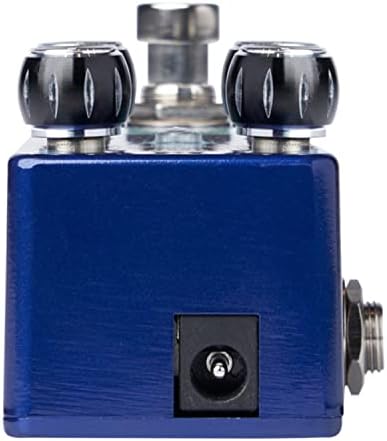
Figure 2: Close-up of the DC 9V power input jack located on the top side of the pedal.
2. Konnessjoni tal-Istrument
Qabbad l-istrument tiegħek (eż., il-kitarra) mal-jack INPUT fuq in-naħa tal-lemin tal-pedala billi tuża kejbil standard tal-istrument ta' 1/4 pulzier.
3. AmpKonnessjoni aktar ħajja
Qabbad il-jack OUTPUT fuq in-naħa tax-xellug tal-pedala tiegħek ampL-input tal-lifer bl-użu ta' kejbil ieħor tal-istrument standard ta' 1/4 pulzier.
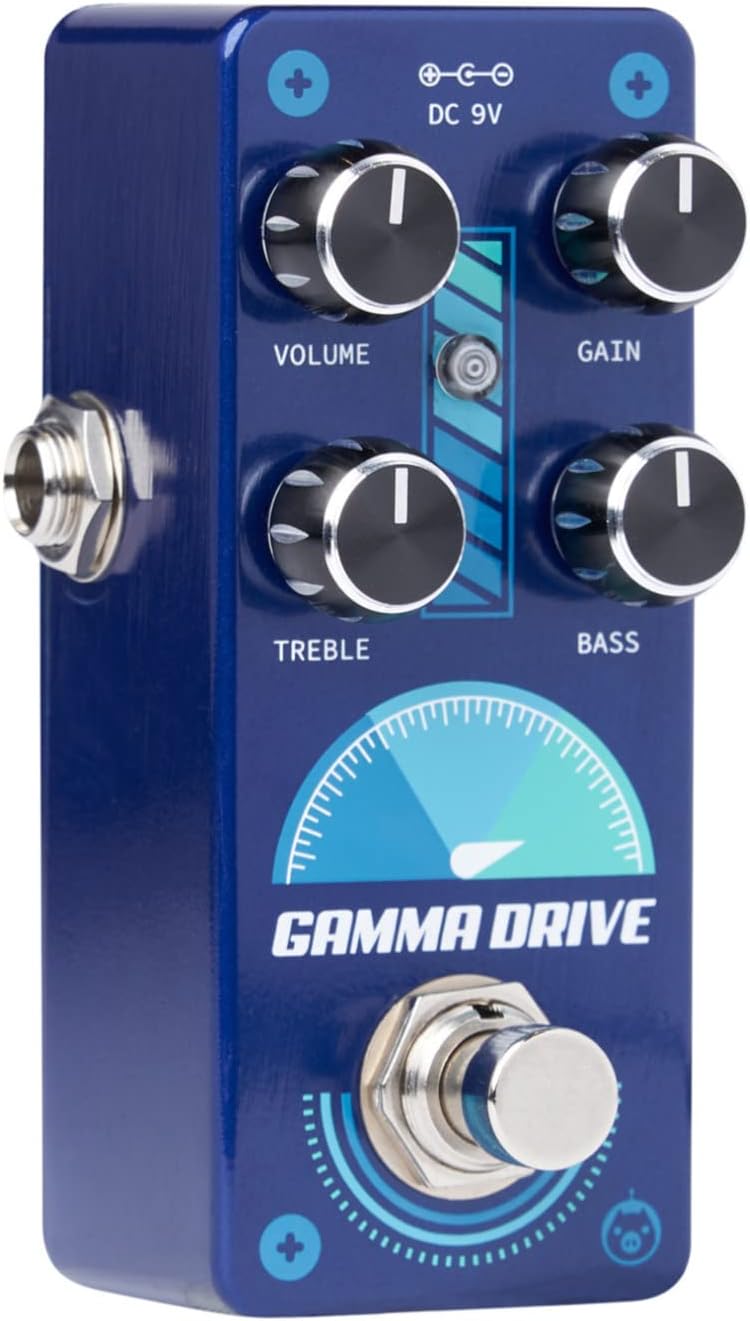
Figura 3: Angolat view illustrating the input jack (right side) and output jack (left side) for instrument and ampkonnessjonijiet ta 'lifier.
Operazzjoni
The Pigtronix Gamma Drive features four primary control knobs and a footswitch for intuitive sound shaping.
Kontrolli Fuqview
Figura 4: Quddiem view of the pedal showing the layout of the control knobs.
- VOLUM: Controls the overall output level of the pedal. Turn clockwise to increase the volume.
- QLIGĦ: Adjusts the amount of overdrive and distortion. Higher settings produce more saturated and aggressive tones.
- TREBLE: Shapes the high-frequency content of your tone. Turn clockwise for brighter sounds, counter-clockwise for warmer tones.
- BASS: Controls the low-frequency content. Turn clockwise to add more bass, counter-clockwise to reduce it.
Bl-użu tal-Footswitch
The large footswitch at the bottom of the pedal engages or bypasses the effect. When the effect is active, the LED indicator above the footswitch will illuminate. When bypassed, your signal passes through the pedal unaffected (true bypass).
Manutenzjoni u Kura
- Tindif: Uża drapp artab u niexef biex tnaddaf il-wiċċ tal-pedala. Evita prodotti tat-tindif jew solventi li joborxu.
- Ħażna: Aħżen il-pedala f'post frisk u niexef 'il bogħod mix-xemx diretta u minn temperaturi estremi.
- Qawwa: Always use a regulated 9V DC power supply with the correct polarity (center-negative) to prevent damage.
- Konnessjonijiet: Ensure all cables are securely connected before use. Disconnect cables when not in use to prevent accidental damage.
Issolvi l-problemi
| Problema | Kawża Possibbli | Soluzzjoni |
|---|---|---|
| L-ebda ħoss meta l-pedala tkun attivata. | Incorrect cable connections; Power supply issue; Pedal not engaged. | Check all input/output cables; Ensure 9V DC power supply is connected and functional; Press footswitch to engage pedal (LED should light up). |
| Ħoss dgħajjef jew distort. | Low power; Incorrect gain/volume settings. | Ivverifika l-provvista tal-enerġija voltage and current; Adjust GAIN and VOLUME knobs to desired levels. |
| Ħoss jew tħaxwix mhux mixtieq. | Ċirkwit tal-ert; Kejbils difettużi; Interferenza minn elettronika oħra. | Use isolated power supply; Try different cables; Move pedal away from power transformers or fluorescent lights. |
Speċifikazzjonijiet Tekniċi
| Speċifikazzjoni | Valur |
|---|---|
| Piż tal-oġġett | 9 uqija |
| Dimensjonijiet tal-Prodott | 8.4 x 6.3 x 4.7 pulzieri |
| Numru tal-Mudell | GDR |
| Kulur | Light Blue, Black |
| Interface tal-Ħardwer | HP-HSC |
| Format tas-Sinjal | Analogu |
| Sors tal-Enerġija | Battery Powered (Note: Typically refers to ability to use battery, but 9V DC adapter is standard for pedals) |
| Voltage | 9 Volts DC |
| Ampetà | 10 Milliamps (minimum required) |
Garanzija u Appoġġ
For detailed warranty information, product registration, and technical support, please visit the official Pigtronix webis-sit jew ikkuntattja lid-dipartiment tas-servizz tal-konsumatur tagħhom. Żomm il-prova tax-xiri tiegħek għal talbiet ta’ garanzija.
Uffiċjali Websit: www.pigtronix.com


