1. Introduzzjoni
This manual provides essential information for the safe and efficient operation of your Sundirect MD650-Plus Infrared Mirror Heater. Please read these instructions carefully before installation and use, and retain them for future reference.
The Sundirect MD650-Plus is an infrared mirror heater designed for bathrooms and similar spaces, featuring anti-fog properties and integrated WiFi thermostat control.
2. Istruzzjonijiet tas-Sigurtà
Dejjem osserva l-prekawzjonijiet ta' sigurtà li ġejjin biex tevita korrimenti jew ħsara:
- Ensure the heater is installed by a qualified electrician in accordance with local regulations.
- Do not cover the heater. Covering can lead to overheating and fire risk.
- Żomm materjali li jaqbdu 'l bogħod mill-heater.
- Tħaddimx il-heater b'korda jew plagg bil-ħsara.
- Avoid direct contact with the hot surface during operation.
- Dan l-apparat mhuwiex maħsub għall-użu minn persuni (inklużi tfal) b’kapaċitajiet fiżiċi, sensorji jew mentali mnaqqsa, jew nuqqas ta’ esperjenza u għarfien, sakemm ma jkunux ingħataw superviżjoni jew istruzzjoni dwar l-użu tal-apparat minn persuna responsabbli għas-sigurtà tagħhom.
- It-tfal għandhom ikunu sorveljati biex jiżguraw li ma jilagħbux bl-apparat.
3. Kontenut tal-Pakkett
Ivverifika li l-komponenti kollha huma preżenti qabel l-installazzjoni:
- Sundirect MD650-Plus Infrared Mirror Heater
- Smart 1.0 Pro WiFi Thermostat (integrated receiver)
- Mounting hardware (Easy-Fit solution)
- Manwal għall-Utent (dan id-dokument)
4. Speċifikazzjonijiet
| Karatteristika | Dettall |
|---|---|
| Mudell | MD650-Plus |
| Dimensjonijiet | 60 x 120 ċm |
| Output ta 'Qawwa | 650 W |
| Żona msaħħna | 7 sa 13 m² |
| Fond totali | 3.8 ċm |
| Materjal | Ħġieġ |
| Piż | 17 kg |
| Termostat | Smart 1.0 Pro WiFi Thermostat (integrated receiver) |
| Karatteristiċi | Quick heating, Wi-Fi compatible, Adjustable temperature, Electronic thermostat, Anti-fog mirror |
5. Installazzjoni u Setup
5.1 Għażla ta' Post
Select a suitable wall location in your bathroom or desired room. Ensure there is adequate clearance around the heater and that the wall can support its weight (17 kg).

Image: The Sundirect MD650-Plus Infrared Mirror Heater seamlessly integrated into a modern bathroom setting, reflecting a shower area. This illustrates a typical installation environment.
5.2 Immuntar tal-Ħiter
The MD650-Plus uses an Easy-Fit mounting solution. Follow these general steps:
- Ipprepara l-Ħajt: Mark the drilling points on the wall according to the mounting template (if provided) or the back of the heater. Ensure the marks are level.
- Drill toqob: Drill holes at the marked points and insert appropriate wall plugs suitable for your wall type.
- Waħħal il-parentesi tal-immuntar: Secure the mounting bracket (if separate) or directly mount the heater to the wall using the provided screws.
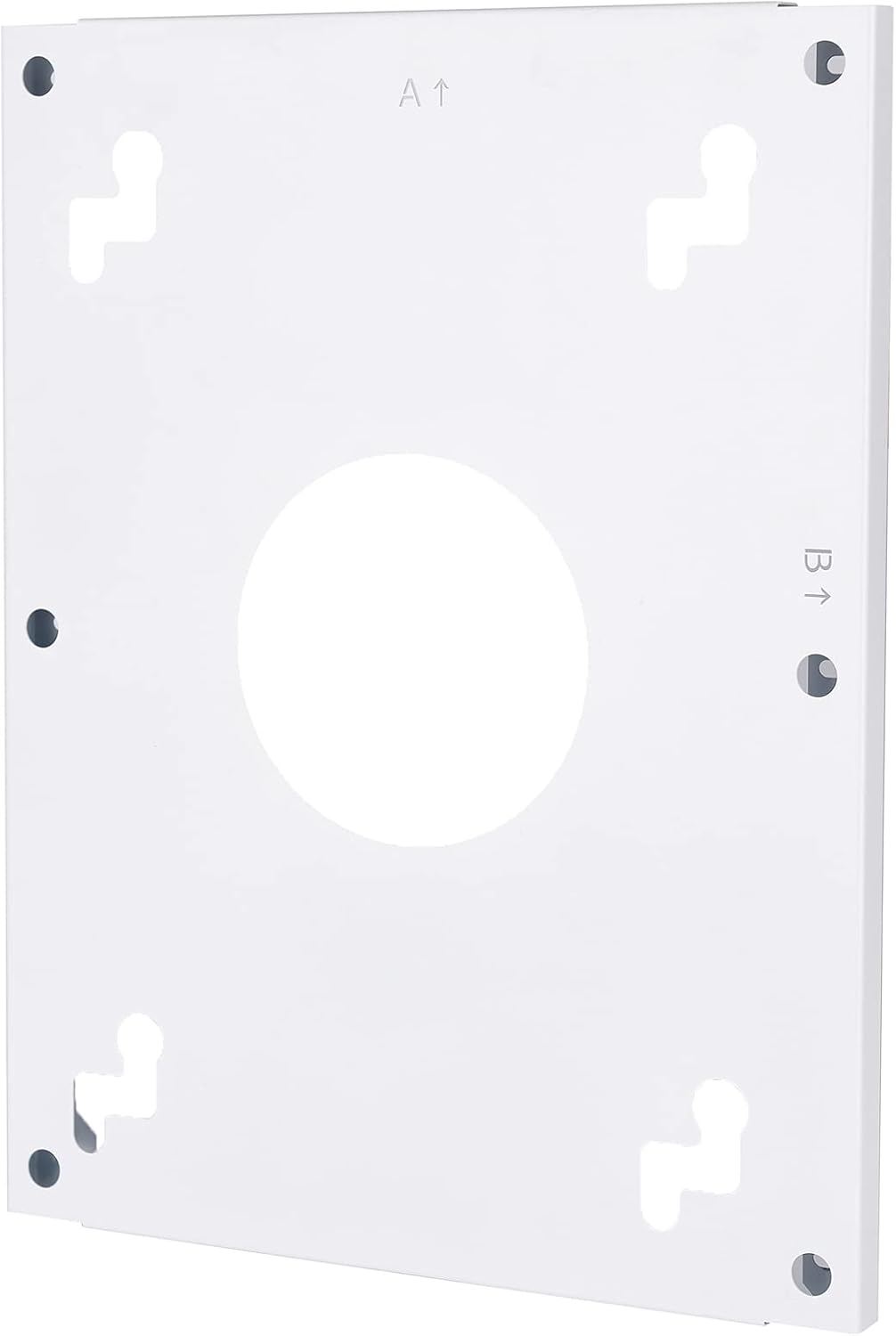
Immaġni: Wara view of the heater's mounting plate, showing the screw holes and keyhole slots for secure wall attachment. Arrows indicate 'A' and 'B' for orientation.
Image: The back of the Sundirect MD650-Plus heater, displaying the power cable and the integrated receiver box with an on/off switch. This shows the electrical connection point.
5.3 Konnessjoni Elettrika
The heater must be connected to a suitable power supply by a qualified electrician. The integrated receiver and power cable are located on the back of the unit.
- Ensure the power supply matches the heater's requirements (650W).
- The integrated receiver allows for connection to the Smart 1.0 Pro WiFi Thermostat.

Immaġni: Dettaljata view of the integrated receiver box on the back of the heater, featuring an on/off switch and indicator lights. This highlights the control interface for the heater.
5.4 Smart 1.0 Pro WiFi Thermostat Setup
The MD650-Plus comes with an integrated receiver for the Smart 1.0 Pro WiFi Thermostat. To control your heater via smartphone, you need to pair the thermostat with the Sundirect Smart App.
- Niżżel l-App: Scan the QR code or visit the provided links to download the Sundirect Smart App or Tuya Smart App.
- Tqabbil: Follow the in-app instructions to pair your Smart 1.0 Pro WiFi Thermostat with the app. This typically involves putting the thermostat into pairing mode and connecting it to your home WiFi network.
- Kontroll: Once paired, you can control the heater's temperature, schedule, and other settings directly from your smartphone.

Image: Two QR codes for downloading the control applications. The left QR code links to Tuya Smart App, and the right QR code links to Sundirect Smart App.

Image: A smartphone displaying the Sundirect smart app interface, showing temperature control and a WiFi logo, indicating remote control capabilities.
6. Istruzzjonijiet Operattivi
6.1 Operazzjoni Bażika
After successful installation and pairing, you can operate your heater:
- Power On/Off: Use the physical switch on the integrated receiver (if applicable) or the app to turn the heater on or off.
- Kontroll tat-temperatura: Adjust the desired room temperature using the Smart 1.0 Pro WiFi Thermostat or the Sundirect Smart App.
- Funzjoni kontra ċ-ċpar: The mirror's anti-fog feature activates when the heater is operating, preventing condensation.

Image: The Sundirect MD650-Plus mirror heater shown with an overlay of the Smart 1.0 Pro WiFi Thermostat, illustrating the integrated control system.
6.2 Karatteristiċi ta' Kontroll tal-App
The Sundirect Smart App provides advanced control options:
- Skedar: Issettja skedi ta' tisħin ta' kuljum jew ta' kull ġimgħa biex tottimizza l-konsum tal-enerġija.
- Kontroll taż-Żona: If you have multiple Sundirect heaters, manage them individually or in groups.
- Monitoraġġ tal-Enerġija: Monitor energy usage (feature availability may vary by app version).
7. Manutenzjoni u Tindif
Manutenzjoni regolari tiżgura prestazzjoni ottimali u lonġevità tal-ħiter tiegħek.
- Tindif tal-wiċċ tal-mera: Uża artab, damp cloth and a mild glass cleaner. Do not use abrasive cleaners or harsh chemicals, as these can damage the mirror coating.
- Tindif Ġenerali: Wipe the frame and back of the heater with a dry or slightly damp cloth. Ensure the heater is unplugged and cool before cleaning.
- L-ebda Partijiet li jistgħu jservu mill-utent: Do not attempt to open or repair the heater yourself. Refer all servicing to qualified personnel.

Image: An icon depicting a crossed-out cleaning brush over a mirror, signifying that abrasive cleaners should not be used on the mirror surface.
8 Issolvi l-problemi
If you encounter issues with your Sundirect MD650-Plus heater, refer to the following common problems and solutions:
| Problema | Kawża Possibbli | Soluzzjoni |
|---|---|---|
| Heater ma jixgħelx | No power supply; Main switch off; Thermostat not calling for heat | Check power connection; Ensure main switch on receiver is ON; Verify thermostat settings and battery (if applicable). |
| Heater not heating sufficiently | Room size too large for heater; Thermostat set too low; Drafts in room | Ensure heater matches room size (7-13 m²); Increase thermostat setting; Seal drafts. |
| Problemi ta' konnessjoni tal-WiFi | Incorrect WiFi password; Router too far; Network interference | Re-enter WiFi password in app; Move router closer or use a repeater; Check for other devices interfering with WiFi signal. |
| Il-mera tiċċapar | Heater not active; Extreme humidity | Ensure heater is on and operating; Allow time for the anti-fog function to work. |
9. Informazzjoni dwar Garanzija
Sundirect products are manufactured to high-quality standards. For specific warranty terms and conditions, please refer to the warranty card included with your product or visit the official Sundirect websit. Żomm il-prova tax-xiri tiegħek għal talbiet ta' garanzija.
10. Appoġġ għall-Klijent
For further assistance, technical support, or spare parts inquiries, please contact Sundirect customer service through their official websit jew l-informazzjoni ta’ kuntatt ipprovduta max-xiri tiegħek.
You can also refer to the seller infrarot-fussboden-de on Amazon for purchase-related queries.


