1. Introduzzjoni
Grazzi tax-xiriasing the CAME-TV Boltzen Perseus RGBDT 55W Lighting Screen. This professional-grade LED light is designed for various photography and videography applications, offering versatile color control and powerful illumination. Please read this manual thoroughly before operating the device to ensure proper use and maintenance.
This manual provides essential information on setting up, operating, maintaining, and troubleshooting your lighting screen. Keep this manual for future reference.
2. Prekawzjonijiet tas-Sigurtà
- Tesponix l-apparat għax-xita jew għall-umdità biex tevita xokk elettriku jew nar.
- Tiżżarmax jew timmodifikax l-apparat. It-tiswijiet għandhom isiru biss minn persunal kwalifikat.
- Ensure the power source matches the device's requirements (Electric, 55W).
- Evita l-espożizzjoni diretta tal-għajnejn għas-sors tad-dawl, għax dan jista' jikkawża ħsara lill-għajnejn.
- Keep the device away from flammable materials and ensure proper ventilation during operation.
- Immaniġġja l-apparat b'attenzjoni biex tevita ħsara fiżika.
3. Kontenut tal-Pakkett
Malli tiftaħ il-pakkett, jekk jogħġbok ivverifika li l-komponenti kollha huma preżenti u f'kundizzjoni tajba:
- CAME-TV Boltzen Perseus RGBDT 55W Lighting Screen (Model: P-1200R)
- Adapter/Kejbil tal-Enerġija
- Borża tal-Ġarr
- Manwal għall-Utent (dan id-dokument)

Image: The CAME-TV Boltzen Perseus RGBDT 55W Lighting Screen (displaying blue light) shown alongside its dedicated carrying bag, illustrating the main product and its portable storage solution.
4. Gwida ta' Setup
4.1 Immuntar tad-Dawl
The Boltzen Perseus P-1200R is designed to be mounted on a standard light stand. Locate the mounting bracket on the light and attach it securely to your light stand's spigot.
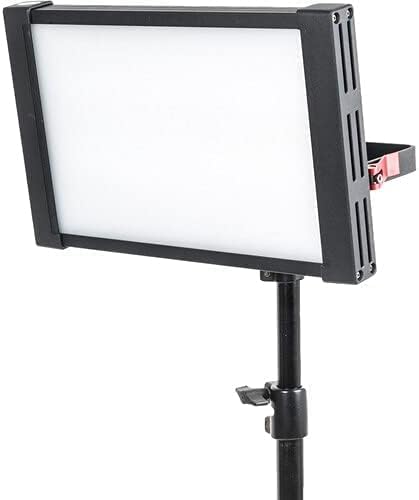
Image: The CAME-TV Boltzen Perseus RGBDT 55W Lighting Screen, emitting a white light, securely mounted on a professional light stand, demonstrating its typical setup for studio or location use.
4.2 Konnessjoni tal-Enerġija
- Connect the power adapter to the DC input port on the back of the light panel.
- Ipplaggja l-adapter tal-enerġija fi żbokk tal-elettriku adattat.
- Alternatively, if using a compatible battery (not included), attach it to the battery plate on the rear of the unit.

Immaġni: Dettaljata view of the rear panel of the CAME-TV Boltzen Perseus RGBDT 55W Lighting Screen, highlighting the control knobs, buttons, and the battery mounting plate, essential for operation and power management.
5. Istruzzjonijiet Operattivi
5.1 Tixgħel/Jitfi
Locate the power switch on the rear panel of the light. Flip the switch to the 'ON' position to power on the device. Flip it to the 'OFF' position to power off.
5.2 Aġġustament tal-Luminożità (Dimmer)
Uża l- DIMMER knob on the control panel to adjust the light's intensity. Rotate clockwise to increase brightness and counter-clockwise to decrease it.
5.3 Color Temperature and Hue Control
The Boltzen Perseus P-1200R features RGBDT color space control, allowing for a wide range of color temperatures and hues.
- Modalità CCT: Uża l- CCT knob to adjust the color temperature from 2000K to 10000K.
- Modalità RGB: Agħfas il- KULUR button to switch to RGB mode. Use the corresponding knobs or buttons to adjust Red, Green, and Blue values to achieve desired colors.
- Effetti Speċjali: The light may include pre-programmed special effects. Refer to the on-screen display and control buttons for navigation and selection of these effects.
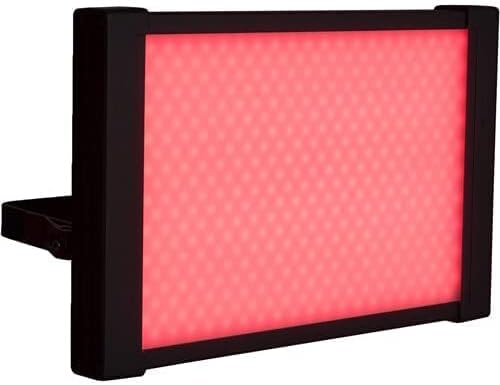
Image: The CAME-TV Boltzen Perseus RGBDT 55W Lighting Screen illuminated with a vibrant red light, showcasing its ability to produce various colors for creative lighting setups.
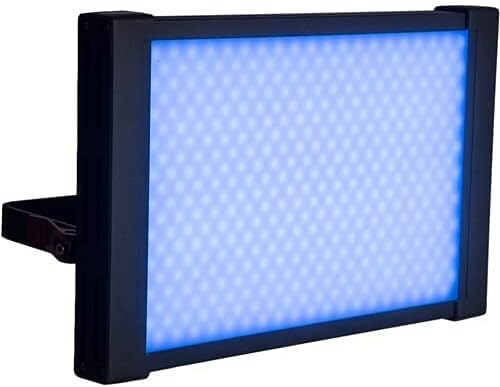
Image: The CAME-TV Boltzen Perseus RGBDT 55W Lighting Screen illuminated with a bright blue light, demonstrating another color option available through its RGBDT color control system.

Image: The CAME-TV Boltzen Perseus RGBDT 55W Lighting Screen illuminated with a rich purple light, further illustrating the extensive color palette achievable with this versatile lighting unit.
6. Manutenzjoni
- Tindif: Uża drapp artab u niexef biex tnaddaf il-pannell tad-dawl u l-housing. Tużax prodotti tat-tindif jew solventi li joborxu.
- Ħażna: Meta ma tkunx qed tuża d-dawl, aħżen il-borża tal-ġarr tiegħu f'post frisk u niexef, 'il bogħod mix-xemx diretta u minn temperaturi estremi.
- Spezzjoni: Regularly inspect the power cable and connections for any signs of damage. If damage is found, discontinue use and contact customer support.
7 Issolvi l-problemi
| Problema | Kawża Possibbli | Soluzzjoni |
|---|---|---|
| Id-dawl ma jixgħelx. | Ebda provvista tal-enerġija; konnessjoni maħlula; adapter tal-enerġija difettuż. | Check power cable connection; ensure outlet is working; try a different power adapter if available. |
| Id-dawl jitteptep jew jitbaxxa b'mod mhux mistenni. | Unstable power supply; overheating; faulty internal component. | Ensure stable power source; allow light to cool down; contact customer support if problem persists. |
| Color or brightness controls are unresponsive. | Software glitch; control panel issue. | Power cycle the device (turn off, wait 10 seconds, turn on); contact customer support. |
8. Speċifikazzjonijiet
| Karatteristika | Dettall |
|---|---|
| Mudell | P-1200R |
| Brand | CAME-TV |
| Output ta 'Qawwa | 55W (Note: Some specifications may list 9W, but the primary output is 55W) |
| Firxa tat-Temperatura tal-Kulur | 2000K - 10000K (RGBDT) |
| Sors tal-Enerġija | Elettriku |
| Dimensjonijiet (Tbaħħir) | 37.2 x 31.2 x 9.6 ċm |
| Piż (Tbaħħir) | 1 kg |
| Komponenti Inklużi | Lighting Screen, Power Adapter, Carrying Bag |
| L-Ewwel Data Disponibbli | 14 ta’ Settembru, 2021 |
9. Garanzija u Appoġġ
For warranty information and technical support, please refer to the official CAME-TV webis-sit jew ikkuntattja lid-distributur lokali tiegħek. Żomm l-irċevuta tax-xiri tiegħek bħala prova tax-xiri għal talbiet ta' garanzija.
Manufacturer: CAME-TV Boltzen Perseus RGBDT 55W - P-1200R-1
ASIN: B09G3JLCSQ


