1. Introduzzjoni
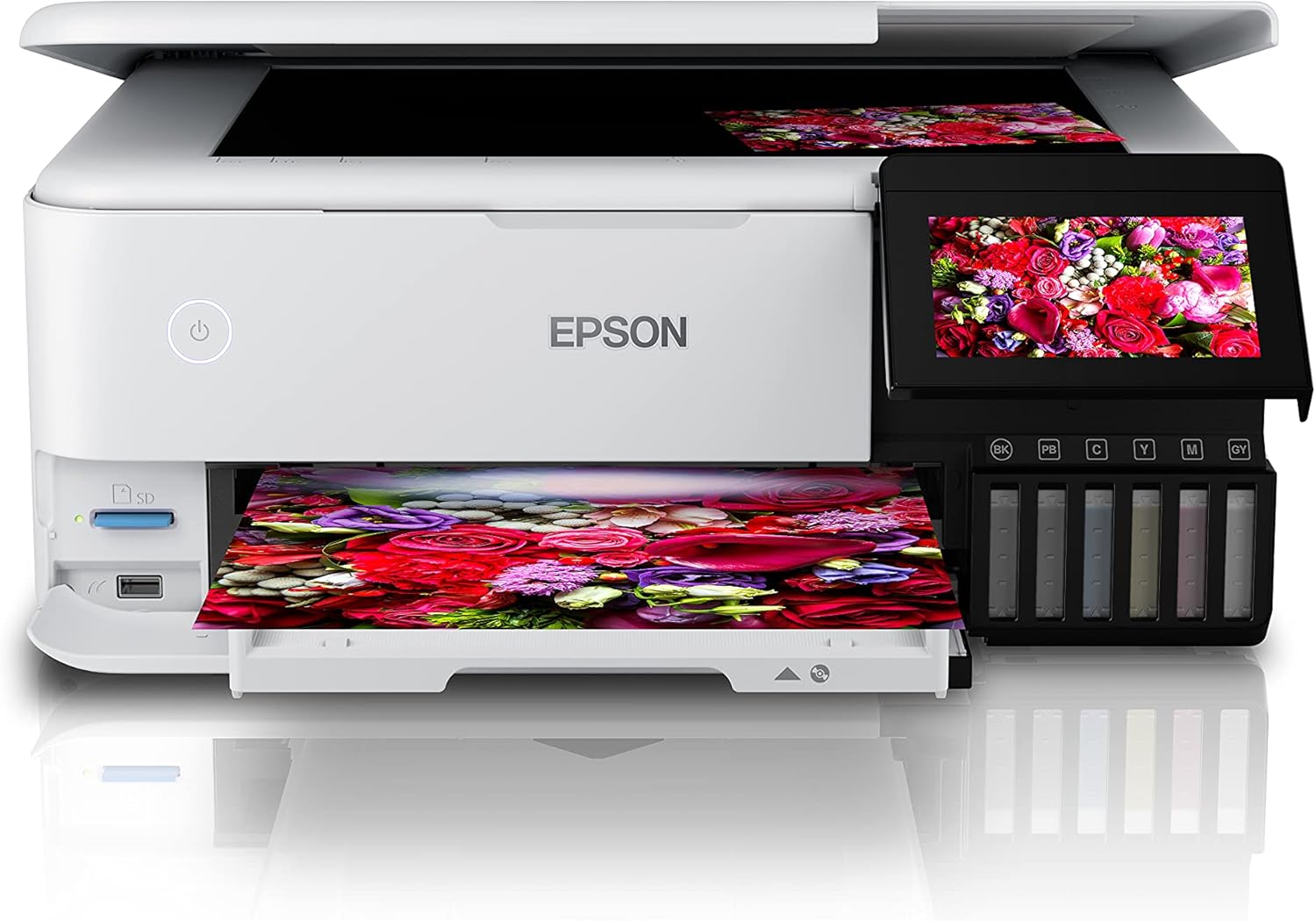
The Epson EcoTank L8160 is a high-performance, low-cost A4 photo printer designed for both photos and documents. This multifunction inkjet printer features a 6-color Epson Claria ET Premium ink system, allowing for borderless A4 color photos and stunning black and white prints. With its integrated ink tank system, it offers ultra-low-cost printing, capable of producing up to 2300 high-quality photos with replacement ink bottles.
The L8160 provides modern connectivity options including Wi-Fi, Wi-Fi Direct, Ethernet, and Apple AirPrint, ensuring seamless integration into your home or office network. It supports versatile paper handling with dedicated A4 and photo paper trays, plus two rear feeds for thicker media. Additionally, it offers convenient duplex printing for clear text on A4 documents using pigment black ink.

Stampa 1.1: Epson EcoTank L8160 printer with key features labeled, including the 10.9cm touchscreen, 6-color ink system, and wireless connectivity.
2. Informazzjoni dwar is-Sigurtà
Jekk jogħġbok aqra l-istruzzjonijiet kollha tas-sigurtà qabel ma tuża l-istampatur biex tevita korriment jew ħsara lill-apparat. Żomm dan il-manwal għal referenza futura.
- Sors tal-Enerġija: Use only the power cable supplied with the printer. Connect to a grounded outlet.
- Pjazzament: Place the printer on a stable, level surface. Avoid locations with excessive dust, humidity, or direct sunlight. Ensure adequate ventilation around the printer.
- Immaniġġjar tal-Linka: Handle ink bottles carefully to avoid spills. If ink comes into contact with skin, wash thoroughly with soap and water. Keep ink out of reach of children.
- Moving the Printer: Before moving the printer, ensure all ink tank caps are securely closed and the printer is powered off and unplugged.
- Żarmax: Do not attempt to disassemble or repair the printer yourself. Refer to qualified service personnel for repairs.
3. Kontenut tal-Pakkett
Iċċekkja li l-oġġetti kollha huma inklużi fil-pakkett:
- Stampatur Epson EcoTank L8160
- Full set of ink bottles (6 colors)
- Kejbil tal-Enerġija
- User Guide / Setup Guide
- Trej tas-CD / DVD
4. Setup
4.1 Tneħħija tal-kaxxa u tqegħid
- Remove the printer from its packaging and remove all protective tapes and materials.
- Poġġi l-istampatur fuq wiċċ ċatt u stabbli ħdejn sokit tal-elettriku.
4.2 Imla t-Tankijiet tal-Linka
The EcoTank L8160 uses an integrated ink tank system. Follow these steps to fill the tanks:
- Iftaħ l-għatu tal-unità tat-tank tal-linka fuq il-ġenb tal-istampatur.
- Uncap the ink bottle for the corresponding color. The bottles are designed to fit only the correct tank to prevent accidental filling errors.
- Insert the ink bottle into the tank's filling port. The ink will automatically start to fill the tank. Do not squeeze the bottle.
- Ladarba t-tank jimtela, il-fluss tal-linka jieqaf awtomatikament. Neħħi l-flixkun u erġa' poġġi l-għatu.
- Repeat for all colors. Close the ink tank unit cover.
Stampa 4.1: Filling the ink tanks on the Epson EcoTank L8160.
4.3 Konnessjoni tal-Enerġija u Setup Inizjali
- Connect the power cable to the printer and a wall outlet.
- Agħfas il-buttuna tal-enerġija biex tixgħel l-istampatur.
- Follow the on-screen instructions on the 10.9 cm touchscreen display to select your language, date, and time.
- The printer will then initiate the ink charging process, which may take several minutes. Do not turn off the printer during this process.
4.4 Software Installation and Network Connection
To use all printer features, install the necessary software and drivers on your computer or connect via a smart device.
- Għall-Kompjuter: Visit the Epson support website for the L8160 model to download the latest drivers and software. Follow the on-screen instructions for installation.
- Konnessjoni Wi-Fi: On the printer's touchscreen, navigate to the Wi-Fi setup menu. Select your network from the list and enter the password.
- Wi-Fi Dirett: This allows direct connection from a device without a router. Refer to the printer's display for Wi-Fi Direct setup instructions and credentials.
- Konnessjoni Ethernet: Connect an Ethernet cable from your router to the printer's Ethernet port. The printer should automatically connect to the network.
- Apple AirPrint: For Apple devices, ensure your device and printer are on the same Wi-Fi network. AirPrint functionality is typically automatic.
5. Istruzzjonijiet Operattivi
5.1 Tagħbija tal-Karta
The L8160 features multiple paper input options:
- Front Paper Cassette (A4): Pull out the front paper cassette. Load A4 plain paper print-side down. Adjust the side guides to fit the paper size.
- Photo Paper Tray: A dedicated tray for photo paper is available. Load photo paper print-side down.
- Rear Feed Slots: Two rear feed slots are available for thicker media or specialty papers. Open the rear paper support and load paper one sheet at a time, print-side up.

Stampa 5.1: Loading paper into the Epson EcoTank L8160.
5.2 L-Istampar ta' Dokumenti u Ritratti
- Kun żgur li l-istampatur ikun mixgħul u konness mat-tagħmir tiegħek.
- Open the document or photo you wish to print on your computer or smart device.
- Agħżel l-għażla tal-istampar mill-applikazzjoni tiegħek.
- Choose the Epson EcoTank L8160 as your printer.
- Adjust print settings such as paper size, media type, print quality, and color options. For duplex printing, select the two-sided printing option.
- Ikklikkja Stampa.
5.3 Printing from Smart Devices
L-app Epson Smart Panel tippermettilek tipprintja, tiskannja, u tikkopja direttament mill-ismartphone jew mit-tablet tiegħek.
- Download and install the Epson Smart Panel app from your device's app store.
- Ensure your smart device and printer are connected to the same Wi-Fi network.
- Open the app and follow the on-screen instructions to connect to your L8160 printer.
- You can now select photos or documents from your device to print directly.

Stampa 5.2: Printing from a smart device using the Epson Smart Panel app.
5.4 Stampar ta' CD/DVD
The printer supports direct printing onto compatible inkjet-printable CDs/DVDs.
- Design your CD/DVD label using compatible software.
- Place the printable CD/DVD onto the included CD/DVD tray.
- Insert the CD/DVD tray into the designated slot on the printer.
- Follow the software prompts to print your design.
6. Manutenzjoni
6.1 Iċċekkjar tal-Livelli tal-Linka u l-Mili Mill-Ġdid
Regularly check the ink levels through the transparent ink tanks or on the printer's display. When a tank is low, refill it using genuine Epson replacement ink bottles as described in Section 4.2.
6.2 Tindif tar-Ras tal-Istampar
If print quality declines (e.g., missing lines, streaking), perform a print head cleaning. This can be done from the printer's control panel or through the printer utility software on your computer.
- Fuq it-touchscreen tal-istampatur, naviga lejn Manutenzjoni or Setup.
- Agħżel Tindif tar-ras tal-istampar.
- Follow the on-screen instructions. A nozzle check pattern will be printed to verify improvement.
6.3 Tindif Ġenerali
Imsaħ il-barra tal-istampatur b'ċarruta ratba u damp, lint-free cloth. Do not use abrasive cleaners or solvents. Regularly remove dust from paper trays and vents.
7 Issolvi l-problemi
Din it-taqsima tindirizza kwistjonijiet komuni li tista’ tiltaqa’ magħhom.
| Problema | Kawża Possibbli | Soluzzjoni |
|---|---|---|
| L-istampatur ma jixgħelx | Kejbil tal-enerġija mhux imqabbad; sokit tal-enerġija difettuż | Ensure power cable is securely connected to printer and a working outlet. Try a different outlet. |
| Kwalità tal-istampar fqira (strixxi, kuluri skuri) | Low ink levels; clogged print nozzles; incorrect paper type settings | Check ink levels and refill if necessary. Perform a print head cleaning and nozzle check. Ensure paper type settings match the loaded paper. |
| Ġamm tal-karta | Incorrectly loaded paper; too much paper loaded; foreign object in paper path | Remove all paper from trays. Carefully open covers and remove any jammed paper. Ensure paper is loaded correctly and not over the maximum capacity. |
| Ma tistax tikkonnettja mal-Wi-Fi | Incorrect password; printer too far from router; network issues | Verify Wi-Fi password. Move printer closer to the router. Restart your router and printer. Reconfigure Wi-Fi settings on the printer. |
8. Speċifikazzjonijiet
Detailed technical specifications for the Epson EcoTank L8160 printer.
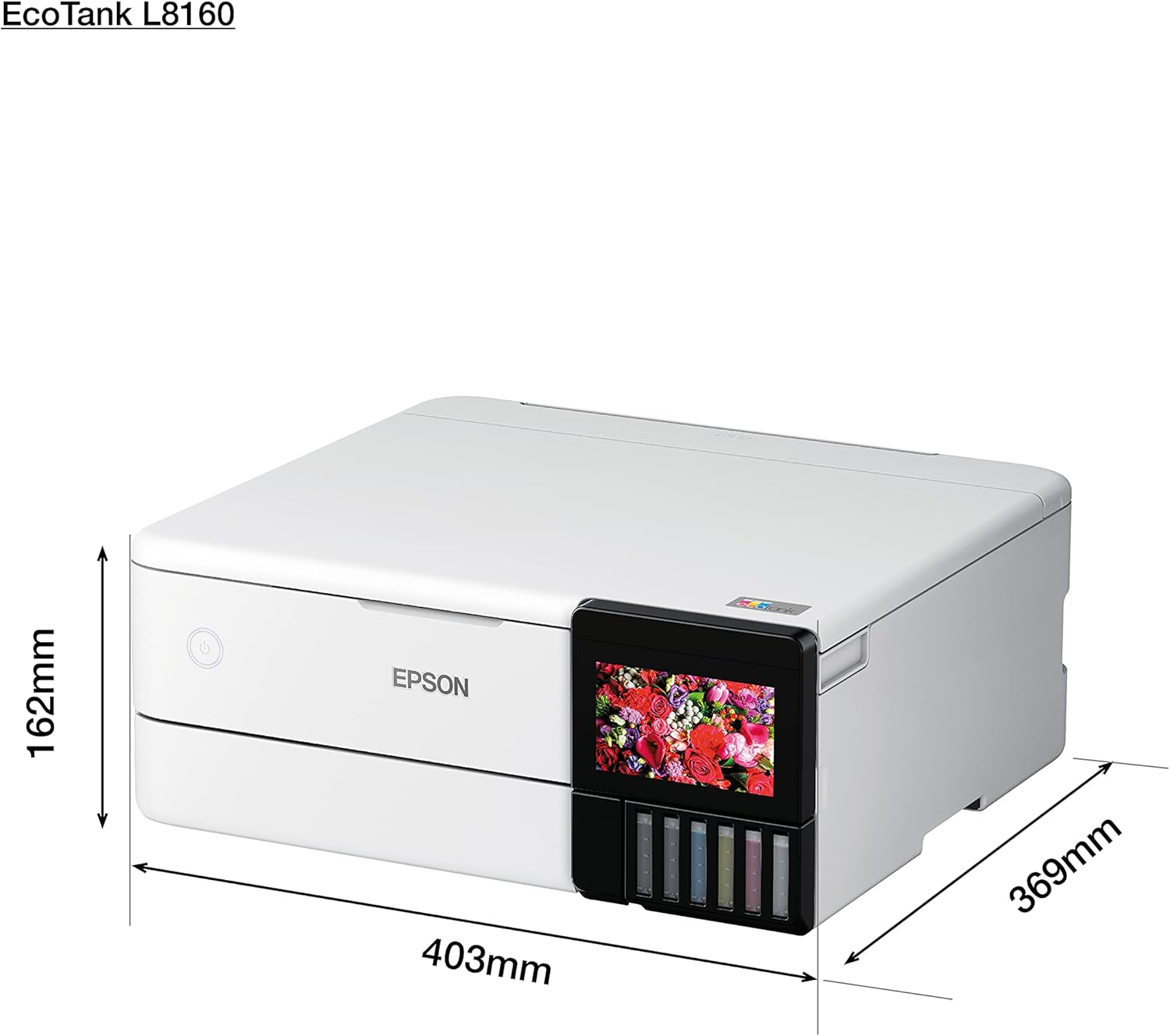
Stampa 8.1: Physical dimensions of the Epson EcoTank L8160.
| Karatteristika | Dettall |
|---|---|
| Brand | Epson |
| Isem tal-Mudell | L8160 |
| Numru tal-Mudell tal-Oġġett | L8160 |
| Teknoloġija tal-Istampatur | Inkjet |
| Output Printer | Multifunzjoni |
| Teknoloġija tal-Konnettività | Wi-Fi |
| Karatteristiċi Speċjali | Netwerk Lest |
| Kulur | Abjad |
| Dimensjonijiet tal-Prodott (Fond x Wisa' x Għoli) | 36.9D x 40.3W x 16.2H ċm |
| Daqs Massimu tal-Midja | 8.5 x 11 pulzier |
| Komponenti Inklużi | Paper trays, power cable, user guide |
| Midja Stampata | Envelopes, Paper (plain), Glossy photo paper |
| Tip ta' Skaner | Ritratt |
| Kapaċità Karta Massima | 100 folja |
| Veloċità Massima tal-Istampar bl-Iswed u l-Abjad | 32 paġna fil-minuta |
| Apparati Kompatibbli | Smartphones |
| Riżoluzzjoni Massima tal-Istampar bil-Kulur | 600 x 600 dpi |
| Daqs tal-Karta | A4 |
| Riżoluzzjoni Massima tal-Istampar bl-Iswed u l-Abjad | 600 x 600 dpi |
| Stampar Duplex | Iva |
| Manifattur | Epson |
| Fattur tal-Formola | Kollha f'Wieħed |
| Daqs tal-iskrin tal-wiri | 10.9 ċentimetru |
| Piż tal-oġġett | 11.3 Kilograms (11.27 Kilograms) |
| ASIN | B09G35WQDW |
| Re tal-Klijentviews | 4.0 minn 5 stilel (125 klassifikazzjonijiet) |
| Ranking tal-Aħjar Bejjiegħa | #18,311 in Electronics, #14 in Ink Tank Printers |
| Data L-Ewwel Disponibbli | 11 ta’ Jannar, 2022 |
| Maximum Color Print Speed (Color) | 32 paġna fil-minuta |
| Maximum Black & White Print Speed (B&W) | 32 paġna fil-minuta |
9. Garanzija u Appoġġ
9.1 Informazzjoni dwar Garanzija
The Epson EcoTank L8160 comes with a 3-year promotional warranty. Please refer to the warranty card included in your package or visit the official Epson websit għal termini u kundizzjonijiet dettaljati dwar il-kopertura tal-garanzija u r-reġistrazzjoni.
9.2 Appoġġ għall-Klijent
For further assistance, technical support, or service inquiries, please contact Epson customer support through their official website or the contact information provided in your product documentation. Have your printer model number (L8160) and serial number ready when contacting support.