1. Introduzzjoni
Grazzi tax-xiriasing the MONODEAL Portable CD Player. This device is designed for personal and portable audio playback, featuring built-in speakers, anti-skip protection, and dual headphone jacks. This manual provides detailed instructions for setup, operation, maintenance, and troubleshooting to ensure optimal performance and longevity of your CD player.

Image: The MONODEAL Portable CD Player, a compact black device with a clear top cover and control buttons on the front.
2. X'hemm fil-Kaxxa
Jekk jogħġbok iċċekkja l-kontenut tal-pakkett biex tiżgura li l-oġġetti kollha huma preżenti:
- CD Player
- Earphones
- Cable tal-Iċċarġjar tal-USB
- Kejbil Aux
- Manwal għall-Utent

Image: The MONODEAL CD Player, its packaging, and all included accessories: earphones, USB charging cable, and aux cable.
3. Prodott Aktarview
Familiarize yourself with the various parts and controls of your CD player:
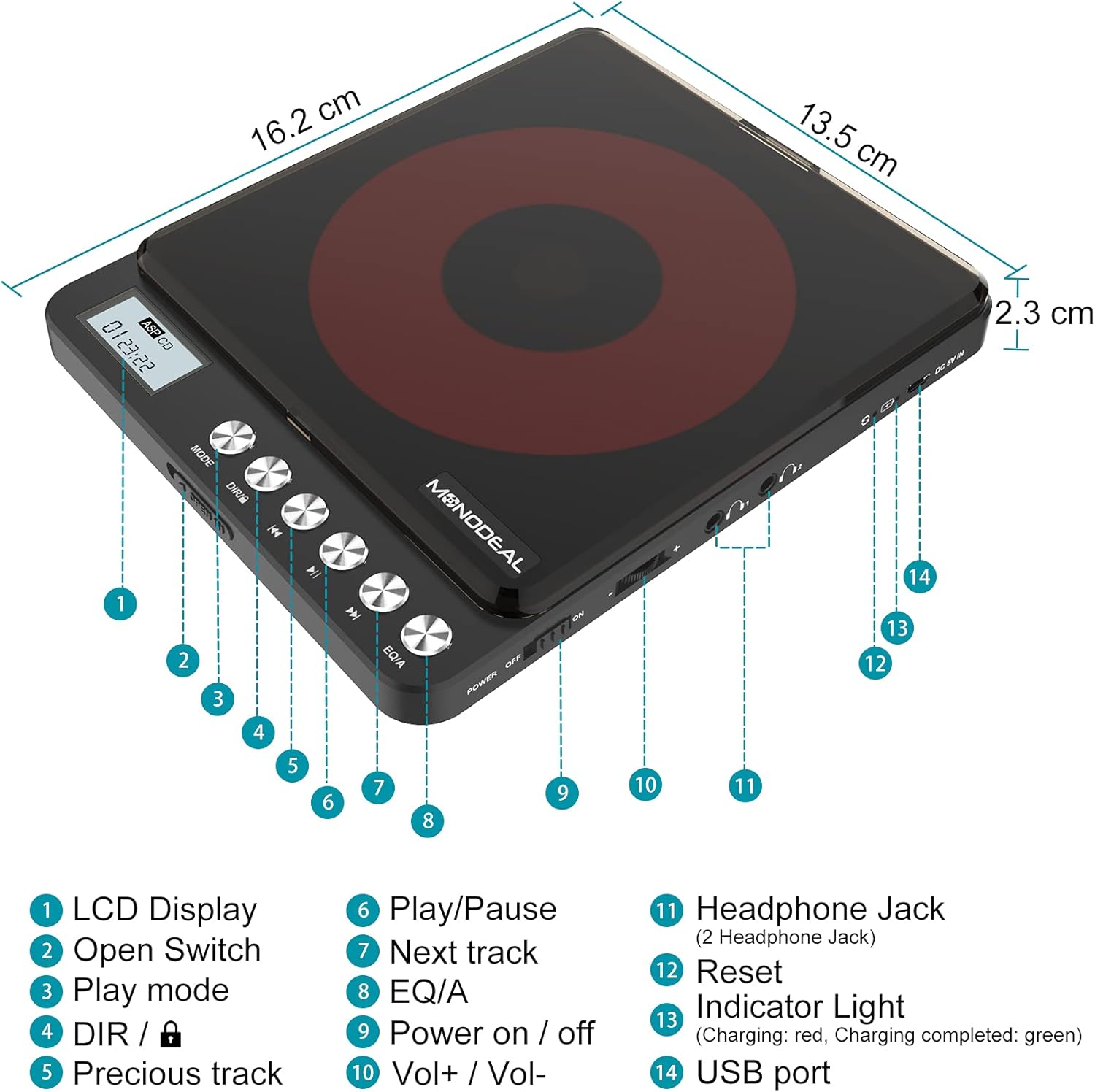
Image: A detailed diagram of the MONODEAL Portable CD Player, highlighting its various components with numbered labels.
- Display LCD: Juri n-numru tat-trakka, il-ħin, u l-istatus tal-plejbek.
- Open Switch: Used to open the CD compartment.
- Modalità Play: Cycles through playback modes (e.g., repeat, random).
- DIR / Lock: Directory navigation for MP3 CDs / Key lock function.
- Track preċedenti: Jaqbeż għall-bidu tat-trakka kurrenti jew tat-trakka ta' qabel.
- Play/Pawsa: Jibda jew iwaqqaf il-plejbek.
- Track li jmiss: Jaqbeż għall-korsa li jmiss.
- EQ/A: Equalizer settings / Anti-skip function indicator.
- Power Mixgħul / Mitfi: Swiċċ tal-qawwa prinċipali.
- Vol+ / Vol-: Kontroll tal-volum.
- Headphone Jack (2 Headphone Jacks): Audio output for headphones.
- Irrisettja: Recessed button to reset the device (requires a thin object like a needle).
- Dawl Indikatur: Shows charging status (red for charging, green for fully charged).
- Port USB: Għall-iċċarġjar tal-apparat.
4. Setup
4.1 Iċċarġjar tal-Apparat
The CD player has a built-in rechargeable battery. Before first use, fully charge the device. A full charge provides up to 15 hours of playback.
- Connect the supplied USB charging cable to the USB port (14) on the CD player.
- Connect the other end of the USB cable to a power adapter, car charger, laptop, or power bank.
- The indicator light (13) will show red during charging and turn green when fully charged.
- L-iċċarġjar tipikament jieħu madwar 4 sigħat.

Image: The MONODEAL CD Player being charged via various methods including a power bank, power adapter, laptop, and car charger.
4.2 Connecting to External Audio Systems
You can connect the CD player to external speakers, car audio systems, or home stereos using the provided 3.5mm AUX cable.
- Insert one end of the 3.5mm AUX cable into one of the headphone jacks (11) on the CD player.
- Insert the other end of the AUX cable into the 3.5mm auxiliary input port of your car stereo or external sound system.
- Nota: The CD player is not compatible with car's USB ports or Bluetooth connections for audio output. An AUX port is required.
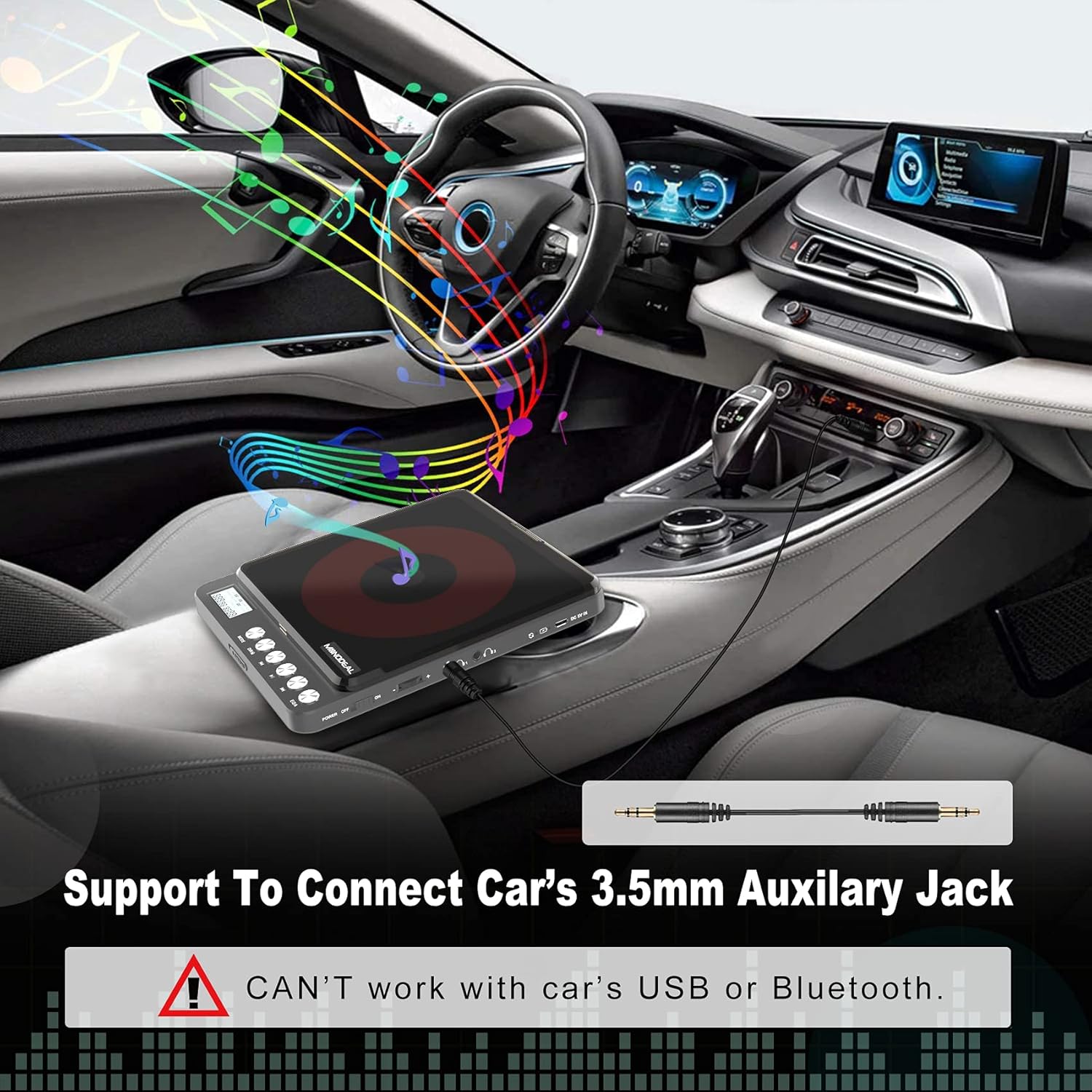
Image: The MONODEAL CD Player connected to a car's dashboard via a 3.5mm auxiliary cable, illustrating its use in a vehicle.
5. Istruzzjonijiet Operattivi
5.1 Daqq Bażiku
- Slide the Power On/Off switch (9) to the "ON" position.
- Press the Open Switch (2) to open the CD compartment.
- Carefully place a compatible CD (CD, MP3, CD-R, CD-RW, HDCD) onto the spindle, ensuring it is seated correctly.
- Agħlaq il-kompartiment tas-CD.
- The LCD display (1) will show "READ" and then the total number of tracks and total playback time.
- Press the Play/Pause button (6) to start playback.
- Adjust the volume using the Vol+ / Vol- controls (10).
- To pause, press the Play/Pause button (6) again. Press again to resume.
- To skip to the next track, press the Next Track button (7).
- To go back to the previous track or the beginning of the current track, press the Previous Track button (5).
- To turn off the player, slide the Power On/Off switch (9) to the "OFF" position. The player will remember the last played position if a disc remains inside.
5.2 Modi tal-logħob
Press the Play Mode button (3) repeatedly to cycle through different playback modes:
- Ilgħab fl-ordni: Plays tracks sequentially.
- Repeat a track: Irrepeti l-korsa kurrenti.
- Irrepeti kollox: Jirrepeti t-traċċi kollha fuq id-diska.
- Introduzzjoni: Plays the first 10 seconds of each track.
- Shuf (Shuffle): Idoqq it-traċċi f'ordni każwali.

Image: A visual representation of the five play modes available on the MONODEAL CD Player, including play in order, repeat track, repeat all, intro, and shuffle.
5.3 Dual Headphone Jacks
The MONODEAL CD Player is equipped with two headphone jacks (11), allowing two users to listen simultaneously. Simply plug two sets of headphones into the available jacks.

Image: Two individuals sharing the MONODEAL CD Player using both headphone jacks, emphasizing the dual listening feature.
5.4 Kelliema Inkorporati
For listening without headphones, the CD player features built-in stereo speakers. The sound quality is suitable for personal listening in quiet environments. The maximum volume of the internal speakers is designed for portability and may not be as loud as larger audio systems.

Image: The MONODEAL CD Player with an overlay indicating the location of its built-in dual speakers, shown in a setting with people dancing to music.
6. Manutenzjoni
- Keep the CD player clean by wiping it with a soft, dry cloth.
- Tużax tindif jew solventi li joborxu.
- Regularly clean the disc and the optical pickup lens of the CD player with a dry, lint-free cloth.
- Evita li tesponi l-apparat għal temperaturi estremi, umdità, jew dawl tax-xemx dirett.
- Aħżen il-plejer f'post frisk u niexef meta ma jkunx qed jintuża.
7 Issolvi l-problemi
| Problema | Kawża Possibbli | Soluzzjoni |
|---|---|---|
| CD skipping or not playing. | Disc is dirty, scratched, or incompatible format. Low battery. |
|
| No sound from internal speakers. | Volume too low. Headphones plugged in. |
|
| No sound when connected to car/external speakers. | Incorrect connection. Car/external system not set to AUX input. |
|
| Il-plejer ma jixgħelx. | Low battery. Power switch off. |
|
8. Speċifikazzjonijiet
| Karatteristika | Dettall |
|---|---|
| Isem tal-Mudell | CW705 |
| Dimensjonijiet tal-Prodott | 6.1 x 5.1 x 1.1 pulzieri |
| Piż tal-oġġett | 1.3 liri |
| Kulur | Iswed |
| Teknoloġija tal-Konnettività | Awżiljarju |
| Karatteristika Speċjali | Portable, Built-in Speakers, Anti-Skip, Dual Headphone Jacks, Rechargeable |
| Formati ta' Diska appoġġjati | CD, MP3, CD-R, CD-RW, HDCD |
| Formati ta 'Mużika Appoġġjati | CD-DA, MP3, WMA |
| Ħajja tal-batterija | Up to 15 hours playback (after full charge) |

Image: The MONODEAL CD Player highlighting its 2000mAh built-in rechargeable battery for up to 15 hours of playback, and listing supported disc and music formats.
9. Garanzija u Appoġġ
For warranty information or further assistance, please refer to the official MONODEAL website or contact customer support through your purchase platform. A digital version of this user manual is also available for download at: MONODEAL User Manual PDF.


