1. Introduzzjoni
This manual provides detailed instructions for the proper installation, operation, and maintenance of your Hollyland Mars 400S Pro SDI/HDMI Wireless Video Transmission System. Please read this manual thoroughly before using the product to ensure optimal performance and safety. The Mars 400S Pro is designed for professional video transmission, offering low-latency, long-range capabilities, and versatile monitoring options.
2. Informazzjoni dwar is-Sigurtà
- Tesponix l-apparat għall-ilma jew għal umdità eċċessiva.
- Evita li twaqqa' l-apparat jew li tissottomettih għal impatt qawwi.
- Use only power adapters and batteries specified by the manufacturer.
- Tippruvax tiżżarma jew timmodifika l-apparat. Irreferi kull servizz lil persunal kwalifikat.
- Żgura ventilazzjoni xierqa biex tevita sħana żejda.
3. Kontenut tal-Pakkett
The standard package for the Hollyland Mars 400S Pro (1 TX with 1 RX) typically includes the following items:
- 1x Mars 400S Pro Transmitter (TX)
- 1x Mars 400S Pro Receiver (RX)
- 5x Antennas (3 for TX, 2 for RX)
- 1x Adapter tad-DC
- 1x Manwal għall-Utent

Figura 3.1: Standard package contents for the Mars 400S Pro system. This diagram illustrates the transmitter, receiver, antennas, power adapter, and documentation included in the box.
4. Prodott Aktarview
The Hollyland Mars 400S Pro system consists of a transmitter (TX) and a receiver (RX), designed for reliable wireless video and audio transmission. Both units feature a compact, robust design with integrated cold shoe mounts.
4.1 Trasmettitur (TX)
- Input SDI: For professional video sources.
- Input HDMI: For consumer and prosumer video sources.
- Portijiet tal-antenna: Three ports for external antennas.
- Display OLED: Shows status, channel, battery, and video format.
- Input ta' Enerġija: DC input (6-16V) and USB Type-C (5-12V) for power.
- L-Series Battery Plate: For portable power.
4.2 Riċevitur (RX)
- Output SDI: For connecting to professional monitors or recorders.
- Ħruġ HDMI: For connecting to monitors or other display devices.
- Portijiet tal-antenna: Two ports for external antennas.
- Display OLED: Shows status, channel, battery, and video format.
- Input ta' Enerġija: DC input (6-16V) and USB Type-C (5-12V) for power.
- L-Series Battery Plate: For portable power.
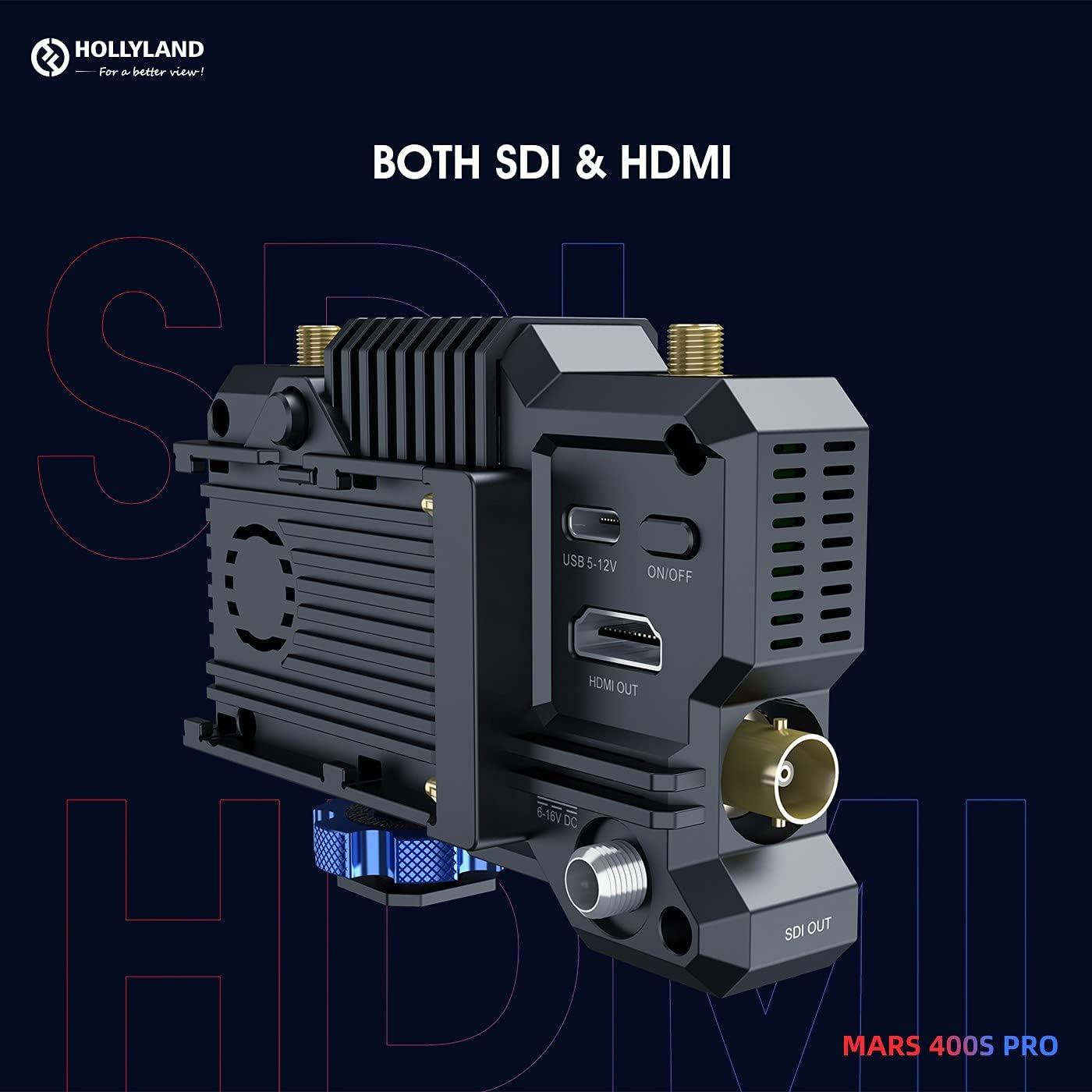
Figura 4.1: Ġenb view of the Mars 400S Pro showing both SDI and HDMI input/output ports, along with USB-C and DC power connections.
5. Setup
5.1 Attaching Antennas
- Carefully screw the provided antennas onto the antenna ports of both the transmitter and receiver units. Ensure they are finger-tight.
5.2 It-Tħaddim tal-Apparat
The Mars 400S Pro offers three power options:
- Qawwa DC: Connect the included DC adapter to the 6-16V DC input port.
- USB Type-C Power: Connect a 5-12V USB Type-C power source to the USB-C port.
- L-Series Batteries: Attach a compatible L-series battery to the battery plate on the rear of the unit.

Figura 5.1: Multiple power options for the Mars 400S Pro, including L-series batteries, USB Type-C, and 6-16V DC power.
5.3 Connecting Video Sources and Displays
- Trasmettitur (TX): Connect your camera or video source to the SDI IN or HDMI IN port on the transmitter using an appropriate cable.
- Riċevitur (RX): Connect your monitor or recording device to the SDI OUT or HDMI OUT port on the receiver using an appropriate cable.
6. Istruzzjonijiet Operattivi
6.1 Tixgħel/Jitfi
Press and hold the power button on each unit to turn it on or off. The OLED screen will illuminate upon power-on.
6.2 OLED Display Navigation
The OLED display provides real-time information. Use the navigation buttons (usually located near the display) to cycle through menus and adjust settings such as channel selection, fan mode, and scene mode.
6.3 Għażla tal-Kanal
The system automatically scans for the best channel. You can manually select a channel via the OLED menu if interference is detected. For optimal performance, ensure the transmitter and receiver are on the same channel.
6.4 Monitoraġġ tal-App
The Mars 400S Pro supports monitoring on up to four mobile devices (phones or tablets) via the HollyView app. Download the app from your device's app store. Connect your mobile device to the Mars 400S Pro's Wi-Fi network. The app provides professional monitoring features including waveform, focus peaking, zebra, zoom in/out, and 3D LUTs.
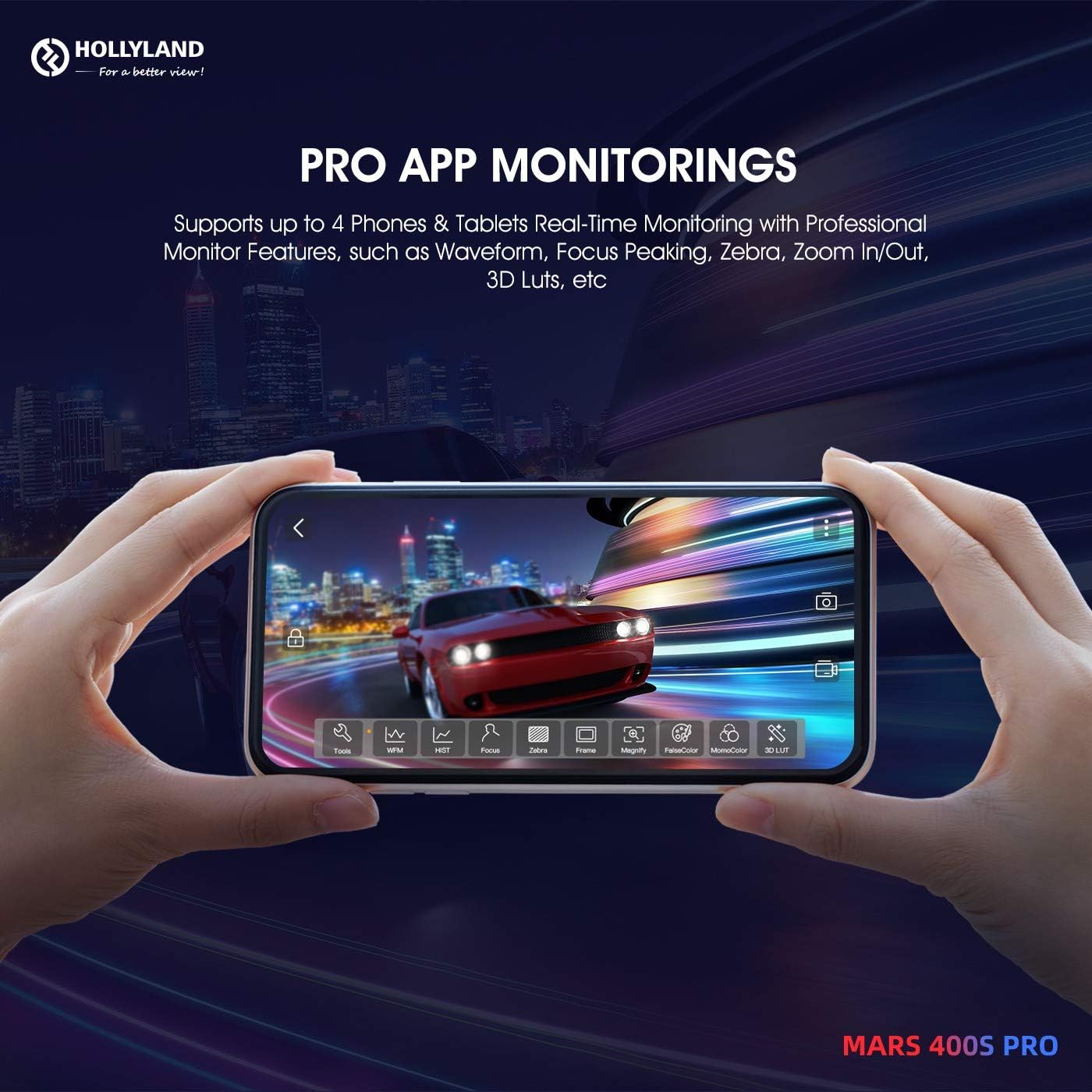
Figura 6.1: Professional app monitoring features available on a smartphone connected to the Mars 400S Pro.
6.5 Modi tax-Xena
The system offers three scene modes to optimize performance for different scenarios:
- High-definition Mode: Prioritizes image quality with a data rate of 12Mbps.
- Modalità Bilanċ: Offers a balance between quality and latency.
- Modalità Veloċità: Prioritizes lowest latency for fast-moving subjects.
6.6 Fan Modes
Manage the device's cooling with three fan modes:
- Mitfi: Fan is off (use with caution in warm environments).
- Veloċità Baxxa: Reduced fan noise for quiet environments.
- Auto: Fan speed adjusts automatically based on internal temperature.
7. Karatteristiċi Avvanzati
7.1 Direct Video for Live Stream
The Mars 400S Pro supports RTSP live streaming directly from the receiver. By connecting the receiver to a computer via a Type-C to RJ45 connector and a standard RJ45 cable, the video feed can be used with streaming software like OBS, Vmix, or VLC without additional video capture equipment.

Figura 7.1: Setup for direct video live streaming from the Mars 400S Pro receiver to a personal computer.
7.2 Optimized Monitoring Feed
The system provides an optimized monitoring feed with a data rate raised from 8Mbps to 12Mbps, ensuring higher definition and clarity for critical monitoring tasks.
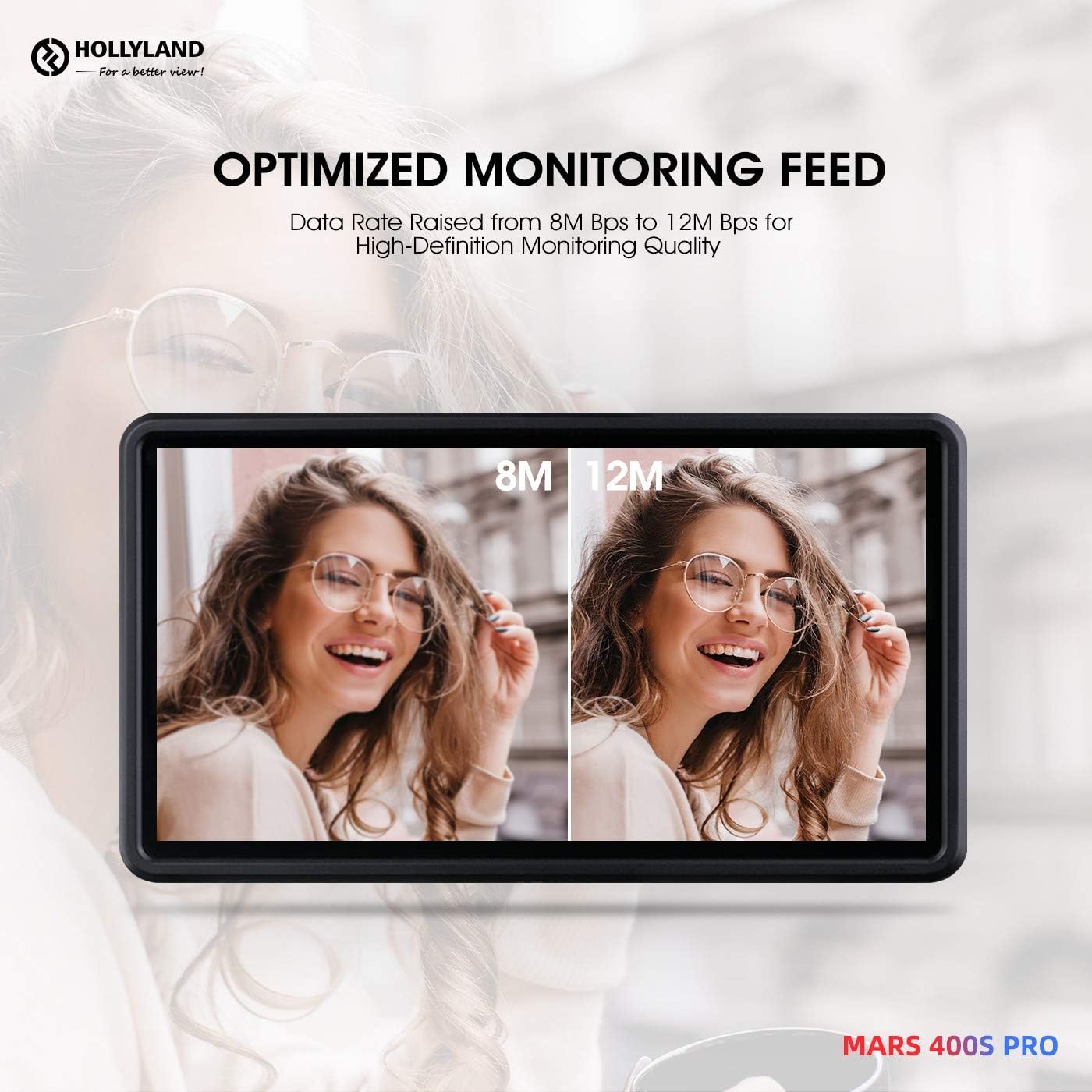
Figura 7.2: Visual comparison of monitoring quality at 8Mbps versus 12Mbps, highlighting the enhanced detail with the optimized feed.
7.3 Channel Scan and Firmware Update
The HollyView app allows for channel scanning to find the clearest transmission frequency. Firmware updates can also be performed directly through the app, ensuring your device always has the latest features and performance improvements.

Figura 7.3: Channel scanning and firmware update functionality accessible via the HollyView applikazzjoni mobbli.
8. Manutenzjoni
- Tindif: Uża drapp artab u niexef biex tnaddaf l-apparat. Tużax prodotti tat-tindif likwidi jew solventi.
- Ħażna: Aħżen l-apparat f'post frisk u niexef 'il bogħod mix-xemx diretta meta ma tkunx qed tuża.
- Antenni: Ensure antennas are securely attached but do not overtighten. Remove them for transport to prevent damage.
- Firmware: Regularly check for and install firmware updates via the HollyView app to ensure optimal performance and compatibility.
9 Issolvi l-problemi
| Problema | Kawża Possibbli | Soluzzjoni |
|---|---|---|
| No signal on receiver | Incorrect channel, loose cables, power issue, out of range. | Verify TX/RX are on the same channel. Check all cable connections. Ensure both units are powered. Reduce distance between TX and RX. |
| Poor video quality/dropouts | Interference, weak signal, obstacles, incorrect scene mode. | Change to a clearer channel. Ensure line of sight. Select High-definition mode. Avoid strong Wi-Fi or RF sources. |
| Apparat mhux mixgħul | Battery depleted, power cable issue, faulty power source. | Charge or replace battery. Check DC adapter or USB-C cable. Try a different power source. |
| App monitoring not working | Not connected to device Wi-Fi, outdated app, firewall. | Connect phone/tablet to the Mars 400S Pro Wi-Fi. Update the HollyView app. Disable any VPN or firewall on your mobile device. |
10. Speċifikazzjonijiet
| Karatteristika | Speċifikazzjoni |
|---|---|
| Mudell | Mars 400S Pro |
| Firxa Wireless | 400ft (Line of Sight) TX to RX; 300ft (Line of Sight) TX to APP |
| Latency | 0.08 sekonda |
| Inputs/Outputs | SDI, HDMI |
| Provvista tal-Enerġija | 6-16V DC, 5-12V USB Type-C, L-series batteries |
| Monitoraġġ tal-App | Up to 4 mobile devices (iOS & Android) |
| Live Streaming | RTSP via Type-C to RJ45 connector |
| Rata tad-Data | Up to 12Mbps (High-definition mode) |
| Dimensjonijiet tal-Prodott | 7.09 x 5.71 x 3.15 pulzieri |
| Piż tal-oġġett | 1.87 liri |
11. Garanzija u Appoġġ
Għal informazzjoni dwar il-garanzija u appoġġ tekniku, jekk jogħġbok irreferi għas-sit uffiċjali ta' Hollyland website or contact your authorized dealer. Keep your purchase receipt as proof of purchase for warranty claims. Product support resources, including FAQs and software downloads, are typically available on the manufacturer's support pages.


