Mixx EX1 Wireless Bluetooth Over Ear Headphones User Manual
Model: HEX1-CG-CP-183
Introduzzjoni
Thank you for choosing the Mixx EX1 Wireless Bluetooth Over Ear Headphones. This manual provides essential information for setting up, operating, maintaining, and troubleshooting your headphones to ensure a long-lasting and enjoyable audio experience. The Mixx EX1 headphones are designed for comfort and superior sound, offering up to 40 hours of playtime and versatile connectivity options.

Image: Mixx EX1 Rose Gold Wireless Bluetooth Over Ear Headphones, showcasing id-disinn eleganti tagħhom.
Setup
X'hemm fil-Kaxxa
- Mixx EX1 Wireless Bluetooth Over Ear Headphones
- Cable tal-Iċċarġjar tal-USB
- Cable Awdjo 3.5mm
- Manwal għall-Utent
Iċċarġjar tal-headphones
Before first use, fully charge your Mixx EX1 headphones. Connect the provided USB charging cable to the charging port on the headphones and to a USB power source. The LED indicator will show charging status. A full charge provides up to 40 hours of playtime. For quick power, a 15-minute charge can provide an additional 8 hours of playtime.

Image: Graphic indicating up to 40 hours of total playtime.
Tqabbil tal-Bluetooth
- Kun żgur li l-headphones huma ċċarġjati u mitfija.
- Agħfas u żomm il-buttuna tal-qawwa sakemm l-indikatur LED jteptep, u dan jindika l-modalità ta' tqabbil.
- Fuq l-apparat tiegħek (smartphone, tablet, kompjuter), attiva l-Bluetooth u fittex apparati disponibbli.
- Select "Mixx EX1" from the list of devices.
- Once connected, the LED indicator will show a steady light.
Konnessjoni bil-fili
The Mixx EX1 headphones can also be used with a wired connection. Simply plug the 3.5mm audio cable into the headphone jack on the earcup and the other end into your audio device. This is useful when the battery is low or for devices without Bluetooth connectivity.

Image: Close-up of the Mixx EX1 headphone showing the 3.5mm audio cable connected to the earcup.
Istruzzjonijiet Operattivi
Kontrolli Fuqview
The Mixx EX1 headphones feature intuitive touch controls located on the earcup for easy management of your audio and calls.
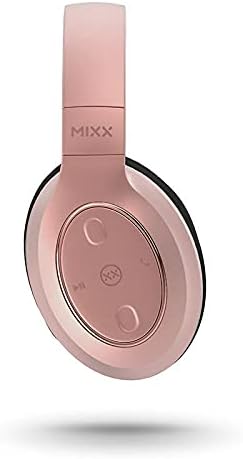
Immaġni: Dettaljata view of the touch controls on the Mixx EX1 headphone earcup.
- Power On/Off: Agħfas u żomm il-buttuna tal-qawwa.
- Play/Pawsa: Single tap the play/pause button.
- Volum 'il fuq/Niżżel: Tap the respective volume buttons.
- Track li jmiss: Double tap the next track button.
- Track preċedenti: Triple tap the previous track button.
- Tweġiba/Tmiem Sejħa: Single tap the call button.
- Irrifjuta Sejħa: Press and hold the call button.
- Attiva l-Assistent tal-Vuċi (Siri/Google Assistant): Press the voice assistant button.
Modi EQ
The Mixx EX1 headphones offer three preset EQ modes to optimize your listening experience:
- Modalità Mużika: Balanced audio for general music listening.
- Modalità ta' Spinta tal-Bass: Enhances low frequencies for a richer bass sound.
- Modalità tal-Vuċi: Optimizes audio for clear voice reproduction, ideal for podcasts or calls.
Refer to the quick start guide included with your headphones for specific button presses to cycle through EQ modes.
Sistema Mikrofonu Doppju
The integrated dual microphone system ensures clear phone calls and accurate voice command recognition for your device's virtual assistant.
Manutenzjoni
Tindif
Biex iżżomm il-headphones tiegħek f'kundizzjoni tajba:
- Imsaħ il-earcups u l-headband b'ċarruta ratba, niexfa u mingħajr suf.
- Do not use abrasive cleaners, solvents, or spray directly onto the headphones.
- Keep charging ports and audio jacks free of dust and debris.
Ħażna
When not in use, store your headphones in a cool, dry place away from direct sunlight and extreme temperatures. The adjustable headband and cushioned over-ear pads are designed for comfort and can be folded for compact storage.
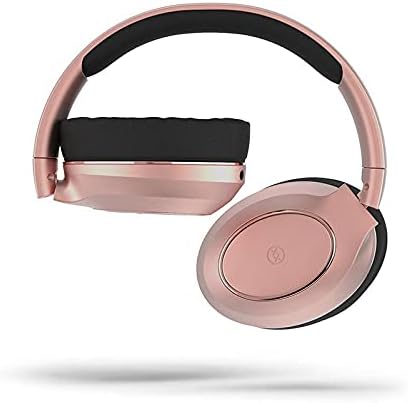
Image: Mixx EX1 headphones shown in a folded position, demonstrating their portability.
Issolvi l-problemi
If you encounter issues with your Mixx EX1 headphones, please refer to the following common solutions:
| Problema | Soluzzjoni Possibbli |
|---|---|
| Il-headphones ma jixegħlux | Ensure the headphones are fully charged. Connect to a power source and wait a few minutes before attempting to turn on. |
| Ma nistax nqabbad permezz tal-Bluetooth | Make sure the headphones are in pairing mode (flashing LED). Turn off and on Bluetooth on your device. Ensure no other devices are connected to the headphones. Try forgetting the device on your phone and re-pairing. |
| Audio cutting in/out or skipping | Ensure your device is within the Bluetooth range (typically 10 meters/33 feet) and there are no significant obstructions. Avoid strong Wi-Fi signals or other wireless interference. |
| L-ebda ħoss | Check the volume level on both the headphones and your connected device. Ensure the headphones are properly paired or the 3.5mm cable is fully inserted. |
| Mikrofonu mhux qed jaħdem | Ensure the headphones are connected and selected as the audio input device on your computer or smartphone. Check application permissions for microphone access. |
Jekk dawn il-passi ma jsolvux il-problema tiegħek, jekk jogħġbok irreferi għat-taqsima tal-Garanzija u l-Appoġġ għal aktar assistenza.
Speċifikazzjonijiet
| Karatteristika | Dettall |
|---|---|
| Brand | Mixx |
| Isem tal-Mudell | HEX1-CG-CP-183 |
| Kulur | Deheb Rose |
| Tqegħid tal-widnejn | Fuq il-widnejn |
| Fattur tal-Formola | Fuq il-widnejn |
| Teknoloġija tal-Konnettività | Bluetooth, Wired (3.5 mm Jack) |
| Teknoloġija tal-Komunikazzjoni mingħajr Fili | Bluetooth |
| Batteriji | 1 batterija tal-polimer tal-litju (inkluża) |
| Dimensjonijiet tal-Prodott | 18 x 17.5 x 8.5 ċm |
| Piż | 560 g |
| Manifattur | Mixx Ltd |
| ASIN | B09F6QG189 |
| Komponenti Inklużi | Ear cushions (pre-installed), USB charging cable, 3.5mm audio cable |
| Firxa ta' Età (Deskrizzjoni) | Adulti |
Garanzija u Appoġġ
Informazzjoni dwar Garanzija
The Mixx EX1 Wireless Bluetooth Over Ear Headphones come with a garanzija ta 'sena when purchased directly through Mixx on Amazon. This warranty covers manufacturing defects and ensures your product performs as expected under normal use. Please retain your proof of purchase for warranty claims.
Appoġġ għall-Klijent
For further assistance, technical support, or warranty claims, please visit the official Mixx website or contact Mixx customer service through the platform where you purchased the product. Detailed contact information can typically be found on the manufacturer's webis-sit jew l-irċevuta tax-xiri tiegħek.


