1. Introduzzjoni
Thank you for choosing the ProCase Smart Cover for your iPad 10.2 inch. This protective case is designed to safeguard your device while enhancing its functionality with features like automatic sleep/wake and versatile viewing angles. This manual provides essential information for proper installation, operation, and care of your new Smart Cover.
2. Kompatibilità
The ProCase Smart Cover is specifically designed for the following iPad 10.2 inch models:
- 2021 iPad 10.2" 9th Generation: Numri tal-Mudell A2602, A2603, A2604, A2605
- 2020 iPad 10.2" 8th Generation: Numri tal-Mudell A2270, A2428, A2429, A2430
- 2019 iPad 10.2" 7th Generation: Numri tal-Mudell A2197, A2198, A2200
To verify your iPad model number, please check the back bottom of your device. This case is NOT compatible with any other iPad models.

Image: Compatibility chart for iPad 10.2 inch models.
3. Karatteristiċi ewlenin
- Disinn Slim u Ħfief: Adds minimal bulk while providing robust protection.
- Hard Back Protective Cover: Offers excellent defense against accidental drops and bumps.
- Unique Brushed Texture: The exterior features a brushed texture on both the front and back covers, enhancing grip and resisting fingerprints and scratches.
- Inforra Interna Artab: Protects your iPad screen from scratches.
- Funzjoni ta' Sleep/Wake Awtomatika: Automatically puts your iPad to sleep when the cover is closed and wakes it upon opening, conserving battery life.
- Magnetic Closure: Securely fastens the case, preventing accidental opening.
- Qtugħ Preċiż: Ensures full access to all ports, buttons, speakers, and cameras without removing the case.
- Dual Standing Angles: Provides two stable positions for comfortable viewing u ittajpjar.

Immaġni: Dettaljata view of the case's brushed texture, soft interior, and precise cutouts.

Image: The magnetic closing clasp of the Smart Cover.

Image: The slim and lightweight profile of the ProCase Smart Cover.
4. Installazzjoni
Follow these steps to properly install your iPad into the ProCase Smart Cover:
- Align your iPad with the hard back shell of the case, ensuring all ports and buttons match the precise cutouts.
- Gently press your iPad into the case, starting from one corner and working your way around until it is securely seated.
- Ensure all edges of the iPad are fully protected by the case's frame.
For a visual guide on installation and features, please watch the official product video below:
Vidjo: Il-prodott uffiċjali spiċċaview of the ProCase iPad 10.2 Smart Cover, demonstrating installation, features, and stand functionality.
5. Operazzjoni
5.1 Funzjoni ta' Sleep/Wake Awtomatika
The Smart Cover utilizes magnets to automatically put your iPad to sleep when the cover is closed and instantly wake it up when opened. This feature helps conserve battery life and provides quick access to your device.
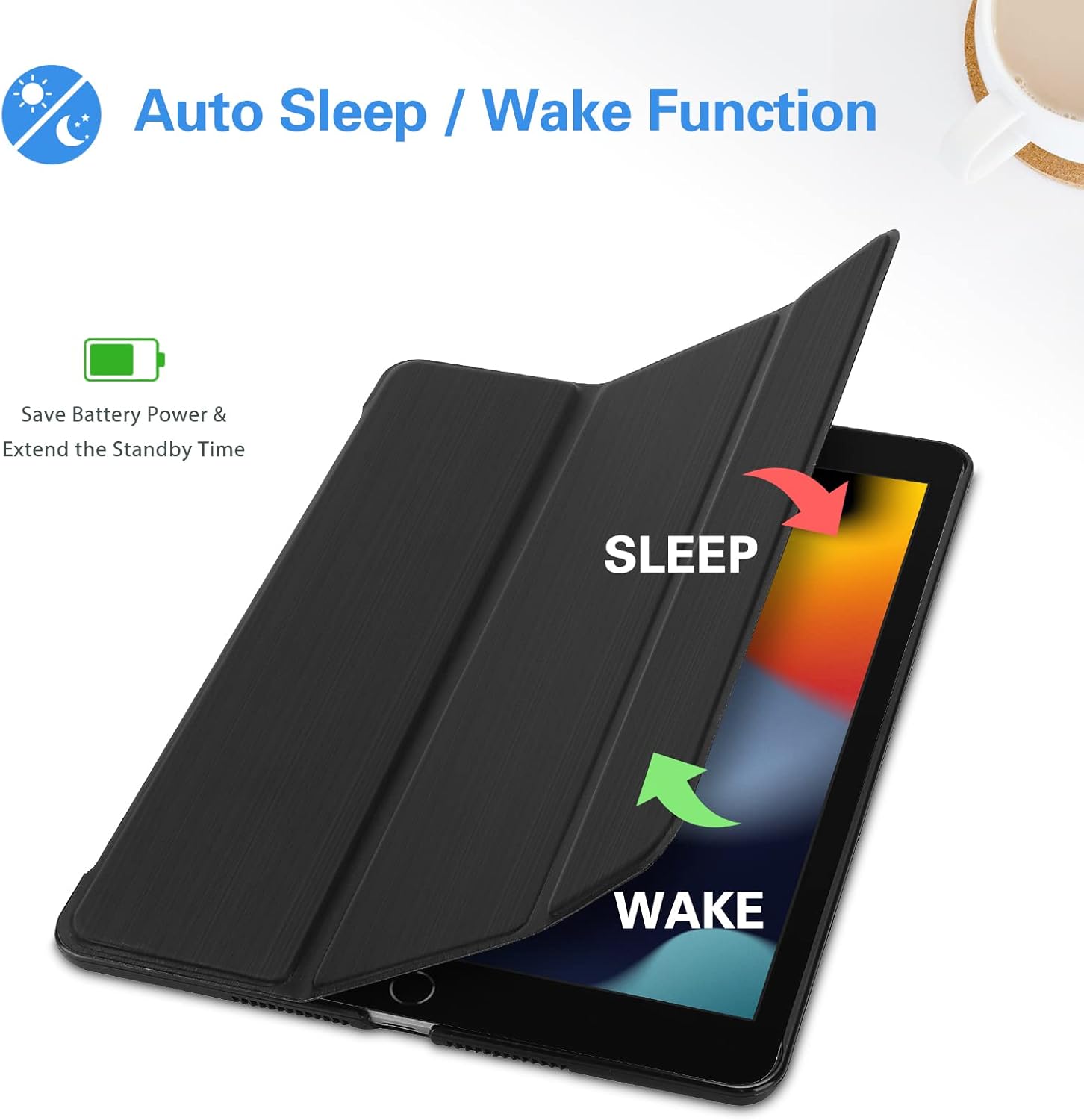
Image: Illustration of the Auto Sleep/Wake feature.
5.2 Funzjoni tal-Istand
The tri-fold front cover can be folded into two distinct stand positions to suit your needs:
- Viewing Angle (approx. 65°): Ideal for watching videos, making video calls, or browsing content.
- Typing Angle (approx. 30°): Provides a comfortable incline for typing or drawing.

Image: The Smart Cover configured for two different viewangoli.

Image: Diagram illustrating the two available standing positions.
6. Manutenzjoni
To keep your ProCase Smart Cover in optimal condition:
- Imsaħ il-barra b'artab, damp cloth to remove dust and smudges. Avoid harsh chemicals or abrasive cleaners.
- For the interior, use a dry microfiber cloth to gently clean any debris.
- Avoid prolonged exposure to direct sunlight or extreme temperatures, which can affect the material's durability.
7 Issolvi l-problemi
7.1 L-Irqad/Qawmien Awtomatiku Mhux Jaħdem
- Iċċekkja s-Settings tal-iPad: Ensure the 'Lock/Unlock' feature is enabled in your iPad's settings (Settings > Display & Brightness > Lock/Unlock).
- Re-seat iPad: Remove your iPad from the case and re-install it, ensuring it is properly aligned and seated.
- Spezzjona għal Ostruzzjonijiet: Check if any debris is preventing the cover from fully closing or interfering with the magnetic sensors.
7.2 Stand Instability
- Kun żgur li l-wiċċ ikun ċatt: Place the iPad on a flat, stable surface when using the stand function.
- Tiwi Tajjeb: Make sure the tri-fold cover is correctly folded into the triangular stand shape. The magnets should hold it firmly.
8. Speċifikazzjonijiet
| Brand | ProCase |
| Apparati Kompatibbli | iPad 10.2 inch (9th, 8th, 7th Generation) |
| Dimensjonijiet tal-Prodott | 6.8 x 0.6 x 9.9 pulzieri |
| Piż tal-oġġett | 7 uqija |
| Kulur | Iswed |
| Fattur tal-Formola | Kawża |
| Tip ta 'qoxra | Iebsa |
| Karatteristiċi Speċjali | Heavy Duty Protection, Scratch Resistant, Auto Sleep/Wake, Magnetic Closure, Lightweight |
9. Garanzija u Appoġġ
For information regarding product warranty, returns, or technical support, please refer to the documentation included with your purchase or visit the official ProCase website. Contact details for customer service are typically provided by the manufacturer.


