1. Prodott Aktarview
The SimpliSafe Wireless Outdoor Security Camera is designed to provide comprehensive surveillance for your property, day and night. It features an ultra-wide 140° field of view, 1080p HD resolution, and a motion-activated spotlight for clear visibility even in low light conditions. With two-way audio, you can communicate with visitors or deter unwanted guests. The camera integrates seamlessly with your SimpliSafe Security System, sending instant alerts and utilizing Smart Person Detection to differentiate between people, vehicles, and animals.
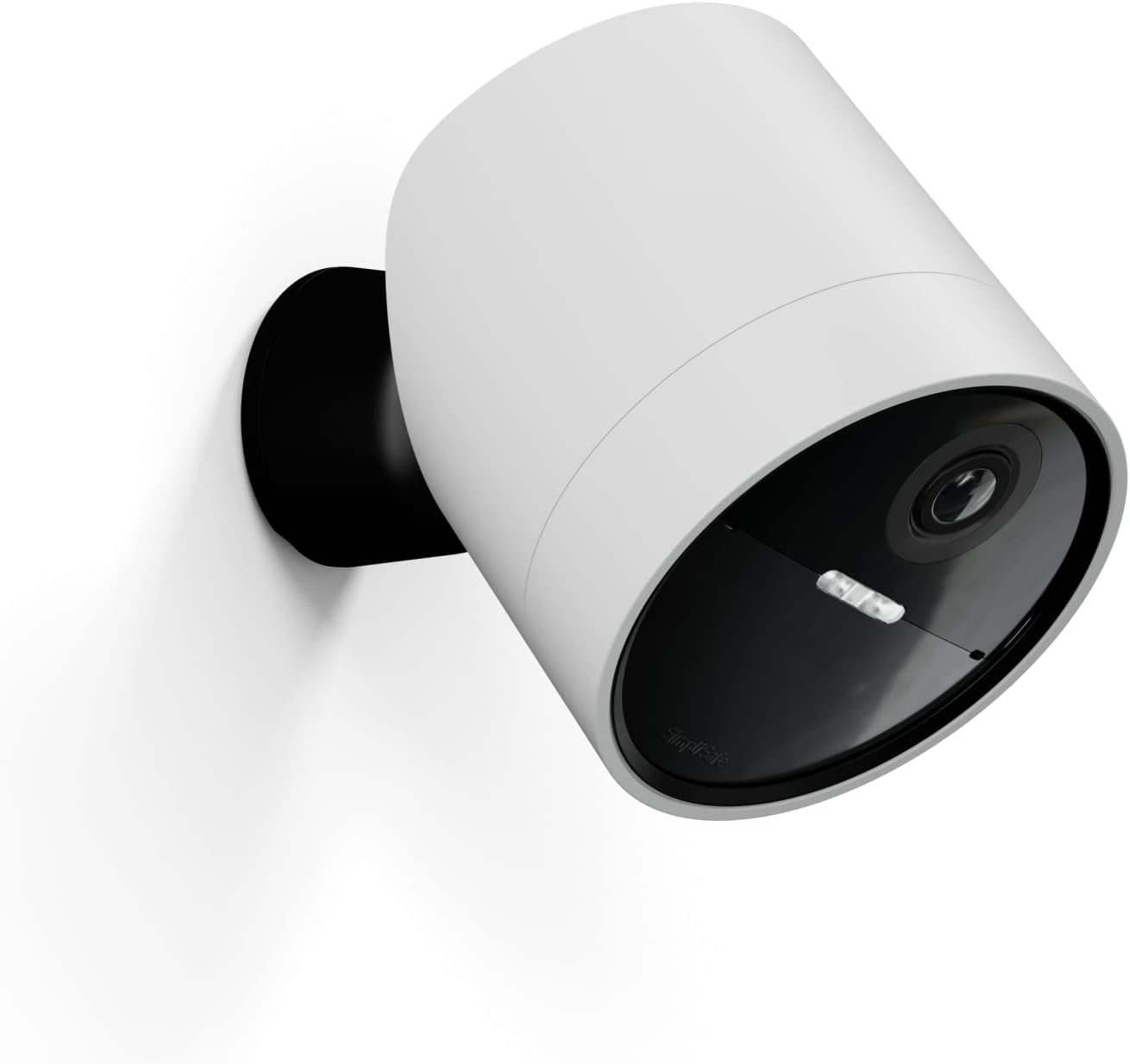
Figure 1: SimpliSafe Wireless Outdoor Security Camera
Karatteristiċi ewlenin:
- 140° ultra-wide field of view for extensive coverage.
- 1080p HD resolution with 8x zoom for clear details.
- Motion-activated spotlight for color night vision.
- Two-way audio for communication.
- Instant alerts and Smart Person Detection via SimpliSafe App.
- Wireless design for easy installation.
- Weather-resistant (IP65) for outdoor use.
2. Komponenti Inklużi
The SimpliSafe Wireless Outdoor Security Camera package includes the following items:
- Kamera tas-Sigurtà ta 'barra bla fili
- Magnetic Mounting Dome
- Batterija Rikarikabbli
- 6-inch Charging Cable
3. Setup u Installazzjoni
The SimpliSafe Wireless Outdoor Security Camera is designed for quick and easy setup with no wiring required. It requires an existing SimpliSafe Security System to function.

Figure 2: The camera requires a SimpliSafe Security System.
Passi ta' Installazzjoni:
- Ipprepara l-post tal-immuntar: Agħżel post adattat fil-beraħ li jipprovdi l-aspett mixtieq viewing angle and is within Wi-Fi range of your SimpliSafe system.
- Attach the Mounting Dome: Secure the screw-in magnetic mounting dome to your chosen surface. Ensure it is firmly attached.
- Poġġi l-Kamera: The camera attaches to the magnetic mounting dome. Its strong magnet will hold it securely in place.
- Aġġusta l-Angolu: The camera offers 4 axes of rotation, allowing you to adjust it to any desired angle for optimal coverage.
- Qabbad mas-Sistema: Press the button on the camera to connect it to your SimpliSafe Security System. Follow the prompts in the SimpliSafe App for final pairing.

Figure 3: Simple setup by attaching the camera to the magnetic mount.
Figure 4: Adjusting the camera angle for optimal view.
4. It-tħaddim tal-Kamera
Once installed and connected, the SimpliSafe Wireless Outdoor Security Camera provides continuous monitoring and smart alerts.
Funzjonijiet ewlenin:
- Live View: Aċċess live footage anytime, anywhere through the SimpliSafe App.
- Sejbien ta' Moviment u Twissijiet: The camera sends instant alerts to your phone whenever someone approaches. With Smart Person Detection, it can distinguish between people, vehicles, and animals, reducing false alarms.
- Awdjo f'żewġ direzzjonijiet: Use the built-in microphone and speaker to hear and speak to individuals on your property, even when you're not home.
- Spotlight & Night Vision: The motion-activated spotlight illuminates the area, allowing you to see clearly in full color, even at night.

Figure 5: Monitor your property day or night via the SimpliSafe App.

Figure 6: Receive instant alerts for detected motion.

Figure 7: Motion-activated spotlight for clear night vision.
Note: No official seller videos were available for embedding in this manual. For visual demonstrations, please refer to the SimpliSafe official websit jew app.
5. Iċċarġjar tal-Batterija
The SimpliSafe Wireless Outdoor Security Camera is powered by a rechargeable Lithium Ion battery. Battery life can last up to 3 to 6 months on a single charge, depending on settings, placement, and usage.
Istruzzjonijiet għall-iċċarġjar:
- When the battery level is low, you will receive an alert via the SimpliSafe App.
- Carefully remove the camera from its magnetic mount.
- Unscrew the back cover of the camera to access the rechargeable battery.
- Remove the battery and connect it to the provided 6-inch charging cable.
- Plug the charging cable into a standard USB power adapter (not included) and then into a wall outlet.
- Allow the battery to charge fully. This typically takes several hours or overnight. The indicator lights on the battery will show charging status.
- Once fully charged, disconnect the battery, reinsert it into the camera, and secure the back cover.
- Reattach the camera to its magnetic mount.

Figure 8: Charging the camera's rechargeable battery.
6. Manutenzjoni
The SimpliSafe Wireless Outdoor Security Camera is designed to be durable and weather-resistant (IP65 rated), allowing it to operate effectively in various outdoor conditions, including snow and rain.

Figure 9: The camera is designed to work in all weather conditions.
Kura Ġenerali:
- Imsaħ il-lenti u l-korp tal-kamera perjodikament b'ċarruta ratba u damp drapp biex tneħħi l-ħmieġ jew il-fdalijiet li jistgħu jostakolaw view.
- Ensure the magnetic mount is securely fastened to prevent accidental dislodgement, especially in high-traffic areas or if mounted at lower heights.
- Monitor battery levels regularly via the SimpliSafe App to ensure continuous operation.
7. Speċifikazzjonijiet
| Karatteristika | Dettall |
|---|---|
| Numru tal-Mudell | SCM301 |
| Użu fuq ġewwa/barra | Barra |
| Sors tal-Enerġija | Mħaddma bil-batterija |
| Protokoll tal-Konnettività | Simplisafe, Wi-Fi |
| Tip ta' Kontrollur | Amazon Alexa, Google Assistant |
| Tip ta 'Immuntar | Mount Wall |
| Riżoluzzjoni tal-Qbid tal-Vidjo | 1080p |
| ViewIng Angolu | 140 Grad |
| Zoom ottiku | 15 x |
| Livell ta 'Reżistenza għall-Ilma | Reżistenti għall-Ilma (IP65) |
| Dimensjonijiet tal-oġġett (L x W x H) | 3.09 x 3.09 x 2.95 pulzieri |
| Piż tal-oġġett | 1.26 liri |
| Karatteristiċi Speċjali | Awdjo b'żewġ direzzjonijiet, Dawl integrat, Riżoluzzjoni HD, Sensor tal-moviment, Viżjoni bil-lejl |
8 Issolvi l-problemi
Kwistjonijiet Komuni u Soluzzjonijiet:
- Il-kamera mhux qed tikkonnettja mal-Wi-Fi:
Ensure the camera is within range of your Wi-Fi router or SimpliSafe base station. Check your Wi-Fi network status and try restarting your router. If using a mesh system, ensure consistent signal strength at the camera's location.
- Grainy or unclear image quality:
While the camera offers 1080p HD, extreme digital zoom can lead to pixelation. Ensure the lens is clean and free from smudges or debris. Check for any obstructions in the camera's field of view.
- Magnetic mount issues (camera sliding/falling):
The magnetic base is strong, but the camera's weight, especially with the battery, requires careful positioning. Ensure the camera's center of gravity is well-supported by the magnetic base. If mounting on uneven surfaces like stucco, concrete, or brick, ensure the mounting screws are firmly secured and the surface is flat enough for stable attachment. Consider using appropriate anchors for these surfaces.
- Batterija tisbat malajr:
Battery life varies based on usage. Frequent motion detection, live viewing, and two-way audio use will consume more power. Adjust motion sensitivity settings in the SimpliSafe App to reduce unnecessary recordings. Ensure the camera is placed in an area with moderate activity if extended battery life is desired.
- No alerts or missed events:
Verify that motion detection is enabled in the SimpliSafe App and that notification settings are correctly configured on your smartphone. Ensure the camera's field of view covers the desired monitoring area and that Smart Person Detection is optimized for your needs.
9. Garanzija u Appoġġ
Informazzjoni dwar il-garanzija:
The SimpliSafe Wireless Outdoor Security Camera comes with a 1 Sena Garanzija tal-ManifatturJekk jogħġbok żomm il-prova tax-xiri tiegħek għal talbiet ta' garanzija.
Appoġġ għall-Klijent:
For further assistance, technical support, or warranty inquiries, please visit the official SimpliSafe website or contact their customer service directly. You can find contact information and additional resources on the SimpliSafe support page.


