Introduzzjoni
This manual provides detailed instructions for the assembly, operation, and maintenance of your FLEXISPOT E4 Classic Electric Standing Desk. Please read this manual thoroughly before use to ensure proper function and longevity of your product.

Figure 1: The FLEXISPOT E4 Classic Electric Standing Desk, featuring a bamboo contour desktop and silver frame, set up with dual monitors in an office environment.
Informazzjoni dwar is-Sigurtà
- Kun żgur li l-komponenti kollha huma mwaħħla sew qabel l-użu.
- Żomm it-tfal u l-annimali domestiċi 'l bogħod mill-iskrivanija waqt l-operazzjoni.
- Do not overload the desk beyond its specified weight capacity (220 lbs).
- Evita li tpoġġi likwidi direttament fuq il-pannell tal-kontroll jew il-komponenti tal-mutur.
- Skonnettja l-enerġija qabel it-tindif jew il-manutenzjoni.
- Uża biss l-adapter tal-enerġija pprovdut.
Kontenut tal-Pakkett
Jekk jogħġbok ivverifika li l-partijiet kollha huma preżenti qabel tibda l-assemblaġġ. Jekk xi partijiet huma neqsin jew bil-ħsara, ikkuntattja l-appoġġ għall-klijenti.
- Bamboo Contour Whole-Piece Desktop (55"x28")
- Silver Frame Legs (Dual Motor)
- Panel tal-Kontroll
- Adapter tal-Enerġija u Cable
- Assembly Hardware (screws, tools, etc.)
- Manwal ta 'Istruzzjoni (dan id-dokument)
Setup u Assemblea
L-assemblaġġ huwa meħtieġ għal dan il-prodott. Jekk jogħġbok segwi dawn il-passi bir-reqqa.
- Ħoll il-Komponenti: Neħħi l-partijiet kollha mill-imballaġġ bir-reqqa u poġġihom fuq wiċċ nadif u artab biex tevita l-grif.
- Waħħal is-Saqajn mad-Desktop: Position the desktop upside down. Align the leg frames with the pre-drilled holes on the underside of the desktop. Secure them using the provided screws and tools.
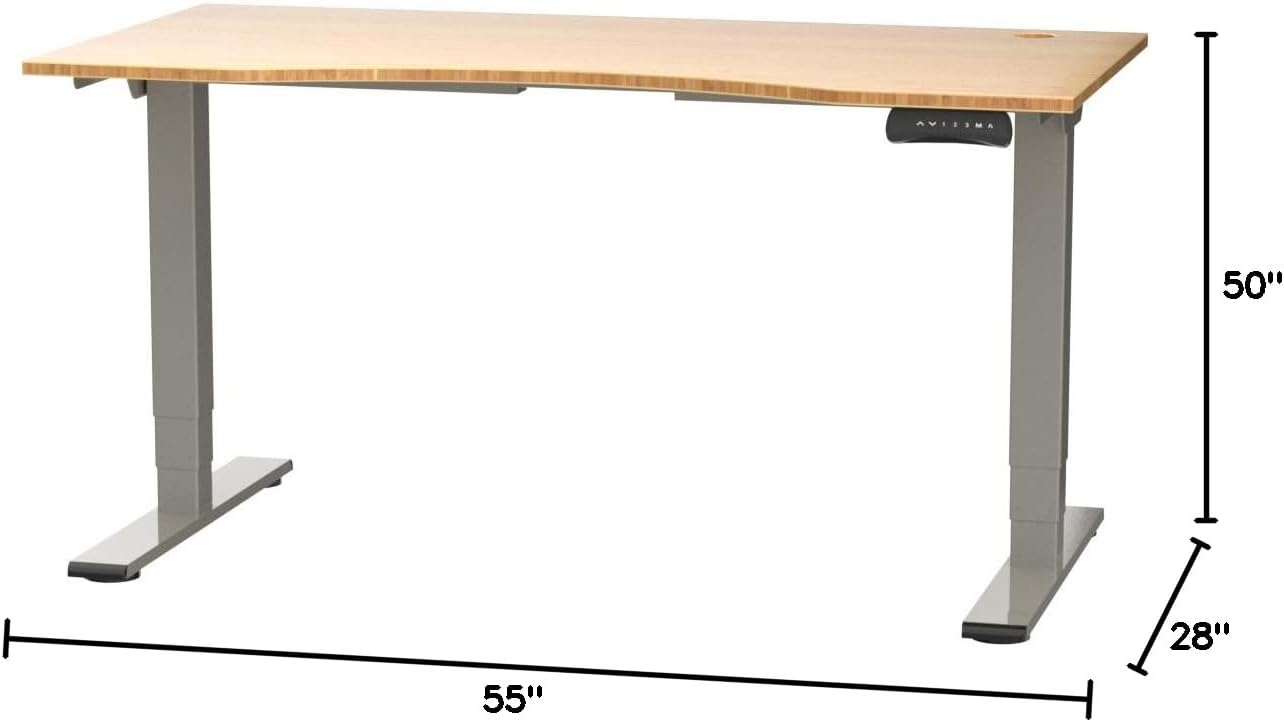
Figure 2: Desk dimensions indicating 55 inches width, 28 inches depth, and adjustable height up to 50 inches.
- Installa l-Panel tal-Kontroll: Mount the control panel to the desired location on the underside of the desktop, typically on the front edge for easy access. Connect the control panel cable to the motor control box.

Figure 3: The programmable control panel with LED display, up/down buttons, and memory presets (1, 2, 3, M, A).
- Qabbad l-Enerġija: Plug the power adapter into the control box, and then plug the power cable into a standard electrical outlet.
- Ġestjoni tal-Kejbil: Utilize the two cable management holes on the desktop to route and organize your cables, preventing clutter.

Figure 4: Detail showing the integrated cable management holes and the water-resistant surface of the bamboo desktop.
- Kalibrazzjoni Inizjali: After assembly and power connection, the desk may require an initial calibration. Refer to the "Operating Instructions" section for details on resetting or calibrating the desk.
Istruzzjonijiet Operattivi
Aġġustament Għoli
The FLEXISPOT E4 Classic desk features a dual-motor lift system for smooth and quiet height adjustments.
- Għolli l-Iskrivanija: Agħfas u żomm il- Up Arrow button (▲) on the control panel. The desk will move upwards.
- Desk t'Isfel: Agħfas u żomm il- Vleġġa 'l isfel button (▼) on the control panel. The desk will move downwards.
- Release the button at your desired height. The desk can adjust from 24.4 inches to 50 inches.
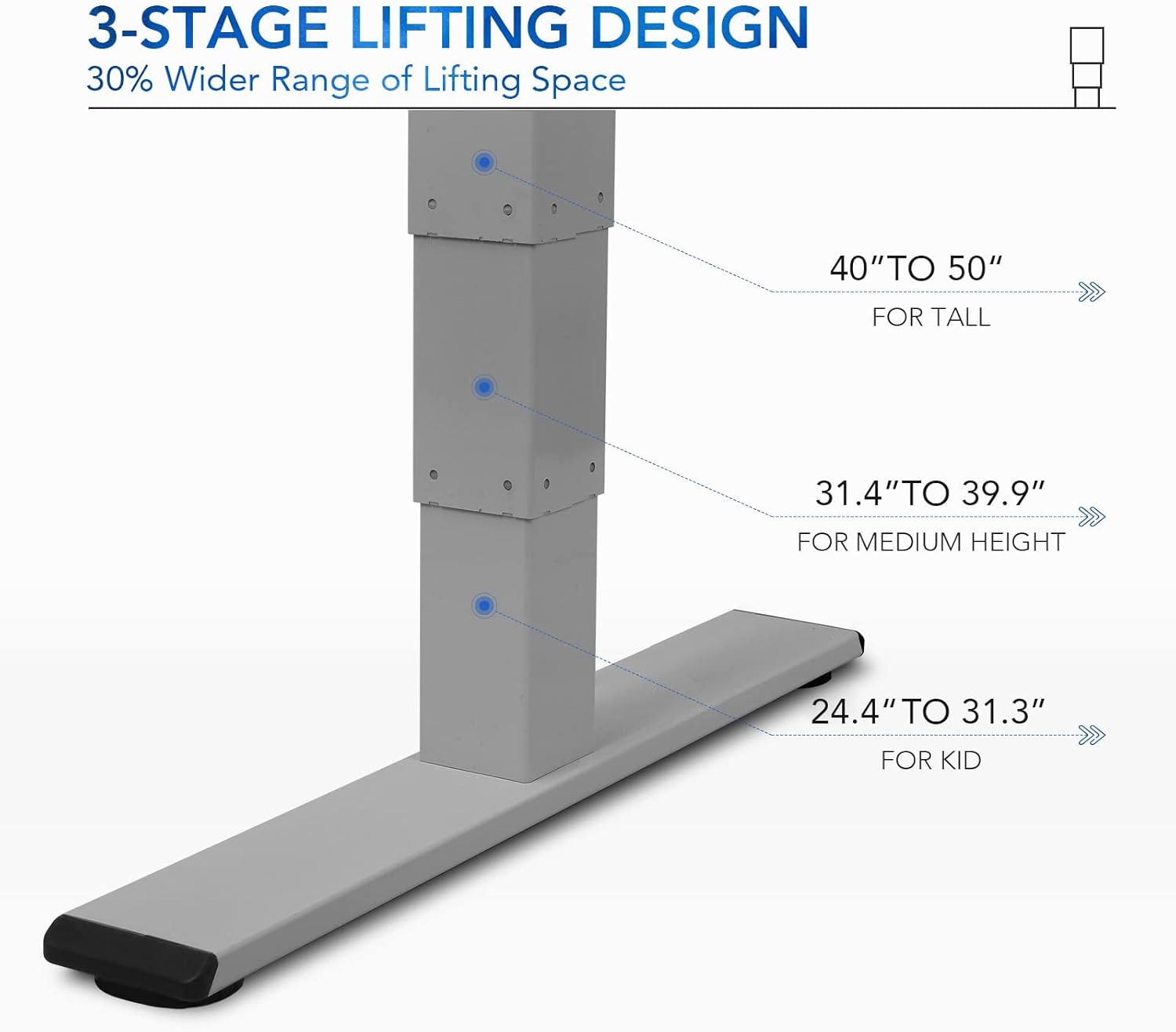
Figura 5: Is-3-stage lifting design provides a wide range of height adjustments, suitable for various user heights, from 24.4" (kid) to 50" (tall).
Programmable Memory Presets
Il-pannell tal-kontroll jippermettilek li ssalva sa tliet settings tal-għoli preferuti għal aġġustamenti rapidi.
- Issettja Pożizzjoni tal-Memorja:
- Aġġusta l-iskrivanija għall-għoli mixtieq tiegħek billi tuża l-buttuni 'l fuq/'l isfel.
- Agħfas il- "M" button. The LED display will show "S-".
- Within 3 seconds, press one of the number buttons ("1", "2", jew "3") to save the current height to that preset. The display will show "S-1", "S-2", or "S-3" to confirm.
- Iftakar Pożizzjoni tal-Memorja: Sempliċement agħfas il-buttuna tan-numru korrispondenti ("1", "2", jew "3"). L-iskrivanija tiċċaqlaq awtomatikament għall-għoli ssejvjat.
Sit/Stand Reminder
The "A" button can be used to set a reminder to switch between sitting and standing positions.
- Consult the full manual for detailed instructions on setting and customizing the sit/stand reminder function.
Ergonomic Curved Design
The 55"x28" desktop features an ergonomic curved design for enhanced comfort and efficiency during work or study.

Figure 6: The ergonomic curved edge of the desktop, designed to provide a more comfortable and natural working posture.
Manutenzjoni
- Tindif: Imsaħ il-wiċċ tal-iskrivanija u l-qafas b'ċarruta ratba u damp cloth. Avoid abrasive cleaners or harsh chemicals. The bamboo surface is designed to be water-resistant, making it easy to clean.
- Kura tal-Mutur: The dual-motor system is designed for low noise and durability. No specific user maintenance is required for the motors.
- Ġestjoni tal-Kejbil: Periodically check that all cables are neatly routed through the cable management holes and are not pinched or tangled.
- Iċċekkja tal-Qafliet: Iċċekkja l-viti u l-qafliet kollha minn żmien għal żmien biex tiżgura li jibqgħu ssikkati. Erġa' ssikkahom jekk meħtieġ.
Issolvi l-problemi
| Problema | Kawża Possibbli | Soluzzjoni |
|---|---|---|
| L-iskrivanija ma tiċċaqlaqx. | Power cable disconnected; overload protection activated; motor error. | Check power connections. Reduce weight on desk. Unplug and replug power after 10 minutes. Perform a reset (see below). |
| L-iskrivanija tiċċaqlaq b'mod irregolari jew tagħmel ħoss mhux tas-soltu. | Loose fasteners; obstruction; motor synchronization issue. | Check and tighten all assembly screws. Ensure no obstructions under the desk. Perform a reset. |
| LED display shows an error code (e.g., "E01", "RST"). | System error; need for reset. | Reset Proċedura: Press and hold the Down Arrow button until the desk reaches its lowest position and then slightly rises. Release the button. If the error persists, unplug the desk for 10 minutes and try again. |
| Il-presets tal-memorja mhux qed jaħdmu. | Il-presets mhux salvati b'mod korrett. | Re-save your desired memory positions following the "Programmable Memory Presets" instructions. |
If the issue persists after attempting these solutions, please contact FLEXISPOT customer support.
Speċifikazzjonijiet
| Karatteristika | Dettall |
|---|---|
| Mudell | E4 Classic |
| Brand | FLEXISPOT |
| Materjal tad-Desktop | Bamboo Contour Whole-Piece Board |
| Materjal tal-qafas | Alloy Steel (Silver Frame) |
| Dimensjonijiet tal-Prodott (P x W x H) | 28"D x 55"W x 50"H (Max Height) |
| Medda ta 'Aġġustament Għoli | 24.4" sa 50" |
| Sistema ta 'rfigħ | Mutur Doppju, 3-Stage Lifting |
| Kapaċità tal-piż | Sa 220 lbs |
| Karatteristiċi Speċjali | Electric Height Adjustment, Programmable Memory Presets, Sit/Stand Reminder, Curved Ergonomic Design, Cable Management Holes, Waterproof Surface |
| Assemblea Meħtieġa | Iva |
Garanzija u Appoġġ
FLEXISPOT products are designed for durability and performance. For specific warranty details regarding your E4 Classic Electric Standing Desk, please refer to the warranty card included with your purchase or visit the official FLEXISPOT websit.
For technical support, troubleshooting assistance, or to inquire about replacement parts, please contact FLEXISPOT customer service:
- Websit: www.flexispot.com
- Email: support@flexispot.com
- Telefon: Irreferi għall-uffiċjal websit għal numri ta' kuntatt reġjonali.
When contacting support, please have your product model (E4 Classic) and purchase information ready.


