1. Introduzzjoni
Grazzi tax-xiriasing the Rosewill BLITZ K50 RGB BR Wired Gaming Mechanical Keyboard. This manual provides detailed instructions on how to set up, operate, maintain, and troubleshoot your new keyboard. Please read this manual thoroughly before use to ensure optimal performance and longevity of your device.
2. Kontenut tal-Pakkett
Jekk jogħġbok iċċekkja l-kontenut tal-pakkett biex tiżgura li l-oġġetti kollha huma preżenti:
- Rosewill BLITZ K50 RGB BR Mechanical Gaming Keyboard
- Serħan tal-palm li jinqala'
- Kit Tneħħija Keycap
- Manwal għall-Utent (dan id-dokument)
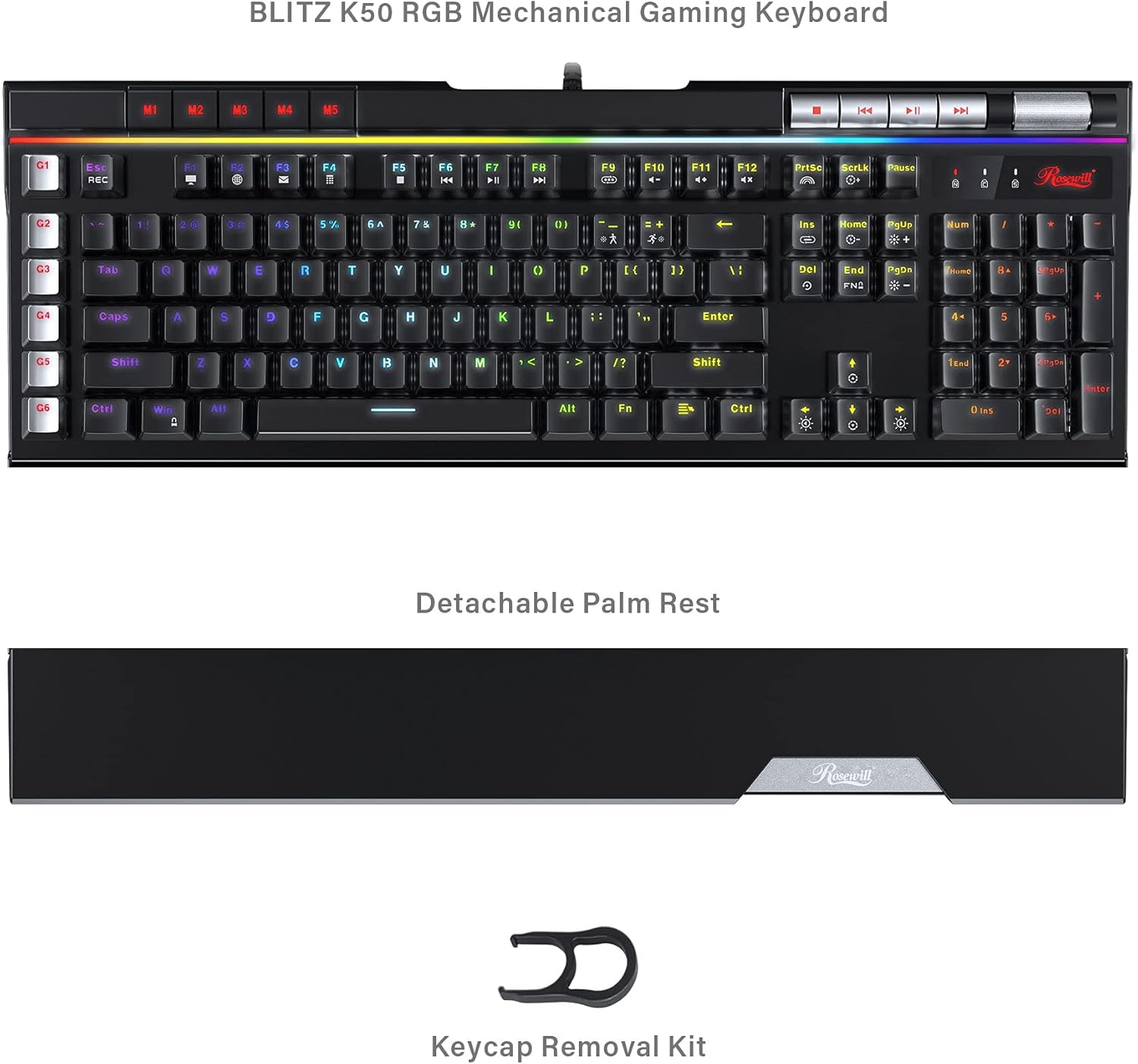
Image: The Rosewill BLITZ K50 RGB BR keyboard shown with its detachable palm rest and the included keycap removal kit, illustrating the complete package contents.
3. Prodott Aktarview
The Rosewill BLITZ K50 RGB BR is a full-sized wired gaming mechanical keyboard designed for performance and customization. It features durable Outemu brown tactile mechanical switches, N-Key rollover, and anti-ghosting for precise input during intense gaming sessions. The keyboard also includes dedicated macro keys, customizable RGB backlighting, and convenient media controls.

Immaġni: Komprensiva view of the Rosewill BLITZ K50 RGB BR keyboard, showcasing its full layout, RGB backlighting, and dedicated function keys.
Komponenti Ewlenin:
- Swiċċijiet mekkaniċi: Equipped with genuine Outemu brown tactile mechanical switches for a responsive typing and gaming experience.
- Ċwievet Makro (G1-G6): Six dedicated, programmable macro keys on the left side for custom command chains.
- Dawl ta' wara RGB: Individual key backlighting with multiple customizable modes and effects.
- Kontrolli tal-Midja Dedikati: Buttons for play/pause, skip, and a volume roller for quick audio adjustments.
- USB Passthrough Ports: Two built-in USB 2.0 ports for connecting additional peripherals.
- Detachable Palm Rest: Jipprovdi appoġġ ergonomiku waqt użu estiż.
4. Setup
Follow these steps to set up your Rosewill BLITZ K50 RGB BR keyboard:
- Qabbad it-Tastiera: Plug the USB connector of the keyboard cable into an available USB port on your computer. The keyboard is plug-and-play and does not require additional drivers for basic functionality.
- Waħħal il-Palm Stretch (Mhux obbligatorju): Align the detachable palm rest with the bottom edge of the keyboard and gently push to secure it in place.
- Installa s-Softwer (Mhux obbligatorju): For advanced customization, including macro programming and RGB lighting effects, download the BLITZ K50 RGB BR software suite from the official Rosewill websit. Segwi l-istruzzjonijiet fuq l-iskrin għall-installazzjoni.

Image: A user operating the Rosewill BLITZ K50 RGB BR keyboard, demonstrating its typical setup on a desk with a computer monitor.
5. Istruzzjonijiet Operattivi
5.1. Funzjonijiet Bażiċi tat-Tastiera
The keyboard functions as a standard QWERTY keyboard. All standard keys (letters, numbers, symbols, function keys) operate as expected upon connection.
5.2. Kontroll tad-Dawl ta' Wara RGB
The BLITZ K50 RGB BR features 5 customizable RGB modes and 14 pre-programmed backlighting effects. Use the dedicated lighting control keys to cycle through modes and adjust brightness.
- Fn + Ins: Cycle through pre-programmed lighting effects.
- Fn + Dar: Adjust lighting brightness (5 levels).
- Fn + PgUp: Change lighting speed/direction for certain effects.
- Fn + Del: Cycle through custom RGB modes.
- Fn + Tmiem: Adjust individual key color in custom modes.
- Fn + PgDn: Reset lighting to default.
5.3. Macro Key Programming (G1-G6)
The six dedicated macro keys (G1-G6) can be programmed to execute complex command chains with a single press. Programming can be done via the keyboard's on-board recording function or through the software suite.
On-board Recording:
- Agħfas il- REC key (above G1). The REC indicator will flash.
- Press the desired macro key (G1-G6) you wish to program. The REC indicator will continue to flash.
- Type the sequence of keys you want to record.
- Agħfas il- REC key again to save the macro. The REC indicator will turn off.
For more advanced macro programming, including delays and specific key combinations, use the BLITZ K50 RGB BR software.
5.4. Dedicated Media Controls & USB Passthrough
The keyboard features dedicated media control buttons and a volume roller for convenient audio management. Two USB 2.0 passthrough ports are also available for connecting other devices.

Immaġni: Dettaljata view of the multimedia control buttons and the metallic volume roller located on the top right of the keyboard, highlighting their accessibility.
- Buttuni tal-Midja: Use the dedicated buttons for Play/Pause, Previous Track, and Next Track.
- Romblu tal-Volum: Roll up to increase volume, roll down to decrease volume. Press to mute/unmute.
- Passthrough USB: Connect your mouse, headset, or other USB devices to the two USB 2.0 ports located on the keyboard for easy access.
5.5. Personalizzazzjoni tas-Softwer
The BLITZ K50 RGB BR software suite allows for comprehensive customization of your keyboard. You can customize lighting effects, program macros, reassign keys, and save up to 3 profiles.
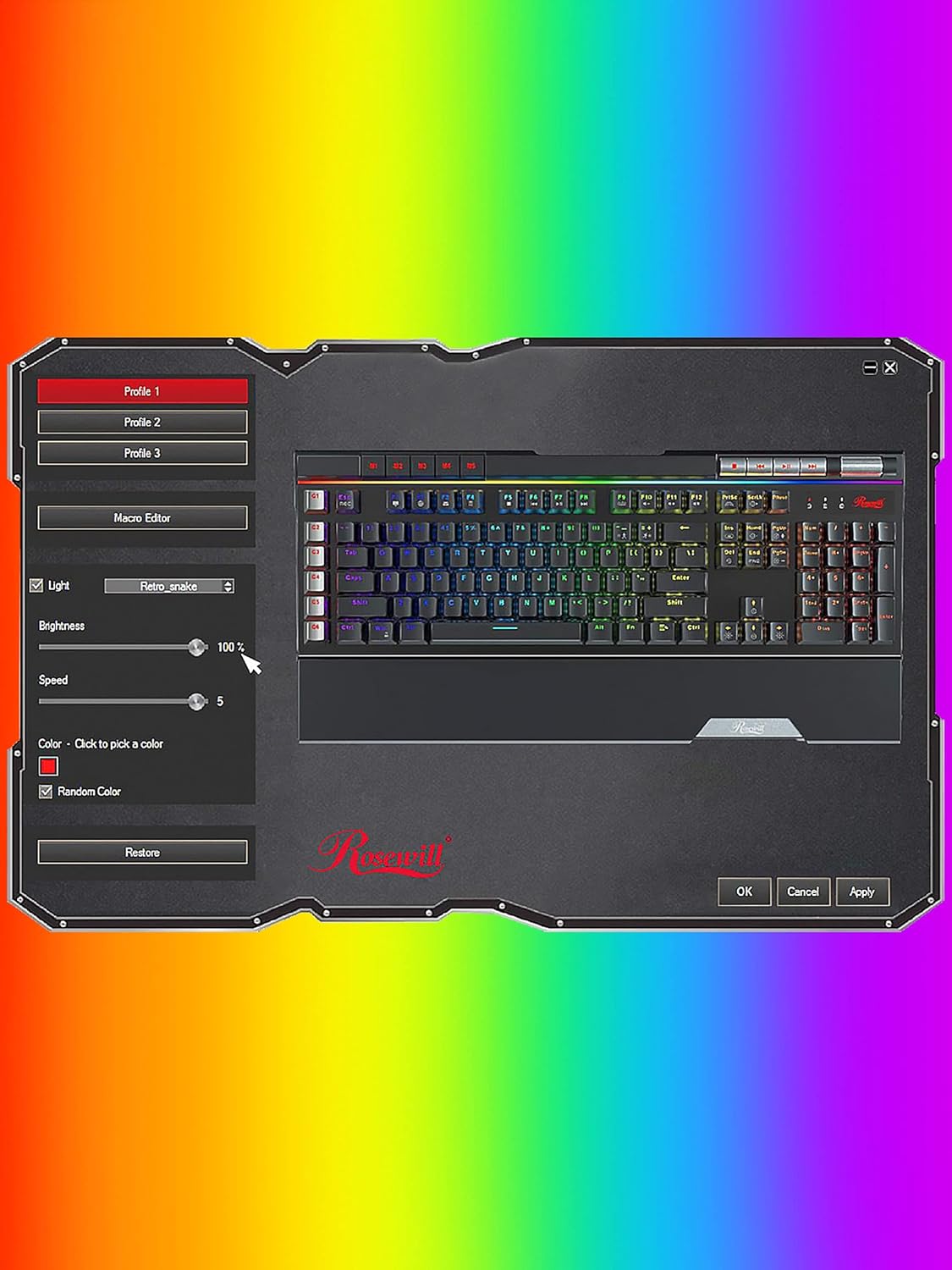
Image: A screenshot of the Rosewill BLITZ K50 RGB BR software interface, showing options for lighting control, macro editing, and profile ġestjoni.
Refer to the software's built-in help or the Rosewill website for detailed instructions on using the software suite.
6. Manutenzjoni u Kura
Biex tiżgura l-lonġevità u l-prestazzjoni ottimali tat-tastiera tiegħek, segwi dawn il-linji gwida ta' manutenzjoni:
- Tindif: Use a soft, dry cloth to wipe down the keyboard surface. For dust and debris between keycaps, use compressed air. The included keycap removal tool can be used to carefully remove keycaps for deeper cleaning.
- Evita Likwidi: Tesponix it-tastiera għal likwidi. F'każ ta' tixrid, skonnettja t-tastiera immedjatament u ħalliha tinxef kompletament qabel ma terġa' tqabbadha.
- Ħażna: Aħżen it-tastiera f'post frisk u niexef 'il bogħod mix-xemx diretta u minn temperaturi estremi.

Immaġni: Close-up view of the Outemu brown mechanical switches beneath removed keycaps, illustrating the internal components for maintenance and customization.
7 Issolvi l-problemi
Jekk tiltaqa' ma' problemi bit-tastiera tiegħek, irreferi għall-passi li ġejjin għas-soluzzjoni tal-problemi:
- It-tastiera ma tirrispondix:
- Kun żgur li l-kejbil USB huwa konness sew mal-kompjuter tiegħek.
- Ipprova qabbad it-tastiera ma' port USB differenti.
- Ibda mill-ġdid il-kompjuter tiegħek.
- Id-dawl minn wara ma jaħdimx jew mhux korrett:
- Check if the brightness is set to maximum using Fn + Home.
- Cycle through lighting modes using Fn + Ins or Fn + Del.
- If using the software, ensure settings are applied and the software is running correctly.
- Try resetting the lighting to default (Fn + PgDn).
- Iċ-ċwievet tal-makro mhux qed jaħdmu:
- Ensure macros are correctly recorded or programmed via the software.
- Check if the macro profile is active if using software.
- USB Passthrough ports not working:
- Ensure the keyboard's main USB cable is connected to a powered USB port on your computer.
- Try connecting a different device to the passthrough port to confirm the issue is with the port or the device.
8. Speċifikazzjonijiet
Detailed technical specifications for the Rosewill BLITZ K50 RGB BR keyboard:
| Karatteristika | Speċifikazzjoni |
|---|---|
| Numru tal-Mudell | BLITZ K50 RGB BR |
| Tip ta' Tastiera | Tastiera Mekkanika tal-Logħob bil-Fili |
| Tip ta' Swiċċ | Outemu Brown Tactile Mechanical Switches |
| Numru ta' Ċwievet | 104 |
| Kontra l-Ghosting | Qlib N-Key |
| Backlighting | RGB (14 pre-programmed effects, 5 customizable modes) |
| Makro Keys | 6 Dedicated (G1-G6) |
| Kontrolli tal-Midja | Dedicated buttons + Volume Roller |
| Passthrough USB | 2 x Portijiet USB 2.0 |
| Konnettività | USB 2.0 |
| Kompatibilità tas-Sistema Operattiva | Windows XP / Vista / 7 / 8 / 10 and above |
| Dimensjonijiet (L x W x H) | 47.6 x 22.8 x 3.9 ċm (18.74 x 8.97 x 1.53 pulzieri) |
| Piż | 1.17 kg (2.58 lbs) |

Image: A technical diagram illustrating the length, width, and height measurements of the Rosewill BLITZ K50 RGB BR keyboard.
9. Garanzija u Appoġġ
Rosewill products are designed for reliability and performance. For warranty information, technical support, or service inquiries, please visit the official Rosewill webis-sit jew ikkuntattja l-appoġġ għall-klijenti tagħhom direttament. Jekk jogħġbok żomm il-prova tax-xiri tiegħek għal talbiet ta' garanzija.


