Introduzzjoni
This manual provides detailed instructions for the safe and effective operation of your Nitecore P10ix Type-C Rechargeable Ultra Compact Flashlight. Please read this manual thoroughly before use and retain it for future reference.

Image: The Nitecore P10ix flashlight shown with its included accessories: two extra NL2150HPi batteries, a USB-C charging cable, and a tactical holster.
Kontenut tal-Pakkett
Malli tiftaħ il-pakkett tiegħek, jekk jogħġbok ivverifika li l-oġġetti kollha elenkati hawn taħt huma preżenti u f'kundizzjoni tajba:
- Nitecore P10ix Flashlight
- 3x NL2150HPi Rechargeable Batteries (including one pre-installed or packaged separately)
- Holster Tattiku NTH10
- Clip
- Lanyard
- O-ring żejda
- Cable tal-Iċċarġjar tal-USB-C
Setup
Installazzjoni tal-batterija
- Ħoll l-għatu tad-denb tat-torċa kontra l-arloġġ.
- Insert the NL2150HPi 21700 Li-ion battery with the positive (+) terminal facing towards the head of the flashlight.
- Invita l-għatu tad-denb lura lejn l-arloġġ sakemm ikun issikkat sew.
Iċċarġjar tal-batterija
The Nitecore P10ix features a built-in USB-C charging port for convenient recharging of the 21700 Li-ion battery.
- Locate the USB-C charging port cover on the flashlight body.
- Open the rubber cover to expose the USB-C port.
- Connect one end of the provided USB-C charging cable to the flashlight's port and the other end to a USB power source (e.g., USB adapter, computer, power bank).
- The power indicator light will illuminate to show charging status. Refer to the flashlight's specific indicator behavior for full charge notification (typically solid green or off).
- Once charging is complete, disconnect the cable and securely close the rubber cover to protect the port from dust and water.
Istruzzjonijiet Operattivi
Funzjonijiet tal-Iswiċċ
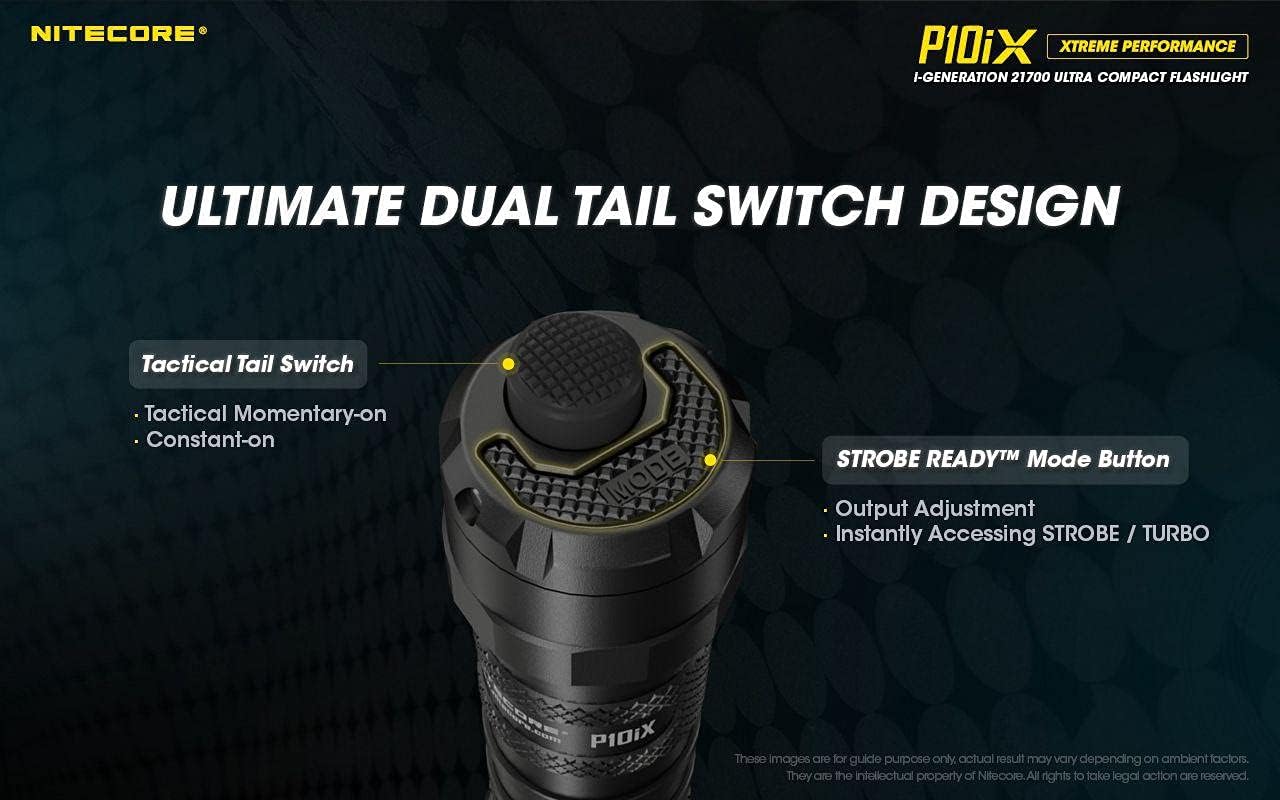
Immaġni: Dettaljata view of the flashlight's tail cap, highlighting the main Tactical Tail Switch and the smaller STROBE READY Mode Button for output adjustment and instant strobe/turbo access.
- Swiċċ Tattiku tad-Denb: This is the primary power button located at the very end of the tail cap.
- Momentarju mixgħul: Half-press and hold for momentary illumination. Release to turn off.
- Konstanti mixgħul: Full-press until a click is heard for constant illumination. Full-press again to turn off.
- STROBE READY™ Mode Button: This smaller, raised button is located next to the Tactical Tail Switch.
- Aġġustament tal-output: When the flashlight is on, press this button to cycle through brightness levels (e.g., Ultra-low, Low, Mid, High, Turbo).
- Instant Strobe/Turbo: When the flashlight is off, half-press or full-press the Tactical Tail Switch to directly access TURBO mode if Strobe is not memorized. This provides an instant dazzling strike, ideal for self-defense and law enforcement.

Image: The Nitecore P10ix flashlight demonstrating its 4000 lumens instant dazzle strike capability, useful for immediate disorientation.
Modi Speċjali
The P10ix features a specialized Strobe mode designed for tactical applications.

Image: An illustration emphasizing the 2nd Generation STROBE READY Technology, which allows instant strobe access from any state and features an inset pedal design to prevent accidental activation.
- Modalità Strobe: To activate Strobe mode, ensure the flashlight is off. Half-press and hold the STROBE READY™ Mode Button. Release to turn off. This mode provides randomly changing frequencies (16Hz-20Hz) for stronger dizzying effects.

Image: A visual representation of the randomly changing strobe mode, designed to create a disorienting effect due to its variable frequency.
Manutenzjoni
- Tindif: Periodically clean the threads of the tail cap and the O-rings with a clean cloth. Apply a thin layer of silicone grease to the threads and O-rings to maintain water resistance.
- Kura tal-batterija: If the flashlight is to be stored for an extended period, remove the battery to prevent leakage. Recharge batteries every three months to prolong their lifespan.
- Reżistenza għall-Ilma: The P10ix is not water resistant. Avoid exposing the flashlight to water or high humidity. Ensure the USB-C port cover is securely closed at all times when not charging.
Issolvi l-problemi
| Problema | Kawża Possibbli | Soluzzjoni |
|---|---|---|
| Il-flashlight ma tixgħel. | Il-batterija hija eżawrita jew imdaħħla ħażin. | Recharge or replace the battery. Ensure the positive (+) terminal faces the head. |
| Id-dawl jitteptep jew huwa baxx. | Għatu tad-denb maħlul jew kuntatti maħmuġin. | Tighten the tail cap. Clean battery contacts and flashlight threads. |
| L-indikatur tal-iċċarġjar mhux qed jaħdem. | Problema bil-kejbil tal-USB jew bis-sors tal-enerġija. | Try a different USB cable or power adapter. Ensure the cable is fully inserted. |
Speċifikazzjonijiet

Image: An illustration detailing the quad-core LED setup of the Nitecore P10ix, emphasizing its 4000 lumens maximum output and 158m beam throw.
| Karatteristika | Dettall |
|---|---|
| Output Max | 4000 Lumens |
| Distanza Massima tar-Raġġ | 158-il metru |
| Intensità Massima tar-Raġġ | 6250 cd |
| Max Runtime | 38 sigħat |
| LED | 4x CREE XP-L2 V6 |
| Modi Speċjali | Strobe |
| Tul | 137.2 mm (5.40 pulzieri) |
| Daqs tar-ras | 25.4 mm (1.00 pulzieri) |
| Piż | 79.5 g (2.80 oz) |
| Sors tal-Enerġija | Battery Powered (3x Lithium Ion batteries required) |
| Materjal | Aluminju |
| Livell ta 'Reżistenza għall-Ilma | Mhux Reżistenti għall-Ilma |

Image: A comparison chart illustrating the significant lumen output increase of the P10ix (4000 lumens) compared to previous Nitecore P10 series models.
Informazzjoni dwar Garanzija
Id-dettalji speċifiċi tal-garanzija tipikament jiġu pprovduti mal-imballaġġ tal-prodott jew fuq il-karta uffiċjali tal-manifattur. website. Please refer to the documentation included with your Nitecore P10ix flashlight for the most accurate and up-to-date warranty policy.
Appoġġ u Kuntatt
For technical support, troubleshooting assistance beyond this manual, or inquiries regarding your Nitecore P10ix flashlight, please visit the official Nitecore websit jew ikkuntattja lid-dipartiment tas-servizz tal-konsumatur tagħhom.
Nitecore Official Websit: www.nitecore.com
Please have your product model number (P10iX_2xNL2150HPi) and purchase date ready when contacting support.


